




Proxy Authentication Methods Explained: Username/Password vs IP Whitelisting
06.10.2026 10 min
Python is used by over 57% of developers, making it one of the most popular programming languages for the last couple of years. Many developers love Python because of its simple syntax, which makes it easier to learn even for absolute beginners than most programming languages.
However, in your learning journey, you may often encounter the “invalid syntax error in Python” issue, which can sometimes be frustrating. In today’s guide, we will help you learn how to fix syntax error in Python using several simple and accessible solutions. So, without wasting any more of your time, let’s dive right in!
An invalid syntax error in Python occurs when the code you write breaks the rules of the language. The Python program expects your code to follow a predetermined structure, and if you wrote something incorrectly, it won’t understand the instructions triggering a syntax error. Python has this syntax error messaging function to enable users to know what is going on.
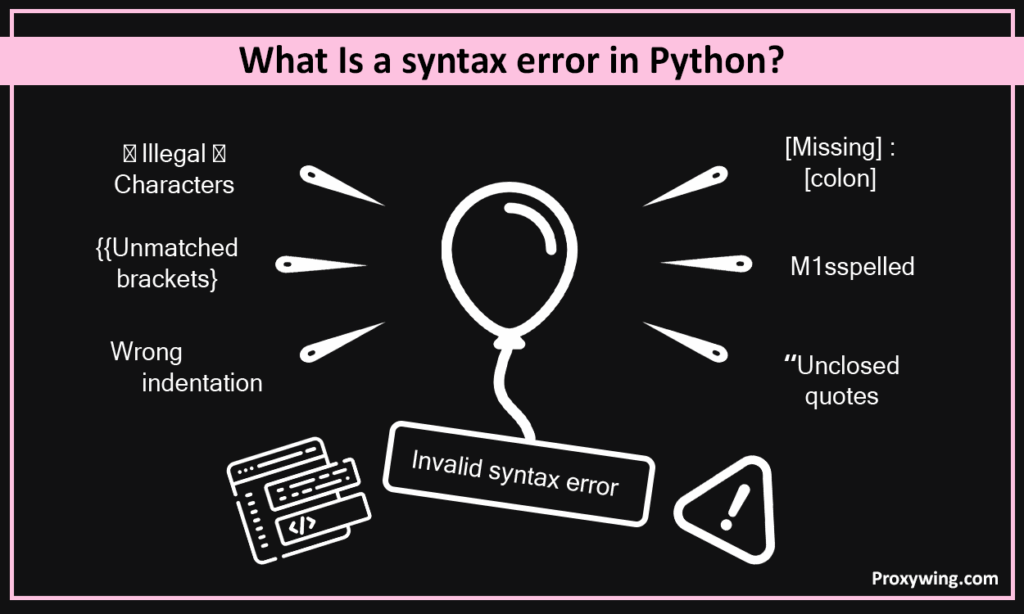
Some of the common errors most new Python programmers make include; a missing colon, unmatched brackets, or a wrong indentation. These may seem like minor issues, but they break Python rules, so your program won’t run until you fix them. Most modern IDEs (integrating development environments) do highlight the lines of code where one of these syntax errors might be.
Understanding syntax errors and how to fix them is important because it helps you write cleaner and accurate code. Also remember that most of the coding time is spent in debugging, which also includes fixing any syntax errors in your Python code. So, you shouldn’t look at it as wasting time.
Like most programming languages, Python is designed to stop running a program if it has any invalid syntax errors. When you try running such Python code, an invalid error message will pop up in the command line, giving all the crucial information such as the type of error and where it happened.
As stated earlier, most modern IDEs will highlight the invalid code within your Python program, which makes it easier to spot and fix. Before these modern IDEs, developers had to look through every line of code to spot errors, which consumed a lot of time.
Whether you are writing simple Python scripts or complex programs, there are so many syntax errors that may show up when you finally try to run the program. Most of these syntax errors in Python come from simple typos or small formatting mistakes. It is common for even experienced developers to run into them from time to time, so it is not just a problem faced by beginners.
In this section, we will walk you through some of the most common invalid syntax errors that you may encounter when writing Python code.
This is by far one of the most common ones. Forgetting to close parentheses, brackets, or quotes will automatically break your program and stop it from compiling or running.
Syntax Error Examples:
Here are some coding examples of how this syntax error might happen.
Missing parenthesis:
print("Hello"In the above line of code, you can easily see that the developer forgot to add the last bracket. The correct syntax for this is:
print ("Hello")Mismatched brackets:
my_list = [1, 2, 3)In Python, you are supposed to use the same type of brackets in any given statement. So, if you use “(“ to open the statement, you should then use “)” to close and not “]”. So, in this case, the current syntax is:
my_list = (1, 2, 3)Unclosed quotes
name = "TomQuotes may seem like something small, but they matter a lot as far as Python syntax is concerned. In this case, the correct syntax is:
name = "Tom"Many developers have encountered this invalid syntax error, so it is also up there among the most popular ones. When coding in Python most structures will always require specific punctuation. So, missing a colon or placing a comma incorrectly will instantly lead to a invalid syntax error when you try to run your Python code.
Examples:
Missing colon after a function or loop:
def greet()
    print("Hello")
In this case the developer was trying to define a function, but they forgot to add a colon. The correct syntax for this Python code snippet is:
def greet():
    print("Hello")
Misplaced comma in a list:
numbers = [1 2, 3]Here the developer was trying to define a list, but they didn’t include a common to separate the first two digits. The correct syntax in this case is:
numbers = [1, 2, 3]Python has several keywords that are reserved for executing certain tasks. Every program written in Python must correctly use these keywords. So, incorrectly spelling or misusing them will instantly break your Python code if you try to run it.
Examples:
Spelling print incorrectly:
prnt("Hello")For this code snippet, the developer was trying to write a simple program for printing the word “Hello”, but they misspelt an important keyword: print. The correct syntax is:
print("Hello")Using a reserved keyword as a variable name:
if = 5It is important to note that reserved keywords are not supposed to be used as variable names in your Python code. For instance, you can not use the word “if” as variable or function names since it is a reserved keyword in Python.
In Python, all your variable names must follow certain rules. Some of these rules include:
Here are some examples of wrong variant names and their correct versions
Wrong:
2name = "Tom"first-name = "Tom"my variable = 10Correct:
name2 = "Tom"first_name = "Tom"my_variable = 10Errors explained
Indentation is one of the ways languages like Python structure code to make it more readable. In Python, indentation is used to define blocks of code. Inconsistent indentation or mixing tabs and spaces will often trigger syntax errors when you run your Python code.
Example:
if x > 5:
print("Greater")   # Not indented
In this example, the developer did not add proper indentation after the if statement. The correct syntax for this Python code snippet is supposed to be as follows:
if x > 5:
print("Greater") #Indented using a single tab. if x > 5:
print("Hi")
print("Hello") # Tab and spaces mixedIn this Python code, the developer used four spaces in line 2 and a single tab in line 3, which goes against the rules of Indentation in Python. The correct syntax for this Python code snipped is as follows:
if x > 5:
    print("Hi")
print("Hello") # In this case four spaces were used for both lines. The assignment operator is one of the most important operators in Python and you will often use it. In Python:
Using = in a conditional statement will always lead to a syntax error causing your program not to run.
Here is an example:
if x = 5:   # Wrong
    print("Hello")
In this case, the developer used “=” instead of “==“ which goes against the rules of using this operator. Below is the correct version of the Python code.
Correct version:
if x == 5:
print("Hello")When writing Python code, you will often have to write functions. One of the common mistakes most developers make is forgetting the colon after def or leaving out parentheses when calling a function.
Here are some common examples:
Missing colon:
def greet()
    print("Hello")
In this example, a colon was not added at the end of the function definition. The correct syntax for this Python code snippet is as follows:
def greet():
    print("Hello")
Forgetting parentheses when calling a function:
When calling the above function, you are supposed to include parentheses. So, it should be: “greet()” instead of “greet”. Ignoring the parentheses will lead to a syntax error.
Some syntax works only in certain Python versions. For example:
Other features like f-strings only work in Python 3.6+, so using them in older versions will cause a syntax error. When coding in Python, it is important to remember the coding rules of the specific Python version you are using. So, if you encounter a syntax error that seems to be unusual, it could be because of the Python version you are using.
Syntax errors can be frustrating to fix, especially if you are a new developer or used to a different programming language. Fortunately, with modern tools, it has become a lot easier to fix syntax errors. In this section, we will explore some of the easiest ways to resolve the common syntax errors.
This guide has covered everything you need to know about Python syntax errors. We have covered the common errors like missing and improper punctuation, inconsistent indentation, misuse of keywords, and more. Knowing these common typing errors and how to fix them makes it a lot easier to learn and start building things with Python.
It is also important to remember the Python best practices like using 4 spaces for indentation, running your code often, and making your programs/scripts readable can help minimize the chances of making errors.
Also, remember to use tools like linters or AI solutions like Claude as these can help speed up the process of spotting invalid code errors. We hope you understood these common invalid code errors, what causes them and the fixes you can use to resolve them.
Article written by:

Full Stack AI Engineer
Full-stack engineer at Proxywing working across backend architecture, performance optimization, and AI-driven workflows. Node.js, React, cloud infrastructure, and RAG pipelines.
All articles by author (61)These are two of the most common types of Python errors. Syntax errors usually happen when the Python interpreter encounters a character or phrase it doesn’t understand. Such invalid code errors include missing a colon or bracket. On the other hand, runtime errors happen while the program is running, even if the code is written correctly. An example of this would be dividing a number by zero.
When an error occurs, look at the invalid error message in your terminal. It usually shows a line number and a small arrow (^) pointing to the problem. Go and check that line and the one above, since sometimes the mistake is before the line Python shows.
This could be due to small issues that may be hard to spot. Such issues include a missing colon after if, for, or while, a missing quote or bracket, wrong indentation, using a keyword (like if or for) as a variable name. So, take time to check these small, yet common issues and fix them to solve the problem.
Modern code editors like VS Code, PyCharm, and Thonny highlight mistakes in realtime as you type the code. Linters such as Pylint or Flake8 can scan your Python code for errors before running it. The good news is that these can all be integrated into your IDE, making the debugging experience more seamless.

