35% OFF Residential Proxies for 9 months
– use code WING35 at checkout

Get the deal
ProxyWing LogoProxyWing

How to Use Firefox with ProxyWing Proxy Manager Extension

Proxywing is a powerful and easy-to-use extension that lets you manage proxy servers directly inside the Mozilla Firefox browser.

  • User-friendly interface with intuitive controls
  • Ability to add new proxies
  • Instant switching between proxies
  • Enable or disable connections in just a few clicks
  • No need to deal with complex or overwhelming system configurations

Types of Proxies

Reliable proxies for daily tasks

Check IconHTTP/SOCKS5 Support
Check IconUnlimited 1 Gb/s+ speed
Check Icon99% Uptime Guarantee
Check IconComplete IP Control
from

$0.9/ month

For those who care about global reach

Check IconMore than 190 countries
Check IconRotational and static
Check Icon99% Uptime Guarantee
Check IconTraffic never expires
from

$2.5/ GB

Residential IPs with no limits

Check IconUnlimited 1 Gb/s+ speed
Check IconDedicated IPs
Check Icon99% Uptime Guarantee
Check IconPremium ISP Providers
from

$1.8/ month

Why You Need a Firefox Proxy Extension

Managing proxies through OS settings is time-consuming and inconvenient. A dedicated proxy manager extension by ProxyWing streamlines the entire process and gives you complete control over your proxy settings directly within your Firefox browser.

Why Choose Proxywing

Instant proxy switchingMove between different proxy servers connected in seconds without interrupting your workflow.
No manual setup neededSkip configurations and manage all IPs directly from your browser.
Enhanced privacy controlManage your browsing IP address with flexibility.
Multi-proxy managementOrganize and control multiple proxy profiles for multiple tasks or projects.
Higher productivityIdeal for automation, web testing, scraping, and other performance-intensive workflows.
Save timeOptimize workflows and speed up task completion.

How to Use the Proxywing Proxy Extension in Firefox

How to Use Firefox with ProxyWing Proxy Manager ExtensionHow to Use Firefox with ProxyWing Proxy Manager Extension
1.
Install the Proxywing extension in Mozilla Firefox

2.
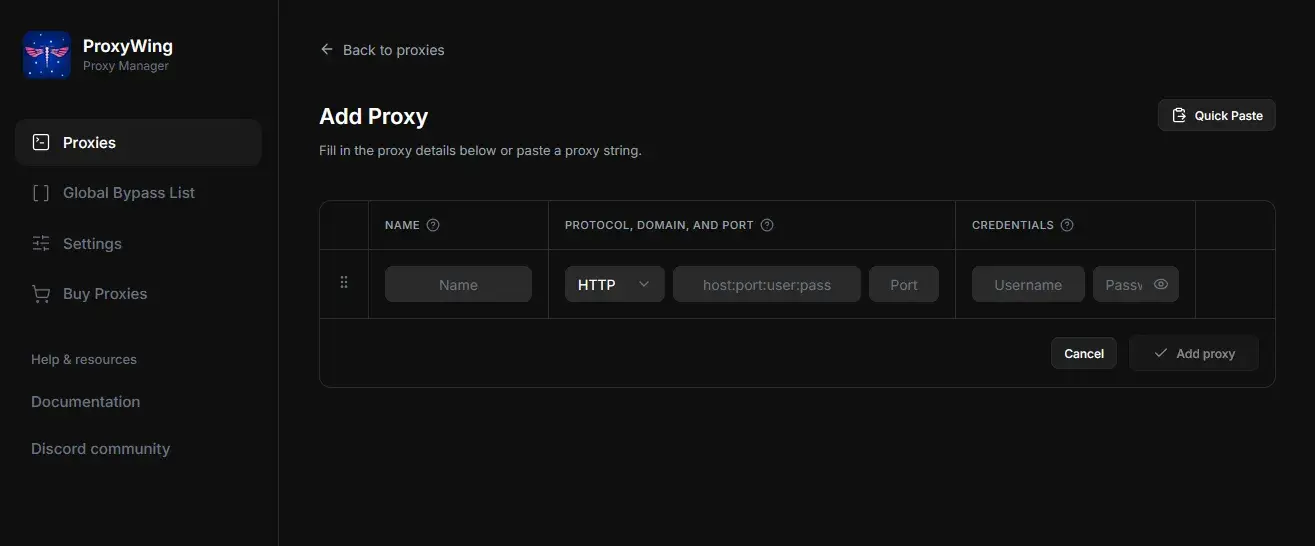
Add a new proxy by entering required details

IP address, port number, username and password (if required)

3.
Activate or switch proxies instantly with one click

Once enabled, all browser traffic will be routed through the selected proxy server automatically.

Install Add-on

Perfect for Different Tasks

Marketing & Arbitrage

Marketing & Arbitrage

Work with multiple accounts and regions.

Testing & Development

Testing & Development

Check websites and services from different IPs.

Data Collection

Data Collection

Work with multiple connections without extra setup.

Personal Privacy

Personal Privacy

Additional level of internet traffic control.

Unmatched customer experience in the industry

Don’t take our word for it. Here is actual feedback from our customers. Powering over 26,000 proxy users.

reviews bg
avatar

Odinvsky

December 4, 202

I'm using their ISPs which have an outstanding price. I recommend ProxyWing, experience is really awesome with them.

avatar

Joshua

November 22, 2025

Excellent ISPs and great support team with 1 minute average response time. Appreciate them - definitely worth using.

avatar

Ivan Obukhov

July 4, 2025

I've been using ProxyWing for a month now and I'm very satisfied with the quality of their IPs and the responsiveness of their support team.

avatar

Artem Balashevsky

November 28, 2025

Liked the residential premium IPs — great stability, huge range of countries, cities…

avatar

Petr Yan

December 12, 2025

ProxyWing is one of the most stable providers I've ever worked with: great speeds, a user-friendly dashboard, and responsive 24/7 support

avatar

Chelsea S.

June 12, 2025

It's very user friendly which fits our marketing team well...

Awards

Awards, which we received from our customers

Users Love Us
People Love Us
Crozdesk Happiest Users
Crozdesk Quality Choice
Customers Love Us
High Achiever Winter 2026
Top Performer Winter 2026
Leader Winter 2026

Configurations & Integrations

Learn how to set up your proxies by exploring our integration guides. You can easily plug in Proxywing solutions with the most popular third-party software.

FAQ

It is a browser extension allowing you to manage and switch proxy servers within Mozilla Firefox.

No, you don’t. All proxy configuration is done inside the browser. There is no need to access system or DNS settings.

Yes, surely you can. Proxywing allows you to manage and switch between multiple proxies instantly.

Yes, it is user-friendly. The interface is intuitive, making it easy for anyone to use.

Have any questions?