

PROXY FUNDAMENTALS
ISP proxies (static residential)
Key features of ProxyWing datacenter proxies
- Static IPs — addresses remain unchanged for the entire rental period.
- HTTP/SOCKS5 support — compatible with most popular applications.
- Natural connectivity — IPs issued by real ISPs earn a high trust score from target platforms.
- High reliability — 99.99 % uptime.
- Speed — up to 1 Gbps+.
Setup and access
ISP proxies are provided in the IP:PORT:LOG:PASS format
How to obtain them:
- Sign in to your ProxyWing account.
- Go to the Dashboard section.
- Open the desired product card.


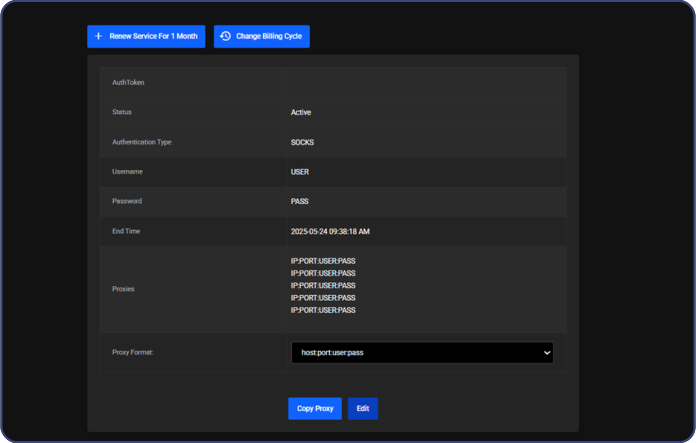
DRenew Service for X Months — button that creates an invoice to renew your proxy
Change Billing Cycle — button that lets you switch the billing period (options: 1 / 3 / 6 / 12 months)
AuthToken — unique product token (use it to find the product via search; support may also request it to assist you quickly)
Status — current product status (Active / Expired)
Username — login for proxy authentication
Password — password for proxy authentication
Proxies — list of all proxies with their usernames and passwords
Credential format — selected export format (domain:port:username:password, etc.)
Copy Proxy — button that copies a proxy entry
Download txt — button that downloads all proxies as a plain-text file, one per line
Download csv — button that downloads all proxies as a CSV file, one per line
Show Socks — toggles the proxy protocol between HTTP and SOCKS5
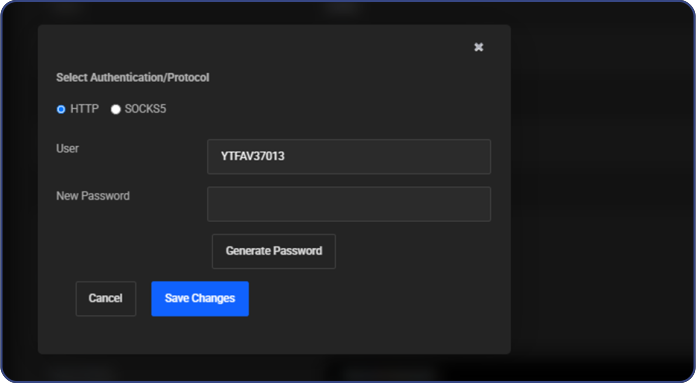
Change Password — button that changes the proxy password
Allows you to:
- Change the proxy protocol (SOCKS5 / HTTP)
- Generate a new password
Example format:
IP:PORT:USER:PASSFor quick reformatting, use our free Proxy Formatter tool
Support
Contact our support team via live chat, the ticket system on our website, or email us at business@proxywing.com

Updated 2 months ago