




Proxy Authentication Methods Explained: Username/Password vs IP Whitelisting
06.10.2026 10 min
AMAZON is a daily shopping, browsing, and account management tool for many users. Interruptions do occur, even though the size is enormous. “Sorry, something went wrong on our end” is one of the most irritating messages users get. The page stops loading. Actions can not be explained. This mistake may manifest itself when browsing, at checkout, or during account access. To technical users, it may stop work processes altogether.
Discover why this common Amazon error happens, what triggers it, and how you can fix it effectively, without guesswork. Read on to learn practical solutions and prevent it from disrupting your experience.
Before implementing fixes, one needs to know what this message means. It is shown when Amazon is not able to fulfill a request in a safe manner. This is not necessarily a failure of the system; in most cases, it is an attempt to protect. The mistake can manifest itself in various forms- it can block Amazon pages, interrupt checkouts, and block accounts. To users who do the same action repeatedly, the message SORRY, SOMETHING Went Wrong may be displayed by the app when it recognizes unpredictable behavior. In such circumstances, the system takes precedence of stability and safety of the users over convenience.
It is not an isolated factor that contributes to this error. Amazon has multiple layers that are used to assess each request, and in case a layer notices instability or danger, the request is denied. Knowing these triggers is a method of minimizing repetitive mistakes.
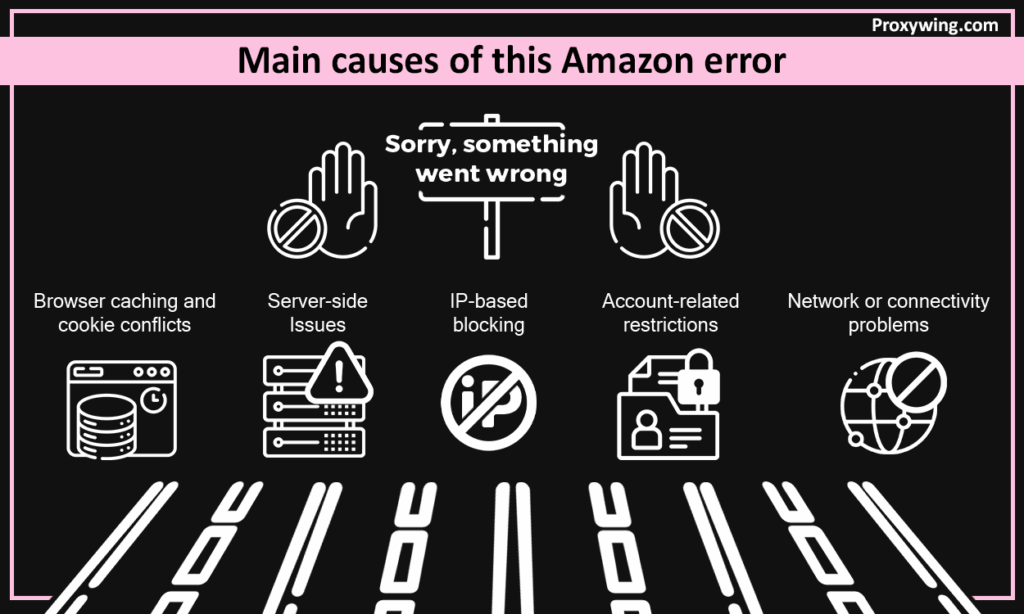
There are some cases when the problem is completely inside AMAZON. Peak times may also overload internal systems, and background updates may cause interruptions to services. In these situations, users can be presented with SORRY, SOMETHING WENT WRONG ON OUR END, though everything goes well in other situations. Such cases tend to solve themselves within a relatively short period.
A poor connection may destroy communication and lead to incomplete or corrupted requests. The inability of AMAZON to identify the integrity of requests causes a refusal to proceed, and in many cases, the error is displayed on the screen.
The browsers save data to help in fast access, yet as time progresses, the data becomes outdated. Out-of-date cookies may lead to failure to authenticate, and when this occurs, Amazon will display SORRY, SOMETHING WENT WRONG ON OUR END rather than the page. This is among the most widespread user-side reasons.
AMAZON constantly analyses the user behaviour. Rapid navigation or repetitive similar operations may be suspicious. The signals are usually triggered accidentally by automation tools. In case of such activity, the app blocks further access and shows the error in order to prevent the activity.
Each request to AMAZON has an IP address. Limits to too many requests can be caused by the same IP, and shared IPs make the situation worse. After the flagging, the access is denied, and the user receives this error as opposed to a warning.
Access is also determined by account health. Accounts with different logins can result in session failures, and limited accounts are checked more closely. Upon Amazon detecting anomalies, it prevents requests to secure the Amazon site.
After knowing the cause, it is easier to fix the problem. Not everything can be fixed in every case, so it is better to begin with the simple measures and follow up with the complicated ones.
Certain AMAZON mistakes are short-lived. It is often sufficient to refresh the page after a few seconds. This method works well, especially during interruptions at Amazon server side.
Clearing the cache and cookies will reread the sessions and remove the old authentication information. This measure eliminates numerous recurring ‘SORRY, SOMETHING Went Wrong’ Amazon errors.
Other issues are environment-specific. To identify the problem, it can be worthwhile to try another browser and even avoid the conflict by using a mobile device.
Flaky connections lead to high failure. The success of Amazon requests can be enhanced by the disconnection of unnecessary VPNs and a stable connection.
The IP reputation has a powerful influence on access. To get a new IP, any temporary restrictions can be cleared, which is particularly necessary when the Amazon user is engaged in high-frequency tasks.
Leaving the system leaves the active sessions cleared, and a new authentication is restored. This is a very straightforward solution to numerous account-based access blocks.
Once the issue has been resolved, prevention becomes the real issue. Most users correct the mistake only once, yet in most cases, it recurs due to the lack of resolution of the root cause. Amazon does not react to individual actions, but to behavioral patterns. The future blocks can be minimized by adjusting the user behavior.
Limited browsers aid in slowing down navigation, and the number of simultaneous requests minimizes risks. When the Amazon is subject to consistent activity, it responds more predictably. Customers who constantly see the message of SORRY, SOMETHING WENT WRONG, repeat similar habits of refreshing pages too fast, opening several product pages at the same time, or using unstable sessions.
Repeat occurrences can be considerably decreased by making small changes to the browsing behavior, which, at the same time, enhances access stability in the long-term.
One of the preventive measures is also monitoring your browsing patterns. As an example, one can log in most of the time, avoid having too many tabs open at once, and place distance between high-volume activities to allow Amazon to identify normal use. In the case of the system labelling activity being labeled as abnormal, it is possible to monitor the duration of time spent on an activity, as well as restrict prolonged activities.
Another way to reduce the chances of repeating mistakes is to regularly check the history of the Amazon account activity and identify suspicious activities.
IP reputation directly affects access, as Amazon evaluates the origin of every request. Datacenter IPs are often flagged quickly, while residential and ISP-based IPs perform better. Using high-quality proxies reduces the risk of blocks for both shoppers and scrapers, improving session reliability and overall stability.
Residential proxies, in particular, mimic normal user behavior, reducing detection risk, while rotating proxies distribute requests naturally across multiple IPs. Maintaining a list of trusted proxies and testing them periodically helps ensure uninterrupted Amazon access, especially for users performing repetitive tasks or high-volume browsing.
All web platforms have request limits, and Amazon is no exception. Amazon monitors volume, timing, and repetition of requests. Crossing these limits often results in access denials, rather than warnings displayed. Spacing out requests and controlling automation patterns prevents overwhelming the Amazon servers. For scrapers and automated tools, adding proper delays and limiting request volume reduces the appearance of aggressive behavior.
Browser updates ensure that they are compatible with Amazon’s systems. Different Browsers are used to handle sessions in different ways, some better than others in handling cookies. Maintaining browsers minimizes mistakes in the session management issues or the old-fashioned authentication system. Besides that, new browsers usually have performance enhancements, bugs, and security patches that safeguard against data corruption or unforeseen crashes, which can cause Amazon system errors. Further, users must also check browser settings to avoid incompatibilities with automation tools or extensions they might apply to access large volumes.
Cookies store session information, and sessions define user identity. Corrupted or conflicting data can cause errors. Regularly clearing the Amazon site cookies or using separate profiles avoids conflicts and ensures that authentication rebuilds properly. Users who access Amazon across multiple devices may experience overlapping sessions, which makes maintaining clean browsing profiles even more important.
It is important to select the appropriate proxies in order to access Amazon in a stable manner. The residential, ISP, and datacenter proxies all have weaknesses and strengths depending on their application. When choosing a type of proxy, it is advisable to choose one that is suitable for your activity, whether browsing, automation, or scraping, to decrease the number of blocks and mistakes.
Residential proxies mimic real users and are the safest option for high-frequency access. They appear more organic, reducing the risk of triggering Amazon’s security systems.
The ISP proxies provide datacenter performance and residential trust. They are also appropriate for those Amazon users who require performance and dependability.
Datacenter proxies are not slow and are cheaper, yet more likely to be flagged. They can be used in tasks that are short-term or low-risk, but cannot be used in long term high volume access.
Rotating proxies redistribute requests in a natural manner, which is best suited to high-frequency applications and scraping. The static proxies have fixed IP addresses and are useful when access is low or when there is a need to have some stability of the session. The decision between them will depend on how often you need it, the time of all sessions, and how stable you are.
Browser fingerprints show information about the device, including screen size, language, and time zone. Incompatible fingerprints may lead to suspicion and mistakes, particularly with the frequent switching of devices or browsing programs. Anti-detect browsers and custom profiles aid in isolating sessions, thus making it seem like it was a separate Amazon user.
The proper rotation of fingerprints will give Amazon a normal response, with a mismatch making it more prone to errors. Browsers should also be updated regularly, and useful extensions should not be installed, as this will also ease the problem with fingerprints, enhancing access stability between sessions. This is an important consideration to advanced Amazon users, who tend to forget about it, yet it is one of the factors allowing eliminating repeated interruptions during browsing, checkout, or account management.
Rotating user-agents makes traffic appear more natural and reduces the chance of Amazon flagging automated behavior. This simple step alone can dramatically lower repeated error messages, particularly for high-frequency browsing or scraping tasks.
Extensions can leak automation signals. Disabling unnecessary or suspicious extensions before using the Amazon app helps maintain a clean, legitimate footprint. Users should review installed extensions periodically to ensure none are inadvertently triggering the system’s security checks and to prevent facing SORRY, SOMETHING WENT WRONG errors.
Advanced tools like anti-detect browsers allow sessions to behave as independent users. This helps prevent fingerprint mismatches and reduces repeated access errors while using Amazon. When combined with proper proxy usage and controlled request frequency, anti-detect browsers form a robust strategy to minimize SORRY, SOMETHING WENT WRONG errors.
The Amazon error SORRY, SOMETHING WENT WRONG ON OUR END is a controlled reaction to instability, constraints, or perceived risky behavior. Knowing the reasons why it seems to be easier to resolve. User behavior is important whether it is on the web, in apps, or when scraping data. It is important to have clean sessions, consistent requests, and the correct automation habits.
Users who keep getting this error are advised to check their access method to Amazon, such as browser, device used, session management, proxy configuration, and consistency of fingerprints. Minor modifications usually help to avoid recurring problems. As they say, it is always cheaper to prevent than cure.
With behavioral awareness, proxy management, fingerprint alignment, and appropriate browser practices applied by advanced users, the error rate can be greatly lowered, enhancing the reliability of workflow and frustration caused by all Amazon interactions.
Article written by:

Full Stack AI Engineer
Full-stack engineer at Proxywing working across backend architecture, performance optimization, and AI-driven workflows. Node.js, React, cloud infrastructure, and RAG pipelines.
All articles by author (61)
