




Proxy Authentication Methods Explained: Username/Password vs IP Whitelisting
06.10.2026 10 min
YouTube is a free online platform accessed by billions of users every day. However, many users report being unable to access the platform for several reasons, including geo-restrictions, network limitations, or IP blocks. By using a YouTube proxy, you can unlock access regardless of the restrictions imposed by your ISP, government, or network administrators.
In this detailed guide, we discuss how to unblock YouTube and enable fast access using proxies. Our discussion includes the proxy setup process on different platforms, the various proxy types available, and practices to ensure the best experience when using YouTube proxies.
Route your connection through a proxy server in a country where YouTube is available. Get an IP address, port and credentials from a provider, enter them in your browser or system network settings, and reload YouTube. Setup takes about two minutes and works on Chrome, Firefox, Windows, macOS, Android and iPhone. For school and workplace filters, almost any proxy works. For geo-locked videos, you need an IP in the country where the video is licensed. For heavy national censorship, use residential IPs.
YouTube access is often restricted in schools and offices to preserve bandwidth or productivity. These typically implement network restrictions using firewalls that block all traffic going to Google’s servers. There are also some governments that censor content, denying their citizens from watching videos on several digital platforms, including YouTube.
Schools are the most common place where students run into a YouTube block. Most institutions enforce content filters under regulations like the Children’s Internet Protection Act (CIPA) in the US, which requires public schools to filter certain web content. In practice, these filters often go beyond their original scope and end up blocking all video streaming platforms, even for legitimate educational use.
Most school networks rely on DNS-level filters, firewall rules, or category-based blocklists provided by services like GoGuardian, Securly, or Lightspeed. Some districts go further and inspect HTTPS traffic using SNI (Server Name Indication) filtering, which detects the destination domain even on encrypted connections.
A proxy for YouTube routes your request through an external server, so the school firewall only sees a connection to the proxy’s IP address rather than youtube.com directly. For students using managed Chromebooks or locked-down lab computers where browser extensions and software installation are disabled, a web-based proxy is often the only practical option to access educational content.
Workplace YouTube blocks are usually about bandwidth and productivity, not censorship. A single employee streaming 4K video can consume more network capacity than an entire team sending emails, so IT teams either throttle YouTube traffic or block it entirely through corporate firewalls (Cisco Umbrella, Fortinet, Palo Alto, etc.).
The challenge with corporate networks is that they often combine multiple detection layers — DNS filtering, VPN protocol detection, deep packet inspection (DPI), and category-based blocking. Some networks even block common VPN ports, which is where SOCKS5 proxies have an advantage: they can run on standard ports and blend in with regular web traffic.
If you need to access YouTube tutorials or industry videos for legitimate work, a residential proxy with sticky sessions is typically the most reliable choice. The IP looks like normal home traffic, which avoids triggering enterprise firewall rules that flag known datacenter ranges. Always check your company’s acceptable use policy first — bypassing IT controls can violate workplace policies, even if your intent is legitimate.
In countries like China, Iran, Turkmenistan, and parts of Central Asia, YouTube is blocked at the ISP or national-firewall level. China’s Great Firewall has restricted YouTube since 2009, using IP blacklisting, DNS poisoning, and DPI to identify and drop traffic. Pakistan, Turkey, and several other countries have imposed temporary or partial bans over the years.
Geo-restrictions are a softer form of blocking — the platform itself loads, but specific videos are unavailable in your region due to licensing agreements between content owners and YouTube. This is why you sometimes see “This video is not available in your country.”
For country-level censorship, a basic web proxy is often not enough since these are quickly identified and blacklisted. A residential proxy with IPs in unrestricted regions (US, EU) gives the highest chance of stable access, since residential IPs are nearly indistinguishable from real home users.
The reason YouTube is blocked on your connection decides which fix actually works. Picking the wrong tool for the wrong block is why most attempts fail.
The country your proxy IP sits in decides two things at once: whether you get through the block, and which version of YouTube you see. Pick it deliberately rather than taking whatever server is first on the list.
A US proxy is the default choice for most people, and for good reason. The largest share of YouTube’s catalogue is licensed for the United States, so a US IP unlocks more videos than any other single location. It’s also what you want for US-only livestreams, sports clips and full-length content that regional licensing keeps out of other markets. If you are testing ads or channel analytics for an American audience, a US IP is the only way to see what your viewers see.
A UK IP is the one to pick for content cleared only for British broadcasters, which most often means sports highlights and music. EU locations such as Germany, the Netherlands and France are the practical choice if you’re physically in Europe: latency stays low, so playback holds at 1080p or 4K without the buffering you get from routing across an ocean for no reason.
If YouTube already works for you and you only need the proxy to get past a network filter, ignore the flag entirely and pick the nearest server. Every extra thousand kilometres adds latency, and latency is what shows up as buffering halfway through a long video. A German IP will almost always outperform a US one for a viewer sitting in Poland, even though both unblock the same filter.
ProxyWing keeps pools in 190+ countries, so you can switch between a US IP for licensed content and a local IP for raw speed without changing providers.
Below are five proven setup methods, organized from easiest to most advanced. For most users, the browser extension method (Method 1) takes under two minutes and works on any device with Chrome or Firefox. If you want system-wide proxy coverage that affects all your apps, jump to the OS-level instructions for Windows (Method 2), macOS (Method 3), or mobile (Method 4).
Before starting, get your proxy credentials ready: IP address, port, and (if applicable) username and password. ProxyWing provides all of these in a single copyable string format.
This is the fastest way to unblock YouTube without affecting your other apps. The proxy only routes traffic from the browser tab, so your other software keeps using your normal connection.
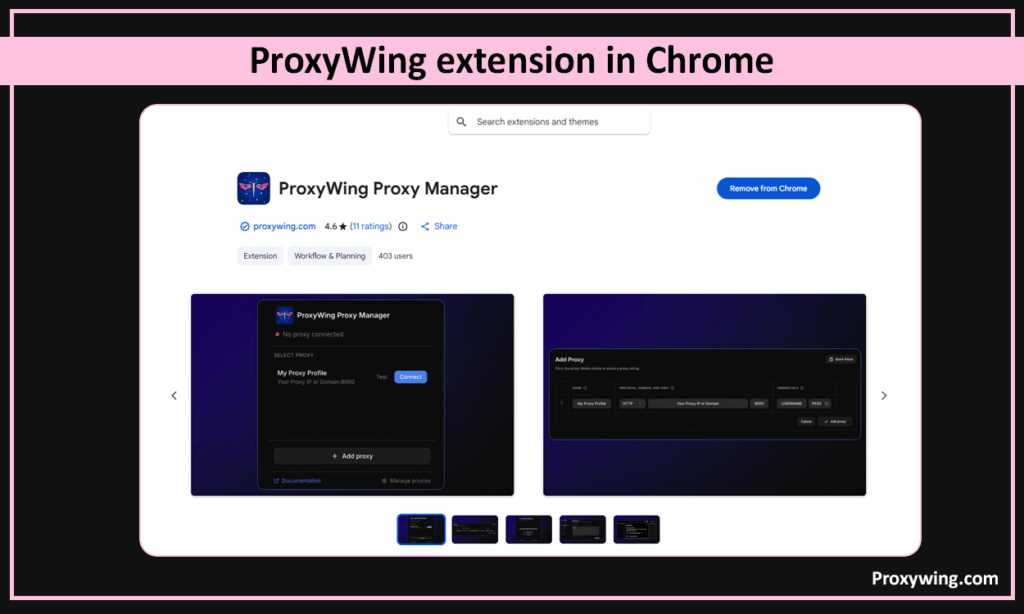
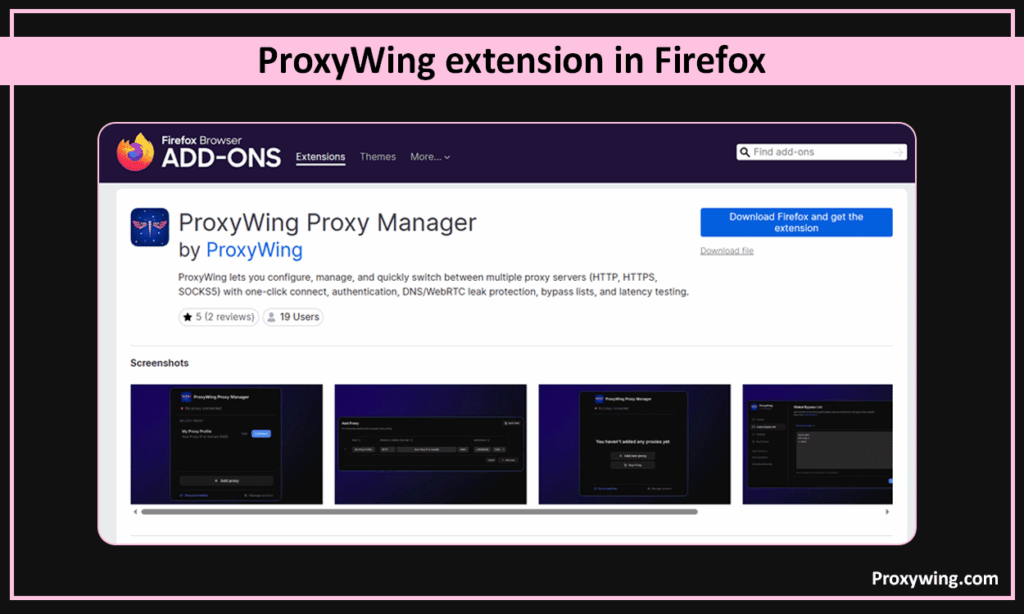
If you don’t want to install an extension, both browsers support manual proxy entry under Settings -> Advanced -> Network -> Proxy settings, but extensions give you faster on/off switching and the ability to whitelist specific sites.
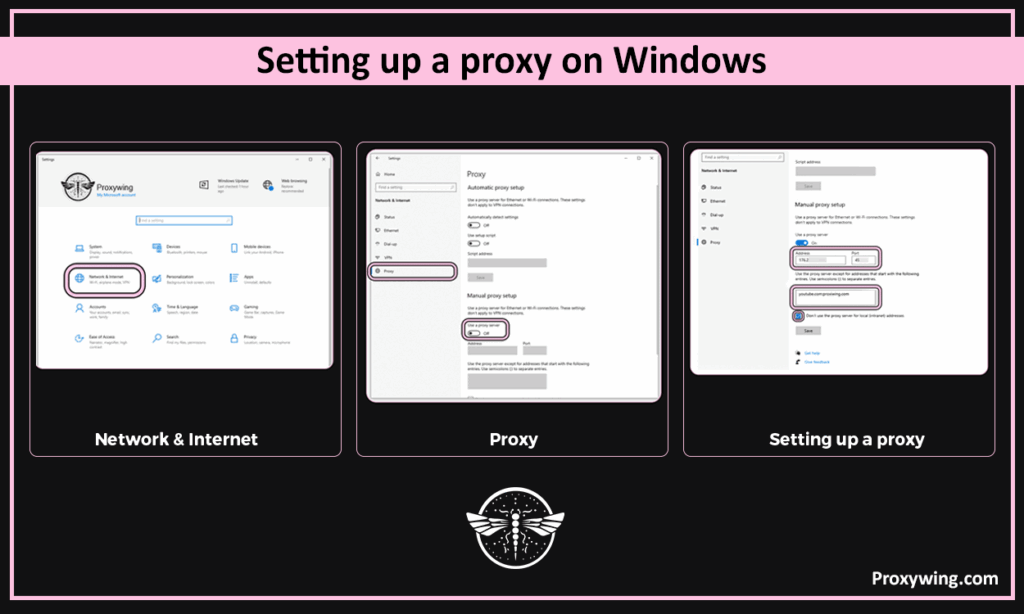
Windows-level proxy settings apply to most apps system-wide, including Edge, Outlook, and the YouTube desktop app.
Steps:
To verify the connection works, visit proxywing.com/ip-check — it should show your proxy’s IP and country, not your real one.
macOS proxy settings are configured per network interface (Wi-Fi or Ethernet).
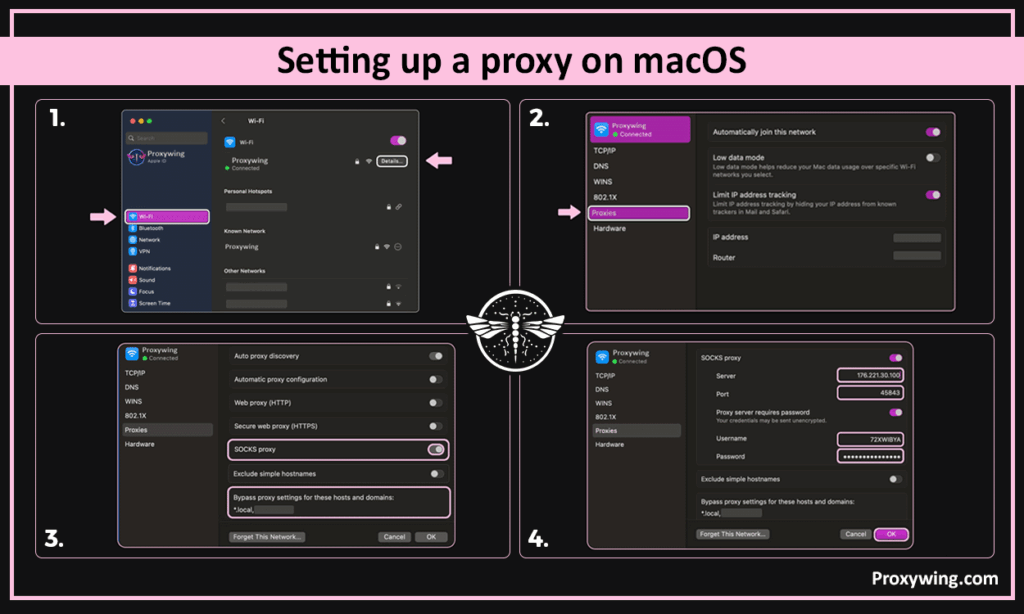
Steps:
For SOCKS5 proxies (recommended for streaming), use the “SOCKS Proxy“ field and make sure HTTP/HTTPS proxy fields are empty to avoid conflicts.
Android proxy support varies by manufacturer. Stock Android and Samsung devices include proxy settings, but some custom skins disable them.
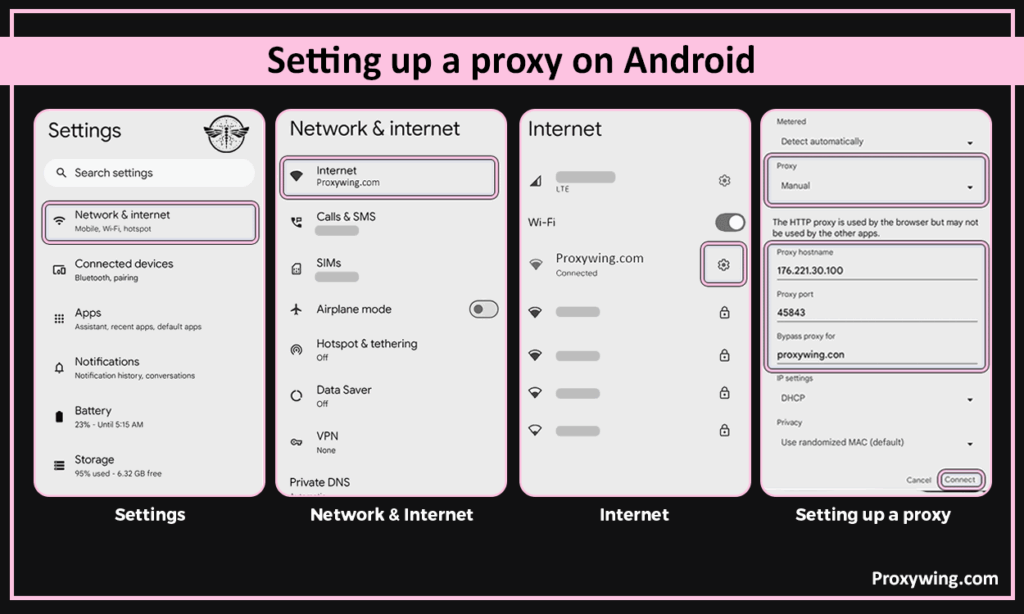
Steps:
For mobile data networks, you’ll need a third-party proxy app like Drony or ProxyDroid (both available on Play Store), since Android’s native proxy settings only apply to Wi-Fi.
iOS only supports proxy configuration on Wi-Fi networks — there’s no native option for cellular.
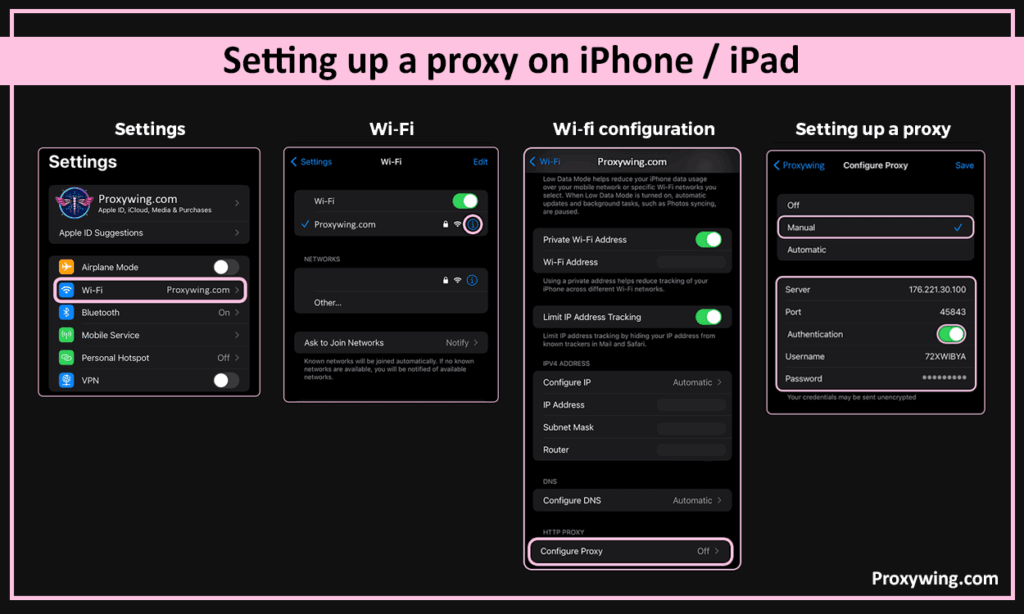
Steps:
To use a proxy on cellular data on iOS, you’ll need to install a configuration profile or use a SOCKS5-compatible browser app.
School and office networks are where most people first lose access to YouTube. The block usually sits on the router, so it applies to every device on the Wi-Fi regardless of which browser you open. A proxy for YouTube gets around it because the filter never sees a request to YouTube in the first place, only a connection to your proxy’s IP address.
There are a few things worth knowing before you set one up on a managed network:
Keep in mind that bypassing a school or workplace filter may go against the acceptable use policy you agreed to. That is a disciplinary question rather than a legal one, but it’s worth knowing where you stand before you start.
A YouTube proxy is a dedicated server that sits between your device and Google’s servers. Instead of sending your internet connection to Google’s servers directly, your request goes to the proxy server, which then fetches the online video content and sends it back to you. This ultimately hides your device’s IP address and location, allowing you to bypass any geo-restrictions put in place by your ISP, network admins, or even the government.
When you use a proxy, your web traffic is routed through a different IP address. If your local network blocks YouTube, the firewall only sees a connection to the proxy’s IP, bypassing any network restrictions. Google’s servers will also see your request as though it is coming from the proxy’s location rather than your restricted network. This allows you to access restricted content in your region or network.
Free IPs may seem tempting since you can easily use them without paying anything. However, they are often overcrowded, slow, and potentially insecure, as they may log your data or inject ads into your browsing experience.
To ensure a more stable and secure browsing experience, consider ProxyWing’s fast YouTube proxy servers, which are optimized for 4K video streaming and offer high uptime. ProxyWIng offers well-optimized proxies that enable fast connection speeds and low latency, ensuring a much better experience than using free web proxies.
Proxies and VPNs can both be used to unblock YouTube access. However, they work differently, so it is crucial to know which one is ideal for your specific needs:
| Proxy | VPN | Smart DNS | |
|---|---|---|---|
| Unblocks school and work filters | Yes | Yes | Sometimes |
| Unblocks geo-locked videos | Yes | Yes | Yes |
| Encrypts your traffic | Only the standard HTTPS layer | Yes, whole device | No |
| Streaming speed | Fastest, no encryption overhead | Slight slowdown | Fast |
| Applies to | One browser or app | Every app on the device | Every app on the device |
| Gets past DPI censorship | With residential IPs | With obfuscation | No |
| Multi-account work | Yes, one IP per account | Limited | No |
| Setup | Enter IP and port, no software | Install an app | Change DNS settings |
A VPN is ideal if you need full-device encryption and maximum privacy when browsing the web. It secures all your internet traffic (not just your browser), making it the better choice for public Wi-Fi security and total privacy. However, the encryption step can slightly increase the latency of your connection.
Proxies are generally faster for streaming because they don’t include the encryption overhead (apart from the standard TLS encryption for HTTPS connections). They are the superior choice for bypassing network restrictions without sacrificing connection speeds and latency. You may also use Youtube unblocked proxy services for tasks that involve automation, data scraping, and managing specific app-level network connections without affecting your entire computer’s speed.
Let’s explore the common YouTube proxy types that you can use to unlock YouTube access:
While HTTP(S) proxies are great for standard web browsing, SOCKS5 is often preferred for streaming. SOCKS5 proxies handle data packets more efficiently, which results in lower latency and a smoother experience during high-definition online video playback. SOCKS5 proxies also handle UDP traffic, which is the popular protocol used by streaming services to ensure the best performance.
Datacenter IPs offer the highest speeds at a lower cost but are easier to detect since they rely on well known IP addresses. A residential proxy for YouTube on the other hand uses real home IP addresses, making them nearly impossible to block, though they are typically more expensive. Residential IPs might be more expensive than datacenter IPs, but their success rate makes them worth it. For scrapping tasks, it is recommended to use rotating IPs to minimize the risk of IP bans.
Shared web proxies are cost-effective but can suffer IP bans if others misuse the shared IP. Dedicated (private) IPs ensure you have the full bandwidth and a clean reputation for your specific streaming needs. Dedicated IPs are more expensive, but might be worth it for users that value reliability and privacy.
There isn’t one best YouTube proxy for everybody. The right choice depends on what is blocking you and what you plan to do once you’re through. Use this as a shortcut:
| What you need | Best proxy for the job |
|---|---|
| Unblock YouTube at school or work | Shared residential or ISP proxy, HTTP or SOCKS5 |
| 4K streaming with no buffering | Dedicated ISP or datacenter proxy over SOCKS5, close to you |
| Watch a video licensed for one country | Residential IP in that exact country |
| Run several YouTube channels | Dedicated residential or mobile IP, one per account |
| Automation and data collection | Rotating residential proxies |
| Heavy national censorship | Residential SOCKS5 |
| Testing before you commit | Free plans and web proxies, with the limits described below |
A few rules hold across all of these. Residential and ISP IPs get through far more often than plain datacenter ranges, because YouTube keeps up-to-date lists of cloud provider address blocks. SOCKS5 handles video streams better than HTTP. And a dedicated IP is worth the difference in price the moment reliability matters, since a shared IP inherits whatever the other users on it have been doing.
After setting up the proxy, it is always a good practice to confirm if everything works as expected. Visit whatsmyip.com to verify the IP address of your internet connection. If the location and IP address have changed to match your proxy’s details, you are successfully connected. After this confirmation, you can go ahead and try loading previously blocked websites, including YouTube to test the speed and connection stability.
Two more checks are worth running once the IP has changed. Open a DNS leak test: even with the proxy active, your DNS queries can still travel through your ISP and give away your real location, which is enough for YouTube to keep serving geo-restricted results. Then run a speed test with and without the proxy. A good residential or ISP proxy should cost you no more than 15–20 % of your connection speed. A larger drop almost always means the server is too far away or the shared IP is overloaded.
Most failed setups fail quietly: the proxy connects, but YouTube behaves as though something is wrong without telling you what. Match what you’re seeing to the table below.
| What you see | Usual cause | Fix |
|---|---|---|
| “Video not available in your country” | Datacenter IP recognised by YouTube, or an IP in the wrong country | Switch to a residential IP in the country the video is licensed for |
| “Proxy access blocked: the video owner does not permit playback” | The uploader has disabled embedded and proxied playback | Watch the video directly on youtube.com through a configured proxy rather than a web proxy site |
| YouTube doesn’t load at all | Wrong port, or the protocol doesn’t match | Re-check the host:port format and confirm whether your provider issued an HTTP or a SOCKS5 endpoint |
| Privacy or certificate error in the browser | HTTPS traffic sent to an HTTP-only proxy port | Use the HTTPS or SOCKS5 port from your dashboard |
| YouTube asks you to verify your account | Your IP rotated mid-session | Switch to a static IP or enable sticky sessions |
| Constant buffering at 4K | Server too far away, or a shared IP under load | Pick a location closer to you, or move to a dedicated IP |
| Works in the browser, not in the YouTube app | The app bypasses the system proxy | Use the mobile browser instead |
| Real IP still shows on an IP checker | The proxy isn’t applied, or the browser has its own settings | Re-check the settings, and in Firefox make sure it isn’t set to use system defaults |
| DNS leak test shows your ISP | DNS queries aren’t going through the proxy | Enable “Proxy DNS when using SOCKS v5”, or use a provider that routes DNS for you |
| A free proxy stopped working overnight | Free endpoints are short-lived and heavily blacklisted | Move to a paid residential or ISP proxy |
If several of these appear at once, start by confirming the basics with the ProxyWing Proxy Tester before changing anything else. It tells you in a few seconds whether the endpoint is alive, which removes half the possible causes.
Using an unblock YouTube proxy is generally legal for bypassing workplace restrictions or censorship. However, using this service does come with some responsibilities that you need to keep in mind. Always respect copyright laws and ensure you aren’t violating YouTube’s Terms of Service regarding automated scraping or fraudulent activity. If YouTube constantly bans your IPs, that could be a sign you’re violating their terms of service.
Select a server geographically close to you or Google’s CDN (Content Delivery Network). This significantly reduces latency, minimizing any possibilities of buffering while watching YouTube videos.
If you experience “stuttering” during playback, your web proxy for YouTube might be overloaded. In such cases, consider switching to a private or less crowded server. If you have the budget, you can always go for proxy servers with dedicated IPs, as these are the most reliable and provide a more consistent bitrate.
For long-form content, use “sticky” sessions by choosing web proxies with static IPs. This ensures you maintain the same IP address throughout the video, preventing the connection from dropping or triggering a re-authentication prompt due to unexpected IP rotations.
While proxies are usually the best choice for streaming YouTube, they aren’t the only way to bypass restrictions. Below are five practical alternatives — each works in slightly different scenarios, so the right choice depends on your network, device, and privacy needs.
A VPN (Virtual Private Network) creates an encrypted tunnel between your device and a remote server, hiding your IP address and routing all traffic through the VPN’s network. Unlike a proxy, which works at the application level, a VPN protects your entire device.
When to use it: When you want privacy across all apps (not just the browser), or when you’re on public Wi-Fi at a hotel, café, or airport.
Quick setup:
1. Sign up for a reputable VPN service like WingVPN.
2. Install the app on your device.
3. Connect to a server in a country where YouTube is unrestricted (US, Netherlands, Germany).
4. Open YouTube — your traffic now appears to originate from that country.
Limitations: Encryption adds slight latency, which may matter for 4K streaming. Some networks (especially corporate and school) actively detect and block common VPN protocols. Look for VPNs with obfuscation or stealth modes if you’re on a heavily filtered network.
Smart DNS reroutes only the DNS queries that determine your apparent location, without encrypting your traffic. This makes it faster than a VPN for streaming, but it doesn’t hide your IP address.
When to use it: When you need to bypass geo-restrictions on a Smart TV, gaming console, or device that doesn’t support proxy or VPN apps.
Quick setup:
1. Subscribe to a Smart DNS provider.
2. Replace your device’s DNS settings with the provider’s DNS addresses.
3. Restart the device and open YouTube.
Limitations: Smart DNS only handles geo-locks based on DNS lookups. It won’t bypass network firewalls that block youtube.com directly, and it provides no privacy — your real IP is still visible to YouTube.
A web proxy is a site where you paste a YouTube URL and the page loads inside their server. There’s nothing to configure, which is why proxy sites for YouTube are the first thing most people try. For watching a single video once, they do the job.
The limits show up quickly after that:
A configured proxy server solves all four. You enter the IP once in your browser or system settings, YouTube loads as normal at full quality, you stay signed in, and the endpoint doesn’t disappear because someone added a domain to a filter list. ProxyWing’s YouTube proxies are set up this way and are optimised for 4K playback rather than for loading a page inside a page.
Tethering through your phone bypasses your local Wi-Fi entirely. Since YouTube blocks are usually applied at the network level, switching to mobile data sidesteps the filter completely.
When to use it: When you only need short access (a single video at school or work) and don’t want to set up anything technical.
Quick setup:
1. Enable Personal Hotspot in your phone’s settings.
2. On your laptop or tablet, connect to your phone’s hotspot Wi-Fi.
3. Open YouTube — it now uses your cellular data, not the restricted network.
Limitations: YouTube uses roughly 3 GB per hour at 1080p, so this drains your data plan quickly. Some carriers throttle or block tethering, and managed devices (school Chromebooks, work laptops with MDM) may still apply filters even over cellular.
Open-source projects like Invidious and Piped fetch YouTube content through their own servers and display it in a stripped-down, privacy-focused interface. They strip Google’s tracking scripts and load faster than the official site.
When to use it: When you want to watch YouTube without ads, tracking, or recommendations — and your network only blocks youtube.com directly (not the alternative front-ends).
Quick setup:
1. Visit a public Invidious or Piped instance (e.g., invidious.io, piped.video).
2. Search for the video or paste a YouTube URL.
3. Watch it through the front-end’s player.
Limitations: Public instances are community-hosted and may be slow, blocked, or down. You can’t log in, comment, or upload. Best for casual viewing, not as a daily replacement for YouTube.
Article written by:

CEO
Founder of Proxywing. Drives growth across EU, US, and Asian markets, combining B2B strategy with a hands-on focus on product quality, 99% uptime, and responsive support.
All articles by author (64)In most countries, using a proxy to unblock YouTube is legal — proxies and VPNs are standard privacy tools. However, the legality depends on your jurisdiction and what you do with the access. Bypassing school or workplace filters may violate institutional acceptable use policies, even if it’s not against the law. Some countries (China, Russia, UAE, Turkmenistan, Iran) restrict or ban VPN and proxy use. Always check your local regulations and respect YouTube’s Terms of Service.
The fastest non-VPN method is a web-based proxy — a browser extension like the ProxyWing Proxy Manager works without installing anything system-wide. On managed school Chromebooks where extensions are blocked, your remaining options are: switching to your phone’s mobile hotspot, using an alternative front-end like Invidious, or opening YouTube videos embedded on other (non-blocked) sites. SOCKS5 proxies set through a portable browser also work in many cases.
If YouTube loads but videos won’t stream, the proxy is probably HTTP-only and doesn’t handle the UDP traffic YouTube uses for video delivery. Switch to a SOCKS5 proxy, which supports both TCP and UDP, and try again. Other common causes: cached YouTube cookies (clear browser cache), the proxy IP being on a known datacenter range that YouTube throttles (switch to a residential proxy), or your proxy being overloaded (try a different server location).
Free proxies are generally not safe for personal use. Most free providers monetize by logging traffic, injecting ads, or selling user data. They’re also notoriously unstable, with many listed servers offline at any given time. Free proxies can be useful for one-off access to public content, but never use them while logged into your Google account, and never enter personal information through them. For consistent, secure streaming, a paid residential or datacenter proxy is significantly safer.
YouTube doesn’t ban accounts simply for connecting through a proxy or VPN — millions of users do this for legitimate privacy reasons. However, the platform may temporarily block known datacenter IP ranges (especially shared ones) if they detect automation, repeated suspicious logins, or violations of Terms of Service. To minimize risk, use a residential proxy with a static IP for your main account, avoid logging in through random free web proxies, and don’t use proxies for activities that violate YouTube’s policies (artificial views, automated scraping, ad fraud).
A YouTube proxy is a server you configure on your device or browser — it routes all your YouTube traffic through that server. You set it up once and it works for any YouTube URL, with full functionality (login, comments, playlists, 4K). A YouTube unblocked site is a website where you paste a YouTube URL and watch the video through their interface — no setup needed, but features are limited (often no login, lower quality, ads). Proxies are better for regular use; unblocked sites are better for quick one-off access on devices where you can’t install anything.
Yes, but options are limited because school Chromebooks are usually managed by the IT admin and block extensions, settings changes, and many websites. The most reliable methods on a school Chromebook are: a browser-based web proxy like CroxyProxy, an alternative front-end like Invidious or Piped (if not blocked), switching to your phone’s mobile hotspot, or asking the IT admin to whitelist specific educational YouTube channels. Note that some school IT systems detect and log proxy attempts, so check your school’s acceptable use policy first.
A well-configured proxy adds minimal latency — usually 10-50ms — which is imperceptible during streaming. Speed issues happen when: (1) the proxy server is geographically far from you or YouTube’s CDN, (2) the proxy is shared and overloaded, or (3) you’re using an HTTP proxy when SOCKS5 would handle video traffic more efficiently. For 4K streaming, choose a SOCKS5 proxy with a server close to your location and a dedicated IP — under those conditions, you won’t notice any difference compared to a direct connection.
Not reliably. System proxy settings on both platforms only apply to Wi-Fi HTTP traffic, and the YouTube app often connects directly instead. Use Chrome or Safari on the phone and the proxy will apply normally.
A well-chosen one costs you around 15–20 % of your connection speed, which you won’t notice on a normal connection. Larger drops usually mean the server is geographically distant or the shared IP is overloaded. Because proxies skip the encryption step a VPN adds, they’re generally the faster option for streaming.

