
Best USA Proxy Providers in 2026
01.11.2026 12 min
The main difference between a proxy and a VPN is how they route traffic and where encryption applies. A forward proxy relays traffic sent to it by a browser, app or network rule. A typical VPN client creates an encrypted tunnel for traffic routed through it, potentially across many apps. Choose by the traffic you need to cover, then check encryption and routing. Neither tool makes you anonymous.
Here, proxy means a forward proxy used by a client. A reverse proxy serves a different, website-side role. The VPN column describes an encrypted client tunnel with an internet exit, not every product that uses the VPN label.
| Factor | Forward proxy | VPN client |
|---|---|---|
| Traffic coverage | Traffic sent through its endpoint by supported apps or routing rules | Traffic included in the VPN routes; split-tunnel exclusions can remain direct |
| Encryption to the relay | Depends on the proxy transport; plain HTTP and ordinary SOCKS5 do not add a general encrypted tunnel | The configured VPN protocol encrypts traffic inside the tunnel to its server |
| HTTPS website content | Can remain encrypted between browser and website through a CONNECT tunnel | Remains separately encrypted between browser and website beyond the VPN exit |
| IP seen by a website | Usually the proxy exit IP for correctly proxied connections | Usually the VPN exit IP for correctly tunneled connections |
| DNS and other traffic | Depend on the app, resolver and proxy configuration | Depend on the client, DNS settings, routes and exclusions |
| Speed | Depends on route, distance, load, protocol and target | Depends on the same factors; encryption alone does not establish a winner |
| Cost | May use per-IP, time-based or traffic billing | Often a subscription, sometimes with data or device limits |
| Website access | Sites can detect or restrict the route | Sites can detect or restrict the route |
| Identity | Does not remove logins, cookies or browser fingerprints | Does not remove logins, cookies or browser fingerprints |
A browser-only proxy and a full-tunnel VPN are examples of configurations, not fixed limits of the technologies. System proxy settings affect apps that honor them; VPN coverage depends on the active routes. Check the actual client rather than relying on its product name.
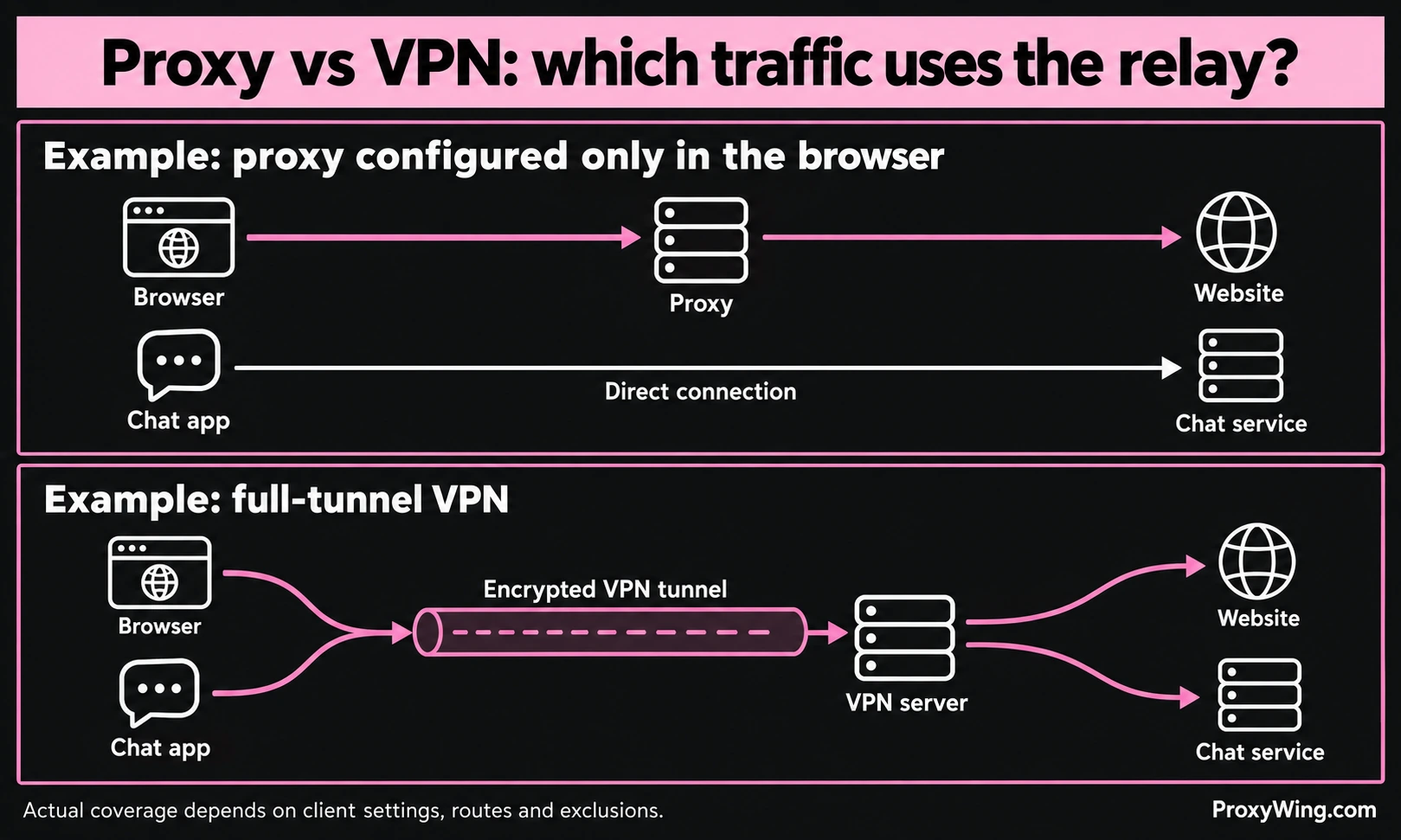
A virtual private network creates a logical connection to another network or server. Consumer VPN clients commonly use an encrypted tunnel to carry selected device traffic to an internet exit. Protocols and clients differ; WireGuard is one example of an encrypted VPN protocol, not a requirement for every service sold as a VPN.
In a full-tunnel configuration, the default internet route uses the VPN, subject to any more specific exceptions. In a split-tunnel configuration, selected traffic uses the VPN while other traffic uses another route. A browser extension marketed as a VPN may cover only browser traffic.
An encrypted VPN can reduce what a local Wi-Fi operator or ISP can inspect within the tunnel. It shifts trust toward the VPN operator, which handles the exit traffic. It does not remove the need for HTTPS, protect a compromised device or stop a website recognizing your signed-in account.
Evaluate the supported platforms, routing mode, DNS handling, disconnect behavior and provider policy. Website restrictions and account-based location rules can still apply.
A forward proxy is an intermediary used by a client. Your app sends a connection or request to the proxy, which relays it to the destination. For that connection, the destination usually sees the proxy's exit IP. Client information can still be exposed by forwarding headers, other connections or the application itself.
The client-to-proxy transport and the browser-to-website HTTPS connection are separate layers. A password used to authenticate to a proxy is not, by itself, traffic encryption.
A forward proxy acts for clients connecting outward. A reverse proxy sits in front of a website's servers and can handle load balancing, caching or TLS termination. It is not a replacement for a user's VPN connection. A transparent or intercepting deployment describes how traffic reaches an intermediary, not a promise of anonymity or unchanged content.
See the guide to proxy types for a broader classification.
Forward proxies are useful when you need an endpoint that a particular browser, script or application can use directly. Depending on the product, you can choose a location, an assigned static IP or a rotating pool without changing the route of every app on the device.
The main checks are client compatibility, supported protocols, authentication, traffic allowance and session behavior. A stable exit IP is different from a sticky session in a rotating pool. A mobile or residential IP describes the network route; it does not make a desktop browser a mobile device.
A proxy is not automatically faster or cheaper than a VPN. Compare your actual destination, page or file size, required session length and billing unit. Paid access alone does not establish security or reliability.
Use the tool that covers the traffic and network route you need. Adding a second relay can change routing, add delay and complicate troubleshooting. It does not automatically add anonymity.
HTTPS encrypts the website connection between the browser and the site. An ordinary CONNECT proxy forwards that encrypted stream without decrypting its page content, assuming valid certificate checks and no TLS interception. An encrypted VPN tunnel instead ends at the VPN server. HTTPS continues to matter on the onward connection to the website.
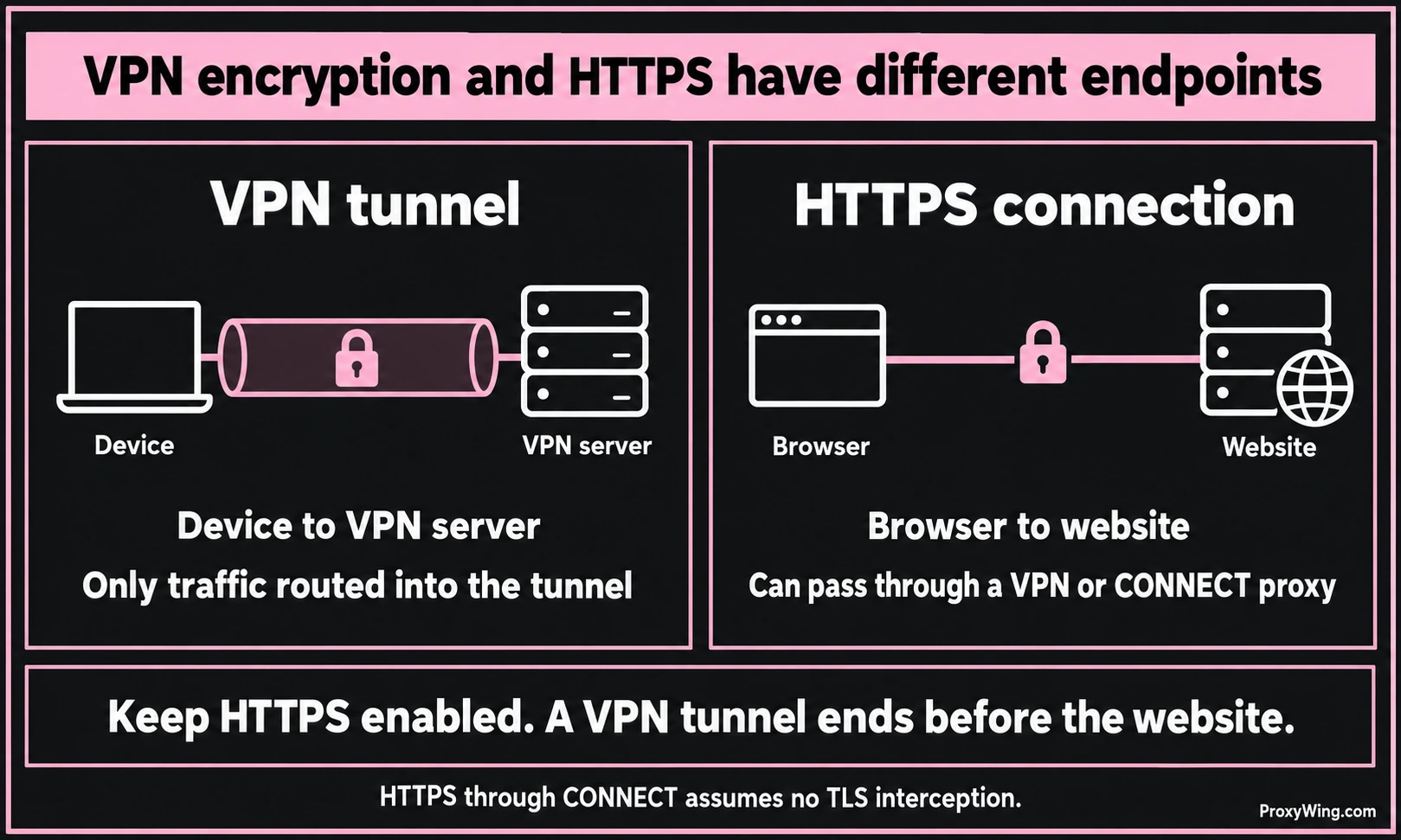
Without HTTPS or other application encryption, plaintext traffic can be visible after it leaves a VPN exit or proxy. A TLS connection to a proxy protects the client-to-proxy leg; it does not turn a plaintext destination into an HTTPS site.
One possible setup sends an app's proxy connection through a VPN. If it is routed that way, the proxy receives the connection from the VPN exit, and the destination normally sees the proxy exit. Other orders and exclusions produce different paths. Use a combined setup only for a defined routing requirement and verify each hop; do not assume that enabling both creates a particular chain.
For an assigned static exit IP in a compatible app, compare ProxyWing ISP proxies. For country-specific collection with rotating or sticky sessions, review ProxyWing residential proxies.
If you need a VPN-style client connection, review Wing VPN plans and platform support. The current product uses VLESS with REALITY and offers split tunneling. Confirm the chosen client's routing mode and platform support before ordering; the protocol name alone does not establish device-wide coverage.
Choose a VPN for the encrypted routes its client provides, or a forward proxy for the app and exit control you need. Keep HTTPS, check the actual traffic path and evaluate the operator you trust. Neither label guarantees speed, anonymity or access.
Article written by:

Product & Support Operations Lead
Built Proxywing's support department from scratch — documented workflows, clear escalations, consistent quality. Now bridges the CEO and engineering, keeping infrastructure projects on track.
All articles by author (70)For traffic included in a correctly configured encrypted VPN tunnel, the VPN protects the device-to-server leg. A proxy’s protection depends on its transport and the application’s encryption. HTTPS can remain encrypted through a CONNECT proxy without TLS interception. Compare coverage, certificate handling and operator trust rather than assuming every VPN is secure and every proxy is unencrypted.
You can combine them when the clients and routing rules support the required path. For example, an app may reach its proxy through a VPN, but exclusions can send that connection another way. Verify the route and the exit IP. Two enabled tools do not automatically provide more privacy and can add delay or connection problems.
Either may change the exit IP and the location a service associates with it. Neither guarantees access: services can also use account region, payment details, location permissions or network restrictions. Choose a route compatible with the service and your permitted access, while keeping HTTPS enabled.
The price alone does not answer that. Review the operator, permissions, encryption, logging and data-sharing policy, and how the service is funded. Free and paid services both need scrutiny. Avoid treating a privacy claim or a subscription charge as proof of safe handling of your traffic.
Pay for the features your task requires: compatible clients, routing controls, location, session continuity, capacity and support. Compare the total cost for that workload and review the operator’s practices. A paid plan does not by itself guarantee anonymity, security or better performance.