Proxy Authentication Methods Explained: Username/Password vs IP Whitelisting
06.10.2026 10 min
Cloaking software is one of the common tools that media buyers and affiliates use to protect their campaigns from platform reviewers. Cloackers are used to disguise traffic and show different content to different visitors, depending on their browsing data. For instance, real users may see the offer the affiliate is advertising, whereas platform bots and reviewers see a page that is compliant with their ad policies. Cloakers can be used alongside proxies.
Proxies can be used to manage affiliate accounts and to make it harder for platform bots to link the cloaker with your account traffic. On the server side, proxies are used to route outbound requests to hide the server’s real IP from platform probes.
However, using a Cloaker doesn’t necessarily guarantee bypassing all platform restrictions if certain things are not in order. In today’s guide, we will discuss seven common mistakes that could lead to campaign blocks and account bans even when using a cloaker — and how to fix each one of them. So, without wasting any more of your time, let’s dive right in.
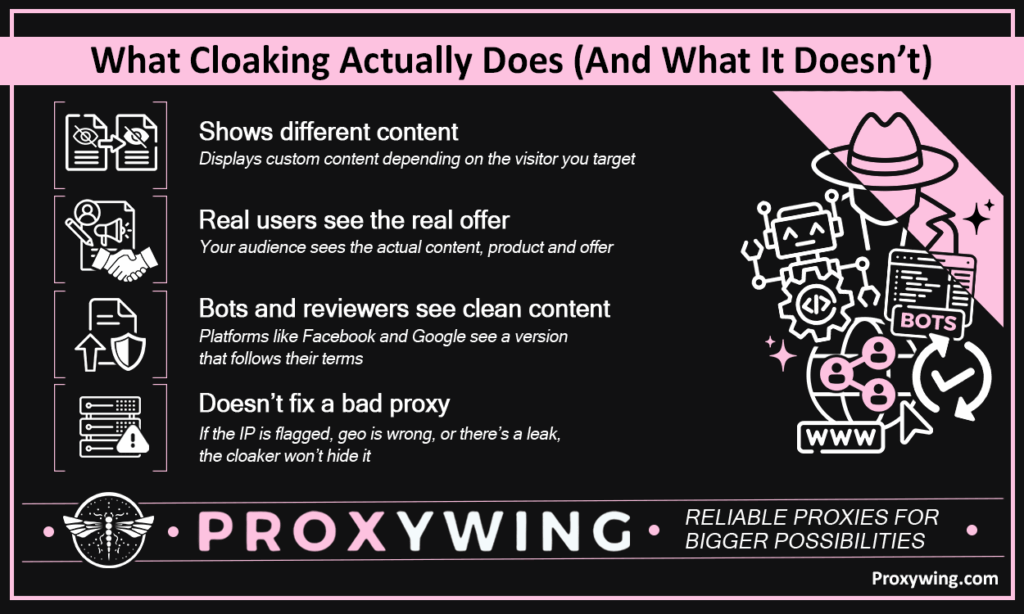
Cloaking shows different content to different visitors, depending on your business goal. For example, real users can be shown the real offer and bots and reviewers for ad platforms like Facebook and Google see something clean that complies with their terms. Businesses are sometimes forced to use cloakers to enable running ads that these platforms don’t find legitimate.
However, using a cloaker doesn’t fix a bad proxy. If the IP address is flagged, the geo is wrong, or there’s a leak, the cloak is transparent. Cloaking is only as strong as the proxy layer beneath it. In the next sections, we will discuss the common mistakes businesses make when using cloakers.
Shared proxies recycle IPs that have already been used and possibly flagged by other advertisers on the same pool. When you use a shared proxy to manage your ad accounts, you risk logging in from an IP the platform has already associated with policy violations. The platform flags your account based on the IP, not the account’s own history. That means it is possible for even a brand new, clean account to get marked immediately upon login.
Run your IPs through at least two of these before deploying:
Replace any IP scoring medium risk or above before going live. Please note that these tools offer free lookups, but you may have to pay a fee if you need to check a large pool of IPs.
Ad platforms cross-check visitor IP location against declared traffic source geo on every impression. A single country mismatch is logged immediately — repeated mismatches escalate to account suspension.
Geo coherence is one of the highest-weighted factors in ad network trust scoring. Consistent matches build score over time and mismatches compound. Enough geo inconsistencies associated with your account can get it flagged for manual review or auto-suspended.
Proxies replace your IP — not your behavior. Uniform request intervals, identical browser fingerprints, and missing mouse movement data all signal automation. These behavioral signals are logged at the application layer, above the IP level, so rotating proxies doesn’t hide them. When using proxies, the goal is to ensure your traffic mimics real user behavior.
Datacenter rotating proxies are fast and cheap but carry recognizable IP ranges and mechanical traffic patterns, making them the easiest to detect and flag. Residential proxies use real ISP-assigned IPs that produce human-like signals, making them significantly harder to detect.
For cloaked campaigns on sensitive platforms, residential proxies are the safer choice to go with. ProxyWing’s residential proxies offer 70M+ clean IPs across 190+ countries, giving you more flexibility to choose any region of your choice.
Using the same proxy IP to manage your ad accounts and test your cloaker creates a detectable link between the two. If the platform identifies your cloaker, it can trace that IP back to every ad account associated with it — and ban them all at once.
ProxyWing lets you assign dedicated IPs per account and per cloaker testing session, ensuring no two accounts share the same IP. If one account gets flagged, the blast radius stays contained — the platform has no IP link to trace back to your other accounts. This ensures your other accounts are safe even if one of them is detected and banned.
DNS leaks send domain resolution requests through your real ISP instead of the proxy, revealing your actual location. WebRTC leaks bypass the proxy entirely at the browser level, exposing your real device IP. Either one gives the platform a clear view of who is actually behind the accounts — making the proxy pointless regardless of everything else being correctly configured.
Shared proxy IPs let platforms cluster accounts. When one account is flagged, the platform queries all accounts tied to the same IP range and bans them simultaneously — one detection event wipes the entire portfolio, which is a nightmare for any business managing the ad accounts.
One dedicated IP or subnet per account and no overlap. At scale:
Most people only test whether the cloaker redirects correctly. Broken redirect chains, timing delays, and mid-funnel geo mismatches are invisible in a basic redirect test but clearly visible to platform crawlers.
Cloaking and using proxies are complementary strategies. The cloaker filters who sees what while the proxy protects the affiliate’s identity and location when managing accounts and testing setups. Neither works without the other being correctly configured. Fixing these seven mistakes covered throughout this guide will dramatically reduce ban rates and extend campaign lifespan.
For advanced cloaking configuration, cloaking.house is one of the most detailed technical references available. It covers detection evasion and infrastructure architecture well beyond the basics here. If you’re looking to set up a cloaking solution for your ad campaigns, cloaking.house is worth checking out since it is a dedicated platform built specifically for that purpose.
Article written by:

Product & Support Operations Lead
Built Proxywing's support department from scratch — documented workflows, clear escalations, consistent quality. Now bridges the CEO and engineering, keeping infrastructure projects on track.
All articles by author (68)Not necessarily. Platforms use multiple detection layers simultaneously. A cloaker addresses one of them — traffic filtering. Without a clean proxy setup, correct geo, and human-like behavior underneath, the cloak provides minimal protection against a thorough platform review.
Residential proxies are the best choice. These rely on real ISP-assigned IPs with human-like traffic patterns. ISP proxies are a solid middle ground since they are faster than residential and also offer higher trust scores than datacenter proxies. Datacenter proxies carry the most risk on sensitive platforms.
Technically yes, but it defeats the purpose. Free proxies use heavily recycled, blacklisted IPs. Pairing a paid cloaking solution with a free proxy leaves the weakest link — the IP — exposed.
The goal should be one account. A single dedicated IP or subnet per account is the minimum standard. Sharing IPs across accounts creates a detectable link that platforms use to ban the entire group from a single detection event.