Best USA Proxy Providers in 2026
01.11.2026 12 min
If you want to browse the internet with minimal restrictions while also maintaining your privacy, a proxy is one of the tools that you must consider using. Proxies hide your IP address and location, allowing you to bypass several network and geo-restrictions while also boosting your account anonymity. For the best experience with proxies, there are some key things you need to consider before making a purchase.
This guide will discuss everything any first-time buyer needs to know when purchasing proxies. We will explore how to buy proxy services from any provider, the common types to choose from, the common pricing models, and more. By the end, you will have a clear idea of where to start from and the most important things that will affect your overall experience when using proxies. Let’s start with the key takeaways from this guide before we get into the weeds.
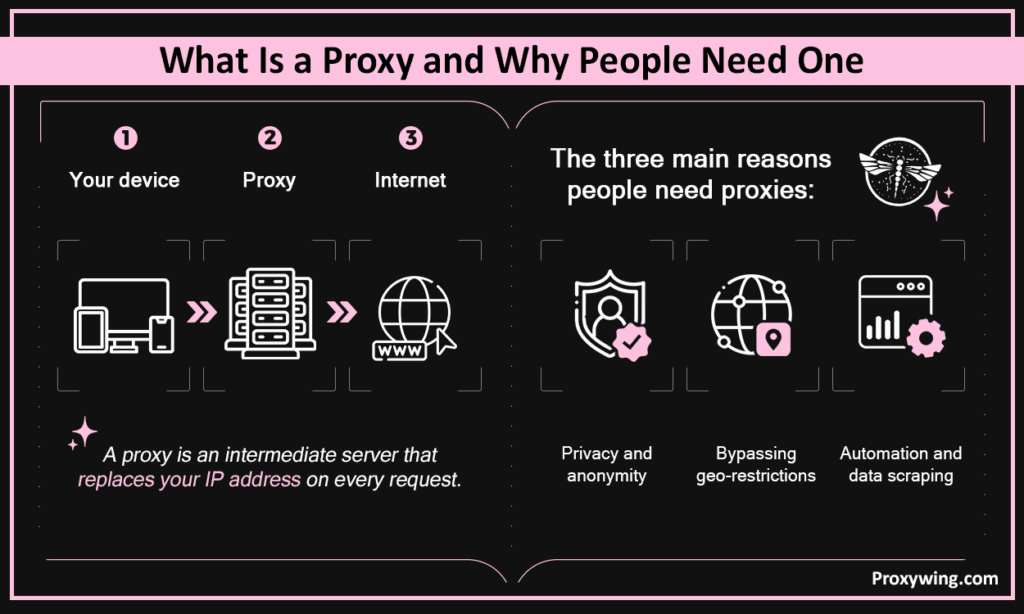
A proxy is an intermediary server that sits between your device and the web, replacing your real network address with its own on every request. When using one, any target website or internet service you access will view your traffic as though it is coming from the proxy’s network address and not your device’s.
The three main reasons people need proxies include:
Premium providers like ProxyWing will enable you to access their reliable services without enterprise budgets. ProxyWing also provides the different proxy types and large pools without compromising performance.
When using a proxy, your request goes to the proxy first, which then forwards it to the target site using its own network address. The site sends the response to the proxy, which then passes it back to you. The target site never sees your real network address. It only sees the proxy’s network address, making your connection anonymous. Using proxy services allows you the flexibility to choose an IP address in any country..
Some of the common use cases for first time users include:
| Type | IP Source | Best For | Typical Price |
| Residential | Real household ISP | Protected sites, ad verification | $2–10/GB |
| Datacenter | Server infrastructure | SEO, monitoring prices of goods bulk crawling | $0.50–2/proxy |
| Mobile | Cellular networks (4G/5G) | Social media, sneakers | $10–30/GB |
| ISP | ISP-registered datacenter | Long sessions, e-commerce | $1–3/proxy |
Let’s explore these different types of proxies and their best use cases.
Residential proxy solutions work by routing your traffic through IPs of real household devices, which makes them nearly indistinguishable from genuine user traffic. They are available as rotating (best for scraping) or static (best for account management).
Residential IPs are harder to block since they resemble real user network addresses, making them ideal for accessing strict targets. However, they’re relatively more expensive than the other types. Affordable residential proxies usually cost twice as much as the most affordable datacenter ones.
A datacenter proxy routes your traffic through a server running in a datacenter. Server-based IPs are often fast, cheap, and available in bulk. However, they are also the easiest to detect among all the types. Dedicated datacenter proxies are best for SEO and bulk crawling where detection risk is low. They’re typically available as shared or dedicated proxy services.
A mobile proxy routes your traffic through 4G/5G networks, replacing your network address with a cellular IP hence giving your connection the highest trust score of any proxy type. This makes mobile proxies a good option for social media, app testing, and sneaker drops. However, static and rotating mobile proxies are the most expensive option among all the available types.
ISP proxies route your traffic through servers running in ISP-managed or affiliated datacenters. They run on datacenter-hosted IPs registered to real ISPs. This type combines residential trust with datacenter speed, making it ideal for long sessions and e-commerce automation.
Use dedicated for anything sensitive or when accessing strict targets. Shared ones are only ideal for less sensitive tasks or when you’re on a tight budget.
These are the three common protocols used in the market today:
For a more flexible experience, SOCKS5 proxies are usually the best choice among the three.
| Use Case | Recommended Type |
| Web scraping | Rotating residential or datacenter |
| Ad verification | Residential (city-level) |
| Account management | Static residential or ISP |
| Geo-streaming | Residential or mobile |
| Sneaker drops | Mobile or residential |
| SEO monitoring | Datacenter or residential |
| App testing | Mobile |
Now let’s explore the different steps that we recommend following when choosing a proxy to use.
Write down your target sites, request volume, geo targets, and monthly budget. Without this, it’s easy to choose the wrong type or oversize the plan.
Having clear answers to all these questions allows you to choose the right type and to have the right budget ready before getting started.
When choosing a provider, evaluate them on ethical sourcing, uptime SLA, support, and geo coverage. Some of the common red flags you need to look out for before making any purchase decisions include vague sourcing language, no refund policy, no verifiable company info, suspiciously low prices.
ProxyWing offers reliable residential, mobile, and datacenter IPs in one dashboard with city-level targeting across 190+ countries and plans from $0.90/month. Their pool has 70M+ IP addresses, giving users enough location flexibility and minimizing chances of reusing blocked traffic. ProxyWing also offers 24/7 support via live chat, email, Discord, and Telegram. If you’re not sure how to buy a proxy service that is reliable, ProxyWing is a safe choice.
Before making your decision, you must also understand the available pricing models for proxies. The three common ones include pay-per-GB, pay-per-IP, and pay-as-you-go. Matching the model to your workload prevents significant overpaying.
| Proxy Type | Fair Price Range |
| Residential | $2–10/GB |
| Mobile | $10–30/GB |
| Datacenter | $0.50–2/IP |
| ISP | $1–3/IP |
After choosing the right provider for your proxy server, here are they key steps you need to follow when subscribing:
Start with a 5–10GB plan to test before committing. Measure real usage in the first billing cycle, then scale. Whenever you can, make use of the money-back guarantees to reduce first-purchase risk.
Most providers accept card, PayPal, and crypto. Before paying, verify the refund window, confirm auto-renewal can be disabled, and check the acceptable use policy. The goal is to choose a payment method that is not only convenient for making payments, but also makes it easy to get refunded if the need arises.
Retrieve host, port, username, and password from your dashboard. Most providers offer a proxy list download or API endpoint, which are usually for tasks that require automated IP addressing. Setup typically takes under five minutes.
The standard setup steps for most platforms:
Check your IP at WhatIsMyIP.com. Run a DNS leak test at dnsleaktest.com. Confirm geo matches your target. Sub-1-second response times are good and above 3 seconds often indicates congestion.
Proxy usage is legal in most jurisdictions. What matters is the way they’re used. Violating platform ToS or scraping prohibited sites creates risk. Ensure to only use proxies for ethical tasks and also follow the TOS of the target sites to avoid legal implications.
Article written by:

CEO
Founder of Proxywing. Drives growth across EU, US, and Asian markets, combining B2B strategy with a hands-on focus on product quality, 99% uptime, and responsive support.
All articles by author (66)Datacenter proxies are the cheapest with shared network address options running as low as $0.50/IP. They are also the fastest, but easy to detect. Best when detection risk is low.
Select crypto at checkout on most major providers. Complete the transaction through the provider’s payment processor.
Most reputable providers offer a 3–7 day money-back guarantee or small free trial allocation. Test the proxy on your actual target sites before committing.
Whether you need a static IP depends on your use case. Static IPs are typically ideal for session-persistent workflows like account management and logins. For scraping, rotating IPs are the most preferable choice.
Residential is sufficient for most platforms since it relies on IPs assigned to real home devices. Mobile is worth the extra cost only for the strictest targets such as Instagram, TikTok, and sneaker sites.
A few hundred for light use. Millions for high-volume scraping across major platforms. Start small, measure ban rate, and scale accordingly. Providers offering large pools should be your priority if you need more flexibility when choosing IPs.