Best Proxies for OnlyFans in 2026
22.10.2026 12 min
If you’re managing multiple accounts using the same device, you stand a high chance of getting your accounts restricted or banned since most platforms prohibit that practice. Using a proxy is one of the safest ways to manage more than one profile on the same device. For the best experience, you will need to choose the right provider based on your needs and budget.
In 2026, there are several providers to choose from, which can make this decision confusing for most users. To make that choice easier, this guide will walk you through the best proxies for multi-accounting. We will cover the key capabilities of each provider, allowing you to make your choice from an informed perspective. Let’s dive right in!
| Provider | Best For | Proxy Types | Starting Price | Multi-Account Performance |
|---|---|---|---|---|
| ProxyWing | Multi-account management & warmup at scale | All types supported | $0.87/IP per month | 70M+ IPs, sticky sessions, city-level targeting |
| Bright Data | Parallel account creation across regions | All types supported | $1.40/IP | 400M+ IPs, ASN/city/carrier targeting |
| Oxylabs | Long-lived ad accounts, 50+ account teams | All types supported | $2.25/IP | 177M+ IPs, built-in fingerprint unblocker |
| Decodo | Teams scaling 3–10 accounts | All types supported | $0.035/IP | 115M+ IPs, integrated antidetect browser |
| SOAX | TikTok/Instagram profile management | Residential, Mobile | $5.00/GB | 191M+ IPs, per-second rotation control |
| IPRoyal | Solo operators, small farms under 10 profiles | All types supported | $1.57/proxy/month | 32M+ IPs, non-expiring traffic, free tier |
The practice of multi-accounting is common among social media managers, and it involves running multiple profiles on one platform, or across platforms, from a single location and device. Using proxies helps because IP overlap triggers profile linking, device fingerprints must stay unique per profile, and rapid logins from one source read as behavioral flags.
Having each profile with a unique IP address significantly reduces the chances of having any of your multiple Instagram or TikTok accounts restricted or banned.
Most modern platforms have advanced systems that can implement IP matching, cross-session cookie tracking, browser fingerprinting (canvas/WebGL), and login-velocity analysis.
Platforms punish linked profiles with bans since multi-accounting often violates their terms. Bypassing detection typically requires using more than one tool since platforms use several parameters to detect potential multi-accounting.
As earlier shared, using the same IP address to manage several profiles significantly increases the chance of detection.
That’s why we recommend using a dedicated IP for each account. 2–3 low-risk accounts can share one IP with rotation. 5+ accounts, or any monetized one, need dedicated IPs. The per-profile cost is relatively insignificant next to the cost of a lost ad account. If you’re a social media manager, the investment will be worth it considering the potential risk.
Trust score, IP persistence, and cost efficiency vary significantly by type. Providers like ProxyWing cover all four types, which matters since the right pick depends on account value. These are the major types you can choose from:
This type routes your traffic through real user residential IPs, making your traffic appear as though it is coming from a legitimate residential user. Using real home IPs offers the best balance of trust and cost. Sticky IPs are mandatory here, since holding one IP per profile for weeks minimizes the possibility of frequent security triggers. With residential IPs, behavioral consistency matters more than ASN detail.
When using this type, your connection is routed through real mobile IP running on mobile carrier networks. Carrier IPs shared by millions via CGNAT give the highest trust, which makes this type best for startup profiles and automation.
Cost per GB for this type is the highest. However, using a dedicated mobile IP per profile is worth it once that account is monetized considering the safety it guarantees you.
With this type, traffic is routed through server IPs, which makes your traffic appear as though it is coming from a datacenter. Datacenter IPs are the cheapest and fastest, but flagged within days. For this type, limit to logged-out scraping only. Spending $30 in cheap proxies isn’t worth risking a $500+ ad account.
With the ISP type, your connection is routed through servers whose IPs are issued by real local ISPs. This type offers datacenter speed while maintaining comparable trust scores as residential IPs. With the ISP type, it is easier to maintain sticky IPs. Strong sticky sessions make this the preferred choice for Business Manager and other high-value monetized profiles over rotating residential.
Here are the key factors considered when choosing the providers on this list:
These are the top providers to consider in 2026

ProxyWing offers the strongest all-around fit for multi-accounting. It combines every proxy type with sticky IPs and deep geo-targeting at accessible pricing, with documented success on social account warmup at scale. This makes it our number one recommendation for most users.
Key Capabilities

Bright Data is another reliable proxy provider, thanks to its enterprise-grade network with one of the largest disclosed IP pools and the deepest targeting granularity on the market. This makes it strong for parallel profile creation across regions, though it comes at a premium price.
Key Capabilities

Oxylabs is another premium, compliance-focused provider built for teams that need broad coverage and managed anti-bot tooling for more than a cheap entry price. Its fingerprint unblocker makes it strong, especially for long-lived sessions where an account can’t afford IP changes.
Key Capabilities

Decodo is a mid-market residential network that pairs well with antidetect browsers, making it a practical pick for teams scaling from a handful of profiles upward.
Key Capabilities

SOAX is another popular proxy provider that offers a flexible, ethically-sourced network geared toward precise geo-targeting and social-platform work, with rotation control fine enough for account-specific session tuning.
Key Capabilities

IPRoyal is a budget-friendly, pay-as-you-go option built around traffic that never expires, making it a practical entry point for solo operators managing a small number of profiles.
Key Capabilities
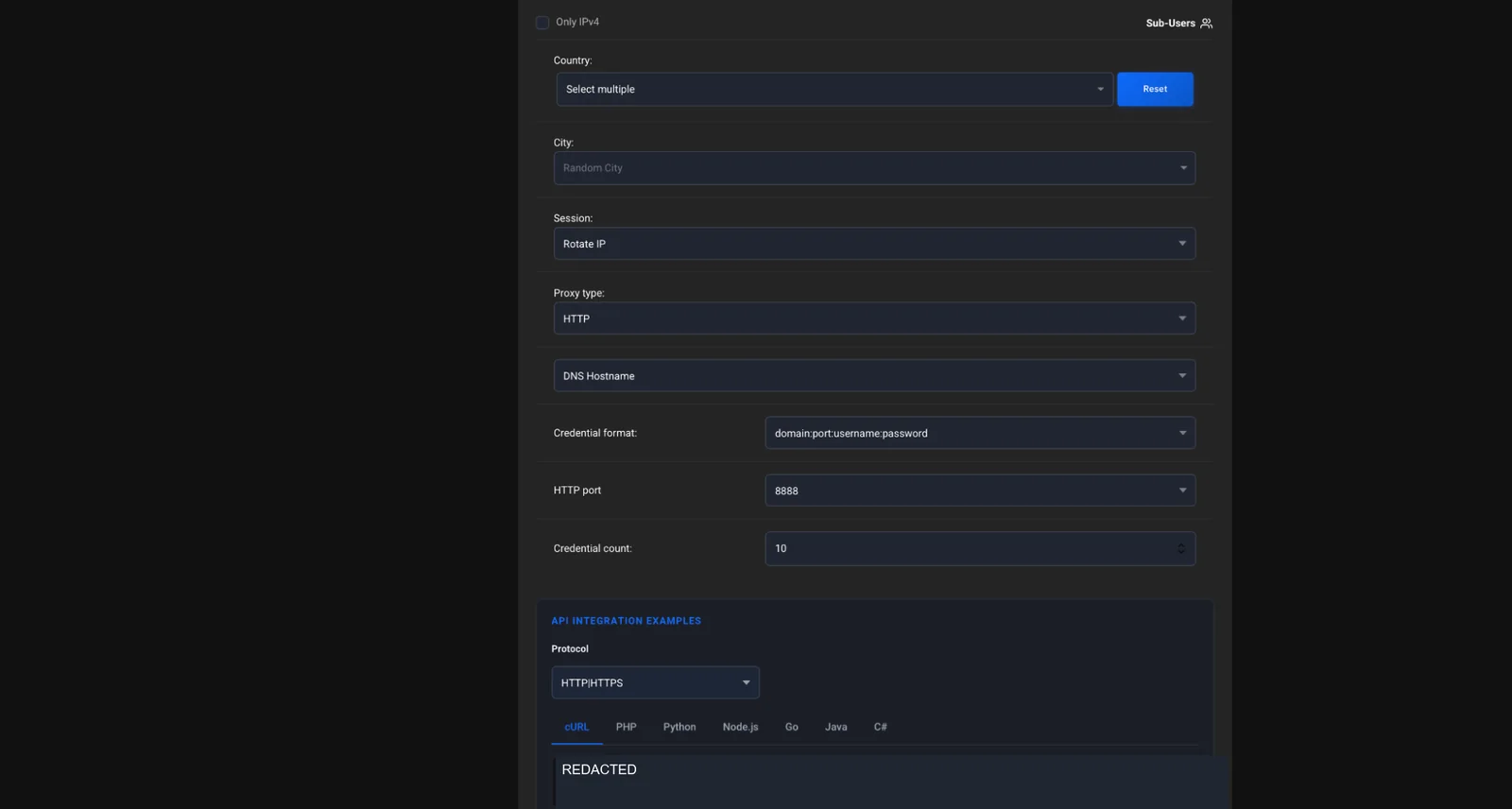
Sign up, pick a plan by account volume and platform, and note the host, port, username, and password in the dashboard. IP-whitelist skips credentials for a fixed server, while login-auth (username/password) works from anywhere. The screenshot above shows the proxy generator with Random City, Rotate IP, and HTTP selected.
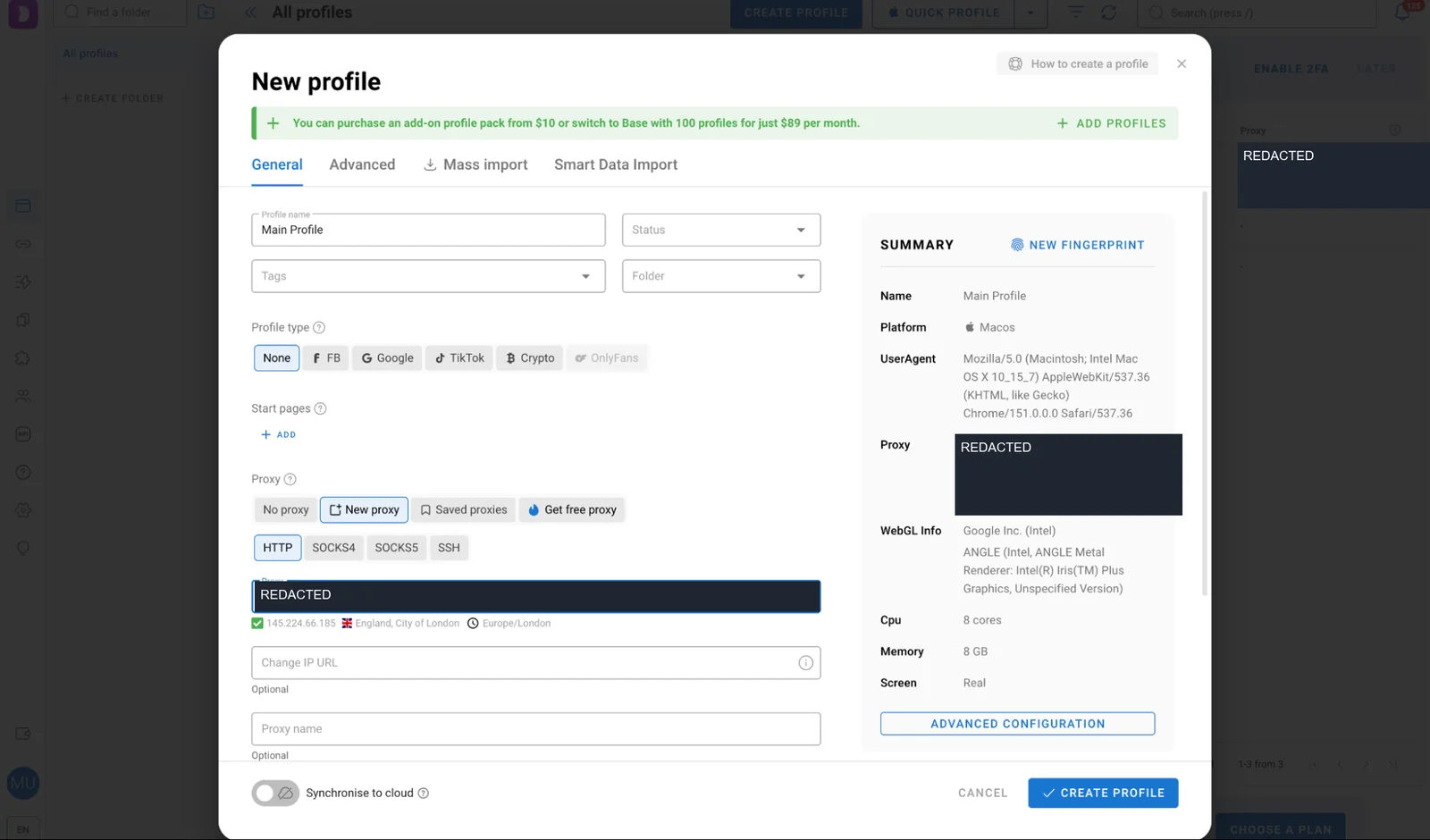
A proxy hides your IP, while an antidetect browser hides your fingerprint — multi-accounting needs both. Add your proxy credentials to a profile in a tool like Dolphin Anty, Multilogin, or GoLogin, with each account tied to its own dedicated profile and IP. The screenshot above shows a Dolphin Anty profile configured with an HTTP proxy and a London location.
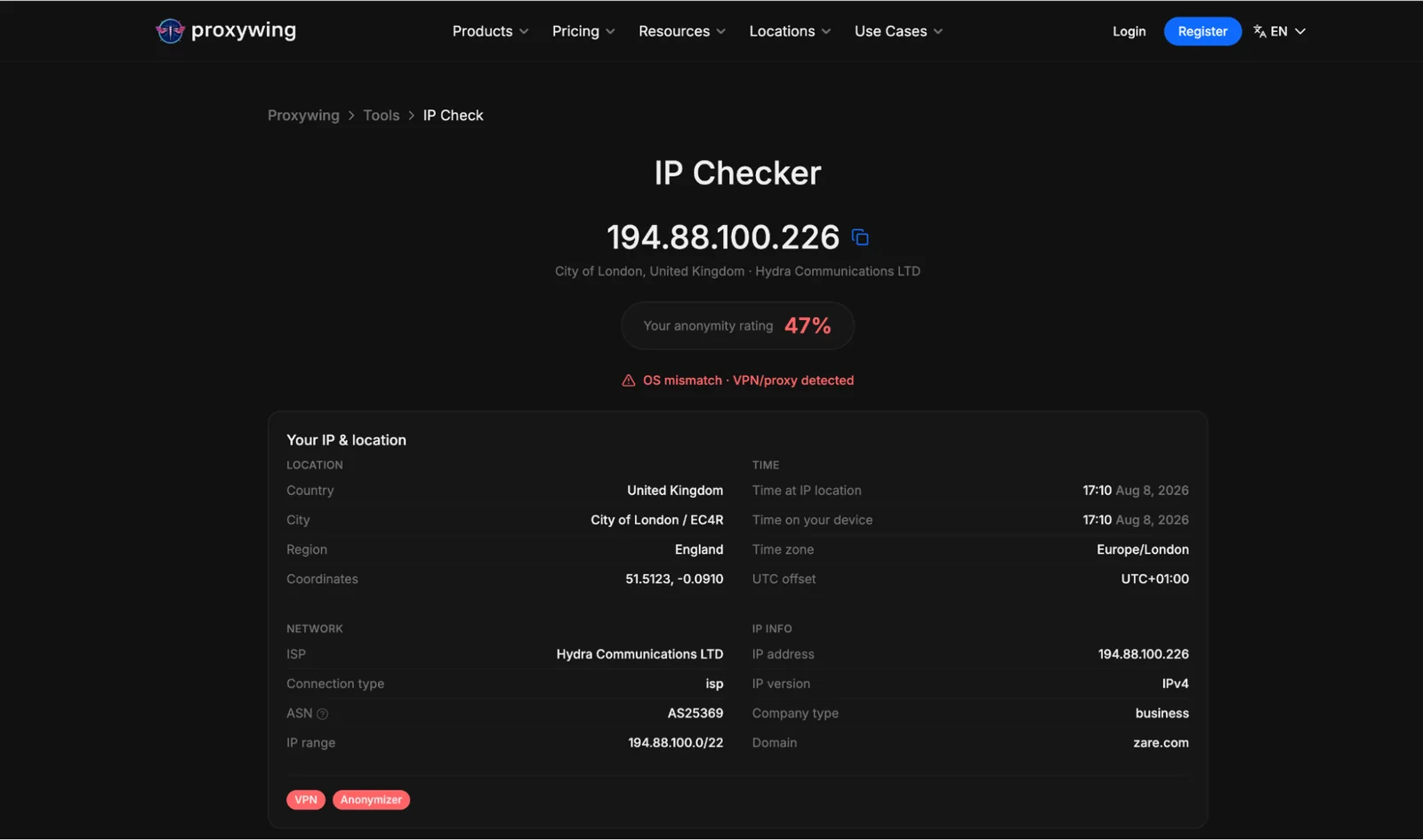
Test on an IP-lookup service such as WhatIsMyIP or ProxyWing’s own IP Checker. Make sure the ASN resolves as residential or mobile, not hosting, and that the geo matches the account’s claimed history. The screenshot above shows a London IP with Hydra Communications LTD on ASN AS25369. It also displays OS mismatch and VPN/proxy warnings, so it should not be treated as a clean pass. A flagged result means requesting a new IP before logging in.
Some of the common real world use cases of needing more than one profile include:
Multiple seller profiles on Amazon/eBay reduce single-profile risk and let you test inventory across regions. One IP per seller profile prevents payment holds and shadow bans. Pair this with a gradual warmup timeline.
Scaling client accounts on Instagram, TikTok, and YouTube while keeping profiles separate. You need to assign a unique IP address to each profile, use geo-matched IPs, use one browser per profile, and use automation tools that don’t share engagement pods across clients.
Free proxies carry already-banned IPs from prior users, offer no IP rotation control, lack encryption, and hit platform ASN blacklists within hours. A banned monetized account costs far more than a month of paid proxies for multiple instagram accounts or any other platform. To avoid frequent interruptions, it is always best to use premium providers with dedicated mobile or residential IPs.
Article written by:

Full Stack AI Engineer
Full-stack engineer at Proxywing working across backend architecture, performance optimization, and AI-driven workflows. Node.js, React, cloud infrastructure, and RAG pipelines.
All articles by author (63)One dedicated IP per valuable profile is the safe rule to follow. At most 2–3 low-risk profiles can share an IP with rotation. But overall, we recommend using a unique IP address for each account.
For anything monetized or valuable, yes. Low-risk accounts can share sparingly, but risk rises fast past 2–3 per IP. If you can afford, make sure each profile has a unique IP address.
Sticky sessions are recommended, since a consistent IP per profile builds trust over time. Rotating proxy solutions suit logged-out scraping, not profile logins.
No, you will need to use it with other tools such as anti-detect browsers to be safe. A TikTok or Instagram proxy hides your IP, but behavior, fingerprint consistency, and warmup pace all matter just as much. That’s where an anti-detect browser comes in.
Mobile or residential, depending on budget. Mobile carries the highest trust, residential offers the best everyday balance of cost and trust.
Yes, for anything beyond one or two profiles. The proxy hides your IP and the antidetect browser hides your device fingerprint by using different browser profiles for each profile. Both tools are needed to keep profiles separate.