Bright Data alternatives: proxy providers and scraping tools compared
Bright Data alternatives split into two categories: Bright Data proxy alternatives – if you already have a parser or tool and just need IPs, and Bright Data scraping alternatives – if you want the provider to retrieve or extract data for you.
The first option worth looking into for the proxy path is ProxyWing, which allows you to purchase IPs, connect them to your current stack, and maintain your own collection logic. Further down this page, the scraping-tool path is discussed in depth, with 13 services categorized based on their actual output.
Do you need proxies or a scraping tool?
Working collection software? You just need IPs. Want a provider to collect data for you? You’ll want a scraping product.
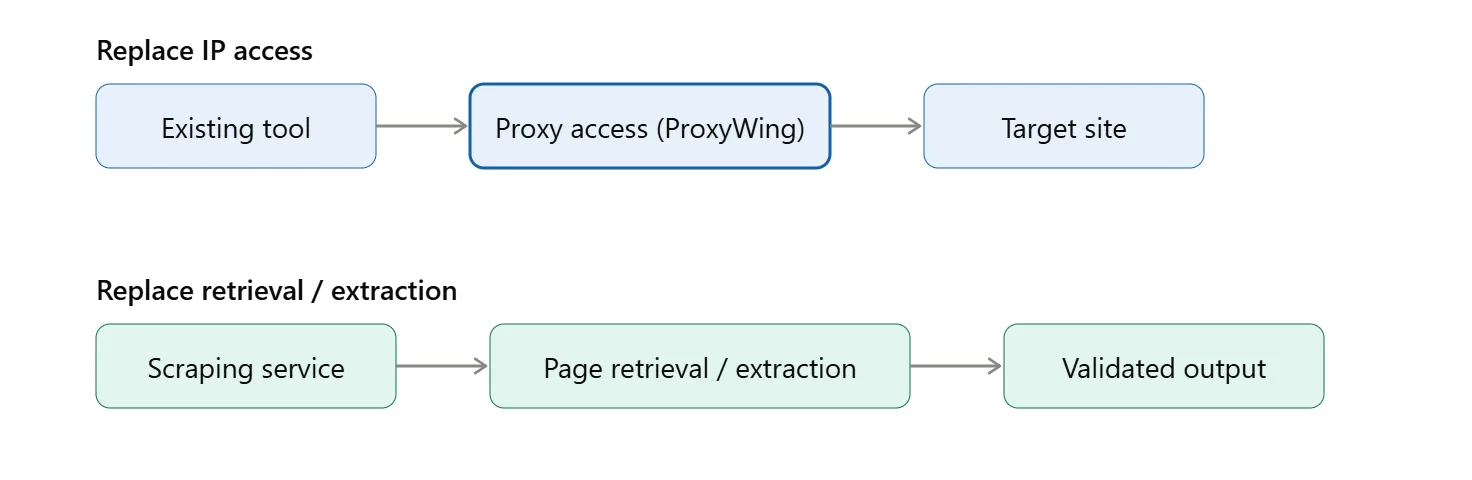
- Keep your tool, replace the IPs: Check proxy type, country/city/ISP, protocol, rotation vs. persistent sessions, traffic/IP allowance, terms.
- Replace retrieval or extraction: Decide the output – HTML, Markdown, validated fields, or scraper records.
- Replacing part of the platform: Oxylabs and Decodo appear in both lists below – proxies and scraping solve different tasks, not four companies.
Actually, when it comes to scraping, these aren’t interchangeable parts:
- Page retrieval: Rendering, sessions and browser actions – separate capabilities.
- Extraction: Check the schema, the page type, field accuracy, and missing values. A JSON output doesn’t guarantee the fields are correct.
- Crawling: Don’t confuse discovery, pagination, depth and fetching with each other – those are separate stages. And just mapping out URLs doesn’t mean they’re actually getting fetched.
- Search/SERP: Define which search engine you’re working with, language, location, depth and what exactly you’re pulling from the results. And don’t confuse AI search that references multiple sources with what you actually get from a search engine results page.
- Datasets/managed delivery: Check when the data is fresh, how much coverage you have and what the delivery terms look like. A basic fetch API doesn’t replace this.
In practice: “oh our parser works, let’s just get some IPs from two cities” means you’re actually dealing with a proxy problem, ProxyWing happens to be the solution – you keep your own logic separate. “We need to scrape a site to get price, currency and availability without having to think about writing our own extraction code” is a scraping problem.
Top 5 proxy providers as Bright Data alternatives
If you’re looking to buy proxies and connect them to your existing proxy stack, ProxyWing is a good place to get started. Of course, if your needs go way beyond that, then Oxylabs and Decodo are probably a better fit. Infatica is a good choice for tasks that are really specific to certain regions, and IPRoyal works well when you’re doing proxy access yourself. The fact that these five companies made our shortlist doesn’t mean they’re the very best option for every single task out there – you should still check the specifics against your own task.
| Provider | When to consider it | Proxy types | Example purchase and price | What to check before buying |
|---|---|---|---|---|
| ProxyWing | Small project with its own parser | Residential, ISP, Datacenter, Mobile | Residential: 10GB at $2.13/GB ($21.30) | Session mode, city/ISP targeting, traffic expiration terms |
| Oxylabs | Regular collection with support requirements | Residential, ISP, Datacenter, Mobile | Residential: 20GB Basic at $5/GB ($100) | Minimum monthly commitment, account-manager tier, trial terms |
| Decodo | Working across several regions | Residential, ISP, Datacenter, Mobile | Residential: 25GB at $3.25/GB ($81.25) | Location availability, trial length, refund policy |
| Infatica | Regional monitoring | Residential, Static ISP, Datacenter, Mobile | Residential: 100GB at $3.60/GB ($360) | Trial cost, city-level coverage, response-time claims vs. your own test |
| IPRoyal | Running an existing tool periodically | Residential, ISP, Datacenter, Mobile | Residential: 10GB subscription at $5.25/GB ($52.50) | Subscription vs. PAYG gap, minimum purchase, sticky-session duration |

ProxyWing

Four proxy types – Residential, ISP, Datacenter and Mobile – for readers that already have a parser or tool and just need to plug in some IPs.
- Fast setup for an existing stack: Choose a product, get the connection details from the dashboard and add them to your tool – you can start small and scale up as needed.
- Traffic doesn’t expire: If you’re buying residential IPs by the GB, anything you didn’t use will carry over to the next month – so a pause doesn’t mean wasting what you’ve bought.
- API for account management: If you want to automate things like provisioning and checking how much usage you’ve got left, you can use ProxyWing’s REST API – account/proxy management only, not a scraper.
- Built for this scenario: If you’re doing local monitoring, or want to use an existing parser along with some automated tools that need a fixed IP or rotating addresses – not a promise of success on every target site.
Define your locations and session mode first, then compare the volume at that spec – not just the lowest advertised price.
Already have a scraper or parser running? Get the IPs it needs without changing anything else. Choose ProxyWing Proxies → plans

Oxylabs

Oxylabs offers mobile, datacenter, residential, and ISP proxies. Its Web Scraper API is a different product that will be discussed later in the section on scraping tools.
- Broad coverage: Proxies available in 195 countries, and you can target them by country, city and state if you choose residential proxies.
- Monthly commitment, not pure pay-as-you-go: Residential proxies start at 5GB for $6 per GB (so that’s $30 a month) and then scale down to a very reasonable rate of $2.50 per GB if you take 1TB or more. Just be sure to check the minimum spend against your actual usage before you commit.
- Support scales by tier: Everyone can get help 24 hours a day, seven days a week, but only the top Corporate plan comes with a dedicated account manager.
- No self-serve trial on residential proxies: To get one, you have to fill out a contact form instead of clicking “Checkout.”
It is appropriate for a project that has actual support needs, such as direct assistance with session setup or troubleshooting rather than just IPs and a dashboard. Due to the monthly billing structure and lack of a residential trial, it is less practical to test a small volume first.

Decodo – formerly Smartproxy

Decodo is Smartproxy, just rebranded – one company, not two. It offers a range of proxy options, including residential, ISP, datacentre and mobile proxies, and a separate scraping API.
- Bandwidth-based pricing, several tiers: The standard plans start at $3.75 per GB, which gets you 3GB, and then go down to $2.75 per GB for a 100GB cap. Enterprise plans get even better with higher volume. If you want to pay as you go, it’s a flat $4 per GB with no minimum spend each month.
- Self-service checkout: Pick a plan and pay – no sales call for the standard tiers.
- A free trial is offered on subscription plans: Decodo does offer a free trial on subscription plans, so all you need to do is confirm how long that trial actually lasts.
- Full IP pool and targeting on every plan: You can target all the locations you need on any plan you pick.
What to check before buying: Make sure your required locations are actually available on the plan you choose, confirm how long the free trial is, and get a clear idea of the refund policy – nothing about that is mentioned on the main pricing page.

Infatica

Infatica offers residential, static ISP, datacenter (shared and dedicated) and mobile proxies, allowing you to pinpoint locations to country, region, city or ISP level. You have the option to log in and authenticate with a password or manually add IP addresses to a whitelist, along with the ability to set your own rotation periods.
- Use case: Checking what a site actually shows visitors in a specific city, not just a specific country.
- Trial isn’t free: You pay $4 for 7 days.
- Pricing scales with volume: Infatica does charge you per GB for residential, but the more you use, the cheaper it gets – down to $2.60 per GB for 1,000 GB of data, and you can even get custom pricing if you plan on using it in even greater quantities.
- Ethical sourcing and real certifications: Infatica goes the extra mile by keeping records of where their IPs are sourced from and has the ISO 27001/22301/27701/20000-1 certifications. Take a look at the actual certificates rather than just believing the claim.
Before making a purchase, check that your specific required city or ISP is actually covered – the level of geotargeting isn’t everywhere, and even having a huge pool of IPs doesn’t necessarily mean they are in the places where you need them to be.

IPRoyal

Residential, ISP, datacenter, and mobile proxies – supporting HTTP(S) and SOCKS5 across more than 195 countries.
- Billing: Default pay-as-you-go option, and a 5% discount for choosing subscription plans. Starting with a 1GB data package that costs $7 per GB, the price only drops to $1.75 per GB once you’re using more than 10TB, which is a pretty big difference between small and large data packages.
- Traffic never expires: Nice feature for tools you only need to run occasionally rather than all the time.
- Session modes: You can either get a new IP address every time you make a request, or stick with the same one for up to 7 days. There’s no limit to how many sessions you can have running at the same time either.
- A limitation worth knowing: If you need a fixed identity for more than 7 days, the static/ISP product is separate from the standard residential proxies.
When you do irregular runs, the price you pay is less based on the headline rate of $1.75/GB and more based on which volume tier you choose and whether a 7-day sticky session is enough time to complete your task.
Which ProxyWing proxies should you choose to replace Bright Data?
| Your task | Proxy type | Why it fits | What to confirm |
|---|---|---|---|
| Check prices in two cities, changing IPs between requests | Residential | City/ISP targeting plus rotating sessions cover per-request IP changes | Both cities are covered, and the rotation mode matches your request pattern |
| Maintain a long working session with one IP | ISP | Dedicated static IP held for the whole subscription term | Country availability and how long the IP stays assigned to you |
| Collect a public catalog once a day from a site that accepts server IPs | Datacenter | Dedicated, unlimited-traffic IP suited to scheduled, repeatable requests | The target site actually accepts datacenter IPs, and which locations are available |
| Check a mobile website through a particular carrier | Mobile | Real IPs from 4G/5G carrier networks, with manual or automatic IP rotation | Which specific carrier is available in your target country – availability varies by location and plan |
Local price monitoring with rotation: a residential proxy that targets a city, changing to a new IP with each request is perfect for checking the same page – each check will look like it came from a different location.
A lengthy process with a fixed IP: an ISP proxy that stays with you for the duration of your subscription fits a task that needs to log in and stay logged in, without an address change interrupting it.
13 Bright Data alternatives for web scraping
| Tool | When to consider it | Expected output | What to check |
|---|---|---|---|
| Oxylabs Web Scraper API | Regularly retrieve product pages from several sites | Pages or structured JSON, per source and JS-rendering mode | Supported source sites and per-result rendering costs |
| Decodo Scraping API | Collect a catalog on an update schedule | HTML, JSON, CSV, PNG, XHR, or Markdown | Standard vs. Premium proxy pricing, and whether your target needs JS rendering |
| String | Retrieve pages where current access is unstable | Target page content, via a plain fetch or full browser render | Access mode (fetch vs. browser) and premium-proxy cost, since they bill very differently |
| ScraperAPI | Feed HTML into an existing parser | HTML for custom extraction (plus structured/AI-parsed data via separate endpoints) | Credit multipliers for the selected site and request type |
| ScrapingBee | Retrieve JS pages and search data | A rendered page (HTML/text/screenshot) or a search API response | Which engine you need, and premium/stealth proxy credit cost for your target sites |
| Scrape.do | Collect pages with billing based on successful requests | Raw HTML or Markdown | What counts as “successful,” and credit cost for your specific proxy/render combination |
| Crawlbase | Add page retrieval to an existing processing system | HTML, JSON, or Markdown | Billing tier reached at your volume, and whether Normal or JS token pricing applies |
| ScrapeGraphAI | Extract price, currency, and availability using a defined schema | JSON with the required fields | Field accuracy and extraction cost |
| Firecrawl | Prepare website content for a knowledge base | Markdown and page metadata | Crawl depth, limits, and excluded sites |
| Nimble | Feed fresh web data into an analytics workflow | A structured response with source data | Freshness, format, and delivery method |
| Zyte | Add extraction to a Scrapy workflow | Data for a supported page type (product, article, job listing) | Domain pricing tier and HTTP vs. browser-rendered mode |
| Apify | Run a ready-made scraper for a specific site | Records from the selected Actor | Actor maintenance and its separate charges |
| Crawl4AI | Deploy a scraper on your own infrastructure | Content in the selected format (Markdown, HTML, structured JSON) | Hosting, maintenance, and stack configuration |
Oxylabs Web Scraper API

Oxylabs’ Web Scraper API is its own separate offering from the residential/ISP/datacenter proxies they offer – this is all about managed retrieval and parsing, not just giving you access to a raw IP.
- Async is built right in: you submit a job and then get your results back by polling or by callback URL – which isn’t an instant response.
- The pricing varies by source and rendering: Amazon and Google are cheaper per 1,000 results than just pulling generic pages, and then there’s the extra charge for sites that use JavaScript to render – that’s a flat rate that drops from $1.35 per 1,000 results all the way down to $0.95 per 1,000 at their business tier.
- You’re only charged for results that actually work: if Oxylabs’ system fails and you don’t get a result, you don’t get charged for it.
- Media downloads are charged separately: by GB, not the result – if you’re pulling images or video, that’s going to cost you extra.
- Free trial: 2,000 results with no need for a credit card to get started.
Compare that against what you’re paying Bright Data, which is only per result – not per GB – because they bill things differently altogether.
Decodo Scraping API

One unified API – all plans get the same output formats and capabilities. What actually scales with price is whether you get a basic proxy or one with JS rendering – not what you’re allowed to use.

- Pricing is based on request complexity, not a tiered feature list: Standard proxies start at $0.50 for every 1,000 requests and Premium for guarded pages at $1.00/1,000 – both roughly double in cost if you want JS rendering. Volume plans will bring that per-request cost down (as low as $0.09/1,000).
- Over 100 ready-made templates: Amazon, Google, TikTok, Walmart, Target, Reddit and many more – including some new additions like scraping data from ChatGPT and Perplexity.
- Free plan available, no credit card needed: 2,000 standard-proxy requests are yours before you have to start paying.
- 14 day money back guarantee on paid plans: see the billing FAQ for the small print.
- MCP Server included: if you’re building an AI pipeline using AI agents, n8n or LangChain connectors – this might actually be useful.
String

String bills you per successful request only – no charge for an attempt that gets blocked, and unused credits carry over.

- Output formats confirmed: supports structured JSON, raw HTML and clean Markdown – picked with a single ‘format’ parameter.
- Real extraction, not just raw fetch: pass a JSON Schema and get back only the fields you asked for – AI helps pick out the relevant info from the page.
- Search covers four engines: Google, DuckDuckGo, Brave, and Mojeek, returned as structured JSON.
- Sitemap discovery and browser automation are separate, documented capabilities: you can access a remote Chrome instance over CDP (works with Puppeteer/Playwright tools) for taking screenshots and scripted browser actions.
- MCP server comes with both hosted and self-managed options.
- Two access modes, priced far apart: plain fetch starts at $0.20 to $0.30 for every 1,000 requests, and the full browser rendering option is 5 times that. If you only need to use premium (residential) proxy routing, then it’s around 10 times the standard price – use this only when necessary.
- A real limitation: some of the places you want to fetch from will require approval first – this is a genuine access-control gate, not just a rate limit.
- Separately: you can also buy Composer, a prose described managed dataset/feed builder – a different product with its own API keys – something to think about if you need ongoing structured data rather than just one-off page retrieval.
ScraperAPI

Send a URL and an API key and you get back HTML – that’s the basic idea, but not the whole platform.
- Six request methods: you’ve got a standard API endpoint, an async endpoint, a proxy-port mode, a Structured Data Endpoint that parses fields right out of the response, a DataPipeline service which lets you do bulk and scheduled jobs, and finally an MCP server that uses LLMs to scrape sites for you.
- Not HTML-only: Structured Data Endpoints return the data itself, and a schema-based AI parser is available – still in closed beta.
- Free trial: 7 days, 5,000 credits, no card required.
- Pay per credit and concurrency, not per feature: Hobby is $49/mo (100K credits, 20 threads, geotargeting only in the US and EU) and goes all the way up to Professional at $975/mo (10.5M credits, 300 threads, global geotargeting, and priority support). Even on the most basic plan, you get full access to the crawler and some premium proxies. The only thing that changes is the volume and the number of threads.
- Save 10% by paying yearly
- Scrape much more than just web pages: images, documents, and PDFs all get treated the same way as any URL – it has 50MB request limit.
- A 70-second timeout is recommended in your own code to get the best results on tougher domains.
Credit costs vary depending on the site you’re trying to scrape and how complex the job is: check out ScraperAPI’s domain cost guide to get a better idea before you start estimating volumes.

ScrapingBee

Base HTML retrieval with a credit cost that scales according to what your request actually needs – as opposed to a flat fee per request.

- Credit cost by configuration: JS rendering (on by default) is 5 credits. Premium proxy adds up to 10 without JS or 25 with it. Stealth proxy (toughest sites) is 75, JS required. AI extraction adds 5 more on top.
- Auto-Mode picks the cheapest config that works: tries cheapest first, charges only for the one that succeeds, nothing if all fail. You can cap the spend.
- Dedicated scraper endpoints beyond generic HTML: Google Search, Fast Search, plus Amazon, Walmart, Shopee, ChatGPT, Gemini, and YouTube APIs – each its own product, not blanket search-engine support.
- Pricing scales by credits and concurrency, not features: Hobby at $19/mo (75K credits, 25 concurrent) up to Business+ at $599/mo (8M credits, 400 concurrent). JS, proxies, geotargeting, and the dedicated APIs are all included from the cheapest tier.
- Pay only for successful requests, cancel anytime.
Scrape.do

Every plan gets every feature from day one – no feature gates by tier. What scales is credit volume and concurrency.

- Success is specific: billed only on 2xx, 400, or 404 responses. Everything else is free. The cost varies a lot – just 1 credit for a basic datacenter request, but 25 for residential + JS rendering.
- Rendering and browser interaction are separate tasks: if you want to render a JS-heavy page, that’s what render=true is for. But if you want to run scripted actions like clicking or scrolling, playWithBrowser is a separate option – and it doesn’t require rendering.
- Each big website has its own special API: Google, Amazon, Walmart – each of these sites has its own endpoint. Google support doesn’t mean every search engine works.
- Async has its own concurrency pool: 30% of your plan’s limit, all to yourself. That’s separate from your regular requests.
- Free tier: 1,000 credits, 5 concurrent, all the features unlocked. Paid plans run $29 to $699 a month, and they scale with your needs. You can get 250K to 10M credits, and concurrency from 10 to 200. The feature set remains the same across all plans.
Crawlbase

One token, one graduated rate card for the whole platform – JS rendering, residential proxies, and anti-bot handling are all free and don’t cost extra.
- Pay as you go is the default, no monthly fees: $3.00/1,000 but that goes down to $0.02/1,000 once your volume starts climbing and you are only charged for successful requests. You also have the option to take a subscription for $99 a month which will work out cheaper in the long run. If you go over the basic free allowance your extra usage will be billed at the same rate you reached by the time you hit that point.
- Output in three formats: rendered HTML, structured JSON (via a named scraper or
autoparse=truefor common sites), or Markdown. - Screenshots: full-page captures, stored for up to an hour.
- Extra: Tor network crawling for onion sites – not something every competitor here offers.
- Free tier: 5,000 requests are free, no need for a card to sign up.
- 99% average success rate: their own measured figure, not independently verified here.
ScrapeGraphAI

Six separate services – not just a one-size-fits-all scraper: Scrape , Extract , Search , Crawl , Monitor , Schema – each priced independently and none of them free-form .

- Extract is 5 credits per call: no matter how many details you want to grab – and that’s the go-to for prices, currencies, or availability.
- Scrape costs 1 credit (Markdown), 2 (screenshot), or 25 (branding analysis): Markdown’s the cheapest.
- Search: 2 credits per result if you don’t need prompting, 5 if you do – and the cost goes up the more results you pull, not per individual call.
- Crawling starts at 2 credits: adds up for each scraped page – which can add up fast, especially if you’re crawling a lot of pages.
- Monitor charges 5 credits when something changes: no cost for a check that comes up empty.
- Stealth mode (the anti-bot bypass) adds 5 credits on top of whatever else you’re using, but the rendering mode choice (auto/fast/js) won’t change the price.
- The core code is open-source and hosted on GitHub, separate from the hosted API
- Credits scale up with your plan: Free (500 credits, one-time only) → Starter $20/mo (10K credits) → Growth $100/mo (100K credits) → Pro $500/mo (750K credits) → Enterprise (custom) . Top-ups, however, never expire and stack on top of your subscription.
Firecrawl

Search, Scrape, Crawl, Map, Parse, Interact, Monitor and Agent – eight separate features all charged up using the same pricing system.

- Credits by endpoint, same rate on every plan: Scrape and Crawl cost 1 credit per page, Map costs 1 credit per page, Search is 2 credits for every 10 results, Interact is 2 credits per minute of browsing, Monitor costs 1 credit per page, per check, and then there’s Agent – you get 5 free runs per day, then dynamic pricing.
- Parse can handle local files: PDFs, DOCX, XLSX, and HTML converted to Markdown or structured JSON – not limited to live URLs.
- Cloud and self-hosted are genuinely different: the pricing numbers mentioned are based on the hosted API – if you’re self-hosting the open-source core, things work differently.
- No API key needed to start: Scrape and Search will work without one, but they’re limited to a certain level – a key lets you boost those limits.
- Pricing scales by credits and concurrency: Free gets you 1,000 credits, Hobby ($16 a month) 5,000 credits, Standard is $83 a month for 100K, Growth is $333 a month for 500K, and Scale gets you 1 million for $599 a month. Each tier roughly doubles the number of requests you can send at the same time. And if you’re on a paid plan, you can top up credits in $5 increments when you run out.
- MCP server included with a keyless endpoint for Search/Scrape/Parse specifically.
Nimble

Six distinct APIs: Agent, Search, Extract, Extract Template, Crawl, and Media – each with its own pricing and output format.

- Pricing by API, not a single unit: search API is $1.10 per 1,000 requests, Extract/Crawl/Map is $1/1,000 requests, Extract Template – which comes with prebuilt templates for names like Amazon and Google – is $3/1,000 requests. Media API is charged $2 per GB and Agent API is $0.025 per request – with an option to adjust how much effort you put in for a trade-off in cost.
- Extract Template is managed, not self-run: it’s a separate “Managed Service” agreement with an extra 10% fee if Nimble runs the template for you instead of you doing it.
- “Deep mode” on Search includes full page contents in results: not just links and snippets – a real capability difference, not a cosmetic toggle.
- Free tier on all APIs: 5,000 requests a month, no credit card required – cancel any time you like.
- “Live” search still needs a defined freshness requirement: actual live results don’t do the job on their own – you still need to figure out what current means in your case – so don’t assume live automatically means good enough.
Zyte

There is now a single API for everything: automatic extraction, proxy management, and rendering are all part of the Zyte API. The old Auto Extract product was taken off the market in 2024.
- Pricing is domain-tiered, not flat: Zyte offers per-domain rates across five pricing bands when you enter a target URL. Pay-as-you-go HTTP response body cost is between $0.13 and $1.27 per 1,000 responses, while browser-rendered responses cost between $1.01 and $16.08 per 1,000 on the same PAYG tier.
- Monthly commitments lower the per-response rate: the price range is further reduced than PAYG by the $100, $200, and $500 minimum-spend tiers, and Enterprise offers custom volume discounts.
- Structured extraction covers named page types: products, articles, job listings, and their list variations are returned as JSON without requiring you to create your own parsing rules.
- Built by and for Scrapy: Scrapy-zyte-api routes current Scrapy requests through Zyte API with minimal code changes. You keep your own spider, and Zyte takes care of the request and extraction layer. Scrapy was created and is maintained by Zyte’s team.
- Ban handling and JS rendering included, with screenshots and scripted browser actions (click, scroll) available when a page needs them.
Your setup will determine who maintains the scraper: if you use the API directly, Zyte will handle extraction from start to finish. If you integrate using Scrapy, you will still be responsible for maintaining your own spider, with Zyte serving as the request/extraction backend.

Apify

The platform itself is the marketplace and runtime of Actors which other developers build and publish. It is all the quality of the Actor that you choose, not the platform.

- Platform pricing is compute-based: $0.20 per compute unit (CU) for Free and Starter, and $0.13 per CU for Business with a monthly platform credit limit of $5 to $999, which can be spent in the Actor Store or on the user’s own Actors.
- An Actor can have its own separate price on top of platform compute: some are free and only require you to use your own compute units, while others charge rental fees or per-result pricing determined by their author. Verify the pricing tab for each actor, not just your plan tier, or you run the risk of paying for both compute and an Actor fee without realizing both apply.
- Storage exports result in multiple options (Dataset), and Proxy (datacenter + residential rotation) is a separate bundled service some Actors use -no additional charge for using it.
- Crawlee: Many Actors are powered by Apify’s own open-source scraping library, which is important to know because code quality is determined by author skill rather than just Apify’s engineering.
- MCP server included, for AI agents to discover and run Actors directly.
- A search-focused Actor does not make the platform a universal SERP API – that Actor covers whatever search engine and scope its author built it for, nothing more.
Crawl4AI

Open source, Apache 2.0 – run it yourself on pip or Docker, no per-call hosted API.
- No cloud fee doesn’t mean free: servers, an LLM if you use one, proxies, and your own time still cost something.
- You handle maintenance: no managed patches or updates – that’s on you.
- Proxy support is built in, but bring your own provider and check credential compatibility with your version.
- Extraction works with CSS/XPath alone, no AI required – or full LLM-driven extraction when you want it.
- Security patches are frequent (recent fixes for SSRF, RCE, auth bypass) but not automatic – self-hosting means staying current yourself.
- Actively maintained: 80.9k GitHub stars, regular releases, an official Docker image with a monitoring dashboard.
How much do Bright Data alternatives cost?
This section performs 2 separate calculations rather than a single ranking because proxy access and scraping APIs bill in entirely different units, such as GB, IP-per-period, API credits, and usable records.
Proxy access for the same volume of traffic comes first. Next, the total cost of scraping for the same usable output. Saving money on proxies does not guarantee that a custom scraping stack built on top of them will be less expensive than a managed API. That is a different question, which is addressed separately below.
Why ProxyWing offers better value than Bright Data at low volumes
A ProxyWing Standard residential package begins at $2.50/GB, 1 GB – it is not a trial, but a purchase. Savings grow with volume: ProxyWing runs $2.13/GB at 10 GB, $2.00/GB at 50 GB, and $1.88/GB at 100 GB.
Unlike residential traffic, a package purchased for one project doesn’t expire in between runs, and it can be stored for future use without any cost – useful for pilot work or collection that happens in bursts rather than on a constant schedule.
| Residential traffic volume | ProxyWing Standard | Bright Data PAYG (base $8/GB) | Bright Data PAYG (with RESIGB50, $4/GB) |
|---|---|---|---|
| 1 GB | $2.50 | $8.00 | $4.00 |
| 10 GB | $21.30 | $80.00 | $40.00 |
| 50 GB | $100.00 | $400.00 | $200.00 |
| 100 GB | $188.00 | $800.00 | $400.00 |
ProxyWing: Standard package with tiered pricing based on basis of GBs used. Bright Data: pay-as-you-go with no monthly payment. The $4/GB price may differ from the regular price as of the time of this writing and is subject to the RESIGB50 promo code.
Sources: ProxyWing residential proxies page, Bright Data residential proxies pricing page.
Even at Bright Data’s promotional rate, ProxyWing costs less at every volume in the table – and the gap is wider without the promo.
Choose a Cost-Effective Residential Proxy Package → ProxyWing residential proxies
Worth noting: Bright Data also offers PAYG with no monthly commitment – that’s not unique to ProxyWing, just priced differently at this volume.
Compare scraping costs per usable result
Compare cost on the same task, NOT on the cheapest request price listed. The first step is to define the output unit, not the request itself, that you’re paying for, such as a page, a product record, an article, or a search response containing specific fields.
Formula: total cost ÷ usable results × 1,000 = cost per 1,000 results. This is the total cost, which includes any additional processing or team time separately charged, and not the package price. If there are no usable results, it isn’t $0, it is an incomplete test.
Acknowledge minimum spend, monthly vs. annual billing, JS rendering surcharges, premium domain pricing, errors and retries, unused credits, and, if self-hosting, compute costs, LLM pricing. Check what’s already bundled into a plan before counting it twice.
Do this test on your own short list candidates and on Bright Data, running the same workload on both, prior to settling on cost.
How to test quality and reliability on your target sites
Check actual content on target sites – HTTP 200 alone isn’t a usable result.
- Proxy-only comparison: fix everything (parser, URLs, location, session, concurrency, retries), change only the proxy. Check observed IP/location, session persistence, and traffic/rental cost.
- Scraping API comparison: document each product’s retrieval/extraction mode, validate against the same required output.
- Pick real URLs: simple and JS-heavy, different sites, pagination, localization, the fields you actually need.
- Record settings: endpoint, location, rendering mode, timeout, retries, concurrency, plan.
- Check content, not status codes: a CAPTCHA with HTTP 200 isn’t usable. JSON → compare values to source. Markdown → check completeness, no interface clutter. SERP → check engine, location, depth, result blocks.
- Repeat at different times: track success, partial failure, and full failure separately per domain. Separate policy exclusions from technical failures.
- Compare time-to-result, errors, freshness, usage: proxy latency ≠ extraction time. State sample size and period.
A 20-30 URL pilot with a few repeats is a starting point, not proof at scale. Set your thresholds before you start.
How to switch from Bright Data
Select the path that relates to what you’re replacing, whether it’s the entire scraping workflow or just proxies. The above section’s quality checks are applicable to both, so the table will not be repeated in this section.
Switch your existing tool to ProxyWing proxies
- Identify your current setup: proxy type, locations, protocol, authentication, sessions, connection count, volume, target sites.
- Choose a ProxyWing product and buy a small package or IP set to start – confirm trial terms directly before promising one to anyone.
- Get connection settings from the dashboard: host, port, authentication method.
- Add the settings to your tool: check protocol match, connection string format, and that your required session mode carries over.
- Test against real target pages, repeated: compare actual content, errors, response time, and usage – not just HTTP status. If your task depends on JS or precise extraction, verify your existing tool still behaves correctly.
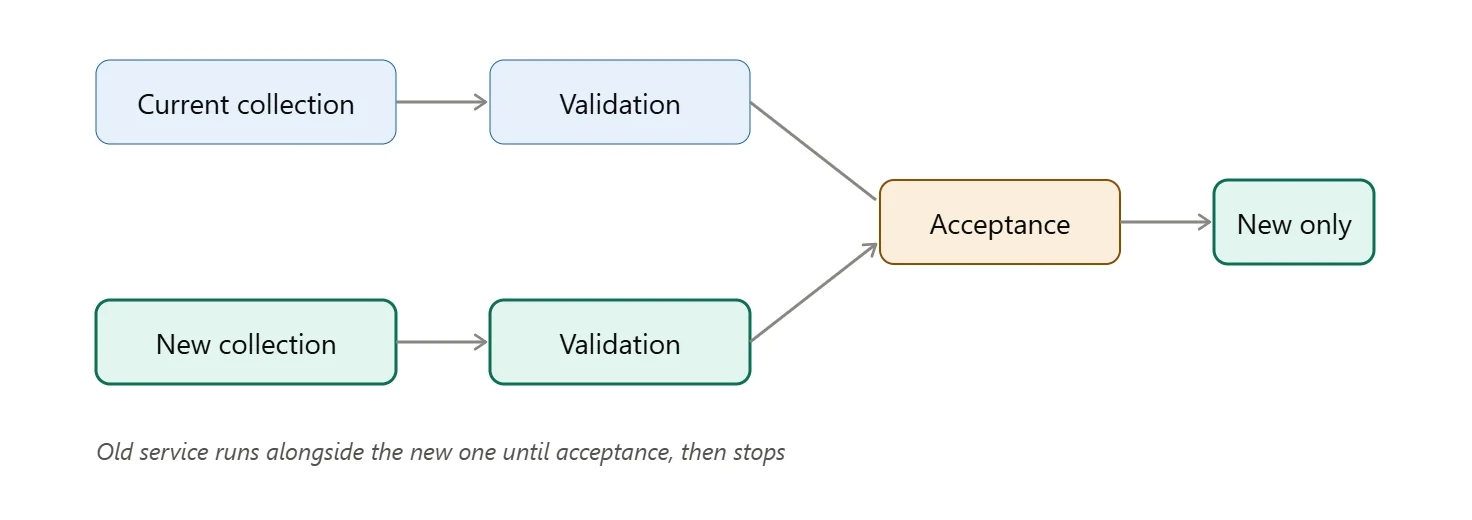
- Move the workload gradually: keep old settings for rollback, check for duplicate collection, disable old resources only after acceptance and a check of contractual obligations.
Prioritize regional availability, documentation depth, and SLA terms for enterprise use.
Migration is successful when: the required IP/location is confirmed, the correct page content is returned, the session remains stable, and usage is within expectations – tested with identical settings and repeated attempts, not one lucky request.
Choose Proxies to Connect → ProxyWing plans
Move to another scraping service
- Inventory current usage: Bright Data products, sources, volumes, schedules, formats, dependencies, the bill. Pick one workflow to pilot.
- Map the request logic: authentication, parameters, browser actions, pagination, sync/async, error behavior, rate limits. Check actual result delivery, not just whether an SDK or MCP integration is listed.
- Agree on the schema: field names/types, currency, timestamps, IDs, missing-value handling, source metadata. Test webhooks and exports in the pilot itself.
- Run old and new in parallel: separate test records from production, compare quality and total usage including retries.
- Move gradually, rollback conditions defined upfront: lost sources, incomplete data, delays, budget overruns. Confirm contract, support, data handling, and permitted sources first.
- After acceptance: update instructions and monitoring, finish remaining old-setup jobs, disable what’s unneeded while honoring obligations. Some Bright Data usage may need to stay if the alternative doesn’t cover a critical task.
There is no fixed timeline or guaranteed savings – it all depends on the complexity of your workflow.
Next action: shortlist 2-3 scraping candidates, test against your actual required sites, migrate whatever passes validation.
Article written by:

Full Stack AI Engineer
Full-stack engineer at Proxywing working across backend architecture, performance optimization, and AI-driven workflows. Node.js, React, cloud infrastructure, and RAG pipelines.
All articles by author (61)