Webshare Best Alternatives in 2026
22.10.2026 13 min
Best Proxies for OnlyFans in 2026

The OnlyFans algorithm uses location, along with other factors, to determine what content you see in your feed. This platform’s ranking algorithm is similar to most social media sites. By using a proxy, you can change your perceived location, allowing you to browse OnlyFans like someone in that new location.
Proxies also come in handy for users in countries like China, Iran, Kuwait, Pakistan, and Qatar, where access to this platform is banned. With a proxy, people in such countries can access OnlyFans with no restrictions. In today’s guide, we will explore the best OnlyFans proxy server providers to help you choose one that suits your needs and budget. Let’s jump right in!
Comparison Table: Best Proxies for OnlyFans Providers at a Glance
| Provider | Best For | Proxy Types | Starting Price | OnlyFans Success Rate |
|---|---|---|---|---|
| ProxyWing | Multi-account management & subscription testing | All four types | $0.87/IP per month | Up to 99.4% |
| CyberYozh | High-trust access & unblocking | All four types | $0.90/GB or IP | Up to 99.8% |
| Bright Data | Restricted-content metadata access at scale | All four types | $1.40/IP | Up to 99.95% |
| Oxylabs | Geo-fenced subscriber access testing | All four types | $2.25/IP | Up to 99.95% |
| Decodo | Small creator teams, multi-creator workflows | All four types | $0.035/IP | Up to 99.86% |
| IPRoyal | Individual creators & small account farms | All four types | $1.57/IP/month | Up to 99.4% |
| SOAX | Medium-scale creator account management | Residential, Mobile | $5.00/GB | Up to 99.95% |
| Webshare | Account testing only, not live use | Residential, Datacenter | $2.99/month | Up to 99.7% |
A proxy for OnlyFans is an intermediary IP between your device and the platform. When using a proxy, your traffic is routed through this remote IP address, making your connection more anonymous. OnlyFans proxies are used for managing multiple creator accounts, accessing geo-restricted content, and automating routine profile actions on this platform.
OnlyFans’s security systems can detect proxy usage through ASN lookups, browser/device fingerprinting, cookie and login-history matching, and behavioral patterns. Cheap or public proxies are the easiest to detect and not recommended for accessing this platform.
For premium OnlyFans proxies, the chances of detection vary based on the OnlyFans proxy you choose. Datacenter proxy servers are the easiest to detect and ISP proxies follow. Mobile and residential proxies are the hardest to flag since they rely on IPs assigned to real users.
As earlier highlighted, trust score and chances of detection vary by type. Providers like ProxyWing offer all four and the right pick depends on whether you’re managing a live profile or just testing. Let’s explore how the different types work in a little more detail.
Highest trust via carrier CGNAT. When you use a mobile proxy, your OnlyFans traffic is routed through a remote carrier IP address, which makes the connection seem like it is coming from a legitimate user.
These are best for warmup and automation since they have the highest trust scores. Dedicated mobile proxies hold the same IP for extended sessions, but are more expensive. Rotating IPs on the other hand are cheaper but also riskier for logins.
A residential proxy redirects your traffic through real ISP-issued home IPs, creating the best balance of trust and cost. They have relatively high trust scores while being slightly cheaper than mobile IPs.
Using sticky sessions matters since creator work needs continuity to avoid flags. This proxy type also typically has large IP pools and coverage, making them the best option for accessing content from a wide range of regions.
ISP proxies will route your connection through ISP-assigned IP addresses in a datacenter, enabling datacenter speed on a residential ASN. This type makes it easier to assign one stable IP per profile, which is best where login history and reputation need to be preserved. They are also cheaper than residential proxies.
Datacenter OnlyFans proxies will route your traffic through IPs in servers running in a mainstream datacenter. They are the cheapest and fastest, but also flagged quickly. Using this type is fine for testing and warmup, but never for logged-in creator profiles. Datacenter IPs are the least recommended if you need the highest success rate.
These are the key factors we used to create the list of the best providers we are about to share:

ProxyWing is the top pick for OnlyFans since it takes care of the fundamentals that most users care about. It combines every type with sticky sessions and deep geo-targeting at accessible pricing, well suited to multi-account management, warmup, and subscription tier testing.
Key Capabilities
Visit ProxyWing.com to start using ProxyWing proxies for OnlyFans.

CyberYozh is an all-in-one proxy and account-infrastructure platform built around unblocking and multi-accounting, with mobile OnlyFans proxies that pass carrier-level DPI filtering.
Key Capabilities

Bright Data offers the largest IP pool on the market with advanced geo-targeting and ASN filtering. It mainly targets large scale users that make use of its large IP pool and wide coverage.
Key Capabilities

Oxylabs is another proxy provider that targets large scale users. It offers premium residential and ISP proxies with high success rates and AI-driven anti-bot features.
Key Capabilities

Decodo is another popular residential network with competitive per-GB pricing and seamless anti-detect browser integration, making it a good option for OnlyFans users.
Key Capabilities

IPRoyal offers budget-friendly residential and mobile proxies with pay-as-you-go traffic that never expires. It is a great option for budget-sensitive users.
Key Capabilities

SOAX offers granular city and ASN targeting with flexible rotation intervals. It also has a relatively large IP pool size and wide coverage.
Key Capabilities

Webshare is one of the cheapest entry points with a free tier offered for datacenter proxies.
Key Capabilities
One dedicated IP per valuable profile. At most 2–3 low-value test profiles per IP.
| Setup | IPs Needed | Est. Monthly Cost (ISP proxy) |
|---|---|---|
| 10 creator accounts | 10 | ~$21.00 |
| 50 creator accounts | 50 | ~$100.00 |
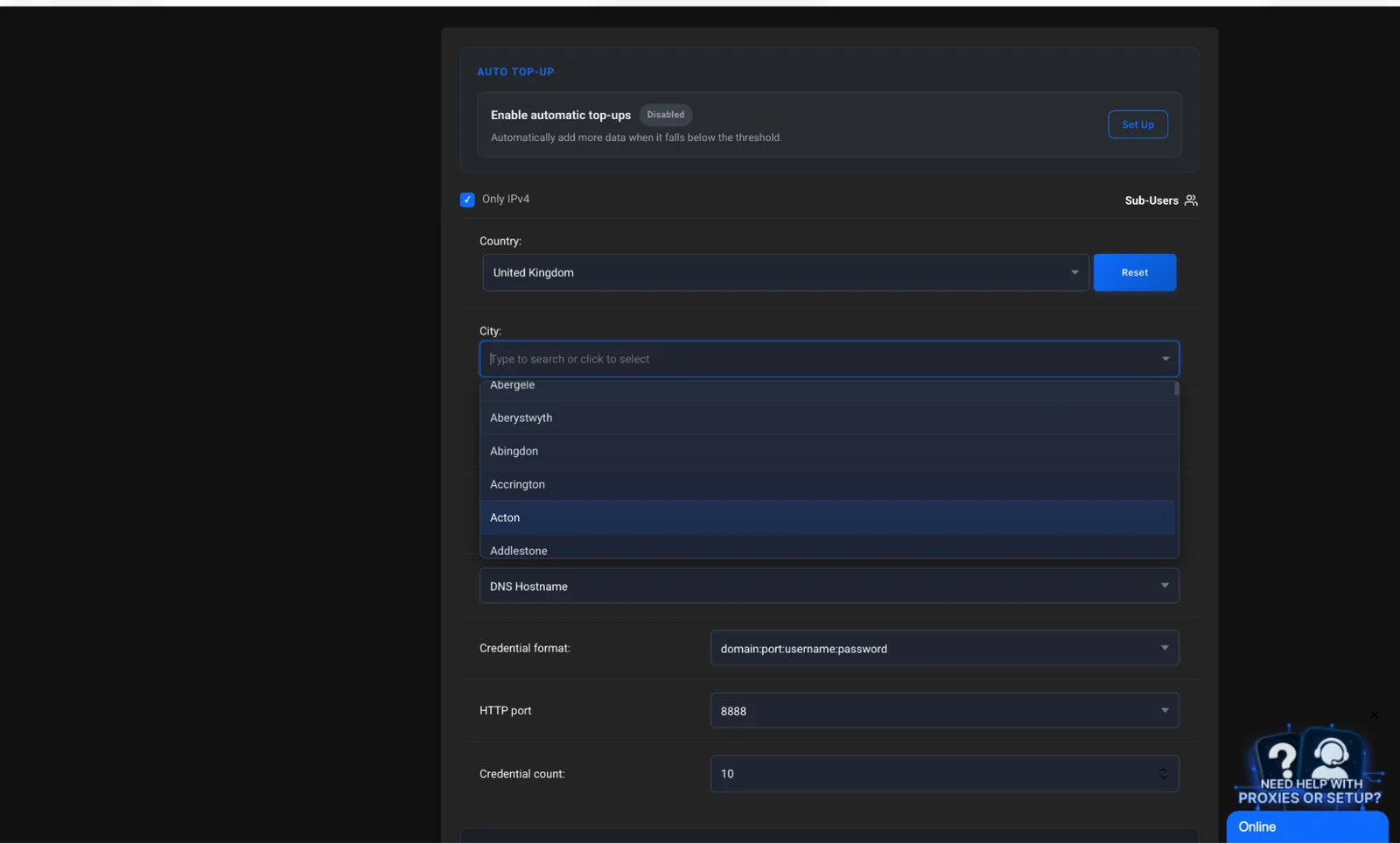
Once you have decided which provider to go with, create your profile, choose the proxy type based on the intended tasks, select a plan, and locate host/port/username/password in the dashboard. The screenshot below shows ProxyWing’s configuration screen on the dashboard that allows you to generate the proxy details using a country and city of your choice.
IP-whitelist skips credentials, but it requires using the same registered network IP address. The login/password authentication method works from anywhere and on any network.
Proxy hides your IP, antidetect browser hides your fingerprint, so you need both to create the perfect separation, especially if you intend to manage multiple profiles. Add credentials to a profile in Dolphin Anty, Multilogin, or GoLogin.
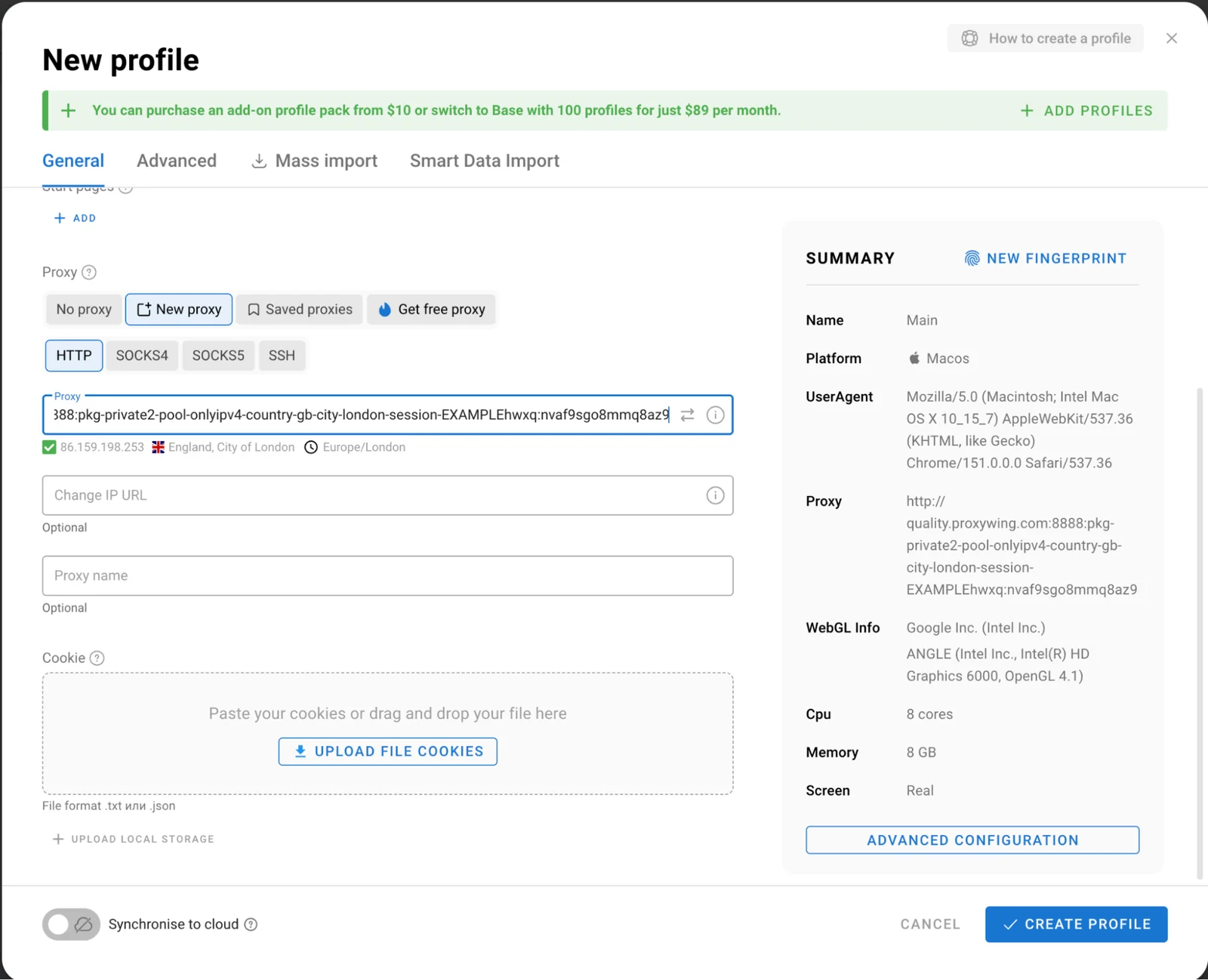
The screenshot above shows the interface of Dolphin Anty with proxy details acquired from ProxyWing. Other anti-detect browsers will typically have a similar setup.
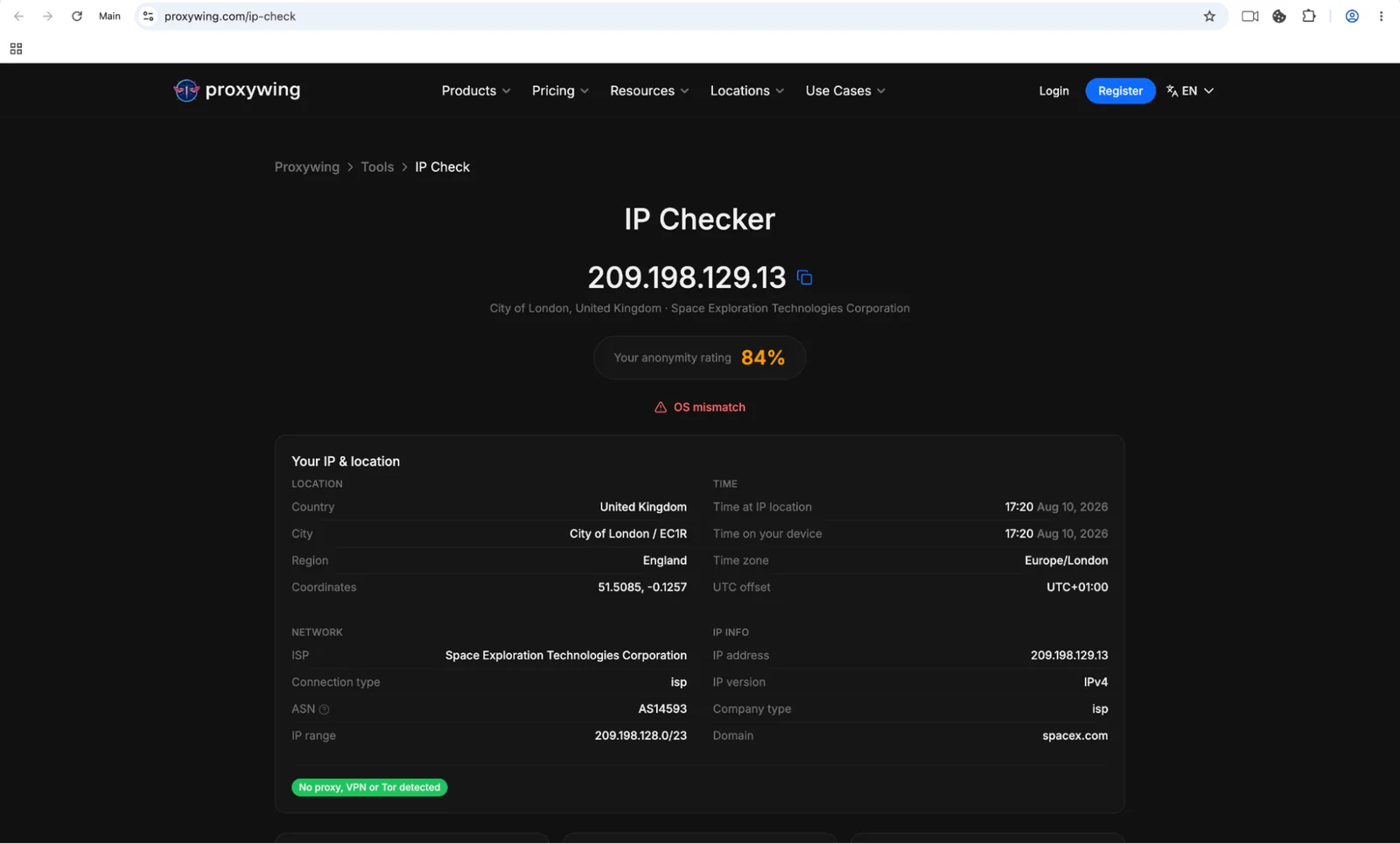
Check the IP on a lookup service, confirm the ASN reads residential/mobile, and confirm geography matches account history. It is common for some providers to label their datacenter IPs as residential.
Using an IP lookup tool like ProxyWing’s IP checker will allow you to view the details and source of the IP address assigned to your proxy server (as shown in the screenshot above).
Content creators are among the major beneficiaries of OnlyFans proxies as they enable several possibilities. The two main ones include:
One proxy per account, sticky sessions, gradual warmup. A 10-profile setup on dedicated ISP proxies runs roughly $21.00/month. That’s a reasonable budget when you consider the potential risk of managing multiple profiles using the same IP address.
Country-level IPs verify subscription content displays correctly per market. By using IP addresses for different regions, content creators are able to see how their content is displayed or accessible in different regions. Remember to pace your requests to avoid triggering flags.
Some of the common failure causes include overcrowded networks, already-blacklisted IPs, no session control, real interception risk. A banned account costs far more than a month of proper proxies, so keep that in mind.
These are some of the best practices you can follow to avoid detection and bans:
Residential and mobile ASNs earn higher trust than hosting ranges since they rely on IP addresses assigned to real users by local ISPs. A good result shows an ISP name, while a bad one shows a hosting company.
The platform matches WebGL, canvas, timezone, and fonts against IP location and login history. Antidetect browsers keep these signals consistent per account. To achieve proper account separation, you need to use proxies alongside anti-detect browsers by assigning each account a different profile and unique IP address.
Article written by:

Full Stack AI Engineer
Full-stack engineer at Proxywing working across backend architecture, performance optimization, and AI-driven workflows. Node.js, React, cloud infrastructure, and RAG pipelines.
All articles by author (62)ProxyWing offers the best balance, combining mobile, residential, ISP, and datacenter proxy solutions with sticky sessions and city-level targeting from $0.87/IP per month. It also has a large IP pool (70M+ IP addresses in 190+ countries) and reliable customer support accessible via multiple channels.
Not for anything valuable. Free or public IPs are typically shared, often blacklisted, and offer no session control. This makes them less effective for sensitive tasks like account management.
Yes, platforms detect them through ASN checks, fingerprinting, login-history matching, and behavioral analysis. However, the proxy type you choose significantly affects the possibility of detection: residential and mobile IPs have the highest trust scores.
One per valuable account, and at most 2–3 low-value accounts per IP. If you’re managing monetized accounts, we recommend assigning each account a unique IP address.
Yes, in most jurisdictions. What matters is following the platform’s own terms and rate limits to avoid having your accounts or IPs blocked.
Mobile carries the highest trust but costs more per GB. Residential is better for everyday use if you factor in both cost and trust. See our mobile vs residential proxies comparison for details.