
Proxy Authentication Methods Explained: Username/Password vs IP Whitelisting
06.10.2026 10 min
When getting into proxies, one of the common types you will often encounter or use is a TCP proxy. It operates on the network layer, allowing it to transmit both web and non-web traffic. The ability to handle different kinds of traffic enables these proxies to be utilized for a wide range of use cases, including gaming, data scraping, SEO monitoring, and more.
If you’re keen to learn more about TCP proxy servers, including how they work, their common use cases, configuration steps, benefits, and more, this guide is for you. By the end, you will have all the information you need to get started using these proxies. Let’s dive in!
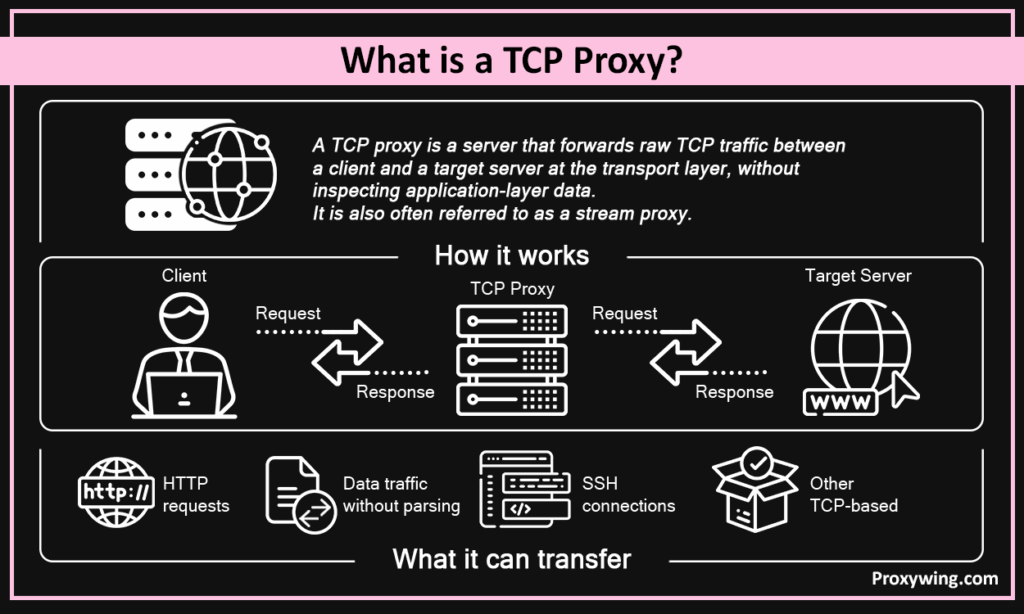
It is a server that forwards raw Transmission Control Protocol traffic between a client and a target server (such as websites and web applications) at the transport layer, without inspecting application-layer data. It is also often referred to as a stream proxy.
Simply put, it is a pass-through relay for TCP-based connections such as HTTP, database protocols, SSH, or anything else running over TCP. The support for all kinds of traffic is what makes these proxies very versatile and used for different kinds of applications in the real world.
An HTTP proxy operates at the application layers (Layer 7) — it parses HTTP requests, headers, and URLs, and can apply access controls based on them. It only supports web traffic. A proxy TCP on the other hand operates at the network layer (Layer 4) and only sees connections, byte streams, and port numbers. URL-based filtering and header manipulation are not possible at this layer, which can be a limitation for some use cases.
The key difference between the two is mainly the direction of the traffic. A forwarding TCP proxy handles outbound connections on behalf of clients. A reverse stream proxy on the other hand sits in front of servers and accepts incoming connections on their behalf.
Load balancing is the most common reverse proxy use case, enabling incoming connections to be distributed across backend replicas to maintain performance and reliability. For most everyday users, forwarding proxies are what you will likely use.
The IP address and port are the two most crucial components in traffic routing and networking in general. The proxy binds to a specific port, and that port maps to a configured target service. A single host can expose multiple services by binding to different TCP ports such as port 5432 to PostgreSQL, port 6379 to Redis, and so on.
The IP address is the server address — it is what devices and networks on the internet use to know where traffic should be forwarded when they receive it. One way to think about it is like a postal address: just as a letter needs a physical address to reach the right building, data packets need an IP address to reach the right device on the internet.
In pass-through mode, the proxy forwards the encrypted TLS stream without terminating it — end-to-end encryption stays intact. Alternatively, it can terminate TLS itself using its own certificate. SNI-based multiplexing lets a single routing server route multiple TLS services on one port without decrypting traffic.
When a routing server forwards a connection, the backend sees the proxy’s IP, not the client’s. The PROXY protocol fixes this by prepending a small ASCII header to the TCP stream containing the real client IP and port. HAProxy, Nginx, and Envoy all support it natively. Masking the client’s IP address makes its traffic more private and anonymous, which enables bypassing any location or IP-based restrictions.
Some of the common use cases include Exposing Databases and Internal Services Publicly. Databases like PostgreSQL, MySQL, Redis, and MongoDB use raw TCP binary protocols, which can’t be effectively handled by HTTP proxies. A TCP proxy provides controlled external access without exposing the database host directly.
A reverse proxy distributes incoming connections across backend replicas using round-robin or least-connections algorithms. HAProxy and Envoy are the common choices for this pattern. Load balancing ensures that servers receive traffic based on factors like their health and the current load they’re handling.
A forwarding stream proxy routes client traffic through an intermediate IP, which improves anonymity. This anonymity enables other useful applications like geo-targeting and scraping web pages that require IP masking to be more effective. ProxyWing offers residential and datacenter IPs for routing TCP traffic through clean IPs across 190+ countries. Our IP pool has over 70M IPs to choose from giving you more location flexibility.
Game servers, SSH bastions, and IoT brokers running MQTT or AMQP all run over TCP and benefit from a proxy layer for access control or IP masking. Masking the IP enables accessing geo-restricted games (or features) or sending SSH traffic to servers with certain geo-restrictions.
Nginx handles TCP traffic routing via the stream module (separate from the http block):
stream {
server {
listen 5432;
proxy_pass db.internal:5432;
}
}
HAProxy uses a frontend/backend block with mode tcp:
frontend tcp_front
bind *:5432
mode tcp
default_backend tcp_back
backend tcp_back
mode tcp
server db1 db.internal:5432
Envoy uses a listener with a TCP proxy filter in its YAML config:
listeners:
– address:
socket_address: { address: 0.0.0.0, port_value: 5432 }
filter_chains:
– filters:
– name: envoy.filters.network.tcp_proxy
typed_config:
cluster: db_cluster
All three are production-grade open-source options that you can choose from based on which one you find more convenient and relevant to your environment. Nginx is the simplest to set up, HAProxy is preferred for load balancing, and Envoy suits more complex service mesh environments.
One of the most important decisions that will affect your experience is the service provider you choose. For scraping and automation, ProxyWing offers 70M+ IPs for residential and datacenter proxies with clean IPs, enabling city-level targeting and reliable throughput across 190+ countries. Check out their TCP proxies.
The choice between these two depends on the kind of project you intend to handle:
ProxyWing supports both proxy types with residential and datacenter IPs across 190+ countries.
Article written by:

Product & Support Operations Lead
Built Proxywing's support department from scratch — documented workflows, clear escalations, consistent quality. Now bridges the CEO and engineering, keeping infrastructure projects on track.
All articles by author (68)Yes, it is typically faster. Stream proxy servers forward raw byte streams with no parsing overhead, resulting in lower latency than HTTP ones. This makes them the ideal choice for tasks like web scraping that require high bandwidth.
Yes, it does. In pass-through mode, TLS is forwarded end-to-end without termination. It can also terminate TLS itself if configured with a certificate.
Yes, it can. A reverse stream proxy distributes connections across backends using round-robin or least-connections. HAProxy and Envoy are common tools for this.
A VPN encrypts all device traffic system-wide and is mainly used when data privacy is the main goal. A stream proxy on the other hand forwards specific connections on a per-port basis with no system-wide encryption. Proxies are more granular and better suited for automation. A proxy also provides access to large IP pools, enabling more location flexibility.
Yes, you can but not directly. Web browsers by design use HTTP or SOCKS proxies. A stream proxy is typically used in backend infrastructure or automation tooling that handles raw TCP connections. When accessing the web, it might be working in the background, but your browser itself is always communicating through an HTTP or SOCKS layer.
Yes, they do. Pass-through mode forwards encrypted streams without terminating them. Termination mode decrypts at the proxy. SNI-based routing handles multiple TLS services on a single port, using multiple domain names to route incoming connections to the correct backend without decrypting the traffic itself.