
Best Proxies for OnlyFans in 2026
22.10.2026 12 min
If you’re reading this guide, there’s a high chance you’ve encountered the infamous 403 error or a CAPTCHA wall when trying to scrape data from your targets. DataDome is one of the popular solutions that most websites and web apps use to block bots and other forms of malicious traffic.
Bypassing DataDome and similar platforms like Cloudflare isn’t straightforward. These systems rely on multiple signals to determine what traffic gets through to the targets they protect, so getting past them takes just as much effort. You’ll need to implement up to four layers of solutions to bypass DataDome successfully.
In this guide, we walk through the tried and tested methods you can use to get past DataDome blocks. Let’s get into it.
DataDome is a bot management and online fraud protection platform that sits in front of websites, web apps, mobile apps, and APIs. It acts as a server-side module, CDN worker, or reverse-proxy that protects web resources from malicious traffic. It works by scoring every request with machine learning models and returns one of three outcomes: pass, challenge, or block.
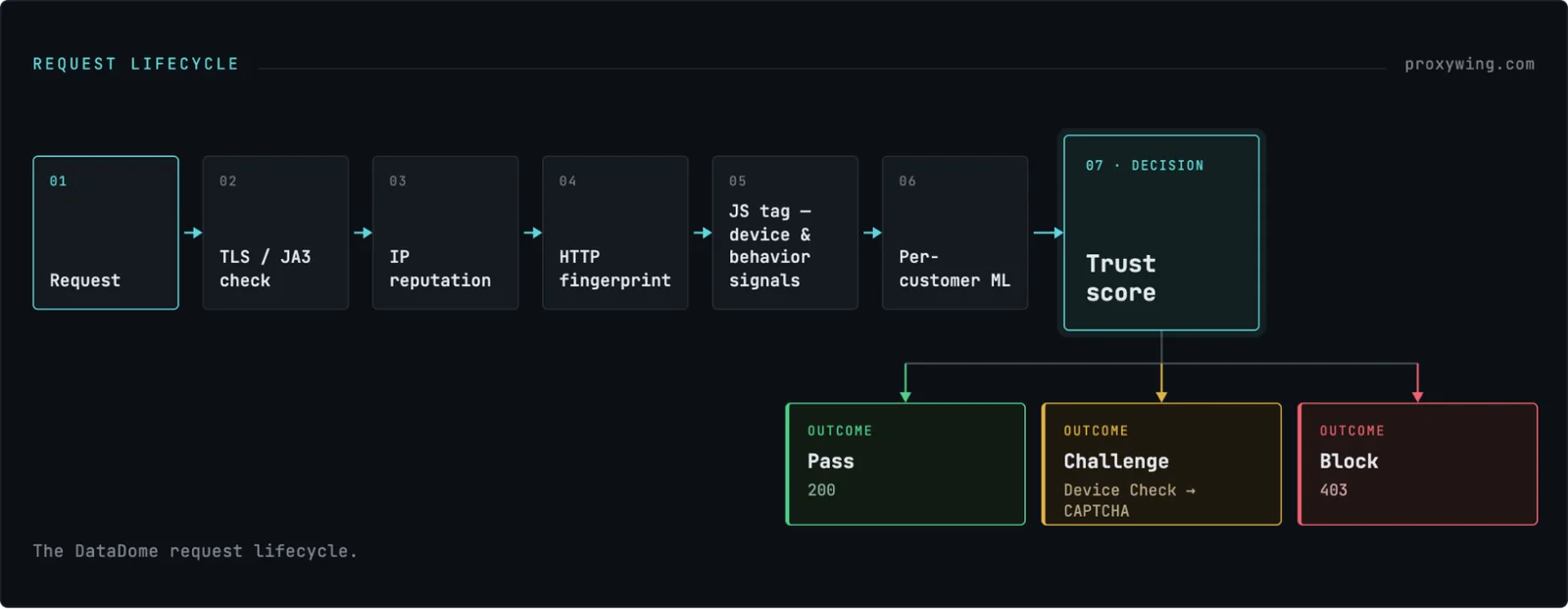
Unlike web application firewalls that primarily match requests using static rules, DataDome asks whether the client behaves like a real browser driven by a real person. That makes it a more complex system to bypass.
DataDome company fact box
| Field | Details |
|---|---|
| Founded | 2015 (in Paris) |
| Founders | Benjamin Fabre (CEO), Fabien Grenier (Chairman) |
| Headquarters | New York, Paris, and Singapore |
| Ownership | Private, venture-backed, not acquired |
| Funding | $35M Series B (May 2021), $42M Series C (March 2023, led by InfraVia Growth with Elephant and ISAI), ~$81–82M total raised |
| Core products | Bot Protect, Account Protect, Ad Protect, Page Protect, Device Check |
| Scale (vendor-reported) | 5+ trillion signals analyzed daily, decisions in under 2 milliseconds |
| Recognition | Leader, Forrester Wave™: Bot and Agent Trust Management Software, Q2 2026 |
DataDome is independently owned and has not been acquired. The platform’s co-founder Benjamin Fabre still serves as CEO and InfraVia Growth, Elephant, and ISAI are among its largest investors. To clear up a common confusion: it is not owned by Akamai, Cloudflare, or HUMAN. Those are actually competitors and not brands that own it.
Ticketing, sneaker and limited-drop retail, classifieds, travel fare pages, real estate listings, and e-commerce with volatile pricing are some of the common websites protected by DataDome. If you confirm that the site you’re targeting is also protected by DataDome, this guide will help you learn how to bypass it.
DataDome offers several plans: Essentials from $3,830/month, Advanced from $8,670/month, Premium from $10,160/month, and Enterprise starting at $13,270/month. The final cost will vary based on volume. An AWS Marketplace listing for DataDome is also available. Users can choose from any of these plans based on the level protection they need and the scale of their web resources.
On websites that use DataDome, every request gets scored before it’s allowed through. DataDome checks the connection type, IP, headers, and (if JavaScript runs) the user’s device and behavior. It then feeds this data into a trust model trained on that specific site’s traffic, and decides in milliseconds whether to let the user through, challenge, or block them.
| Layer | What’s checked | Bot tell | How to pass |
|---|---|---|---|
| IP | IP type, history, location match | Datacenter IP, one IP across many sessions | Sticky residential/mobile IP |
| TLS | Handshake fingerprint | Fingerprint no real browser has | Browser-mimicking TLS tool |
| Headers | Order, casing, content | Alphabetized or mismatched headers | Browser-accurate headers |
| Browser (JS) | Canvas, fonts, browser properties | navigator.webdriver, fake renderer | Hardened browser |
| Behavior | Mouse, scroll, typing, pacing | Instant clicks, no scroll, rapid-fire requests | Human-like pacing |
| Session | Cookie/IP/fingerprint consistency | Same cookie, different IP | Keep identity consistent |
DataDome tracks IP history across all the websites it protects. That means a “residential” IP address that’s been overused elsewhere can score worse than a clean datacenter one. Mismatched signals hurt too. For example, a Texas IP set to Russian language and a Moscow timezone is an instant red flag and can easily get blocked.
Clean, well-managed IPs matter more than the label, which is why testing ProxyWing’s residential and mobile pools against your own target is worth the effort.
Every connection leaves a fingerprint before any data is even sent, and standard Python HTTP libraries produce one that no real browser has. It gets checked before your IP or User-Agent even matters. This simply means changing your User-Agent alone won’t help: you’d be claiming to be Chrome while your connection says otherwise.
The code below compares the TLS fingerprint of a plain Python requests call against a curl_cffi call impersonating Chrome.
import requests
from curl_cffi import requests as cffi
CHECKER = "https://tls.peet.ws/api/all"
plain = requests.get(CHECKER).json()
print("requests JA3:", plain["tls"]["ja3_hash"])
# e.g. cd08e31494f9531f560d64c695473da9 -- a hash no browser emits
spoofed = cffi.get(CHECKER, impersonate="chrome131").json()
print("curl_cffi JA3:", spoofed["tls"]["ja3_hash"])
# matches a genuine Chrome 131 handshakeDataDome loads a small script on the page that collects device signals and sends them back to verify the visitor. It doesn’t just read values like navigator.webdriver, it also checks whether those values have been faked, since a patched browser leaves telltale signs a real one never would. Traffic is blocked if any inconsistencies are detected.
DataDome also tracks how you move through a site (mouse movement, scrolling, typing rhythm, and timing) across your whole session, not just one request. Adding random delays doesn’t fool it, since real human pauses aren’t random in the way a script’s are.
Each protected site trains its own model on its own traffic, so there’s no single system to beat. It is common to find out that a setup that works on one site gets blocked on another within the hour. That is why general principles carry over between targets but exact configurations don’t. You need to optimize the solution differently for different targets.
Device Check is an invisible version of the CAPTCHA that is designed to verify your device in the background with no puzzle to solve. That’s why scrapers can hit 403s or silent stalls without ever seeing a challenge screen, and it works on mobile apps too, not just browsers. This layer of protection adds another challenge when trying to bypass DataDome.
Do these three quick checks:
The screenshot below confirms DataDome is active on the page: `tags.js` loads in the Network tab, and the `datadome` cookie is set and visible in Storage.
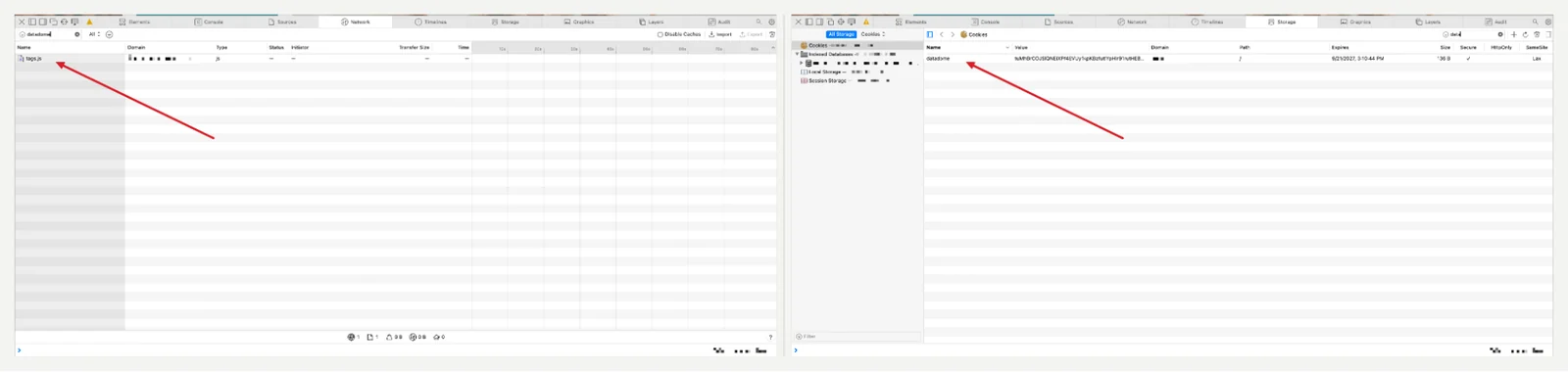
There are three outcomes to watch for:
It’s DataDome’s own slider puzzle, not a standard reCAPTCHA or hCaptcha. You may pay a solving service or attempt it with human-like mouse movement, but neither fixes the real issue. Remember, a well-trusted session is never shown a CAPTCHA in the first place. If you’re hitting it often, the fix is your IP and fingerprint setup, and not using a better solver. Fix those basics first.
There’s no single trick to bypass DataDome since it scores every layer. Fixing just one (like your IP) while leaving another broken won’t resolve the issue. Work through the layers below in order, testing after each fix, since earlier layers are cheaper to fix than later ones.
Don’t rotate your IP on every request. The datadome cookie is tied to the IP that earned it, so swapping mid-session breaks things. Instead, keep one IP for the whole session. If you’re to rotate, ensure to rotate everything together (IP, fingerprint, and cookie) as a full identity change.
Proxy types against DataDome
Here is how the different proxy types compare when used to bypass DataDome
| Proxy type | How it tends to score | Best for | Starting price |
|---|---|---|---|
| Datacenter | Lowest trust, easy to spot as a shared, non-residential IP | Low-value or unprotected pages, quick checks | $0.87 |
| ISP (static residential) | Looks residential but stable, good until the IP gets flagged | Long sessions needing one stable identity | $1.71 |
| Rotating residential | Solid default, but only as good as the pool’s cleanliness | Most DataDome-protected targets | $1.00 |
| Mobile (4G/5G) | Highest trust: shared by many real users, costly for sites to block | Toughest targets, account-based tasks | $4.00 |
ProxyWing runs residential and mobile pools (the two categories that matter most here) across 190+ countries.
Use a tool like curl_cffi that mimics a real browser’s connection. Just make sure the version you claim (like Chrome 131) matches the version it’s actually mimicking. The script below sends a request through a proxy while mimicking a real Chrome browser’s TLS fingerprint, then checks whether the response was blocked with a CAPTCHA challenge.
from curl_cffi import requests
UA = ("Mozilla/5.0 (Windows NT 10.0; Win64; x64) AppleWebKit/537.36 "
      "(KHTML, like Gecko) Chrome/131.0.0.0 Safari/537.36")
proxies = {"https": "http://USER:PASS@proxy.proxywing.com:PORT"}
r = requests.get(
    "https://target.example.com/listing",
    impersonate="chrome131",        # must match the UA version above
    headers={"User-Agent": UA},
    proxies=proxies,
    timeout=30,
)
print(r.status_code)
if "captcha-delivery" in r.text:
    print("Challenged -- this endpoint needs a JS-issued cookie.")
Note: This approach works for pages that don’t load the JavaScript tag. Pages that require a valid datadome cookie need a real browser too.
Standard Playwright and Puppeteer get caught easily since they leave automation traces, report a fake graphics renderer, and have a thin font list compared to a real computer. Stealth plugins can patch some of this, but they still fall behind as DataDome updates, so they tend to stop working after a few weeks.
Tooling against DataDome
| Tool | What it is | TLS | JS fingerprint | Effort | Note |
|---|---|---|---|---|---|
| requests / httpx | Basic HTTP client | Fails | — | Minimal | Blocked instantly on protected sites |
| curl_cffi | HTTP client, mimics browser TLS | Good | — | Low | Fine if no JS tag is served |
| Playwright / Puppeteer (plain) | Real browser | Good | Fails | Low | Automation traces give it away |
| Stealth plugins | Browser + patches | Good | Partial | Medium | Falls behind as DataDome updates |
| SeleniumBase (UC/CDP) | Browser | Good | Good | Medium | Solid, actively maintained pick |
| nodriver | Browser, no CDP traces | Good | Good | Medium | Modern successor to undetected-chromedriver |
| Camoufox | Modified Firefox | Good | Strongest | Higher | Hardest to detect, heaviest to run |
| Managed scraping API | Outsourced service | Handled | Handled | Lowest | Costs per request, less control |
The script below launches a hardened Chrome instance through a proxy, warms up the session on the homepage before hitting the target page, and checks whether the response came back clean or challenged.
import asyncio
import nodriver as uc
PROXY = "proxy.proxywing.com:PORT"   # unauthenticated proxy, or IP-whitelisted
async def main():
    browser = await uc.start(
        browser_args=[f"--proxy-server=http://{PROXY}"],
        headless=False,               # headful avoids the SwiftShader tell
    )
    try:
        page = await browser.get("https://target.example.com/")
        await page.sleep(3)           # let tags.js run and issue the cookie
        await page.scroll_down(250)
        await page.sleep(2)
        page = await browser.get("https://target.example.com/listing")
        html = await page.get_content()
        print("blocked" if "captcha-delivery" in html else "ok", len(html))
    except Exception as e:
        print("session failed:", e)
    finally:
        browser.stop()
uc.loop().run_until_complete(main()) # nodriver docs recommend this over asyncio.runWhen accessing your target, visit the homepage first, let the tag load and set the cookie, scroll around, then head to your target page with natural pauses. Remember to keep your IP, fingerprint, and cookie together as one identity throughout the session.
DataDome updates constantly, so your setup should not be created once and not updated. At low volume, a managed API is usually cheaper than your time, while at high volume running your own stack wins. Choosing between the two depends on your targets and costs.
Services like ScrapFly, ScrapingBee, ScraperAPI, Zyte, Bright Data, and Oxylabs handle all the technical layers for you. Test them against your real target during a trial because advertised success rates are usually higher than what you’ll see in practice. When choosing a provider, look at billing per successful request, JS rendering support, geo-targeting, and how generous the trial is.
ProxyWing works a level below these, as proxy infrastructure rather than a full API. Many teams pair their own browser setup with our proxies to save on cost and stay in control.
| Symptom | Likely cause | Fix |
|---|---|---|
| 403 with a captcha-delivery.com link | Trust score bottomed out, a hard block | Rotate the full identity (IP, fingerprint, cookie), not just the IP |
| CAPTCHA reappears right after solving | Cookie doesn’t match the IP/fingerprint using it | Keep the same IP for the whole session and never move a cookie between IPs |
| Works locally, fails in Docker/VPS | No GPU (fake renderer) or missing fonts | Use GPU-backed or headful mode and install real fonts |
| Passes for a while, then blocks everything | Behavior pattern caught up with you | Slow down, add real navigation, rotate identity periodically |
| Pages load but API calls return 403 | Endpoint needs a cookie from the JS tag | Get the cookie via a browser first, then reuse it in the same session |
| Worked last month, fails now | DataDome updated or retrained | Re-check your fingerprint setup — expect regular upkeep |
| Works on one site, blocked on another | Each site has its own model | Tune per target, since nothing generalizes automatically |
Besides DataDome, several other platforms, including Cloudflare, Akamai, and HUMAN are used to protect web resources. PerimeterX became HUMAN Security after the 2022 merger, though a lot of search traffic still uses the old name.
It is also common for some websites to run several systems at once. For instance they can use Cloudflare as CDN with DataDome layered on top is common. The table below shows how these different systems compare:
| DataDome | Cloudflare | Akamai | HUMAN (ex-PerimeterX) | |
|---|---|---|---|---|
| Where it runs | Any CDN or server and not tied to one platform | Only within Cloudflare | Only within Akamai’s CDN | Edge module or CDN integration |
| Challenge type | Own slider puzzle + invisible Device Check | Turnstile | Sensor-based, usually invisible | Press-and-hold |
| Tell-tale cookies | datadome, tags.js, captcha-delivery.com | cf_clearance, __cf_bm | _abck, bm_sz, sensor_data | _px family |
| How it learns | Trained per customer | Mostly network-wide | Network-wide, tuned per customer | Network-wide |
| Difficulty to get past | High | Medium-high | Very high | High |
It depends. Scraping publicly available data has been treated relatively permissively by several countries’ laws, including the US. Breaching Terms of Service of your target is a contractual matter, not a criminal one, exposing you to a breach claim or account termination.
Bypassing any form of protection alongside other conduct, including bypassing authentication, accessing non-public data, handling personal data, or generating load heavy enough to degrade a service is a different case entirely.
To be clear, this guide does not encourage credential stuffing, scalping, paywall bypassing, harvesting personal data, or any request volume amounting to a denial of service. This is general information, not legal advice. Jurisdictions differ and case law continues to move. Consult a lawyer about your specific use case before proceeding if it feels necessary.
Bypassing DataDome is a stack, not a trick, despite what some guides claim. All four layers have to line up together and fixing three still gets you the same 403 as fixing none. Because models are trained per customer, results are local to each site. Test per target and expect the numbers to shift from one to the next.
And don’t stop at the initial setup. DataDome’s tags update and models retrain, so budget for ongoing maintenance from day one.
Article written by:

CEO
Founder of Proxywing. Drives growth across EU, US, and Asian markets, combining B2B strategy with a hands-on focus on product quality, 99% uptime, and responsive support.
All articles by author (65)Yes, it can, but not permanently and not universally. Working setups exist, but DataDome ships tag updates and retrains models continuously, requiring a few changes to the procedure.
Not necessarily. DataDome allowlists verified good bots including Googlebot. These are validated by reverse DNS rather than User-Agent. That’s why spoofing Googlebot’s User-Agent fails that check immediately.
Not really. A residential IP improves one of four scored layers. Use it alongside a browser-matching TLS fingerprint, a hardened browser, and human-like behavior. Without those, your fingerprint still gives you away.
It’s the session token issued after the JavaScript tag reports device signals, bound to the IP and fingerprint that earned it. Presenting it from a different IP triggers an immediate block.
Plain Selenium will get blocked easily. Use SeleniumBase’s UC mode instead, which patches the calls that give Selenium away and stays updated.
Instantly. The decision happens on your first request, in under two milliseconds. A bad fingerprint gets blocked before your scraper even reads the response.
Yes. AI and LLM agents are their own detection category, and it’s one of DataDome’s fastest-growing areas of focus as some sites don’t want these crawlers to access their resources.
No it can’t. Google shut down cached links in 2024, and even when it worked, the data was stale, not live.
No, it’s not. DataDome is a bot management platform. CAPTCHA on the other hand is just one possible response. Most blocks happen silently, with no challenge at all.
It offers several plans: Essentials from $3,830/month, up to Enterprise from $13,270/month. The final cost varies by traffic volume. It’s also available through AWS Marketplace.