Best Proxies for School Chromebooks in 2026
31.10.2026 12 min
LinkedIn is the default platform that most professionals and entrepreneurs use to connect with potential employers/employees or clients. However, for people in restrictive countries such as China, Iran, Russia, Syria, and Cuba, accessing LinkedIn requires using tools like proxies since the platform is blocked by their ISPs. Using a LinkedIn proxy allows you to use an IP address from any country, enabling you to access this platform even in regions where it is restricted.
For the best experience, we recommend using premium proxy providers that offer clean IP pools and other capabilities that enhance the browsing experience. Today, we will explore the best proxies for LinkedIn, including their key capabilities, pricing, and more. For anyone that needs to browse LinkedIn without regional limitations, this guide is for you. Let’s start with a comparison summary of the best linkedin proxy providers.
| Provider | Proxy Types | IP Pool | Pricing (from) | Free Trial | Best For |
| ProxyWing | Residential, ISP, Datacenter | 70M+ | $0.90/month | No | Multi-accounting & Linkedin automations |
| Bright Data | Residential, ISP, Mobile, DC | 400M+ | $0.90/IP | Yes | Enterprise scraping & LinkedIn API |
| SOAX | Residential, Mobile, ISP, DC | 191M+ | $0.32/GB | Yes | Market research & geo-targeting |
| IPRoyal | Residential, ISP, Mobile, DC | 32M+ | $1.39/GB | No | Multi-accounting & warm-up |
| Webshare | Residential, Static Residential, DC | 80M+ | $2.99/month | Free tier (10 proxies) | Market research & geo-targeting |
| NetNut | Residential, Mobile, ISP | 85M+ | $99/month | 7-day free trial | Enterprise LinkedIn scraping |
| Rayobyte | Residential, ISP, DC | 40M+ | $0.45/GB | Yes | Multi-accounting & warm-up |
| NodeMaven | Residential, Mobile, ISP | 30M+ | $2.20/GB | Yes | IP cleanliness & long sticky sessions |
It is an intermediary server that routes your traffic through a remote IP address before forwarding it to LinkedIn. A LinkedIn proxy replaces your real IP with the proxy’s, so LinkedIn sees the proxy address instead of yours. This lets you manage multiple accounts, bypass rate limits, and access geo-restricted content and features. Without clean LinkedIn proxies, any multi-account or automation workflow will hit restrictions quickly.
Like most social media platforms, LinkedIn prohibits users from having multiple accounts. So, using the same IP address to manage multiple accounts can lead to account bans if detected. Using LinkedIn proxies allows you to assign each LinkedIn account a unique IP address. However, datacenter IPs are flagged on sight since LinkedIn fingerprints known hosting ASNs.
Rate-limit violations during scraping (too many profile views or connection requests in a short window) compound the risk further. The most effective way to scrap data from LinkedIn or manage multiple accounts is by using residential or mobile proxies. These use IPs assigned by ISPs, which makes your traffic look more legitimate.
The provider you choose for LinkedIn proxies will have a significant impact on your overall experience. In this guide, LinkedIn proxy service providers were ranked on IP quality, pool size, LinkedIn success rate, sticky session support, and pricing. These are the 8 best Linkedin proxy providers in 2026.
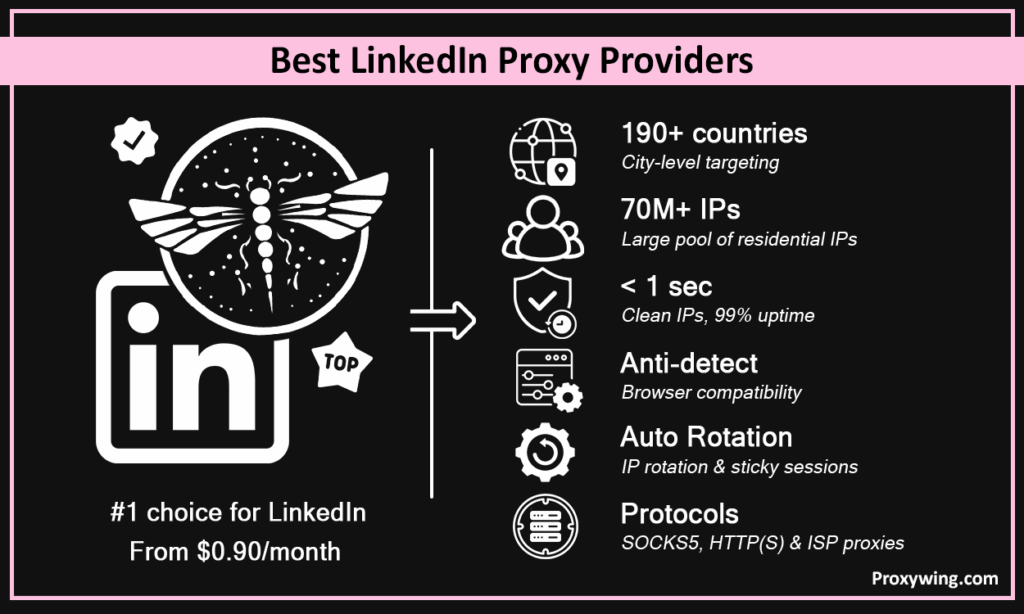
ProxyWing is our top pick since it covers all the key features users care about when using proxies. It offers residential, ISP, mobile, and datacenter proxies with a 70M+ IP pool, city-level targeting across 190+ countries, and sticky session support, which helps users have more flexibility.
Clean IPs, sub-1s latency, 99% uptime and anti-detect browser compatibility make it the top pick for LinkedIn proxies from $0.90/month. Other key features it offers include automated IP rotation, SOCKS5 and HTTP/S protocol support, and unlimited ISP bandwidth. ProxyWing proxies also seamlessly integrated with most scraping tools
Ideal For: Multi-account management, outreach automation, lead scraping
Pricing: From $0.90/month
Bright Data is the provider with the largest IP pool. It offers over 400M IPs across residential, ISP, mobile and datacenter proxies in more than 195 countries with ZIP and ASN-level targeting. This provider also has a dedicated LinkedIn Scraper API, making it the strongest option for enterprise-scale data extraction.
Other key features include ZIP/ASN targeting and HTTP/S and SOCKS5 protocol support. Users needing reliable IPs for enterprise-level workflows, Bright data is one of the best options.
Ideal For: Enterprise LinkedIn scraping, large-scale lead generation
Pricing: From $0.9/IP
SOAX is another top rated provider that has been in the proxy business since 2019. It offers 191M+ IPs across 195+ countries with a 99.95% success rate and 0.55s response time. Other key features include residential, mobile, ISP, datacenter proxy types that offer support for HTTP(S), SOCKS5, UDP, and QUIC protocols. Its LinkedIn proxies also seamlessly integrate with most scraping solutions.
Ideal For: Market research, geo-targeted outreach
Pricing: From $0.32/GB
IPRoyal is known for offering proxies on a budget, making it the ideal choice for users on a budget and small businesses. It has an IP pool of 32M IPs across mobile, residential, datacenter, and ISP proxies in 195+ countries worldwide. Its other key features include country/state/city targeting, sticky and rotating IPs, and non-expiring traffic.
Ideal For: Multi-accounting, account warm-up
Pricing: From $1.39/GB residential; $5.50/IP static
80M+ IPs across rotating residential, static residential, and datacenter types in 195+ countries worldwide. The permanently free 10-proxy tier makes it the lowest-friction entry point on the list. Its other main capabilities include 99.7% Success rate, Rotating + static residential + DC, and support for a wide range of browser extensions.
Ideal For: Budget LinkedIn tasks, developer testing
Pricing: From $3.50/GB residential; $2.99/month datacenter
It is another great option for small businesses and individual users. NetNut offers 85M+ IPs across residential, mobile, and datacenter types in 195+ countries. It guarantees 99.99% uptime and 99.99% success rate, making it one of the most reliable providers on this list. Its other key capabilities include a dedicated LinkedIn scraping API that handles rate limits automatically, and 7-day free trial available.
Ideal For: Enterprise LinkedIn scraping, high-volume extraction
Pricing: From $99/month
It has been in business for 10+ years and has gradually expanded its coverage over time. It currently offers 40M+ ethically sourced residential IPs plus 400K static ISP proxies, with a Web Unblock feature for CAPTCHA handling. Its other key capabilities include being EWDCI certified, Web Unblock tools, and support HTTP/S and SOCKS5 protocols.
Good Option For: Versatile LinkedIn workflows, CAPTCHA-heavy scraping
Pricing: From $0.45/GB
It may not have the largest IP pool, but NodeMaven has built a reputation for offering reliable IPs. It currently offers 30M+ residential and mobile IPs with a real-time quality filter keeping 95%+ of IPs clean. Its other key features include sticky sessions up to 7 days, traffic rollover, and 99.4% business success rate.
Ideal For: IP-cleanliness-first workflows and long-session LinkedIn account management
Pricing: From $2.20/GB
Residential and mobile proxies are the only safe choices for LinkedIn account work. ISP proxies are a solid middle ground for warm-up at scale. Datacenter proxy servers should be avoided for anything involving a login.
Residential proxies route your traffic through real ISP-assigned household IPs. These residential IPs have a high trust score, which makes them ideal for multi-accounting and account warm-up. Use rotating residential proxies for data scraping and sticky residential proxies for LinkedIn account management where session continuity matters.
Mobile proxies redirects your traffic through mobile networks with 4G/5G carrier IPs shared across many real users. Since mobile IPs are assigned to several users on the network, they are the hardest type for LinkedIn to flag as this could lead to blocking real users from accessing this social media platform. Mobile proxy services are best for high-value social media accounts where restrictions can’t be risked. However, they are the most expensive among all the types that most providers offer.
ISP proxies route traffic through servers with ISP-assigned IPs, offering datacenter speeds with a residential ASN. They are ideal for account management, allowing users to assign each LinkedIn account a stable dedicated IP that looks like a real home connection over months. ISP proxy services can also be used for tasks that require maintaining the same IP address for a sustained period.
Datacenter proxies route your traffic through servers in datacenters with shared or dedicated IPs sourced from hosting companies and cloud providers like AWS and Microsoft Azure. These proxies are typically fast and cheap but LinkedIn flags datacenter ASNs aggressively. Acceptable only for anonymous browsing of public pages and accessing less strict targets. We don’t recommend them for account management or anything requiring a login since they are very easy to detect and block.
Larger pools mean less IP repetition and cleaner history per IP, which significantly reduces the chances of experiencing IP bans and rate limits. Geo coverage must match where your target LinkedIn accounts or audiences are located and city-level targeting is the minimum for established accounts. Providers that cover more regions give you more flexibility.
LinkedIn expects the same IP across a session and random changes can lead to security triggers like MFA. Providers offering 1h, 12h, 24h, or multi-day sticky sessions are essential for uninterrupted LinkedIn access. Providers capping sessions at a few minutes are unsuitable for account work regardless of IP quality.
Use free trials or small pay as you go plans to validate IP quality against your actual LinkedIn workflow. Most providers offer free trials that you can utilize to test the reliability of their IPs before committing. Generic IP tests are not enough. We recommend testing on LinkedIn itself before scaling.
After signing up, locate your credentials in the provider dashboard and copy the host, port, username, and password. Below is a sample of how these details should look like.
host: residential.proxywing.com
port: 8080
username: user123
password: pass456
Some providers also support IP whitelisting as an alternative to username/password authentication. With IP whitelisting, you are required to input the IP address of the device or network that will be used to connect to the dedicated proxy service.
Native browser: For most browsers, proxy configuration is done through the system settings. Enter host, port, and credentials in network/proxy settings. Fine for basic tasks but offers no fingerprint isolation.
Anti-detect browser (recommended for multi-accounting): Tools like Multilogin, AdsPower, or Dolphin Anty assign a unique proxy, fingerprint, and timezone per profile, which is essential for running multiple LinkedIn profiles without cross-contamination. To get started, enter your proxy credentials in the network/routing settings of your preferred anti-detect browser.
Verify the Proxy Works Before Logging In: Visit an IP-check site proxywing.com/ip-check to confirm the new IP is showing, then check it against a blocklist tool (Scamalytics or MXToolbox). Only log into LinkedIn after both checks pass.
A proxy hides your IP, but LinkedIn also checks canvas fingerprint, WebGL, timezone, and fonts. An anti-detect browser spoofs all of these per profile. Both layers are needed; a good quality IP alone is not enough.
First week: complete the profile, browse the feed, view a few profiles. Week two: 5–10 connection requests per day. Scale gradually to full outreach over 2–3 weeks. LinkedIn rewards consistent, human-like behavior.
If an account has always logged in from New York, the LinkedIn proxy must also be New York. A sudden geo jump is one of the top ban triggers. City-level targeting should be non-negotiable for established accounts.
Article written by:

CEO
Founder of Proxywing. Drives growth across EU, US, and Asian markets, combining B2B strategy with a hands-on focus on product quality, 99% uptime, and responsive support.
All articles by author (66)Sticky residential proxy services are the safest choice since they rely on real user IPs. ProxyWing is the top all-around option with clean residential IPs, city-level targeting, and sticky sessions from as low as $1/GB for the residential IPs.
Yes. LinkedIn fingerprints datacenter ASNs and flags bot-like request patterns. Residential and mobile proxies are significantly harder to detect when compared to datacenter proxies. Pairing with an anti-detect browser reduces risk even further.
One dedicated IP per account. Sharing a proxy across accounts means one flagged IP exposes all of them. Use sticky residential or ISP proxies with a fixed IP per account.
Using proxies isn’t inherently illegal, but running multiple profiles and automated scraping violates LinkedIn’s User Agreement. Commercial scrapping of personal data may also interact with GDPR and CCPA depending on jurisdiction.
Rotating proxies assign a new IP per request, which makes them good for public scraping. Sticky proxies hold the same IP for hours or days, which is essential for account management where LinkedIn expects session consistency.
No. Free LinkedIn proxies are shared, commonly flagged by LinkedIn, and lack session consistency that is required to have uninterrupted sessions. Even for basic browsing, the risk isn’t worth it. A low-cost paid plan is always the better option.