
Best Proxies for OnlyFans in 2026
22.10.2026 12 min
One of the most effective ways to improve the efficiency of programs is through Python cache. If a developer implements cache, Python stores the results of expensive operations so they don’t need to be recomputed every time they’re needed. This helps reduce the compute time and stress on system resources, resulting in overall better Python program performances.
For programmers, Python caching is a good practice that needs to be adopted, especially when creating resource-intensive Python programs. In today’s guide, we will discuss everything you need to know about Python cache, including how it works, benefits, use cases, best Python coding practices, and more. So, without wasting any more of your time, let’s jump right into this Python coding guide!
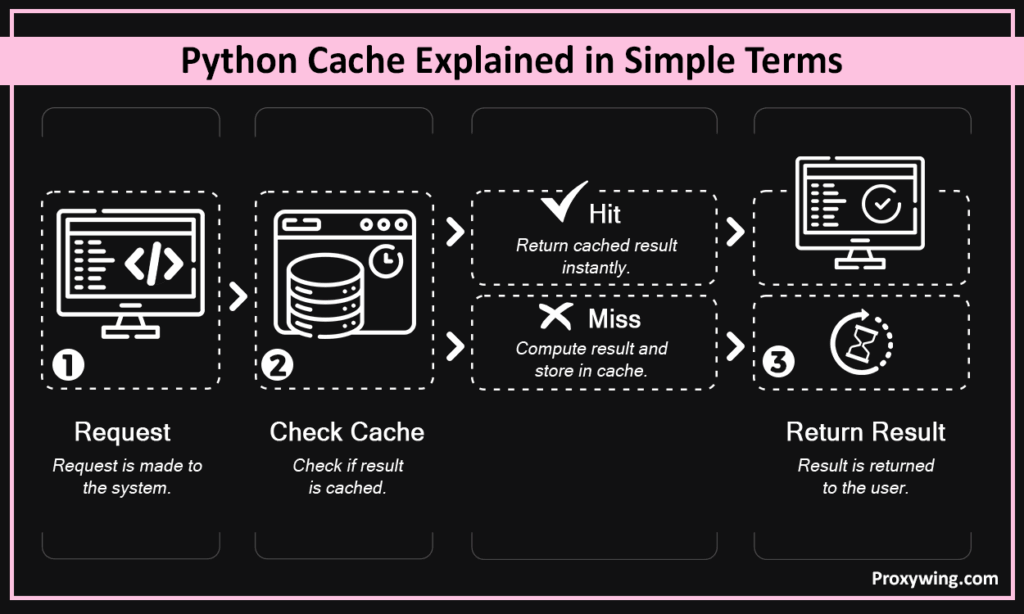
Caching stores a computation, query, or request result (referred to as storing values) so it can be returned instantly on the next call instead of also being recalculated or re-fetched. Without Python caching, every call will have to run the computation again, which significantly affects the performance of the system in question.
Python’s built-in caching was introduced in Python 3.2 in 2011. It is now included in all the newer Python versions. The main purpose of introducing this approach was to improve performance of API responses, database query results, and other similar tasks.
It cuts loading times, reduces database and API load, and keeps data-heavy workflows running smoothly — particularly when accessing data that is requested repeatedly across multiple operations..
Python caching is best for repeated, expensive operations with stable outputs. When outputs are cached, there’s no need for recompilation every time a new call is made. On the other hand, caching is less effective for data that changes with every request. For such Python programs, temporarily storing the result in cache memory has no tangible benefit.
Store results in a dictionary and check it before computing. Simple and effective for small, single-process Python scripts. The sample Python code below shows how this is implemented in a real Python program.
| cache = {} def get_data(key): if key not in cache: cache[key] = expensive_operation(key) return cache[key] |
The Python function argument serves as the cache key used to look up stored results.
When built-in options don’t fit your exact needs, custom caching logic wrapped in a decorator gives you full control over how results are stored, keyed, and retrieved. Wraps caching logic into a reusable function so you don’t repeat dictionary Python code across every function.
| def simple_cache(func): store = {} def wrapper(*args): if args not in store: store[args] = func(*args) return store[args] return wrapper |
lru Python caching works by automatically dropping the least recently used items (results) when the cache reaches its size limit. The goal of this approach is to keep memory under control without manual cleanup. It is faster, but stores all return values indefinitely, making it ideal when memory isn’t a concern and the Python function output never changes
| from functools import lru_cache @lru_cache(maxsize=128) def compute(n): return n ** 2 |
This is a simpler version of lru_cache() with no size limit. Faster, but stores everything indefinitely.
| from functools import cache @cache def compute(n): return n ** 2 |
Third-party library with TTL and size-based eviction policies. The cachetools library provides TTL and size-based eviction policies that go beyond what Python’s built-in options offer. This makes it useful when you need more control over how and when cached data expires.
| from cachetools import TTLCache cache = TTLCache(maxsize=100, ttl=300) |
Redis supports external shared caching for larger Python apps, distributed systems, or multi-process environments where multiple services need access to the same cached data.
| import redis r = redis.Redis() r.set(“key”, “value”, ex=300) result = r.get(“key”) |
Beyond function-level memoization, there are different types of caching mechanisms worth knowing depending on your use case. These include:
Cached results return in microseconds because repeated method calls with the same arguments skip recomputation entirely, which enables the fastest access times for frequently used or requested data. The more expensive the original operation, the bigger the gain.
Every cached files use memory. Set size limits or eviction policies to define what happens when the cache reaches its maximum capacity. This approach prevents unchecked growth that could make the system less responsive overall.
High hit rates mean the cache is working. This happens when the cached results are requested very often. Low cache hits mean you’re caching data that isn’t reused enough to justify the resource usage. Developers can analyze these numbers, allowing them to optimize their Python programs further to offer users the best experience while keeping resource usage as efficient as possible.
Some of the popular use cases of Python caching include:
Modern systems make several API calls to enhance their capabilities. In this case, caching helps prevent the need to hit the same endpoint repeatedly. The response can be cached until it expires. This helps users get faster responses, but also reduces the cost of making API calls. The Python below shows how this can be implemented.
| @lru_cache(maxsize=50) def fetch_user(user_id): return requests.get(f”/api/users/{user_id}”).json() |
Cache read-heavy query results to cut database load and improve data access speed. Retrieving data from cache is significantly faster than running the same query against the database repeatedly. It also lowers the resource consumption of the database server, allowing it to handle other queries that require unique results for almost every call.
Classic use case for lru_cache() — recursive Python functions run orders of magnitude faster with memoization. The code below shows how this is implemented.
| @lru_cache(maxsize=None) def fib(n): return n if n < 2 else fib(n-1) + fib(n-2) |
Cache pages, API responses, or session data to reduce backend load and improve scalability. Almost every modern web app caches some of its most used content to improve response time and the overall user experience of its users.
Before you can determine the operation to cache, it is best to determine where the bottlenecks of your Python program are. Improving performance through caching only works when you target operations that are genuinely slow and repeated multiple times.
Storing frequently accessed results is what makes caching worthwhile. If a result is only requested once, caching it wastes memory. Use data such as hit rates to determine the API endpoints or database queries that are hit the most, then prioritize caching those specific calls to maximize performance gains without unnecessary memory overhead.
Use TTL for time-sensitive data and invalidation logic when underlying data changes. You may choose to use TTL for time-sensitive data and invalidation logic when underlying data changes. For example, set a short TTL on stock prices or live scores that update frequently, and trigger explicit cache invalidation on user profile or inventory updates where stale data could cause real errors.
Set maxsize limits or eviction policies to keep memory usage stable. This allows your Python program to use cache to improve overall responsiveness without sacrificing memory.
Plan refresh and expiry logic upfront since stale caches silently cause incorrect results.
Knowing when to clear or refresh cached data is the hardest part. Outdated results cause silent bugs. This requires using an expiry login to ensure cache results are relevant.
Too much cached data can hurt the overall performance of the system. Monitor cache size and set appropriate limits to ensure the system has free memory needed to run the other aspects of your Python application.
Personalized or rapidly changing content needs careful cache key design. If the cache sees the same key for two different users, it may return the wrong result entirely. Only results that are frequently quarried deserve to be cached.
Old cached results can hide newest changes. Always remember to clear the cache first when debugging unexpected behavior in your Python program.
It prevents duplicate requests, lowers bandwidth use, and speeds up repeat scraping runs significantly. This may also lower the overall compute costs required to run scraping projects.
Cache discovery and extraction steps independently to avoid refetching pages that were already processed. This keeps repeat runs fast and prevents unnecessary load on target servers.
Every run re-fetches every page, which makes the process slow, wasteful, and unnecessary for development and testing.
This strategy stores the HTTP responses locally and returns them on repeat requests without hitting the server.
| import requests_cache requests_cache.install_cache(“scrape_cache”, expire_after=3600) response = requests.get(“https://example.com”) |
Fast and async-capable, but repeated uncached requests still create avoidable load, which could lead to more computing costs and slow response times.
Persists responses across async scraping runs for faster repeat access.
| import diskcache, httpx cache = diskcache.Cache(“./cache”) async def fetch(url): if url in cache: return cache[url] async with httpx.AsyncClient() as client: response = await client.get(url) cache[url] = response.text return response.text |
Python caching eliminates repeat calls. Proxies distribute traffic across IPs and maintain access on large scraping targets, minimizing possible disruption due to IP blocks and rate limits.
Use caching together with residential proxies when you collect regional versions of a website: reuse valid responses and fetch fresh pages through the right location. If responses differ by region, add the region to the cache key. That way one country’s cached result never gets served for another. For the residential connections, pick one of the ProxyWing residential proxy plans and use code for a lifetime discount.
Caching reduces redundant requests. ProxyWing proxy services handle the rest, including providing you with stable IPs, broad geo-coverage, and reliable rotation so your scraper keeps running without blocks.
Article written by:

Head of Partnerships
Leads partnerships at Proxywing with hands-on knowledge of residential, ISP, datacenter, and mobile proxies. Works with affiliates, bloggers, and tech communities, bridging tech and partner needs.
All articles by author (23)It is a Python programming strategy that involves storing data or the result of an operation so it can be returned instantly on repeat Python function calls without recomputing it. The goal is to improve the responsiveness of the Python program while minimizing resource consumption.
In-memory caching is faster for single-process Python apps while Redis is better when multiple processes or services need to share cached data.
Not always. It only helps when the same data is requested repeatedly. For rarely repeated or constantly changing data, it adds complexity and more resource usage without real benefit.
Yes, it is an effective approach. It prevents duplicate requests, speeds up development, and makes large scraping jobs faster on repeat runs.