




Proxy Authentication Methods Explained: Username/Password vs IP Whitelisting
06.10.2026 10 min
When browsing the internet, one of the most effective ways to keep your internet activity private is by using a VPN or an anonymous proxy. Although both tools can be used to enhance online privacy, they offer different capabilities and have pros and cons that you should understand before choosing which one suits your needs.
In this anonymous proxy vs. VPN guide, we will dive into the main differences and the best use cases for each. By the end of this guide, you will know whether you need an anonymous proxy server or a VPN. So, without wasting any more of your time, let’s jump right in!
| Criteria | Anonymous Proxy | VPN |
|---|---|---|
| Encryption | None (typically) | High-level (AES-256) |
| Privacy | Hides IP from website only | Hides IP from website & ISP |
| Coverage | Single app/browser | Entire device |
| Block Risk | Generally low (Depends on proxy server type) | Moderate (cycles IPs) |
| Speed | Faster browsing speeds (no encryption lag) | Slower due encryption overhead |
| IP Control | High (easy IP rotation) | Moderate (server-based) |
| Setup | Manual in device or browser settings | Simple (app-based) |
| Best Use Case | Scraping & targeted tasks | General security & streaming |
An anonymous proxy is an intermediary server that hides your device network address from websites and online services you access. When using it, your traffic is routed through an IP address of a proxy server before it is sent to the target online service you intend to access. In the process, your device’s IP address is replaced with the proxy’s IP.
Unlike a transparent proxy, which shares your real network address, an anonymous proxy keeps your device’s IP address hidden but often still identifies itself as a proxy server. Elite (high-anonymity) proxies go a step further by hiding both your network address and the fact that a proxy is being used at all. Using elite proxies is usually necessary if you need to access websites that restrict proxy server usage.
As far as proxies are concerned, it specifically refers to the masking of the HTTP_X_FORWARDED_FOR header. It is this header that usually carries your real device network address. Even though the network address is hidden, the proxy server may still send the HTTP_VIA header that tells the destination server that the request is coming through a middleman. If this header is sent, the target server will know that traffic is coming from a proxy server.
When using them, it is important to always comply with the website’s Terms of Service (ToS) and local data privacy laws.
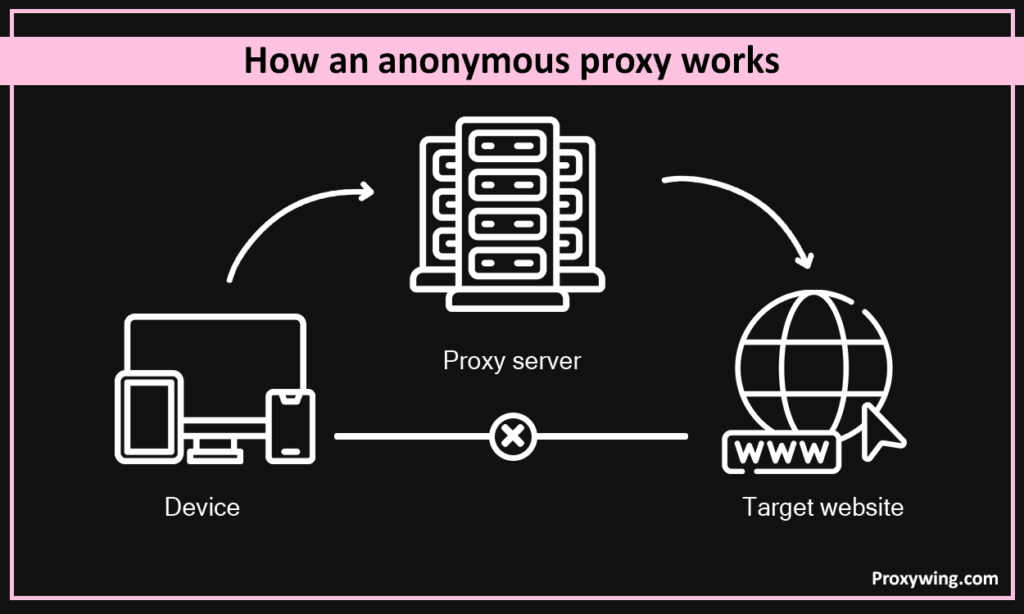
When using it, your traffic will travel following this path: Device → Proxy Server → Target Website. That means the anonymous proxy intercepts your request, strips your network address, and replaces it with its own. The website will see your traffic as though it is coming from the proxy’s IP address as the origin, ensuring more secure connections.
Even though the anonymous proxy server masks your network address and location, some of your traffic details will still be exposed to the websites. Such details include:
Proxy anonymity includes three levels:
These are primarily used by organizations to filter content or web caching to improve performance. They offer no privacy at all since they pass your real network address in the headers.
An anonymous proxy hides your real network address, but does not hide the fact that you are using a proxy by forwarding the HTTP_VIA header. If the website restricts proxy server usage, your connection can be interfered with.
An elite proxy provides the highest level of proxy security since it hides your network address and does not send any headers that identify the server as a proxy. To the website, the connection looks like a standard residential user.
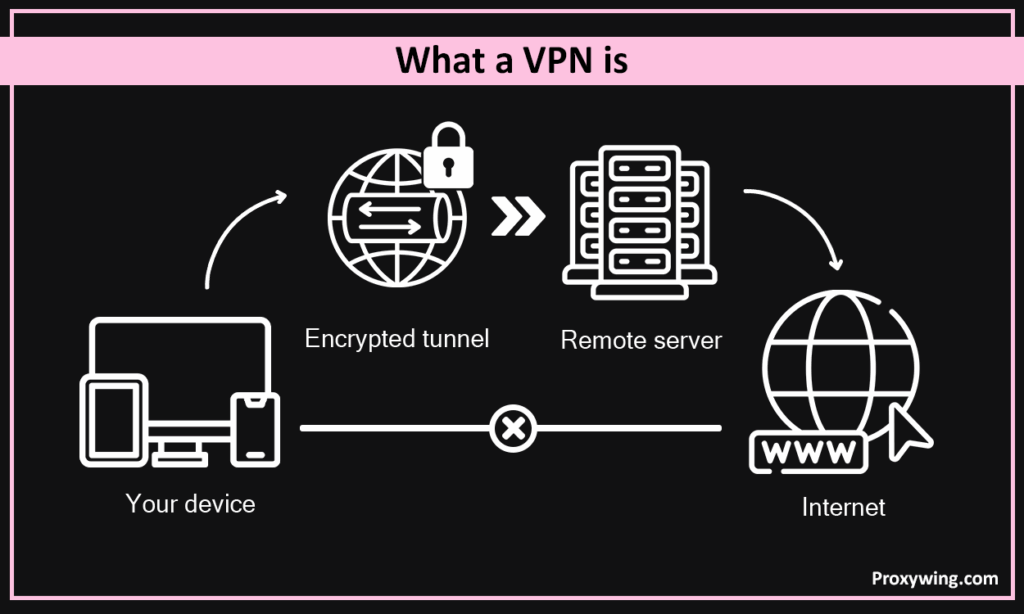
It is a secure, encrypted tunnel between your device and a remote server. When using a VPN, all your traffic is sent using this secure tunnel. Unlike a proxy, which usually works at the app level (like a browser), a VPN typically operates at the Operating System level. When it is turned on, all traffic leaving your device goes through encrypted tunnels unless you enable split tunneling.
Tunneling protects your data using three main steps:
Split tunneling gives users the choice to determine which traffic goes through the VPN and which use the open internet. This is useful for accessing content on websites that restrict VPN usage, while simultaneously browsing the rest of the web securely. However, it is crucial to carefully configure split tunneling and make sure all the necessary traffic uses a secure tunnel to avoid unintended data leaks if it is accidentally not encrypted.
It is primarily designed to enable remote workers to access a company’s internal network (intranet). These virtual private networks provide admins the flexibility to manage who sees sensitive company files and who doesn’t. They are not specifically meant to provide internet anonymity.
This is designed to enhance personal privacy by encrypting their traffic before sending it over to the internet. These services focus on masking your web browsing activity from internet service providers, protecting data when using public networks like airport WiFi. It also helps with bypassing geographical content restrictions on streaming platforms.
The primary difference between the two lies in scope and encryption. Here is a summary of the differences in the table below:
| Feature | Anonymous Proxy | VPN |
|---|---|---|
| Scope | App-level (e.g., Browser) | OS-level (Entire device) |
| Encryption | None (unless HTTPS/SOCKS5) | High-level (AES-256) |
| Performance | Faster connections (less overhead) | Slower (encryption lag) |
| Manageability | Highly granular | “Set and forget” |
Let’s explore all the differences in more detail:
VPNs automatically encrypt all data leaving your device, making it invisible to anyone on the network, including ISPs. Most proxies do not encrypt your data. That means if you use an anonymous proxy on an unsecured network, an attacker could still see your traffic content (when accessing non-HTTPs websites) even if your network address is hidden.
Proxies hide your network address and location. On the other hand, virtual private networks offer “full-tunnel” routing, hiding your network address and most of your browsing details. However, both tools will not hide your identity if you are logged into an account or have unique browser fingerprints.
Proxies generally offer higher connection speeds because they don’t include the encryption step. This makes them a better option for high-bandwidth tasks like web scraping. VPNs add overhead due to the encryption/decryption process, which can slightly affect the performance.
An anonymous proxy in some cases has to be configured inside each specific app (e.g., Chrome, Telegram). A VPN on the other hand automatically covers the entire device, unless you specifically exclude apps using split tunneling.
VPNs use well-known datacenter IP ranges that most firewalls often block. They also usually have a few network addresses generated by the virtual private networks providers. Traffic from proxies, especially residential proxy services is harder to detect because it is similar to the standard home internet connections.
Here are some of the common proxy classifications
A forward proxy server is the standard type used by clients. It sits in front of the user and forwards their web requests to the target websites, after masking their network address and location.
After purchase, the provider will give you all the proxy details, including IP address (hostname) and port. They may also provide authentication details if necessary. You should then add these proxy details in your device network settings.
Depending on your operating system, you need to find the proxy option in your network settings and add these settings. Remember, a proxy only works with one network at a time. Connecting to a different one will require setting it up for that network as well. If you are using web browsers like Firefox or Tor browser, you can integrate the proxy details directly into the browser settings.
Here is how to fix some of the common proxy errors:
The choice between proxies and virtual private networks will largely go down to what you intend to do on the internet and your priorities. Go for virtual private networks if you want a simple, one-click solution for broad security of your device or accessing blocked contents in your country. Anonymous or elite proxies are the best choice if you need precise control over your IP reputation and want to have the fastest internet speeds for tasks like web scraping or online gaming.
Article written by:

Product & Support Operations Lead
Built Proxywing's support department from scratch — documented workflows, clear escalations, consistent quality. Now bridges the CEO and engineering, keeping infrastructure projects on track.
All articles by author (68)Usually, no. A VPN does everything a proxy does and more. However, using a proxy is necessary if you need more control over the IP addresses you use. Proxies provide extra capabilities like IP rotation and more precise geo-targeting that VPNs don’t offer.
No. Incognito mode only prevents your browser from saving history and cookies. Unlike proxies, it does not hide your IP address from the websites you visit or your ISP.
It hides your IP address and encrypts your internet traffic, masking both your physical location and the specific content of your online activity from third parties. However, if you are logged in to the website, you won’t be anonymous since you already provided your identity details.

