




Proxy Authentication Methods Explained: Username/Password vs IP Whitelisting
06.10.2026 10 min
Janitor AI is a chatbot system built to let you focus on characters and have creative and dynamic conversations. This versatile tool for chatting featuring personas based chatting. A lot of users prefer Janitor AI for experiencing interesting conversations with a clear tone and personality. This guide tells you what Janitor AI is, how it works, and why so many chatbot platforms talk about it these days. You will learn the basics of setting up, using the API, costs, restrictions, safety, and substitutes to Janitor AI. Read this guide all the way through to get a comprehensive picture of Janitor AI.
Janitor AI does not generate replies on its own. It sends your message to a language model and shows the answer back in the chat. To get better replies, you connect a model through API settings, and that connection can go either straight to a provider or through a proxy.
The word “proxy” means two different things in Janitor AI, and mixing them up is the most common reason a setup fails:
If replies fail, fix the API settings. If the site itself will not open, fix your browser connection. The sections below cover both, plus the settings values, API keys, and the errors you are most likely to hit.
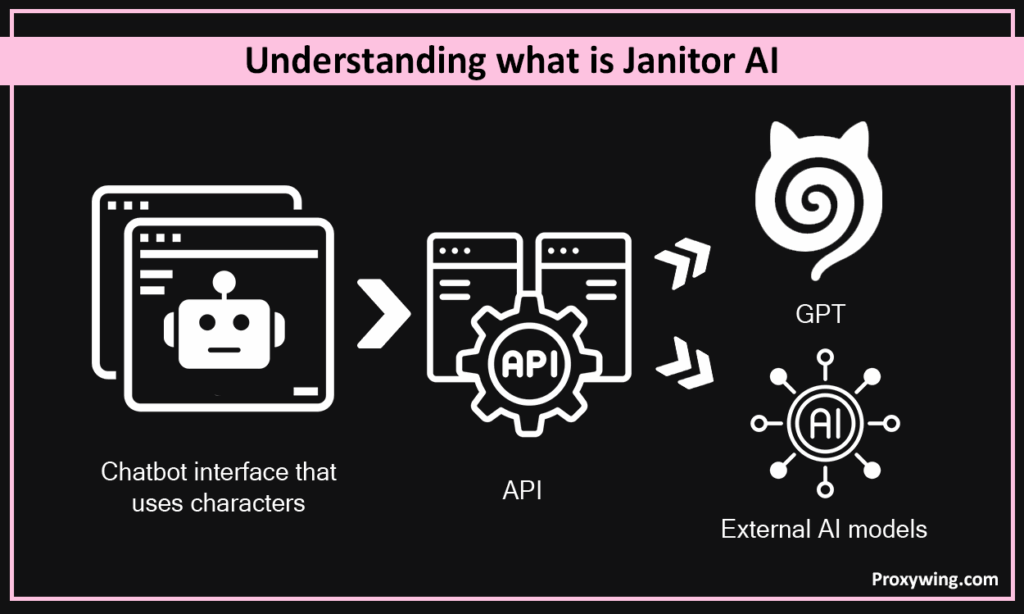
Janitor AI is a chatbot interface that uses characters. This is not an AI model by itself. Janitor AI uses an API to link users to outside models like GPT. Using an API, only needing is a valid provider key. The platform is designed to help people in creating characters with rules and a tone. Janitor AI’s goal is providing structure instead of just intelligence. These rules help with people’s responses during conversations. Janitor AI gets its intelligence from the services of its providers. Janitor AI controls chatting experiences within itself and when integrated with platforms like GPT.
There are several real-world uses for Janitor AI. Writers utilize Janitor AI to write stories and narratives. It is also great for fans who want roleplaying experiences with customizable characters. Moreover, communities make amusing bots for shared interactions with others in group settings. Developers use Janitor AI to make prototypes of AI bot platforms, requiring minimal setup to test ideas rapidly. People who make chatbots always try making conversation feel more natural. They aim to help bots sound and feel more like humans. Janitor AI is ideal for people who seek flexible conversational experiences.
Janitor AI is all about control and personalization, which is in line with advances in conversational AI interfaces. Janitor AI helps you in creating custom characters and rules. Moreover, it works with learning models from an external source like GPT. Janitor AI has capabilities for finding shared characters. Also, Janitor AI is flexible for API integrations and tuning settings. These advanced and key features offer great user experiences.
With Janitor AI, first, you need to create characters. Janitor AI gives prompts to AI models via an API. After that, the model reflects back the generated text. Then the chatbot interface shows the answer from Janitor AI. This loop keeps going during the whole conversation.
In Janitor AI, characters have restrictions as well as personalities. For instance, different styles, tones, and limits. When you use Janitor AI, effective designs assist to make responses much better. Also, clear examples help models during interactions. Remember, powerful personas give you a unique personality.
This technology can figure out exactly what someone wants from text. It keeps track of the context of previous messages. This makes it easier for Janitor AI’s chatbots to respond in a better way. It makes interactions effective without going too deep into technicalities.
The role of generative AI is to make answers from prompts as well as tokens. The answer depends on the situation. That is why responses vary with time. Also, in Janitor AI, different models modify the style and speech.
API integration connects Janitor AI with service providers. This allows businesses as well as individuals to send requests safely in very little time. The service gives you back the generated text.
Go to the official website and then sign up. In the beginning, it will be best to create a free account. It takes only a few minutes.
You can choose custom characters or make your own. Check the rules, the tone, and your distinct goals before proceeding. This prevents strange responses.
How to Create a Character in Janitor AI (Field by Field)
The character card decides most of the reply quality. A weak card makes even a strong model sound generic.
If a character starts replying out of voice, edit the example dialogue before you touch the model settings. Nine times out of ten the card is the problem, not the API.
After this, you will need to integrate the AI provider and API keys. Put the key into the Janitor AI settings. This allows you to use the API and start chatting quickly.
First messages should be clear and simple. For this, set the tone as well as the goal early. This makes conversations feel pretty natural. All you need to do is start with a short conversation in Janitor AI and expand it gradually.
After that, adjust the length of the context as well as the level of creativity. It is important to note that in Janitor AI, lower values make the response more focused. Although higher values feel inventive, they cost more tokens.
This step is completely optional. Users can attach files or notes. This gives replies a basis in data. It also assists to start building more informed chatbot processes. This eventually enables structured content as well as learning.
Janitor AI offers free chatting for casual users. This simply means you can start without having to pay anything up front. The free tier lets you test basic functionality as well as the JanitorLLM beta. But there are limitations. For a better experience, Janitor AI offers premium plans. These include Pro Plan for $9.99 a month and reported subscription choices for $2.99 a month or $39.99 a year. It is important to note that if you want to use an external provider, you have to spend money. In such a case, you have to pay for tokens that external models utilize.
Follow these steps to configure Janitor AI:
First, make an account with Janitor AI, and then go to the settings. This is the main place to configure your setup. The reason is that it controls API linkages as well as character management.
The next step is to use a simple template for character creation. Clearly explain the overall persona and tone. Moreover, give examples of messaging, and list do’s and don’ts. This way, you can create unique behavior for more engaging chatbot interactions.
Request an API key from your AI provider and keep it with you only. These keys allow you accessing AI services as well as connecting Janitor AI setup to external models. Therefore, don’t share them online.
Change your Janitor AI settings after your key is active. Thereafter, pick a model, select the size of the context, and change the levels of inventiveness. For the best results with Janitor AI, it is advised to start with the default parameters and, after that, make a few changes.
Finally, send a sample prompt to test the integration. However, make sure the tone, flow, as well as responses remain the same. To make sure your Janitor AI configuration works well, don’t overlook mistakes and make sure the response times are stable.
Reverse Proxy vs Regular Proxy in Janitor AI
Two different tools share the same name, and Janitor AI uses both. Knowing which one you need saves most of the setup trouble.
A reverse proxy sits between Janitor AI and the model provider:
Janitor AI → reverse proxy → AI model provider
You paste its address into the Proxy URL field inside Janitor AI API settings. It handles the model request, so it affects the replies you get. Community-hosted reverse proxies are popular because they let people chat without buying their own API key.
A regular proxy, also called a forward proxy, sits between your browser and the website:
Your browser → residential or ISP proxy → janitorai.com
You set it in a browser extension or proxy manager, not inside Janitor AI. It changes the IP address the site sees. It does not touch model requests and will not fix a broken API key.
| What you need | Reverse proxy (API) | Residential, ISP, or mobile proxy |
|---|---|---|
| Where it goes | Janitor AI API settings | Browser or proxy manager |
| Main job | Routes model requests | Routes website traffic |
| Affects reply quality | Yes | No |
| Changes your visible IP | No | Yes |
| Helps when the site will not load | No | Yes |
| Helps with API key or model errors | Sometimes | No |
| Helps with stable long sessions | No | Yes |
One warning about free reverse proxies. Your prompts and sometimes your API key pass through a server that a stranger runs. Shared endpoints also get overloaded, which is where most 429 errors come from. Free is fine for a quick test. It is a poor default if you care about privacy or uptime.
The proxy configuration lives inside a chat, not in your account settings. Open any character first, then follow these steps.
Start a chat with any character. Tap the three-line menu in the chat window and choose API Settings. The panel opens with tabs for the available connection types.
Switch to the Proxy tab. This is the option for any OpenAI-compatible endpoint, whether that is a community reverse proxy, OpenRouter, or another provider. Then press + Add Configuration to create a new setup.
You get five fields. Only three of them matter for a first working setup.
/chat/completions. Paste it exactly as the provider gives it, with no trailing space.Press Test and wait for the result. A green confirmation means the endpoint answered. An error here is a connection problem, not a character problem, so there is no point editing your bot yet.
Click Save Settings, go back to the chat, and send something simple like “hello”. A short first message tells you whether the connection works without burning tokens. If the reply arrives, your setup is done.
Once replies come through, tune the generation settings and the custom prompt one change at a time. Changing three things at once makes it impossible to tell what broke the setup when replies get worse.
A proxy sends traffic through secure proxy servers before it gets to the AI provider. A proxy service is typically used in Janitor AI to make routing more stable, deal with access problems, and handle rate constraints more easily. While it doesn’t bypass any provider regulations, it can help connections be more stable. ProxyWing is a useful proxy provider for people who want dependable routing and regulated access. These are made to help AI integrations that are stable and can grow. Learn more about our solutions by visiting our homepage.
There is no single correct configuration, but there is a sensible starting point. Use these values, then change one at a time.
A quick way to diagnose bad replies: if the bot is repetitive, raise temperature. If it ignores your persona, raise context size. If it cuts off mid-sentence, raise max new tokens. If it invents events that never happened, lower temperature.
The model you connect changes the experience more than any other setting. Here is how the common options compare.
| Option | Cost | Setup effort | Best for |
|---|---|---|---|
| JanitorLLM | Free, beta | None | Trying the platform before you commit |
| OpenRouter | Pay per token, some free models | Low | Switching between many models with one key |
| DeepSeek | Low cost per token | Low | Long roleplay on a small budget |
| Google Gemini | Free tier, then paid | Medium | Fast replies and a large context window |
| OpenAI | Higher cost per token | Low | Consistent, well-behaved output |
| Anthropic Claude | Higher cost per token | Medium | Long scenes that need to stay coherent |
| Community reverse proxy | Free | Low | Casual use, at the cost of privacy and uptime |
JanitorLLM is the built-in option and costs nothing. It is still in beta, so downtime and queue waits happen. Most people start here and move on when replies get repetitive.
OpenRouter is a gateway rather than a model. One account and one key give you access to a long list of models, and you switch by changing the model name in your configuration. Some models on it are free but rate-limited, which is a common source of failed replies during busy hours.
DeepSeek is the usual pick when you want long conversations without a large bill. Pricing per token is low compared with the bigger providers.
Gemini offers a free tier through Google AI Studio and a generous context window, which helps in long chats. Check whether your endpoint is the OpenAI-compatible one before pasting it into the Proxy field.
OpenAI and Claude give the most consistent writing quality. They also apply content policies to what passes through your key, so read the provider terms before you set up a character.
A practical order: start on JanitorLLM, move to OpenRouter when you want choice, and go direct to a single provider once you know which model you actually like.
Janitor AI does not issue API keys. You get one from a model provider and paste it into the API settings.
The general flow is the same everywhere:
“Free API key for Janitor AI” usually means one of three things, and each has a catch.
There are no legitimate free keys for paid models. Sites offering “free OpenAI keys” are either sharing stolen credentials or collecting yours, and a key found in a public list is usually revoked within hours.
Do not paste your key into a random proxy, a Discord message, or a screenshot. If a key leaks, someone else spends your balance. Rotate it from the provider dashboard the moment you suspect it, and set a spending limit if the provider supports one.
Janitor is ideal for creative roleplaying experiences where the story can change, as well as the dialogue can be expressive. This tool lets you create customizable characters, which makes the talks feel alive and interesting. But Janitor AI isn’t great for rigorous factual accuracy. The reason is that it gets its answers from outside sources. Long chats can also use quite a lot of memory, and continued access depends on the reliability of the linked AI provider.
Well, the safety of Janitor AI depends significantly on how users set it up and operate it. You can face issues like leaking private information, inadequate account security, and being exposed to unsuitable or sensitive content. Hence, users should make sure their passwords are strong, keep their login information safe, and not share personal data while chatting. Moreover, to use Janitor AI safely, you should pick the safest provider options. Also, read the privacy regulations properly and establish the right settings.
Most Janitor AI problems come from four places: the key, the endpoint, the model name, or the provider. Work through them in that order.
This is a rate limit, not a broken setup. It means too many requests hit the same endpoint in a short window. It happens most on free model tiers and shared community reverse proxies, where hundreds of people use one route.
Wait a minute before retrying, stop hitting the regenerate button, switch to a different model, or move off the shared endpoint to your own key. If it only happens at certain hours, the endpoint is simply crowded.
The key is wrong, expired, revoked, or does not have access to the model you selected. Re-copy it from the provider dashboard, watching for a leading or trailing space. Then check your provider balance. An empty balance often returns an authorisation error rather than a billing one.
Usually a model name that does not exist on that endpoint, or a Proxy URL missing its final path segment. Copy the model string directly from the provider’s model list instead of typing it. Then confirm the endpoint ends where the provider’s documentation says it ends.
If janitorai.com does not open at all, the model settings are irrelevant. Check whether it loads on mobile data but not on Wi-Fi. If it does, the block is at the network level, and a residential or ISP proxy in your browser is the right tool. If the page loads but replies fail, the problem is on the API side.
Normal behaviour for free and community reverse proxies. Endpoints get taken down, restricted, or overloaded without warning. If you need a setup that works the same way every day, use your own API key.
Context size grows with the conversation, so each request carries more text. Trim the chat, lower the context size, or start a fresh chat and paste a short summary into the first message.
People look for an alternative for three reasons: JanitorLLM is down, the setup is too fiddly, or they want different content rules. The right replacement depends on which of the three applies.
| Alternative | Best for | Main difference |
|---|---|---|
| Character.AI | Casual character chat | No API setup at all, stricter content rules |
| SillyTavern | Full control over models and prompts | Runs on your own machine, more setup work |
| Chub AI | Large character library | Its own model options and hosting |
| Venus AI | Roleplay communities | Setup still depends on a model or proxy route |
| Chai | Chatting on a phone | App-first, fewer settings |
| Poe | Trying several models in one place | Multi-model access, limited persona control |
| Replika | Companion-style conversation | Guided experience, little character control |
If your problem is downtime, an alternative will not help much. Every one of these platforms depends on a model provider, and the same providers go down for everyone. Connecting your own API key in Janitor AI is usually a faster fix than migrating your characters.
If your problem is setup complexity, Character.AI and Chai remove almost all of it. You lose model choice in exchange.
If your problem is control, SillyTavern is the step up. It runs locally, connects to any provider you want, and exposes every generation setting. It also takes an afternoon to configure properly.
Check four things before you move. Can you import or rebuild your characters without starting over? Does it let you bring your own API key, or are you locked to the platform’s model? What are the content rules, and are they enforced by the platform or by the model provider? And is there an active community publishing working setups, because that is where you will find answers when something breaks.
It is crucial to employ Janitor AI in an ethical way. This helps keep trust and interactions responsible. Users should respect consent as well as keep their personal information private when they talk to chatbots. Don’t misuse generated content or share your private data in Janitor AI. Knowing who owns the content, how to handle data, as well as what the platform’s duties are can prevent misuse. Using Janitor AI in a safe, open, and moral way means following the norms of the platform, the law, and the community properly.
Article written by:

Full Stack AI Engineer
Full-stack engineer at Proxywing working across backend architecture, performance optimization, and AI-driven workflows. Node.js, React, cloud infrastructure, and RAG pipelines.
All articles by author (61)The amount of storage in Janitor AI completely depends on the connected provider. It may keep records for keeping an eye on or making chatbot conversations better. Users should read the policies of their provider to safely handle data as well as chats.
Absolutely, most of the functions of Janitor AI need API keys to link the platform to models outside of it. Users can’t use advanced features of chatbots or manage conversations well without them.
Invalid API keys, reached limits, or provider outages are some of the most common problems with Janitor AI. To make sure that chatbots work well, users should check their settings. Make sure you have access to the API with simple prompts.
Start with temperature around 0.9, max new tokens around 300, and context size around 8,000. Then change one value at a time. Raise temperature if replies feel flat, raise context size if the bot forgets things, raise max tokens if replies cut off.
A 429 means rate limiting. It usually comes from a crowded free tier or a shared reverse proxy. Wait, stop retrying, switch models, or move to your own API key.
The platform is free to use with JanitorLLM. External models cost money based on the provider’s token pricing, and Janitor AI also offers paid plans with extra features.
No. A direct API key works fine. A reverse proxy is only useful if you want model access without your own key, and a residential proxy is only useful if the website itself will not load for you.
For a quick test, yes. As a default, no. Your prompts and sometimes your key pass through a server you do not control, and free endpoints go down without warning.

