Datacenter
For quick catalog browsing, a dedicated server IP is the cheapest fast option, and nobody shares it. It is visibly a hosting address, which some services treat warily.
from
Buy now$0.87/ month
WatchSoMuch is a popular site for streaming free TV shows and movies, but it’s banned in several countries, so users often run into a 403 error, “This site can’t be reached,” an endless spinner, or a notice page from their ISP. In almost every case the site is up: WatchSoMuch is blocked on your end, and the restriction sits on your IP address, not on the site’s servers. A WatchSoMuch proxy fixes this by routing your traffic through a remote IP, which hides your real address from your ISP and restores access. This guide explains how to tell a block from an outage, why mirrors and free proxies fall short, which proxy type suits streaming, what it costs per month, how to set it up in five minutes, and how to confirm your new IP is working. Everything here covers watching in your browser, not P2P downloading.

On WatchSoMuch the main questions are privacy of your own IP and session length. Each proxy type answers them differently.
For quick catalog browsing, a dedicated server IP is the cheapest fast option, and nobody shares it. It is visibly a hosting address, which some services treat warily.
$0.87/ month
Want the session to resemble a regular home user? Sticky household IPs do that, in a country you pick. Rotation suits brief lookups, but mind the GB meter on long ones.
$1.00/ GB
If you browse from a phone, a carrier IP keeps the whole session on mobile-network addresses. The site logs that shared 4G/5G address rather than your own connection.
$4.00/ day
For long, regular sessions, one static provider IP is the low-maintenance route: the same address every time, home-level trust, and your own IP kept out of site logs.
$1.71/ month
| Gigabytes | Discount | Price per GB | Total Amount | Buy |
|---|---|---|---|---|
| 1 | - | $2.50 | $2.50 | Buy |
| 2 | 10% | $2.25 | Buy | |
| 10 | 15% | $2.13 | Buy | |
| 50 | 20% | $2.00 | Buy | |
| 100 | 25% | $1.88 | Buy | |
| 250 | 30% | $1.75 | Buy | |
| 500 | 35% | $1.63 | Buy | |
| 1000 | 40% | $1.50 | Buy | |
| 3000 | 45% | $1.38 | Buy | |
| 5000 | 50% | $1.25 | Buy | |
| 7500 | 55% | $1.13 | Buy | |
| 10000+ | 60% | $1.00 | Buy |
| Gigabytes | Discount | Price per GB | Total Amount | Buy |
|---|---|---|---|---|
| 1 | - | $6.00 | $6.00 | Buy |
| 2 | 5% | $5.70 | Buy | |
| 10 | 10% | $5.40 | Buy | |
| 50 | 15% | $5.10 | Buy | |
| 100 | 20% | $4.80 | Buy | |
| 250 | 30% | $4.20 | Buy | |
| 500 | 40% | $3.60 | Buy | |
| 1000 | 45% | $3.30 | Buy | |
| 3000 | 55% | $2.70 | Buy | |
| 5000 | 60% | $2.40 | Buy | |
| 7500 | 65% | $2.10 | Buy | |
| 10000+ | 70% | $1.80 | Buy |
Awards, which we received from our customers







Discover the wide-ranging applications of Proxywing's proxies across different industries and online activities. Maximize your business potential with our versatile and dependable proxy solutions, customized to meet your specific requirements.
We offer fast, secure and anonymous IP addresses around the world that provide access to the resources you need.
WatchSoMuch is a streaming and torrent-indexing site that lets you watch movies and TV shows in a built-in browser player, rather than hosting the files itself. With this website, you can watch content in different resolutions (up to 4K) and also supports several audio technologies, including Dolby and DTS.
The WatchSoMuch catalog runs to tens of thousands of movies and thousands of series and they are all playable inside the browser as long as WatchSoMuch is reachable from your region. When your ISP blocks it, a proxy is the fastest way to restore access without having to download any extra apps on your device.
WatchSoMuch catalog at a glance
| Metric | Value |
|---|---|
| Movies | 93,147 |
| TV series / episodes | 22,065 series, 368,028 episodes |
| Video quality | SD, HD, Full HD, 4K, 3D — plus Dolby, DTS, HEVC on torrents; SD/HD/Full HD on direct downloads (VIP members) |
| Subtitles | Multiple languages, plus custom subtitle upload with styling and time-syncing tools |
| Registration required | No — streaming works without an account. A “VIP member” tier exists for direct downloads |
As shared earlier, this website is blocked in several countries, including UK, Australia, and India, alongside parts of the EU. However, many are still drawn to the website due to its rare international content (Bollywood, anime, K-dramas, regional titles), no subscription, and multiple audio/subtitle tracks.
The trade-off for accessing this website comes down to two separate problems: access and privacy, and both come down to the IP address you connect with. That’s where using a trusted proxy provider comes in.
The safety and legality of using this platform depends on how and where you use it. WatchSoMuch carries two different kinds of problems, legal and technical, and they’re solved in different ways. Let’s dive into this in more detail below:
The operators of WatchSoMuch argue they host no files, but only links. However, rights holders disagree with this. In several Western countries like the US, UK, and most of the EU, watching copyrighted content without permission is unlawful, so check your own country’s rules before proceeding (or know the risks involved before using unblocking methods).
A proxy changes your network route, but it doesn’t make copyright infringement legal, and torrenting or P2P downloads aren’t supported on ProxyWing proxies. However, while using a proxy, your traffic will seem as though it is heading to the proxy’s IP address (as the destination), so your ISP’s system may not detect whether you’re accessing WatchSoMuch.
Legal exposure by region
| Region | What counts as infringement | What typically happens in practice |
|---|---|---|
| United States | Streaming/downloading copyrighted content without a license | ISP notice, rarely prosecuted for streaming alone |
| United Kingdom | Streaming/downloading copyrighted content without a license | ISP warning letters, site-blocking orders |
| European Union | Varies by member state, generally unlawful | ISP notice, enforcement intensity varies |
| Rest of world | Varies widely | Ranges from unenforced to ISP-level blocking |
Besides the legal, there are also some technical risks that you need to be aware of before accessing this website. Malvertising and fake “Play” buttons are pretty common on such websites (that’s how they make money). Prompts to install an “HD Video Player” or codec can sometimes hide malware.
Beyond that, your real IP tells the site and its ad network your country, city, and ISP, and folds your viewing into an ad profile. You can see exactly what’s currently visible about you with ProxyWing’s free IP checker. The only way to mask your real IP address from being accessed by WatchSoMuch is routing through an intermediate address like a residential proxy.
WatchSoMuch not working usually comes down to three causes: your IP address is blocked, WatchSoMuch is restricted across your whole region, or the site itself is temporarily down. Identify which one you’re facing first, then pick any of the fixes, including using, free proxy, or paid proxy accordingly.
The table below shows the different causes of the site to be blocked and the respective fixes:
Access methods compared
| Method | Works reliably | Hides your real IP | Phishing/data-leak risk | Cost |
|---|---|---|---|---|
| Mirror site | No — domains get blocked in batches | No | High | Free |
| Free public proxy | No — slow, often already blocklisted | Partially | High | Free |
| Paid residential proxy | Yes | Yes | Low | From $1.00 |
| Paid ISP/datacenter proxy | Yes | Yes | Low | From $1.71 / $0.87 |
ISPs restrict access at the DNS, IP, or SNI level, usually at a regulator’s or government’s request, and this can be a full country-level block or just part of the catalog withheld in your region.
Since the block is tied to your IP and your ISP, switching to an address in an unrestricted country unblocks the website. ProxyWing’s residential pool covers 190+ countries, giving you the flexibility to use IPs from one of the unrestricted countries.
You need to clearly look at the error shown in your browser to know the difference. The common ones include: ”This site can’t be reached,” a 403, endless loading, or a redirect to your ISP’s notice page.
Try accessing the website on mobile data, switch DNS, and trace the route to the domain. If it opens on mobile data but not your home connection, that’s an ISP block, and switching IP fixes it. Run the diagnosis with ProxyWing’s IP tracing and the connection checker for more information.
Mirrors serve WatchSoMuch content on a different domain. Even though mirrors look like an easy fix, they have the lowest ceiling: mirrors typically survive weeks before they’re blocked or taken down, which means hunting for a replacement every time one dies. That’s an inconvenience that lots of users are not willing to go through.
Phishing clones are the bigger problem. These clones typically include aggressive redirects, a registration demand where WatchSoMuch never had one, and swapped playback buttons. And if your ISP blocks new domains in batches, the mirror won’t open either. A mirror solves half the problem at best, but it never touches your exposed IP. Using a proxy from a trusted provider solves both.
Known mirrors and Their Risks
| Domain / Access Route | Current Status | What You Risk |
|---|---|---|
| watchsomuch.com | Active (Official Hub) | None (Safe Original). This is the legitimate central directory. |
| watchsomuch.tv | Active (Official Stream) | None (Safe Original). Official frontend optimized for on-site streaming. |
| watchsomuch.to | Active (Official Torrent) | None (Safe Original). Official hub dedicated to P2P torrent downloads. |
| Third-Party Lookalikes (e.g., to.com, watchsomuch-co) | Highly Unstable / Blocked | Phishing & Credential Theft. These fake mirrors clone the original interface to steal VIP login credentials, email addresses, and payment data. |
| Public Proxy Aggregators (scraped unblocking directories) | Intermittent | Aggressive Ads & Malicious Scripts. They inject hidden crypto-miners, explicit pop-unders, and deceptive “Update Your Browser” malware prompts into the site wrapper. |
| Unverified Clone Mirrors (ad-revenue clones) | Rapidly Terminated | Swapped Links. They modify download anchors and magnet links to point to malicious executables (.exe or .scr masquerading as video files) instead of the actual media torrent. |
Free proxy lists are slow and unstable, their addresses already sit in blocklists, and the nodes are overloaded. However, the bigger risk is traffic interception and resale of your data by whoever runs the node. If you really care about getting a good user experience and not exposing your data, using a paid proxy is a more reliable option.
Entry plans for paid proxies start at $1.00 per gigabyte or $1.71 for a dedicated address per month. Remember, what you “save” on a free node, you pay for with your data. You can test any free list yourself with the proxy checker to see how many addresses are even alive.
ProxyWing proxies offer you flexible payment options, including credit card, PayPal, Klarna, UPI, or 100+ cryptocurrencies.
TABLE 5 — free public proxy vs. paid
| Free public proxy | Paid (residential / datacenter) | |
|---|---|---|
| Speed | Unpredictable, often overloaded | Sub-1s response, 1 Gb/s+ on datacenter |
| Uptime | No guarantee | 99–99.9% |
| Blocklisting | Common — address reused by thousands | Rare on residential, dedicated on datacenter/ISP |
| Your data | Unknown handling, resale risk | Managed access controls, no traffic logging |
| Support | None | 24/7 live chat, Discord, Telegram |
| Price | “Free” | From $1.00 / $0.87 |
A proxy routes your traffic through a remote IP before it reaches WatchSoMuch, allowing users in restrictive countries to access this website. By the end of this section you’ll have a working ProxyWing setup for in-browser viewing.
When using a residential proxy, your device connects through a node carrying a real home user’s IP, so the site sees that address instead of your real one. This does three jobs:
On ProxyWing, that means 70M+ IPs across 190+ countries, country/city/ISP targeting at no extra cost, sticky sessions long enough that a movie won’t cut out mid-stream, and HTTP/S and SOCKS5 support. The documented uptime is also high enough to stream WatchSoMuch with minimal interruptions.
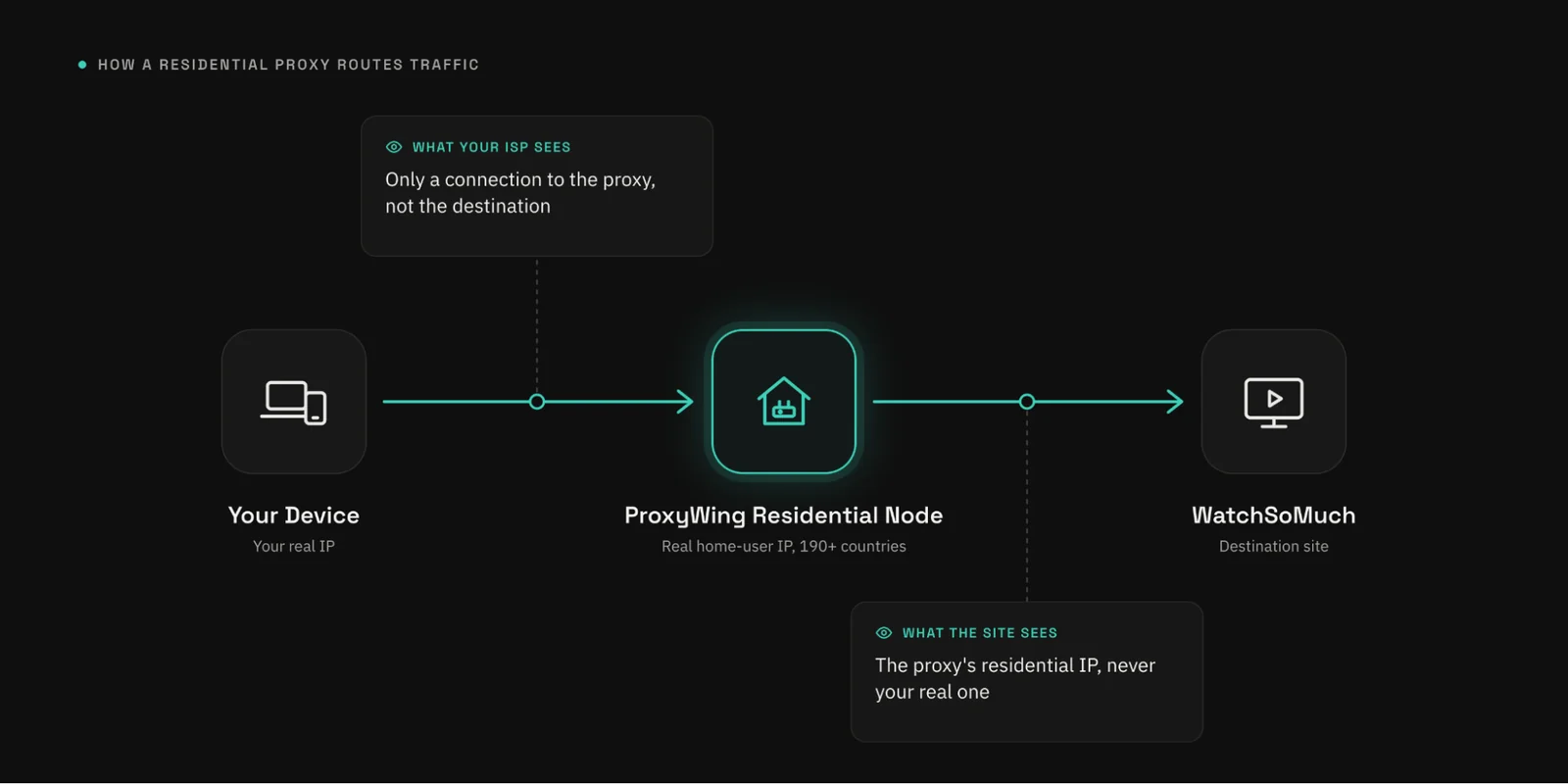
As shown in the above diagram, your request leaves your device, passes through a residential node carrying a real home-user IP, and reaches WatchSoMuch from that address. Your ISP only sees traffic going to the proxy, and WatchSoMuch only sees the node’s IP.
For streaming video, the billing model is the deciding factor:
Choose residential proxies when you need a home IP to clear hard blocks on WatchSoMuch, ISP or datacenter when you watch a lot and in high quality, and mobile only when nothing else gets through.
Proxy types for streaming
| Type | What the IP is | Traffic | Geo coverage | Price from | Best for |
|---|---|---|---|---|---|
| Residential | Real home ISP connection | Per GB, never expires | 190+ countries | $1.00 | Clearing hard blocks with a home IP |
| ISP | Static IPv4, Tier-1 ISP-registered | Unlimited | 10 countries | $1.71 | Regular viewing, flat monthly cost |
| Datacenter | Dedicated server IPv4 | Unlimited | 21 countries + 4 MIX | $0.87 | High-volume, speed-first viewing |
| Mobile | Real 4G/5G carrier IP | Unlimited on unlimited plans | 15 countries | $4.00 | When residential/ISP/datacenter all get flagged |
The experience you will get watching content on WatchSoMuch via a proxy will significantly depend on the proxy provider you choose. Judge providers on the criteria below, not brand name alone. The table below shows the key factors to consider when choosing a provider.
| Criterion | Why it matters | How ProxyWing does it |
|---|---|---|
| Pool size & geography | Bigger pool = less repetition, better city-level targeting | 70M+ IPs, 190+ countries |
| Sourcing transparency | Cheap/unverified pools risk botnet-sourced IPs | Ethically sourced from real ISP subscribers |
| Speed & uptime | Slow or unstable connections break streaming | 99–99.9% uptime across plans |
| Session length & rotation | Streaming needs a session that doesn’t cut out | TTL up to 1,000 min (Standard), 7 days (Premium) |
| Protocol support | Browser and app compatibility | HTTP and SOCKS5 |
| Concurrent connections | Matters for multi-device or team use | Up to 2,500 on ISP plans |
| Authentication | Flexibility for setup | Login/password or IP whitelist |
| Own testing tools | Verify before you commit | IP checker, speed test, and more |
| Support | Fast help when setup goes wrong | 24/7 live chat, Discord, Telegram |
The cost for streaming WatchSoMuch will vary from user to user depending on factors like the quality and size of video being streamed. Below are rough estimates that you can use for planning purposes:
720p ≈ 1–1.5 GB/hour, 1080p ≈ 2–3 GB/hour, and a movie ≈ 2–4 GB. An evening of three episodes may be around 5–8 GB.
Watch occasionally and a per-GB residential plan wins since ProxyWing offers non-expiring bandwidth. If you watch constantly in high quality, an unlimited ISP or datacenter IP at a flat monthly price works out cheaper. Please note ProxyWing doesn’t offer a free trial, so test on the smallest package instead.
Scenario-based pricing
| Scenario | Traffic | What to buy | Price |
|---|---|---|---|
| A couple of movies a month | ~4–8 GB | Residential | From $1.00 |
| I watch constantly | Unlimited needed | ISP or datacenter | From $1.71 / $0.87 |
| Blocked even with a proxy | Varies | Mobile | From $4.00 |
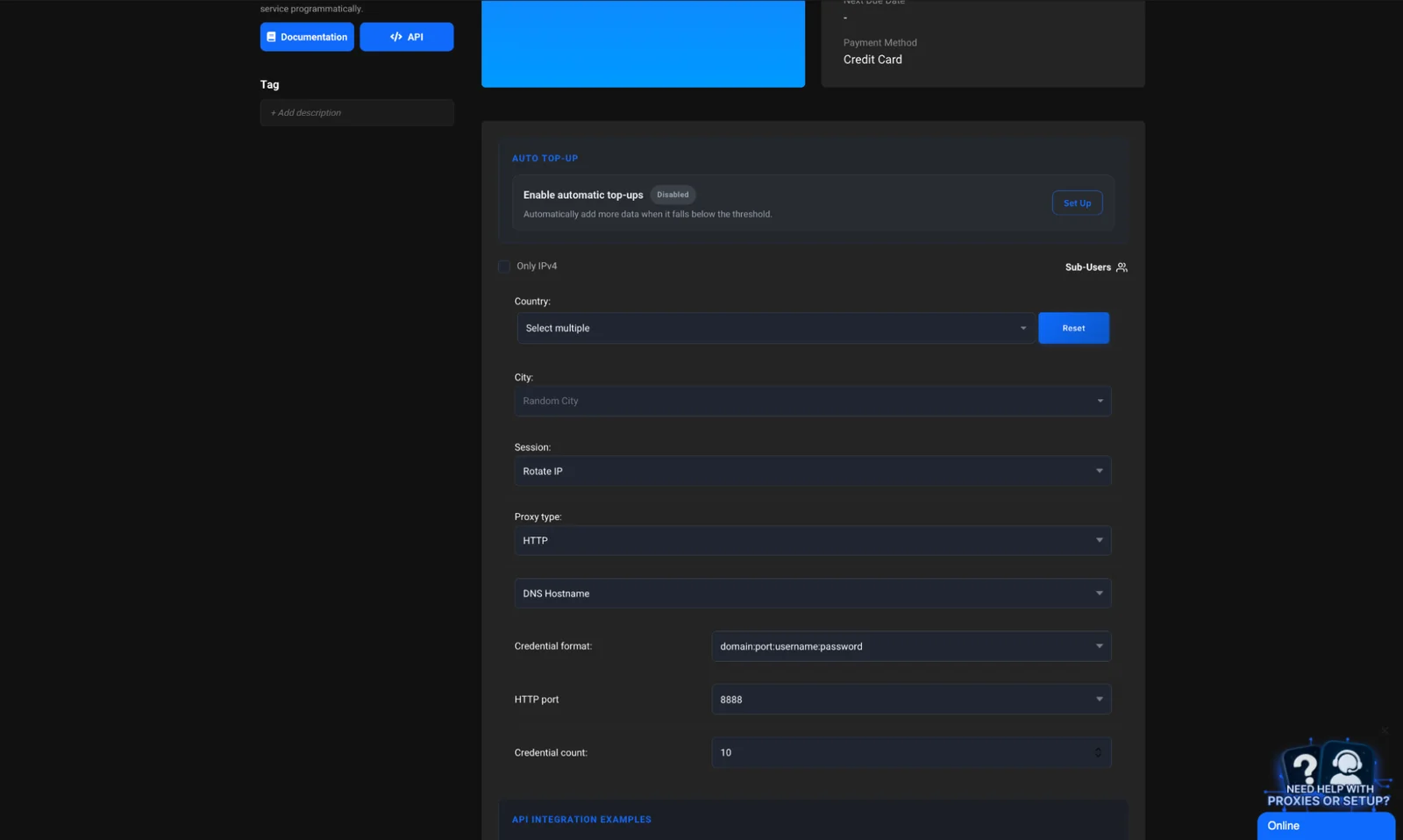
ProxyWing’s Standard residential plan costs $2.50 per GB and gets cheaper as you buy more, down to $1.00 per GB (a 60% discount) at 10,000+ GB. Traffic never expires, and every package includes geo-targeting in 190+ countries plus sticky and rotating sessions.
Troubleshooting setup errors
| Symptom | Fix |
|---|---|
| Wrong login or IP not whitelisted | Recheck credentials/whitelist in dashboard |
| HTTP set where SOCKS5 is needed | Switch protocol in browser/extension settings |
| Residential traffic used up | Top up GB balance |
| Chosen location also blocked | Try a different country/city |
| Proxy set in one browser, site opened in another | Match proxy config to the browser in use |
Before opening WatchSoMuch, confirm the outside world sees the proxy address and not yours. Check three things: which IP and country are detected on the IP checker, whether WebRTC leaks your real address on the WebRTC leak test, and whether DNS matches on the network test.
If your real address still shows, disable WebRTC or add a leak blocker and recheck. A successful check shows a residential address in the right country. A datacenter address gets flagged immediately.
The IP checker should show the proxy’s address, country, and ISP instead of your own, and flag no proxy, VPN, or Tor. If it warns about a time zone mismatch or gives a lower anonymity score, your device settings don’t match the proxy’s location, so set your time zone to match before you open WatchSoMuch.
With the proxy running, the rest is hygiene and troubleshooting. The checklist below covers in-browser WatchSoMuch viewing only.
Work through these eight items before you start watching. Most take seconds.
Checklist
| Action | Why | How to verify |
|---|---|---|
| Proxy on, IP verified | Removes your real IP from the picture | IP checker |
| Ad blocker enabled | Stops pop-ups and fake Play buttons | Check extension is active |
| Never install players/codecs | Site’s player works without them | N/A — just don’t |
| Never open .exe or similar files | Common malware vector | N/A |
| Antivirus up to date | Catches malicious downloads | Check last scan date |
| Separate browser profile | Isolates cookies/history | Use a dedicated profile |
| Clear cookies/cache regularly | Limits tracking | Browser settings |
| Don’t register with personal email/reused password | Limits fallout from a breach | Use a throwaway address |
Most WatchSoMuch problems fall into four buckets, each with a straightforward fix.
Problem/cause/fix
| Problem | Cause | Fix |
|---|---|---|
| Won’t open | ISP block | Proxy (see setup section above) |
| Buffering | Overloaded/distant node, or quality too high for the channel | Switch location, test speed, lower quality |
| Captcha/extra verification | Address already flagged | Enable rotation or switch proxy type |
| Wrong subtitles/audio | Mismatched track | Check description/comments before playing |
Cheap datacenter IP addresses and free nodes are a common cause of buffering and captchas. Switch to residential IPs if this persists. Residential IPs typically have higher trust scores, which makes them more reliable and stable to use.
If you want legal certainty, licensed services are the answer. If you want the rare international content WatchSoMuch is known for, a proxy plus regional platforms gets you closest. Almost every alternative below is region-locked, so the same proxy plan applies either way.
WatchSoMuch Alternatives Summary
| Service | Model | Legality | Proxy needed | Availability |
|---|---|---|---|---|
| Tubi TV | Free, ad-supported | Legal | Only if region-locked | US-focused, expanding |
| Pluto TV | Free, ad-supported | Legal | Only if region-locked | Multi-region |
| Sling Freestream | Free, ad-supported | Legal | Only if region-locked | US |
| Kanopy / Hoopla | Library card | Legal | No | US/Canada libraries |
Tubi, Pluto TV, and Sling Freestream are free with ads and carry zero legal risk, but they’re strictly region-locked and their catalogs are smaller than WatchSoMuch’s. Kanopy and Hoopla run through a public or university library card and are strong on indie films and documentaries.
Hard-to-find films are often available as legal rentals on YouTube. All of these only work from their own country. A residential IP in the right location opens them from the right country, entirely legally.
IPTV services let you watch channels without extra software, though legality depends on the operator. For context, legal use means accessing licensed platforms in a country where the content is officially available. Similar index sites do exist, but P2P downloading isn’t supported on ProxyWing proxies.
However, regardless of the platform you choose, you can use one ProxyWing plan. The residential proxies plan covers every platform at once, since residential traffic never expires and an unlimited ISP address needs no recalculation.
Its safety and legality depends on how and where you are watching it from. Ads, fake files, and an exposed IP remain real risks. The site indexes links rather than hosting files, but accessing copyrighted content without permission is unlawful in many countries. Check the legal status of your country and know the risks before accessing this platform.
If your ISP or region is blocking it, switching to an IP in an unrestricted country restores access via residential proxies. If the site itself is down, a proxy won’t help. Confirm whether the site is down by checking the web to see if users in other countries are facing similar issues.
It depends on your budget and streaming behavior. Residential proxies are great for occasional watching since they don’t have expiring traffic, though they are relatively pricey. ISP or datacenter for unlimited heavy viewing since they typically don’t have bandwidth caps. Use mobile proxies when nothing else works (they are the most expensive). See residential, ISP, datacenter, and mobile proxies.
Roughly 2–3 GB/hour at 1080p, 2–4 GB per movie, 5–8 GB for an evening of about three episodes. Residential traffic never expires, making it a great option for occasional viewers. Regular viewers can save with an unlimited ISP plan.
No, proxies are for browser and application traffic, so P2P downloads aren’t supported under the acceptable use policy. Reaching the site and watching in-browser is unrestricted.
Free proxies are typically unstable, slow, usually already blocklisted, and may sell your data. They should be a last resort at best (see why free proxies are a bad idea above). Paid entry starts at $1.00 per GB. Test any free list with the proxy checker.