IPs from real home connections
Each IP belongs to a real home connection on a real internet provider's network. Sites see an ordinary household visitor, not a server in a datacenter, so residential IPs clear checks that block hosting ranges.
Route your traffic through real residential IPs from home ISP networks, the same connections regular users browse on every day. ProxyWing gives you 70M+ residential IPs across 190+ countries on two plans built for any need, from everyday tasks to high-control sessions. Traffic never expires, country, city, and ISP targeting is included, and you pick rotating or static sessions over HTTP and SOCKS5.
Pay only for the traffic you use. Buy more, pay less per GB, and your traffic never expires.
| Gigabytes | Discount | Price per GB | Total Amount | Buy |
|---|---|---|---|---|
| 1 | - | $2.50 | $2.50 | Buy |
| 2 | 10% | $2.25 | Buy | |
| 10 | 15% | $2.13 | Buy | |
| 50 | 20% | $2.00 | Buy | |
| 100 | 25% | $1.88 | Buy | |
| 250 | 30% | $1.75 | Buy | |
| 500 | 35% | $1.63 | Buy | |
| 1000 | 40% | $1.50 | Buy | |
| 3000 | 45% | $1.38 | Buy | |
| 5000 | 50% | $1.25 | Buy | |
| 7500 | 55% | $1.13 | Buy | |
| 10000+ | 60% | $1.00 | Buy |
| Gigabytes | Discount | Price per GB | Total Amount | Buy |
|---|---|---|---|---|
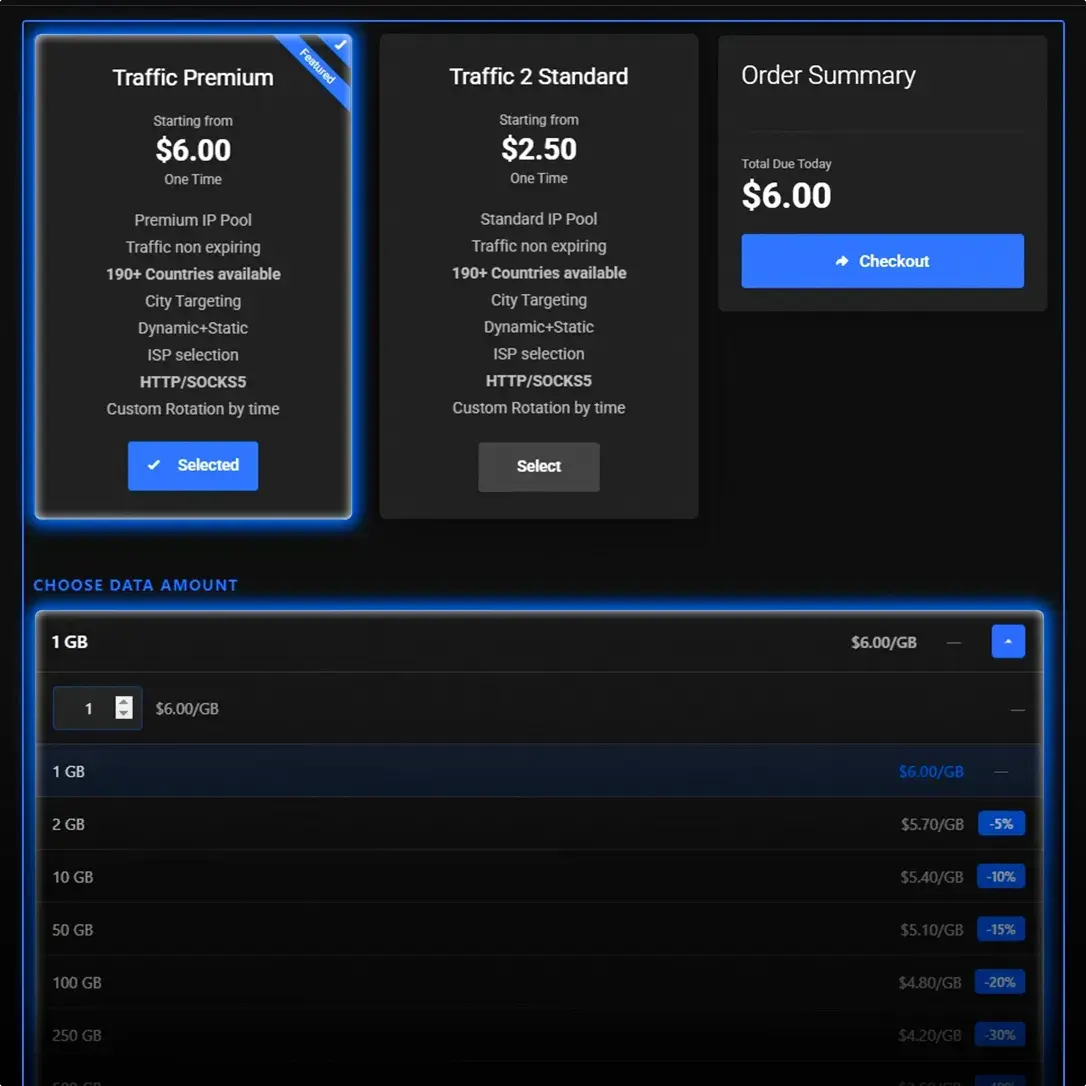
| 1 | - | $6.00 | $6.00 | Buy |
| 2 | 5% | $5.70 | Buy | |
| 10 | 10% | $5.40 | Buy | |
| 50 | 15% | $5.10 | Buy | |
| 100 | 20% | $4.80 | Buy | |
| 250 | 30% | $4.20 | Buy | |
| 500 | 40% | $3.60 | Buy | |
| 1000 | 45% | $3.30 | Buy | |
| 3000 | 55% | $2.70 | Buy | |
| 5000 | 60% | $2.40 | Buy | |
| 7500 | 65% | $2.10 | Buy | |
| 10000+ | 70% | $1.80 | Buy |
Need more traffic? Contact us for a custom offer.
Contact usPay with 100+ cryptocurrencies, cards (Visa, Mastercard, Amex, Discover), PayPal, Klarna, Kakao Pay, or UPI. Top up your account balance and turn on auto top-up so you never run out of traffic mid-task.
 Bitcoin
 Ethereum
 Solana
 Litecoin
 XRP
XRP Tron
Tron Visa
Visa Mastercard
Numbers from our own monitoring, measured on real residential endpoints and refreshed regularly.
Three things make residential IPs behave like ordinary home users: the IPs belong to real ISP subscribers, you control how they rotate, and you target by location and operator.
Each IP belongs to a real home connection on a real internet provider's network. Sites see an ordinary household visitor, not a server in a datacenter, so residential IPs clear checks that block hosting ranges.
Pick rotating IPs for scale, or a static session that holds one IP while you work. Set the TTL yourself: up to 1000 minutes on Standard, up to 7 days on Premium. Keep one address for a login flow, or cycle through fresh IPs for wide collection.
Narrow your pool to a country, a city, or a specific internet provider, included in every plan. Match the network your target audience actually uses, with no surcharge for finer targeting.
Reach real residential IPs in 190+ countries. Pick a location, target down to the city and ISP, and route your traffic through addresses that look local to your target.
 United States 3,420,000 IPs
 India 2,330,000 IPs
 Germany 2,347,129 IPs
 United Kingdom 1,364,739 IPs
 France 938,458 IPs
 Netherlands 1,574,293 IPs
 Poland 965,489 IPs
 Spain 823,485 IPs
 Ukraine 754,983 IPs
 Romania 657,872 IPs
 Lithuania 580,283 IPs
 Italy 338,094 IPs
 Switzerland 325,483 IPs
 Australia 280,000 IPs
 Canada 260,000 IPs
 China 9,180,000 IPs
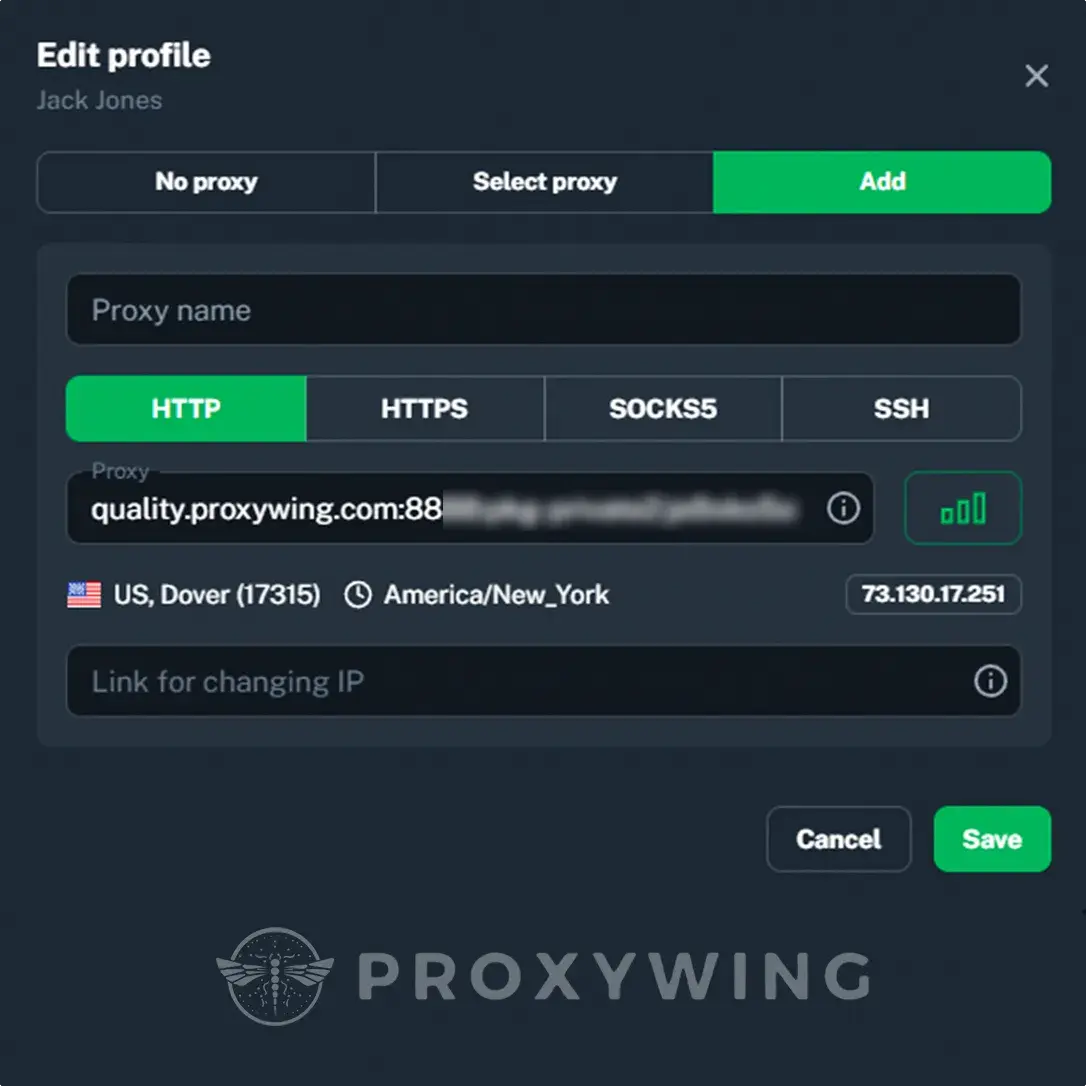
Plug ProxyWing residential proxies into the antidetect browsers, scraping frameworks, and proxy managers your team already uses.
 Vision
 AdsPower
 Dolphin Anty
 GoLogin
 Octo Browser
 Selenium
 Puppeteer
 Playwright
 Scrapy
 Proxifier
Choose how your IP behaves. Rotate through fresh IPs for scale, or hold one IP with a static session while you finish a task.
Each request can go out through a different residential IP. Best for wide data collection, price monitoring, and any job where you want to spread load across many addresses. One set of credentials, many exit IPs.
Hold one IP for the length of a session and set the TTL yourself. Standard supports a TTL up to 1000 minutes. Premium up to 7 days, set in seconds, minutes, hours, or days. The same IP stays with you for as long as the network allows, which suits logins, checkout flows, and account management.
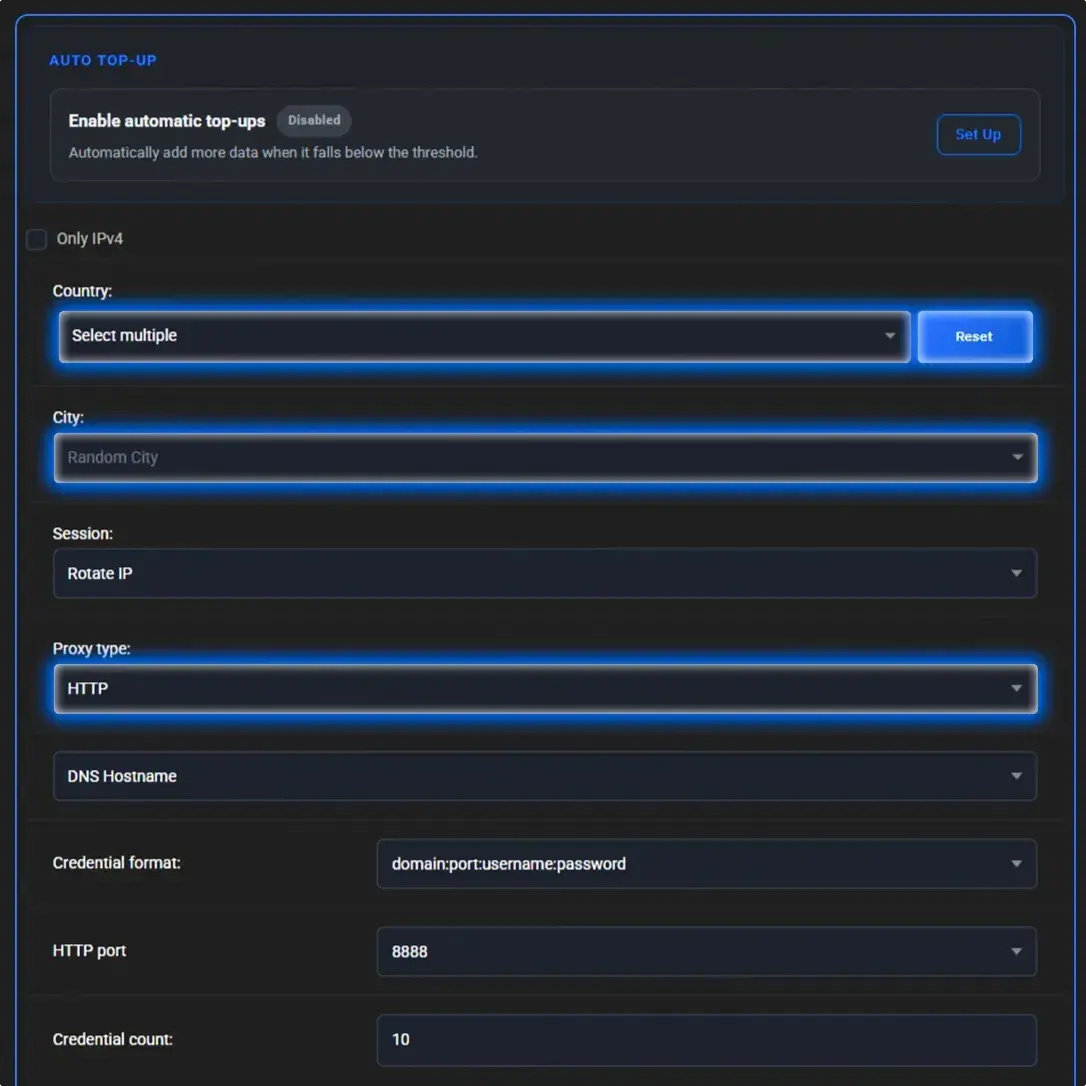
Provision and manage residential, ISP, datacenter, and mobile proxies straight from your code. Order proxies, read live credentials and usage, set targeting and rotation, and generate ready-to-use proxy strings - all over one REST API.
curl -X POST "https://api.proxywing.com/v1/residential/services/{svc_id}/generate-proxy-list" \
  -H "Authorization: Bearer pk_live_XXXXXXXX" \
  -H "Content-Type: application/json" \
-d '{"count":2,"protocol":"http","country":"US","session":"sticky","session_ttl":"10m"}'{
"gateway": "quality.proxywing.com",
"port": 8888,
"protocol": "http",
"count": 2,
"proxies": [
"quality.proxywing.com:8888:pkg-private2-pool-onlyipv4-country-US-session-a1b2c3d4-ttl-10:sample_password",
"quality.proxywing.com:8888:pkg-private2-pool-onlyipv4-country-US-session-e5f6g7h8-ttl-10:sample_password"
]
}Control traffic, targeting, sessions, and credentials from one dashboard built for daily residential proxy work.
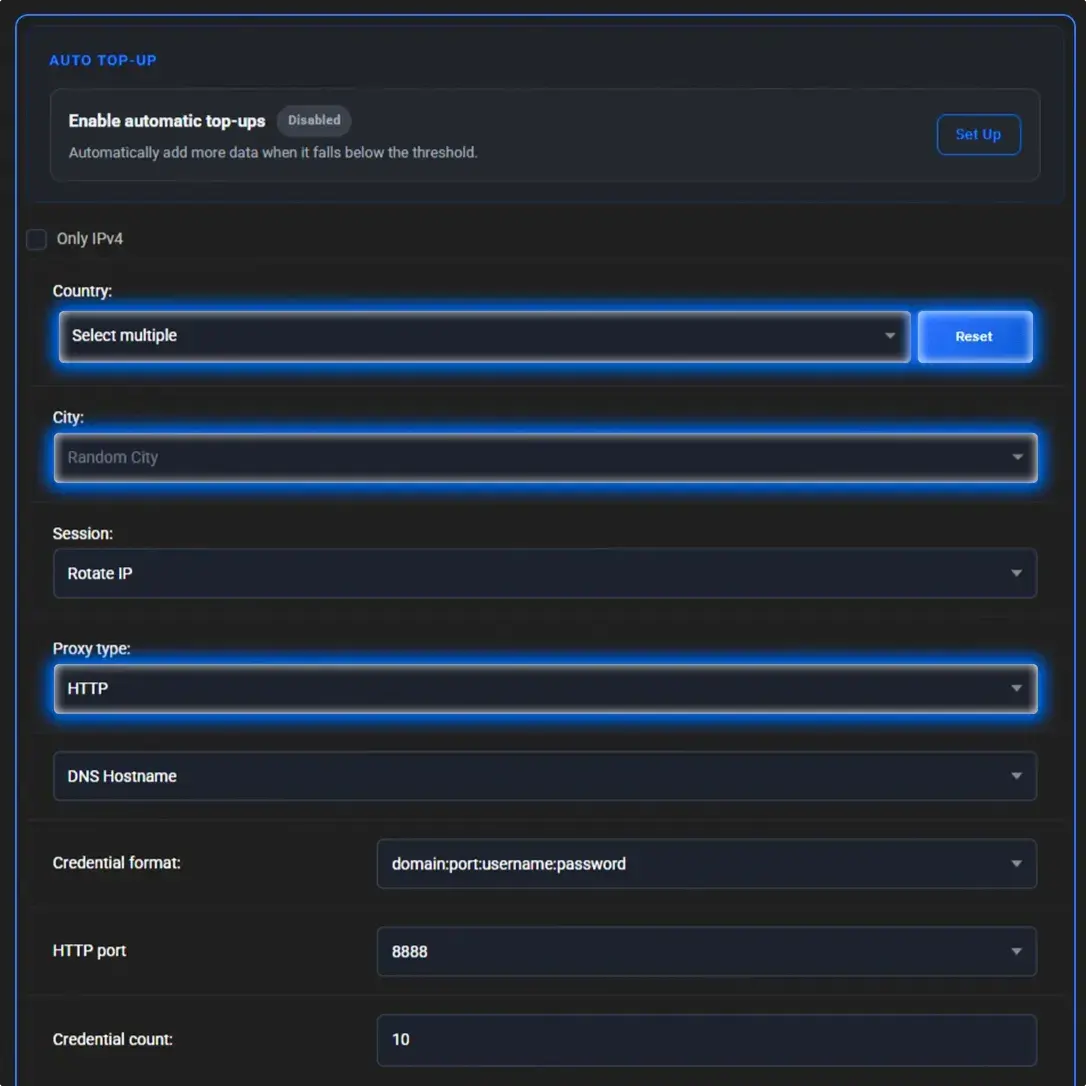
Residential IPs read as ordinary home users, which makes them the right tool for data collection, research, and localized testing at scale.

Collect data from sites with anti-bot protection, using a clean residential IP per request.
Go to page
Track keyword rankings and read search results the way real users in a region see them.
Go to page
Check how ads render by country and city, and spot click fraud across regions.
Go to page
Gather real-time flight and hotel data and track price changes across markets.
Go to page
Run many profiles with a clean residential IP per account, with fewer bans.
Go to page
Monitor counterfeits and track unauthorized sellers across regions and marketplaces.
Go to pageRun competitor analysis, SEO monitoring, and multi-account marketing campaigns.
Go to page
Feed AI pipelines with large, geo-diverse datasets collected through real IPs.
Go to pageMonitor listings, stock, and pricing across Amazon marketplaces from any location.
Go to pageCollect SERP data and run localized search research without triggering blocks.
Go to page
Boost your social media presence and manage accounts on high-trust residential IPs.
Go to pageBypass geo-restrictions and web blocks for unrestricted access to online content.
Go to pageReal residential IPs on two plans, with country, city, and ISP targeting, rotating and static sessions, traffic that never expires, HTTP and SOCKS5 support, and 24/7 support.
70M+ IPs that belong to real home connections on real ISP networks. Sites see an ordinary household visitor, not a datacenter server, so these IPs clear checks that block hosting ranges.
Standard from $1.00/GB for everyday work, Premium for tighter control: longer TTL, more ports, traffic logging, and IP skipping. Pick the plan that matches your task and budget.
Pay as you go and keep what you buy. Your traffic stays in your account until you use it, with no monthly reset and no subscription.
Narrow your pool to a country, a city, or a specific internet provider. Targeting is included in every plan, with no surcharge for finer location control.
Rotate through fresh IPs for scale, or hold one IP with a static session and set the TTL yourself: up to 1000 minutes on Standard, up to 7 days on Premium.
Connect browsers, anti-detect tools, scrapers, and scripts. Both protocols work with login and password authentication across every plan.
Generate as many proxies as you need from one account. In rotating mode, one set of credentials gives you many exit IPs.
Real human support through live chat, Discord, and Telegram, ready to help with setup, targeting, and any question at any time.
Compared on the practical details buyers review when choosing a residential proxy provider. Competitor figures are public entry-level list prices and can change.
| Comparison Criteria | ProxyWing | Ox***** | B****D*** |
|---|---|---|---|
| Volume price | From $1.00/GB | From $2.00/GB committed | From $2.50/GB committed |
| Entry price | $2.50/GB (min 1 GB) | $6.00 (min 5 GB) | $8.00 (min 1 GB) |
| Traffic expiry | Never expires | Monthly reset | Monthly reset |
| Pricing model | Pay as you go, no subscription | Subscription tiers | Pay as you go or committed |
| Targeting | Country, city, and ISP included | Country, city, ASN included | Country included, city is a paid add-on |
| Static session TTL | Up to 7 days | Up to 24 hours | Configurable sticky |
| Account access | No KYC, instant start | KYC for full access | KYC required |
Choose your plan and traffic volume, and see your price instantly. Volume discounts are applied automatically, and your traffic never expires.
Residential proxies use home ISP networks, ISP proxies are residential-grade IPs hosted on servers, datacenter proxies use server-hosted IPs, and mobile proxies use cellular carrier IPs. In each row, 1 marks the best fit and 4 the weakest.
| Residential | ISP | Datacenter | Mobile | |
|---|---|---|---|---|
| IP source | Home ISP networks and household devices | Residential-grade IPs hosted on servers | Hosting providers and server data centers | Mobile carriers and cellular networks |
| Trust score | High and suitable for most websites | High, with a fixed server-hosted IP | Lower on sites that flag hosting ranges | Highest, helped by real carrier traffic |
| Block resistance | Good across most anti-bot systems | Good, but a static IP is easier to track | Weakest on strict anti-bot systems | Strongest, even on the hardest targets |
| Speed | Stable for browsing, scraping, research | Fast, server-hosted connection | Fastest and most predictable for bulk tasks | Varies by carrier and location |
| Price | Higher per GB, traffic never expires | Lower on volume, unlimited traffic per IP | Lowest cost for high-volume automation | Highest cost, priced per IP |
| Session control | Rotation and static sessions with TTL | Static, long-lived sessions | Static sessions | Rotation by timer, link, or button |
| Best use cases | Web scraping, SEO, market research, price monitoring | Account management, long sessions, secure browsing | Bulk crawling, uptime checks, speed-heavy scraping | Social accounts, app testing, strict anti-bot targets |
| Residential proxies | ISP proxies | Datacenter proxies | Mobile proxies |
Don't take our word for it. Here is actual feedback from our customers. Powering over 70,000 proxy users.

Jose R.
March 28, 2026
I use ProxyWing residential proxies almost every day to validate perspective and to ensure that our product listings and offers are live and correct on major online retailers such as - Amazon, Walmart & Target

Tom B.
December 22, 2025
I use ProxyWing residential proxies every day to visit tech blogs, academic papers and competitor websites IN ANOTHER COUNTRY

John S.
December 13, 2025
I can easily get a local residential IP from any city in my coverage area to test local search results, competitor ads and event pages. Implementation was instant.

Jenn C.
December 10, 2025
I use ProxyWing's worldwide residential IPs to verify my AI Software Company's product performance and localization pre-deployment as a Product Marketer

Jeremy W.
March 8, 2026
The offering of features, ISP proxies for speed and residential for quality included, can handle everything from IP warming (email marketing) to ad testing (social media)

Helen W.
April 6, 2026
For what we need to do, nothing compares to their global residential IP network and how easy it is to work with them.
Every IP address traces back to whoever it was allocated to. A residential IP went to a household subscriber from their internet provider; a datacenter IP went to a hosting company. A residential proxy routes your request through the first kind, so the site sees an address belonging to somebody’s home broadband line rather than a server rack. Who the address is registered to is exactly what anti-bot systems check, and it is the entire reason the two types get treated differently.
No provider owns the home connections it routes through. A residential pool is built from people who opt in to share bandwidth through a clearly disclosed app or SDK, in return for a free service or a payment, and an address leaves the pool when that consent ends. This is what makes suspiciously cheap pools cheap: the alternative is harvesting addresses from botnets, malware-bundled SDKs and compromised devices, which arrive already listed on major blocklists and put the buyer in the path of legal risk.
“Dedicated” describes exclusivity, not the source of the IP. A dedicated proxy is an address reserved for one customer, and underneath it can be residential, ISP or datacenter. So “residential vs dedicated” is not a like-for-like question. The two things worth asking are who else uses the address and where it comes from. For most account and login work, what people actually want is a static residential session, not a separate product.
Basic e-commerce pages, public datasets, simple geo-checks and uptime monitoring rarely inspect the IP at all, and datacenter proxies handle them faster and far cheaper per request. Residential earns its price on hard targets: search results at scale, major social platforms, sneaker and ticketing sites. The same is true wherever the answer itself depends on where the request appears to come from. Paying residential rates to fetch a page that never checks is just an expensive way to fetch a page.
Two providers can sell the same residential proxies and return completely different success rates on your target, because the label says nothing about how the pool was built or how it is maintained. Ask any provider, us included, to describe its sourcing model in specific terms, and verify the performance claims rather than taking them on trust. Vagueness on either count is itself an answer.
Buy the smallest volume a provider sells and run these three checks on its residential proxies against the sites you actually plan to work with. Testing against a provider’s own demo page or a generic IP-lookup tool proves nothing, because neither runs the anti-bot systems you are buying residential proxies to get past. You can run all three against ProxyWing.
Beyond sensible pacing and rotation, four operating details decide whether a long job holds up.
Awards, which we received from our customers





Our residential network covers 70M+ IP addresses across 190+ countries. Traffic runs through managed access controls and monitored infrastructure, with abuse prevention and account safeguards in place.

Residential proxies are proxy servers that use real IP addresses assigned by internet providers to home users. Your request goes from your app to the proxy, the proxy forwards it to the target site, and the response comes back the same way. The site sees the provider's residential address, not your own IP. Because the address belongs to a real home connection on a real ISP network, the site treats the traffic as an ordinary visitor rather than automation, which is the main difference from datacenter proxies. The IPs in our pool are sourced ethically and lawfully.
Yes, when used for lawful purposes and within the terms of the sites you work with. Legality depends on how you use them and on the laws in your country or target region. Residential proxies are commonly used for market research, brand protection, ad verification, and ethical web scraping. Use of ProxyWing is governed by our acceptable use policy, and you are responsible for staying compliant with the laws that apply to you.
Residential proxies are safe when they come from a responsible provider and are used within applicable policies and laws. What makes a provider trustworthy: IPs sourced ethically and lawfully, login and password authentication, and no logging of your traffic. Free or unknown proxies carry real risk, because you cannot verify where the IPs come from or what happens to the traffic that passes through them. ProxyWing runs managed access controls and monitored infrastructure, with abuse prevention and account safeguards in place.
It depends on whether you need to spread requests across many IPs or hold one address. Rotating sessions give you a fresh IP per request, which suits wide data collection, price monitoring, and large-scale scraping. Static sessions hold one IP for the length of a session, with a TTL you set yourself: up to 1000 minutes on Standard and up to 7 days on Premium. Use static for logins, checkout flows, and account management, where the IP should stay stable. A quick guide: bulk scraping - rotating. Account management - static Ad verification - static within a region. In the API, static sessions are referred to as sticky sessions.
Residential proxies fit any task where traffic needs to read as an ordinary home user: • Web scraping and public data collection at scale, with a clean IP per request. • Multi-account management, with a separate residential IP per profile and fewer bans. • Ad verification, checking how ads render by country and city and spotting click fraud. • Price and competitor monitoring across regions and marketplaces. • SEO monitoring, reading search results the way real users in a region see them. • Access to geo-restricted content for testing and research. • Brand protection, tracking counterfeits and unauthorized sellers. ProxyWing supports all of these scenarios on both plans.
Residential proxies are much harder to detect than datacenter proxies, because the addresses belong to real ISP networks rather than hosting ranges. Detection is still possible when request patterns look abnormal: unusual request frequency, atypical browser fingerprints, or aggressive behavior. You lower the risk with sensible IP rotation, reasonable intervals between requests, and correct headers. Our pool of 70M+ IPs spreads your traffic across many addresses, which reduces the chance of any single IP being flagged.
Channel speed averages up to 300 Mbps, higher in well-connected regions and lower in others. Actual speed depends on the target region, the session type (rotating or static), and current pool load. Speed matters because it affects success rate on scraping jobs and the throughput of automated tasks. A large IP pool helps keep performance stable, since load is spread across millions of addresses rather than concentrated on a few.
ProxyWing covers 190+ countries, with real residential IPs across every major region: North America, Europe, and Asia among them. You can target by country, city, and ISP (the specific operator). One thing to keep in mind: the finer your geo-targeting, the smaller the available pool at that level, so for most tasks country-level targeting gives the best balance of precision and pool size. Drop down to city or operator when the task genuinely needs it.
Traffic use depends on the task: the number of target pages, request frequency, and the average weight of each response. As a rough guide, light HTML scraping runs about 1 to 2 MB per request, while media-heavy pages use more. The practical approach is to start with a smaller amount, measure your real consumption, and scale from there. Since ProxyWing traffic never expires, you can buy a larger volume without risk of losing unused gigabytes, and larger volumes get automatic discounts. If your task is unusual, contact support and we will help you size it.
Your traffic never expires. There is no monthly reset and no subscription, so unused gigabytes stay in your account until you use them, whether that is next week or a year from now. This means you can buy in bulk with confidence, take advantage of volume discounts, and use the traffic at your own pace. You can also turn on auto top-up from your balance or card so you never run out mid-task.
Yes. ProxyWing works with any tool that supports HTTP, HTTPS, or SOCKS5, including Scrapy, Selenium, Puppeteer, Playwright, anti-detect browsers, and custom scripts in Python, Node.js, or any other language. Integration uses standard connection parameters: host, port, username, and password, with no extra SDK to install. You will find setup examples for popular tools in your ProxyWing dashboard.
On iPhone: Settings to Wi-Fi, tap your network, scroll to HTTP Proxy, choose Manual, and enter the host and port; add your username and password for authentication. On Android: Settings to Wi-Fi, press and hold your network, choose Modify Network, open Advanced Options, set Proxy to Manual, and enter the host and port. Both devices use the same credentials from your ProxyWing dashboard. Full step-by-step guides are in our blog.
Use a VPN to protect general browsing traffic on a device. Use residential proxies when your workflow needs rotating or static real IP addresses, location targeting, or integration with tools and scripts. A simple rule: personal privacy points to a VPN. Business tasks, automation, and multi-accounting point to proxies. If you need both, ProxyWing also offers a residential VPN service built on residential IPs.
ProxyWing does not run free trials, demos, or trial periods. Because traffic is priced per GB and never expires, the low-risk way to test the service is to buy a small amount, such as 1 GB, and run it against your real task. If it fits, top up for more and take advantage of volume discounts. There is nothing to subscribe to and nothing to cancel.
ProxyWing accepts 100+ cryptocurrencies, cards (Visa, Mastercard, Amex, Discover), and options including Klarna, Kakao Pay, and UPI. Crypto support is broad, which suits users who prefer to pay that way. You top up your account balance and can enable auto top-up so traffic never runs out mid-task.
ProxyWing gives you 70M+ residential IPs across 190+ countries on two plans, with country, city, and ISP targeting included, rotating and static sessions with custom TTL, HTTP and SOCKS5 support, and traffic that never expires. Our own monitoring shows a 99.5% success rate, 0.6s average response time, and 99% uptime. Support is available 24/7 via live chat, Discord, and Telegram. Start with 1 GB and scale as you grow.
Yes. ProxyWing has a full REST API for provisioning and account management. You can order traffic, top up a service, read traffic usage, set auto top-up, and generate ready-to-use proxy lists with country, city, and ISP targeting and rotating or sticky sessions. Requests go over HTTPS to one base URL with Bearer-key authentication. Order and top-up writes are idempotent, and the rate limit is 600 requests per minute. Get your API key in the dashboard under Account, and see the full reference in our API documentation.
It depends on the size of the pool rather than on any fixed number. A large, well-managed pool spreads usage thinly across millions of addresses, so an individual IP carries less traffic and is less likely to be overloaded or flagged. A small pool concentrates the same volume on far fewer addresses, which is why pool size affects success rate.
Fewer than most people expect. Ad verification, SEO checks and localized testing often need only one correctly targeted address at a time. Light scraping runs comfortably on a few thousand. Millions matter only for high-volume concurrent collection against major platforms, where repeat use of the same address is what triggers bans.
A static residential session holds one address from our pool for a TTL you set, billed per gigabyte like the rest of your traffic. A truly dedicated IP is reserved for you alone and is usually an ISP or datacenter product, sold at a flat monthly price per address. Pick by billing shape and session length, not by the label.