
Best Proxies for OnlyFans in 2026
22.10.2026 12 min
For the last couple of years, SOCKS5 proxies have been getting more popular and pretty much the standard, thanks to their flexibility. Proxies using the SOCKS5 protocol can handle both web and UDP traffic, making them the best solution for a wide range of proxy use cases.
SOCKS proxies can also be used on all the popular platforms, including Android, iPhone, and even browsers like Chrome and Firefox.
In today’s guide, we will discuss in detail how to use SOCKS5 proxy solutions. We will also cover the setup process, their practical use cases, benefits, and more. If you’re into proxies, this guide is for you. Make sure you read till the end.
SOCKS (Socket Secure) is a network protocol that routes traffic through an intermediary proxy server. Unlike HTTP proxies, SOCKS operates at a lower network level and doesn’t modify traffic, which makes it compatible with virtually any application or protocol. Since it operates at a lower layer, it can handle several kinds of traffic and maintains the fastest connection speeds compared to protocols.
The table below shows the main differences between these two SOCKS protocols:
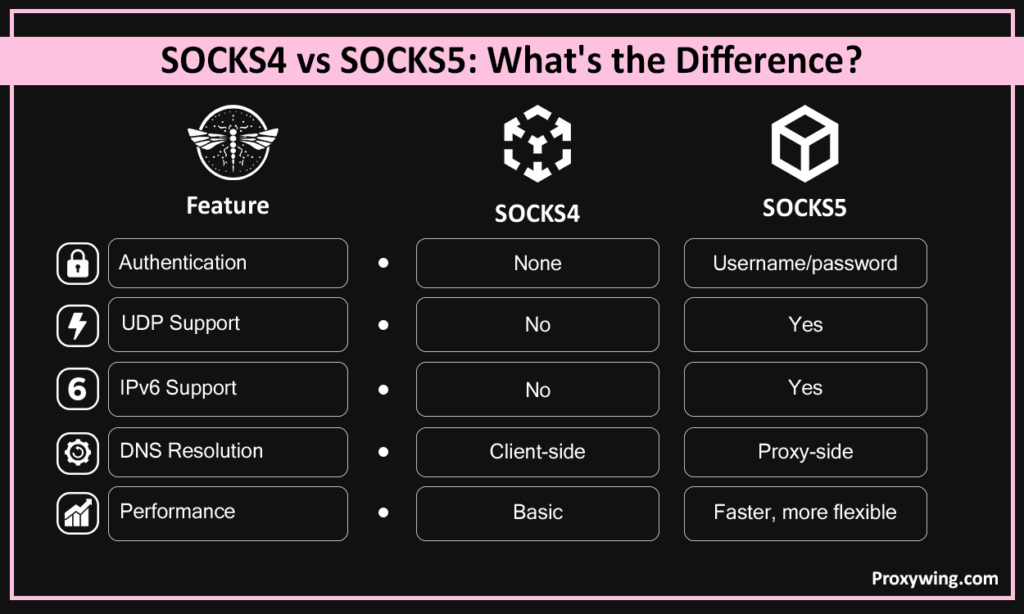
| Feature | SOCKS4 | SOCKS5 |
| Authentication | None | Username/password |
| UDP Support | No | Yes |
| IPv6 Support | No | Yes |
| DNS Resolution | Client-side | Proxy-side |
| Performance | Basic | Faster, more flexible |
SOCKS5 is the newer standard for this protocol. It added several capabilities, including UDP and IPV6 support and authentication, enabling more secure connections. With SOCKS5 proxies, DNS resolution happens on the proxy side and not the client side, which makes it harder for third parties to monitor your browsing activity through DNS leaks.
Your client connects to the SOCKS5 proxy, which then connects to the destination on your behalf. The destination sees the proxy’s IP and not yours. Unlike an HTTP(S) proxy that only handles HTTP and HTTPS traffic alone, a SOCKS5 proxy ensures that all internet traffic passes through this intermediary regardless of application or protocol type.
SOCKS5 proxies handle both TCP (web browsing, scraping) and UDP (gaming, VoIP, streaming). This dual-protocol support makes it one of the most versatile proxy options available. That’s why SOCKS5 proxies are the best option for use cases like gaming and streaming that involve other types of traffic.
SOCKS5 proxies support username/password authentication or IP whitelisting, which restricts access to only authorized users. SOCKS4 has no authentication layer at all. IP whitelisting is the best choice if your client relies on the same IP address for extended periods. If you intend to use different networks, then username/password authentication makes more sense.
SOCKS5 proxies distribute different requirements across multiple IP addresses, which reduces ban and rate-limit risk. It’s also compatible with most frameworks for scraping and automation tools, reducing the heavy lifting you need to do to get everything running.
A SOCKS5 proxy routes file transfer traffic through an intermediary server, masking the origin IP before sending this traffic to the destination online services. This is useful for privacy-sensitive transfers over FTP or similar networking protocols.
SOCKS5 proxies route your network traffic through stable networks and enable access to region-locked servers. UDP support is essential here, as most gaming traffic is UDP-based, providing the fastest internet connection speeds than you may need with other applications.
SOCKS5 proxies let users appear in a different region, bypassing geo-restrictions on streaming platforms without modifying the traffic itself. They also offer faster connections than VPN since they don’t include the encryption layer.
SOCKS5 proxies mask your real IP address at the network level, which makes it hard for online services and trackers to identify your location or link sessions back to you.
This section of the guide will cover the standard steps you will go through when configuring SOCKS5 proxies in different Operating Systems and browsers.
If you need full SOCKS5 proxy support, use a tool like Proxifier. Windows native settings are HTTP-only.
Unlike Windows, macOS does offer an option to choose your preferred protocols with options, including SOCKS5. Getting started with SOCKS5 proxies on macOS? These are the set up steps you can use:
Via terminal:
Run the command below in your terminal:
exportSOCKS5_PROXY="socks5://username:password@proxy_ip:port"Replace all the above parameters in the command with the proxy details acquired from your provider.
Or use Proxychains:
socks5 proxy_ip port username passwordAndroid doesn’t natively support SOCKS5 proxies. For SOCKS5 proxies specifically, use apps like Shadowsocks if you need your proxies to handle all the connection protocols enabled by SOCKS5.
Use any of the compatible proxy apps for SOCKS5. iOS native settings are HTTP-only.
Chrome uses OS proxy settings — no independent configuration. For SOCKS5 proxies, use the command line:
chrome --proxy-server="socks5://proxy_ip:port"For quick setup, use ProxyWing Proxy Manager—a convenient proxy extension.
Unlike most web browsers that rely on system networking settings, Firefox has its own proxy settings. To get started using SOCKS5 proxies with Firefox, follow these steps:
The ProxyWing Proxy Manager extension is also available in the Firefox browser.
Edge uses system proxy settings like Chrome. For SOCKS5 proxies, use the command below:
msedge --proxy-server="socks5://proxy_ip:port"Safari also uses macOS system proxy settings. To use SOCKS proxies, follow these steps in System settings:
Use an IP checker like ProxyWing’s proxy tester, Proxywing IP-checker, or ipleak.net. These tools display the current IP address of your traffic, location, and ISP.
If the proxy is working, it will display the IP address and location of the proxy and not your real one.
These are usually caused by entering incorrect proxy IP, wrong port, or a firewall blocking the proxy port. Always double-check all settings and confirm the port is open on your network.
Slow connection speeds are typically caused by an overloaded server or poor routing between your client and the proxy. Move to a less congested IP or one closer to your destination. You may also consider using dedicated IPs over shared ones.
Occur when credentials are entered incorrectly or have expired. Make sure to re-enter details carefully and confirm your account is active with your provider.
The provider you choose will directly affect the speed, uptime, and security of the proxy service. When making your choice, always prioritize uptime guarantees (at least 99%), low-latency infrastructure, verified IP pools, and responsive support. Avoid any provider that offers pools of shared or recycled IPs with poor reputations.
ProxyWing’s SOCKS5 proxies offer 99.99% uptime, sub-1-second latency, and full SOCKS5 support for their ISP, datacenter, and residential proxy solutions. With prices starting at $0.90/month, ProxyWing is one of the best and accessible choices for SOCKS5 proxies.
SOCKS5 proxies offer the flexibility, online security, and performance that you may not get with HTTP(S) or other proxy types. Using SOCKS5 proxies allows you to manage different types of tasks without encountering limitations. Whether your project involves web or UDP traffic, SOCKS5 supports them both and many more.
Proper configurations for your proxies ensures traffic flows correctly. However, the overall performance depends on the infrastructure behind the proxy. That’s why it is crucial to select a proxy vendor with verified, low-latency networks and clean dedicated IPs for the best results.
Article written by:

Head of Partnerships
Leads partnerships at Proxywing with hands-on knowledge of residential, ISP, datacenter, and mobile proxies. Works with affiliates, bloggers, and tech communities, bridging tech and partner needs.
All articles by author (23)SOCKS5 doesn’t modify or log traffic, which makes it less intrusive than HTTP proxies. Safety ultimately depends on the provider’s infrastructure and their logging policies. Make sure you choose a trusted provider.
No, it doesn’t. SOCKS5 masks your IP but doesn’t encrypt traffic. For encryption, pair it with SSH tunneling or a TLS-based tool.
When enabled, VPNs encrypt all traffic leaving your device, securing your digital footprint. A SOCKS5 proxy on the other hand, routes specific application traffic without encryption. The main benefit of these proxies is that they give users more flexibility and speed for targeted use cases.
Yes, they can. SOCKS5 routes network traffic through a server in a remote location, making the target website see a different IP and region. It can also be used to bypass network restriction in organizations.
Yes, you can. UDP support makes SOCKS5 proxies suitable for streaming, and it can route traffic through a server in the required region without significantly impacting speed.