Best Reddit Proxy 2026: Top Choices for Multi-Account, Karma Farming, and Avoiding Bans
28.09.2026 11 min
If you need more freedom and privacy while using the internet, using proxies is one of the most effective ways to achieve that. Datacenter and residential proxies are the two popular types of proxies that you can choose from depending on your needs. However, these two proxy types have several differences that you need to know about before making your choice.
In this “residential proxy vs datacenter proxy” guide, we will unpack all the key differences to consider when making this choice. So, without further ado, let’s get started with this proxy comparison.
A datacenter proxy is a proxy type that routes your internet traffic through IPs of servers in datacenters before forwarding it to the target website or online service you intend to access. In the process, the real IP of the user’s devices is replaced with the proxy server’s IP.
Datacenter proxies work by routing your internet requests through dedicated servers hosted in data centers. These proxy servers use virtual IP addresses that are generated by cloud providers and hosting companies. .
So, when you send a request, it goes from your device to the proxy server, then to the target website, and the response comes back using the same path. This process ensures that the real IPs of your devices are hidden from all the online services you use.
Some of the common real world applications of datacenter proxies include:
| Factor | Datacenter Proxies | Residential Proxies |
|---|---|---|
| IP source | Servers in data centers | Real devices on home ISPs |
| Detection risk | Higher — easy to flag in bulk | Low — look like normal users |
| Speed | Very fast, low latency | Slower, depends on the host device |
| Success rate on hard targets | Lower on sites with strong anti-bot | Higher, including Cloudflare-heavy sites |
| Pricing model | Per IP or per port, cheap | Per GB of traffic, more expensive |
| Best for | High-speed tasks on tolerant sites | Hard targets, geo-accuracy, account work |
Short version: datacenter proxies are faster and cheaper but easier to block. Residential proxies cost more and run slower, but they pass detection on sites that block datacenter IPs. The rest of this guide breaks down each factor so you can match the proxy type to your task.
A residential proxy is the proxy type that routes your requests through the IP addresses of real home devices before sending it to the target website or online service. When using residential proxies, your real IP address is replaced with IPs of these home devices, making it more anonymous.
Residential proxies work by routing your traffic through real home or mobile devices before sending it to the target endpoint. This is often done using peer-to-peer networks or apps and SDKs installed on user devices.
When your traffic goes through one of these devices, it looks like normal human browsing activity. To websites, your traffic appears natural because it comes from real ISP-assigned proxy IPs, making it less likely to be blocked. This makes residential proxies less prone to IP bans.
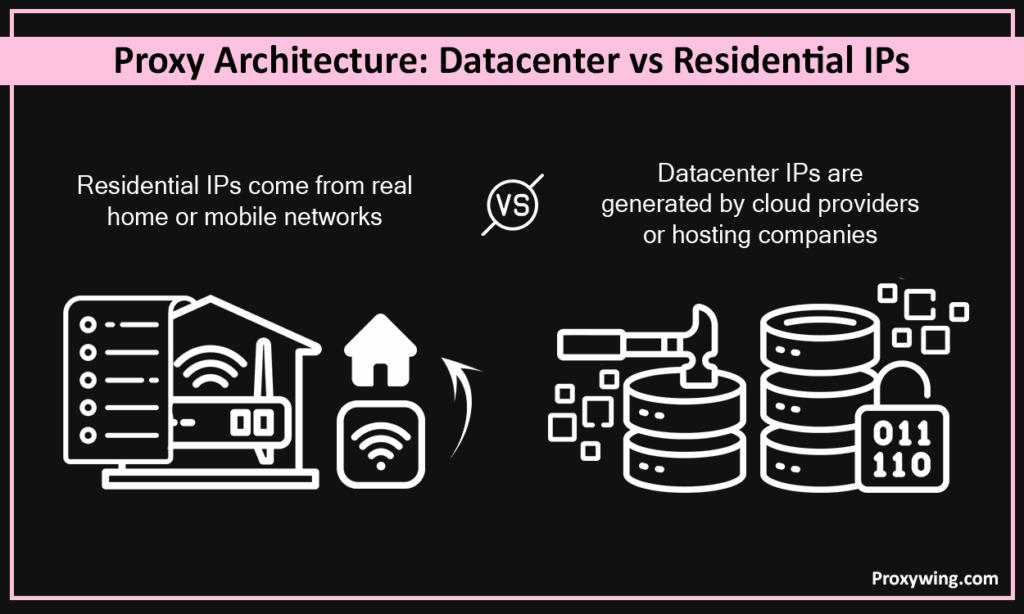
As discussed earlier, the key difference between datacenter and residential proxies comes down to the source of their IP addresses and how the traffic is routed. Datacenter IPs are generated by cloud providers or hosting companies.
On the other hand residential proxy IPs come from real home or mobile networks and are assigned by ISPs. This difference affects performance, risk of IP bans, and how websites see the traffic.
Datacenter proxies run on powerful servers hosted in large data centers, offering faster speeds and stability. These servers host thousands of virtual IP addresses that are owned by cloud providers and hosting companies and not ISPs. The infrastructure of these proxies is designed to prioritize speed, uptime, and scale.
Because many users share the same server environment and IP ranges, websites can easily recognize these proxy IPs as coming from a data center. Datacenter proxies also offer less flexibility when it comes to location since there are way fewer datacenters when compared to home devices.
Residential proxies operate by routing your traffic through IPs of real home and mobile internet connected devices. The IPs of these devices are assigned by ISPs , which make them more trusted by websites. Traffic is routed through these real networks, often using peer-to-peer systems or approved SDKs.
This makes it easier for providers to offer millions of IPs in several regions since they are much easier to source when compared to datacenter IPs.
In this section, we will break down the most crucial factors users look at when choosing between residential and datacenter proxies.
Datacenter proxies use IP addresses owned by hosting companies or cloud providers. These IPs have a lower reputation because websites know they are not tied to real users, so they can often.
block them. Users using shared datacenter IPs face an even higher risk of IP bans. Sharing IPs also affects the security and privacy of your connections.
Residential proxies use ISP-assigned IPs linked to real devices such as mobile phones, routers, and laptops. Since the IPs are sourced from real home devices, they have a higher reputation and are less likely to be blocked.
Datacenter proxies usually offer the fastest speeds and lower latency because they run on high-performance servers with strong network connections. This makes them ideal for tasks like large scale data scraping where performance is the most important factor.
On the other hand, residential proxies are slightly slower since their traffic passes through real home or mobile networks, which can vary in quality and speed. For tasks that need the highest bandwidth and lowest latency possible, residential proxies may not be the ideal choice.
Datacenter proxies are generally cheaper and often sold at a flat monthly rate per IP or per plan. This makes them the best choice for users on a budget.
Residential proxies on the other hand are more expensive and are usually priced by bandwidth usage. The higher cost for residential proxies comes from sourcing real ISP IPs and the complexity of maintaining large residential networks.
Datacenter proxy pools are large but limited to fewer regions since providers only have access to a few datacenters.
In comparison, residential proxies offer massive IP pools spread across many countries, cities, and ISPs. For instance, ProxyWing’s residential proxies give users access to millions of IPs in more than 190 countries.
Datacenter proxies are easier to detect and block because their IP ranges are well known by most websites. Residential proxies on the other hand are much harder to identify since they blend in with normal user traffic.
Since datacenter proxies run on high performance infrastructure and networks, they are very stable and offer consistent uptime and predictable performance. Using dedicated datacenter IPs offers high speeds and more stable internet connections.
Residential proxies on the other hand can sometimes be less stable because they depend on mobile and home networks that can sometimes go offline or change IPs. Several residential proxy providers offer static residential IPs that may come in handy for several use cases. However for some tasks, rotating residential IPs can be a better choice. Rotating IPs also offer good anonymity, making it harder for sites to detect proxy usage.
From a compliance perspective, datacenter proxies are straightforward since they use IPs that are owned and controlled by the proxy providers. So, it is much easier for the providers to comply with regulations in various regions.
Residential proxies on the other may require more work since providers must obtain user consent and be transparent about how their networks work. To ensure compliance, it is crucial to choose a reputable proxy provider.
Detection is where the two types differ most. Datacenter IPs come from known server ranges, so anti-bot systems can identify and block them in bulk, sometimes by entire subnet. On sites with light protection this is fine. On sites running Cloudflare, Akamai, or similar systems, datacenter IPs hit CAPTCHAs and blocks far more often.
Residential IPs belong to real users on real ISPs, so they blend in with normal traffic. That is why residential proxies clear Cloudflare verification and pass on hard targets where datacenter IPs fail. The trade-off is cost and speed, not stealth.
In practice this shows up as a success-rate gap. On tolerant targets both types perform well. On protected targets, datacenter success rates fall sharply while residential stays high. If your target uses aggressive anti-bot protection or strict geo-checks, residential is usually the safer choice even at a higher price. If the target is permissive, datacenter proxies get the job done for less.
The two types are priced on different models, which is why a direct cost comparison can be misleading.
So “which is cheaper” depends on the task, not the country. For heavy traffic on tolerant targets, datacenter is more affordable per request. For hard targets where datacenter IPs get blocked, residential is cheaper in real terms, because failed and retried requests on datacenter IPs waste money too.
Geography mainly affects availability and price of residential IPs, not the underlying logic. Large pools in the US, UK, and Germany are easy to source and competitively priced; smaller markets can cost more per GB.
Residential and datacenter are not the only options. Two more types fill the gaps between them.
ISP proxies are hosted on datacenter servers but registered under real ISPs. They combine datacenter speed with a residential-looking IP, which makes them strong for account work and tasks that need both stability and a clean footprint. They cost more than plain datacenter proxies and are usually billed per IP.
Mobile proxies route through 4G/5G cellular networks. They carry the highest trust level because mobile IPs are shared by many users and rotate often, so blocking one risks blocking real customers. They are the most expensive and best reserved for the hardest targets, like social platforms and sneaker or ticketing sites.
| Type | Footprint | Speed | Cost | Best for |
|---|---|---|---|---|
| Datacenter | Server IP | Fastest | Lowest | Bulk tasks on tolerant sites |
| ISP | ISP-registered server IP | Fast | Medium | Account work, stable sessions |
| Residential | Home device IP | Moderate | High | Hard targets, geo-accuracy |
| Mobile | Cellular IP | Variable | Highest | Social, sneakers, strict anti-bot |
Datacenter proxies offer very fast connection speeds, low latency, and high throughput. This makes them the best choice for large scale tasks. The only downside with this proxy type is that many websites can easily detect them, increasing the risk of IP bans or blocks.
Residential proxies on the hand focus on trust. Their IPs are ISP-assigned, so most websites view them as regular IPs from normal users. This effectively leads to higher success rates and fewer IP bans. The tradeoff with residential proxies is slower speeds and higher cost.
When it comes to pricing, datacenter proxies are the cheaper option. They are often priced per IP or per monthly plan. If you’re handling tasks that don’t involve accessing websites that are strict on non-human traffic, datacenter proxies are the most ideal considering their lower pricing and performance benefits.
Residential proxies are more expensive and are usually priced by bandwidth usage. This makes costs less predictable, especially for large-scale projects. However, the high success rates of residential proxies make the price worth it if you’re handling sensitive tasks.
Match the proxy to the target, not the other way around.
If you are unsure, start with datacenter proxies and switch to residential only on the targets where you actually get blocked. That keeps cost down without sacrificing results.
Datacenter proxies are the best choice when:
Overall, using datacenter proxies is ideal when you need the best performance on a budget. Yes, they may be more prone to IP bans, but the cost savings can make this inconvenience worth it for the use cases shared earlier.
Residential proxies are the best option when:
Even though they cost more, residential proxies save time and effort by reducing blocks and retries, which makes the cost worth it, especially when handling critical or sensitive tasks.
| Feature | Datacenter Proxy | Residential Proxy | ISP Proxy |
|---|---|---|---|
| Cost | Low | High | Medium |
| Speed | Very fast | Moderate | Fast |
| IP Reputation | Low | Very high | High |
| Block Resistance | Low | Very high | High |
| IP Source | Cloud providers | Internet Services proxies (Real user devices) | Internet Services proxies |
| Location Accuracy | Limited | Very high | High |
| IP Pool Size | Medium to large | Very large | Small to medium |
| Stability | Very stable | Can vary | Very stable |
| Best For | Bulk tasks | Sensitive tasks | Long sessions |
You need to start by defining your goal and the task you intend to use the proxies for.
For instance, if you need a proxy providing speed, scale, and low cost, datacenter proxies are usually the right choice. If your project faces strong anti-bot systems or depends on trust, residential proxies are the safer option.
Think about your budget and risk level. Low-risk projects can save money with datacenter IPs. High-risk projects benefit more from the reliability of residential IPs despite the higher cost. You can also use a mix of both types if your project includes a series of tasks with different needs.
If you want reliable proxies, ProxyWing offers both high-performance datacenter proxies and trusted residential proxies, making it easy to choose the right fit as your project grows. Check them out today from as low as $1.05/month for datacenter proxies and $2.5/GB for residential proxies.
As you might have noticed throughout the guide, datacenter and residential proxies each have their pros and cons. For the best experience, we recommend clearly defining your tasks and goals to make the selection process easier.
Datacenter proxies are fast, stable, affordable, and suitable for large-scale tasks. However, they have a lower success rate, which makes them ideal for low-risk activities. Residential proxies, on the other hand, are more expensive and slower but offer higher trust, better success rates, and stronger resistance to blocks.
There is no single best option for everyone. The right choice depends on your goals, budget, and how strict the target websites are. For some applications, combining both proxy types based on the task provides the best balance of performance, cost, and reliability.
Article written by:

CEO
Founder of Proxywing. Drives growth across EU, US, and Asian markets, combining B2B strategy with a hands-on focus on product quality, 99% uptime, and responsive support.
All articles by author (63)No, it is the opposite on protected sites. Residential proxies have higher success rates on targets with strong anti-bot systems, because their IPs look like normal users. On tolerant sites both types perform similarly.
Yes. Residential IPs belong to real devices on home ISPs, so anti-bot systems treat them as regular traffic. Datacenter IPs come from known server ranges and are easier to flag and block in bulk.
They use different pricing models, so the gap depends on usage. Datacenter proxies are billed per IP with unlimited traffic, which is cheaper for high-volume work. Residential proxies are billed per GB, so cost scales with data used. On hard targets, residential is often cheaper in practice because datacenter retries waste requests.
For high-volume tasks on sites that allow datacenter IPs, datacenter proxies are both faster and cheaper. For sites with strong protection or strict geo-checks, residential proxies are the better choice despite the higher price, because they actually complete the requests.
Yes. Datacenter proxies run on high-bandwidth servers with low, stable latency. Residential proxies depend on the host device’s connection, so they are slower and less predictable.
In most cases, yes. Because residential IPs look like ordinary users, they pass Cloudflare checks that frequently block datacenter IPs. This is one of the main reasons people choose residential proxies for protected targets.