Datacenter
Check IRCTC train schedules and fares from a data center IP. Use this option when you want to see how a public train search loads from a hosted connection.
from
Buy now$0.87/ month
Buy an Indian residential proxy from ProxyWing to search for trains, compare ticket prices and check seat availability on IRCTC with an Indian IP. Pay by the gigabyte and choose a sticky session if you want to keep the same IP while you compare options and book through your own IRCTC account.
Our proxies are suitable for any purpose
Check IRCTC train schedules and fares from a data center IP. Use this option when you want to see how a public train search loads from a hosted connection.
$0.87/ month
Browse routes and check seat availability with an Indian residential IP. Choose a sticky session to keep the same address while you compare trains and travel dates.
$1.00/ GB
See how IRCTC’s train search loads through a mobile carrier. Use a mobile IP to check whether a loading issue you saw on cellular data also occurs on Wi-Fi.
$4.00/ day
Use a static, ISP-registered IP when you need the same address across multiple visits. Return to an IRCTC route later to check fares and availability from a consistent connection.
$1.38/ month
| Gigabytes | Discount | Price per GB | Total Amount | Buy |
|---|---|---|---|---|
| 1 | - | $2.50 | $2.50 | Buy |
| 2 | 10% | $2.25 | Buy | |
| 10 | 15% | $2.13 | Buy | |
| 50 | 20% | $2.00 | Buy | |
| 100 | 25% | $1.88 | Buy | |
| 250 | 30% | $1.75 | Buy | |
| 500 | 35% | $1.63 | Buy | |
| 1000 | 40% | $1.50 | Buy | |
| 3000 | 45% | $1.38 | Buy | |
| 5000 | 50% | $1.25 | Buy | |
| 7500 | 55% | $1.13 | Buy | |
| 10000+ | 60% | $1.00 | Buy |
| Gigabytes | Discount | Price per GB | Total Amount | Buy |
|---|---|---|---|---|
| 1 | - | $6.00 | $6.00 | Buy |
| 2 | 5% | $5.70 | Buy | |
| 10 | 10% | $5.40 | Buy | |
| 50 | 15% | $5.10 | Buy | |
| 100 | 20% | $4.80 | Buy | |
| 250 | 30% | $4.20 | Buy | |
| 500 | 40% | $3.60 | Buy | |
| 1000 | 45% | $3.30 | Buy | |
| 3000 | 55% | $2.70 | Buy | |
| 5000 | 60% | $2.40 | Buy | |
| 7500 | 65% | $2.10 | Buy | |
| 10000+ | 70% | $1.80 | Buy |
Awards, which we received from our customers






Discover the wide-ranging applications of Proxywing's proxies across different industries and online activities. Maximize your business potential with our versatile and dependable proxy solutions, customized to meet your specific requirements.
We offer fast, secure and anonymous IP addresses around the world that provide access to the resources you need.
Accessing IRCTC from outside India (even if you are resident but outside of India) can be a challenge, but buying a proxy with an Indian IP is one of the most reliable fixes. It routes your browser traffic through an Indian IP address, and you still book through your own IRCTC account.
For an Indian browser connection, ProxyWing’s Indian residential proxies let you select India and pay per GB. In this guide, we cover how to buy IRCTC proxies, the types available, who they suit most, and more. Let’s start off by sharing when using these proxies makes sense.
IRCTC is the official booking site for Indian Railways. If you’re abroad and a train search stalls or errors out, an Indian exit IP lets you see how the page loads on a local connection. Using an Indian IP address makes your connection seem as though it is coming from a local user.
You may also see the term “Tatkal proxy.” Tatkal is IRCTC’s short-notice reservation quota, so the term just means a proxy used during that window. A local IP doesn’t change fares or reveal extra seats. All the proxy enables is giving you a similar experience as the Indian residents.
Not for the Foreign Tourist Quota itself. It’s open to foreign tourists and NRIs with a valid passport. You verify an international mobile number by OTP, enter passport details when booking, and pay with an international card. None of these steps on IRCTC’s booking site require an Indian IP.
However, there have been a number of users abroad that have reported that IRCTC fails to load from their foreign connections. If that happens to you, an Indian proxy lets you reach the site from a local IP even if you are not in the country.
ProxyWing sells residential traffic as prepaid data by the GB, and unused traffic doesn’t expire, so you can use the same package for several months. Everything your browser loads through the proxy counts toward your data. In November 2026, the smallest Standard package was 1 GB. The 1 GB package costs $2.50 total, with bulk rates as low as $1.00/GB.
There’s no free trial, but you can test with a small 1 GB package. Standard is enough for a short manual visit. Premium suits longer sessions. You can always upgrade to higher plans if you like the experience, but need more data.
Here’s how the two India plans compare:
| What you need | ProxyWing plan | What you get |
|---|---|---|
| One Indian IP for a short browser session | Residential Standard (India) | Prepaid traffic by the GB, static session up to 1,000 minutes |
| A longer session on the same connection | Residential Premium (India) | Prepaid traffic by the GB, static session up to 7 days while the exit stays available |
Please note that these limits are how long ProxyWing tries to hold an IP. IRCTC sets its own login timeout.
Before you get started, you will need a ProxyWing account, a payment method, and Chrome or Firefox. By the end, your browser will show India as its location.
Once traffic is active, set the location to India and the session to static. Click Generate and copy the server, port, username, and password.
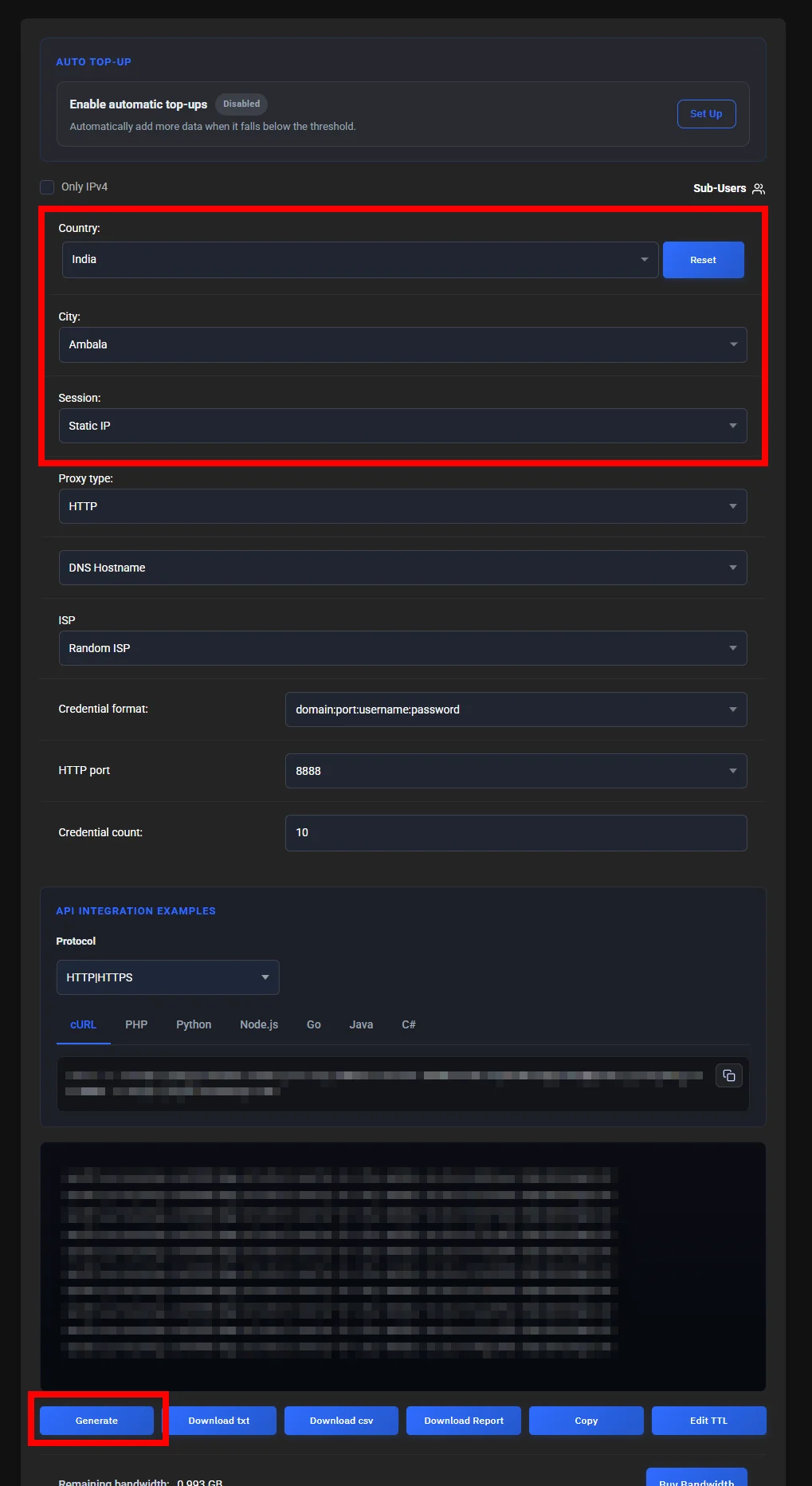
The screenshot above shows ProxyWing residential dashboard set to India (Ambala) with a static IP session, ready to generate HTTP proxy credentials on port 8888.
For both Chrome and Firefox, ProxyWing offers an extension that makes integrating your proxy details (generated in the previous step) pretty straightforward.
Chrome
Firefox
Note: These are your proxy credentials, not your IRCTC login.
Open ProxyWing IP Checker and check Your IP & location → Location → Country. If it says India, your connection is working. It doesn’t confirm that IRCTC will accept your login or booking, but it does confirm that websites see your traffic as coming from India.
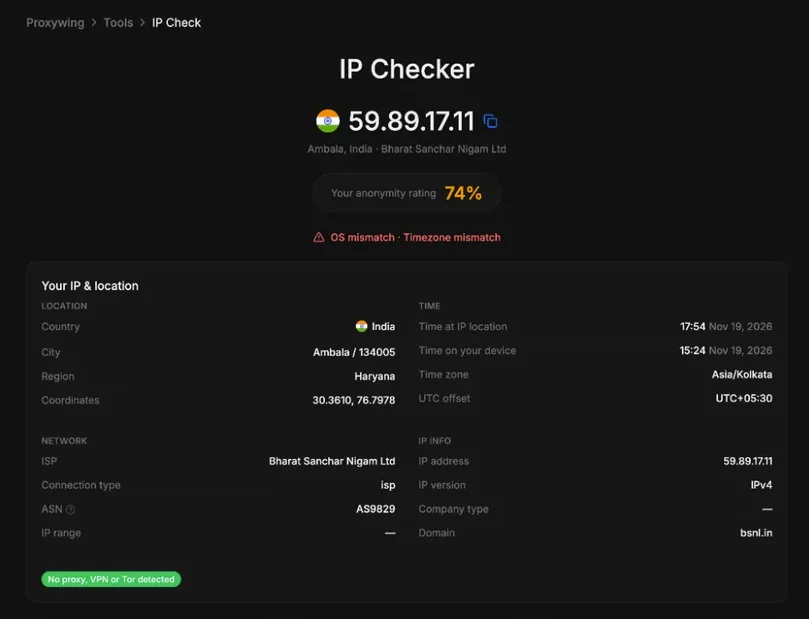
The screenshot above shows ProxyWing IP Checker confirming the browser connection is routed through an Indian IP in Ambala, Haryana, on an Indian ISP network.
Not necessarily. A proxy may affect how fast pages load, but the railways control when the quota opens, how seats are allocated, and your booking status. A page can load quickly while your class is already waitlisted. IRCTC’s terms also prohibit automated booking software, so make sure to do this whole process manually to prevent your traffic from being blocked.
Check who runs it and how to get help. Confirm the Indian location with an IP checker before trusting it. Only enter your railway password on IRCTC’s official site or app. However, we don’t recommend free proxies since most of them don’t respect user privacy and could put your private information at risk of being exposed.
Once traffic appears on your account, generate your connection details in the residential settings. If your order is still pending after payment, contact ProxyWing’s 24/7 support with your order reference. Overall, your proxy should be available immediately after making payment.
No. A VPS is a remote machine you usually access through RDP. This setup works on your own computer.