Datacenter
Cheapest and quickest per request, so restock and new-product monitors usually run on them. They may also hold up on first-come drops at lightly protected boutiques.
from
Buy now$0.87/ month
Buy sneaker proxies from ProxyWing for limited drops, restock monitoring, and regional store checks. If your checkout needs one address to stay the same from login to payment, choose a static IP. If you're watching stock or prices across different locations, residential proxies give you more control over rotation and session length.
Raffles, queues, and first-come-first-served drops reward different things. Pick IPs by release format, not by the shoe.
Cheapest and quickest per request, so restock and new-product monitors usually run on them. They may also hold up on first-come drops at lightly protected boutiques.
$0.87/ month
Raffles and queue-based releases weigh trust over speed, which favours home IPs from the launch country. Rotate between tasks, then hold a sticky session at checkout.
$1.00/ GB
App-only launches expect phone traffic, and carrier IPs provide it. Billed per day, they make more sense around a release date than across a whole season.
$4.00/ day
The middle ground for first-come-first-served drops: server-grade speed on addresses that stores read as a home connection. One static IP per task from login to payment.
$1.71/ month
| Gigabytes | Discount | Price per GB | Total Amount | Buy |
|---|---|---|---|---|
| 1 | - | $2.50 | $2.50 | Buy |
| 2 | 10% | $2.25 | Buy | |
| 10 | 15% | $2.13 | Buy | |
| 50 | 20% | $2.00 | Buy | |
| 100 | 25% | $1.88 | Buy | |
| 250 | 30% | $1.75 | Buy | |
| 500 | 35% | $1.63 | Buy | |
| 1000 | 40% | $1.50 | Buy | |
| 3000 | 45% | $1.38 | Buy | |
| 5000 | 50% | $1.25 | Buy | |
| 7500 | 55% | $1.13 | Buy | |
| 10000+ | 60% | $1.00 | Buy |
| Gigabytes | Discount | Price per GB | Total Amount | Buy |
|---|---|---|---|---|
| 1 | - | $6.00 | $6.00 | Buy |
| 2 | 5% | $5.70 | Buy | |
| 10 | 10% | $5.40 | Buy | |
| 50 | 15% | $5.10 | Buy | |
| 100 | 20% | $4.80 | Buy | |
| 250 | 30% | $4.20 | Buy | |
| 500 | 40% | $3.60 | Buy | |
| 1000 | 45% | $3.30 | Buy | |
| 3000 | 55% | $2.70 | Buy | |
| 5000 | 60% | $2.40 | Buy | |
| 7500 | 65% | $2.10 | Buy | |
| 10000+ | 70% | $1.80 | Buy |
Awards, which we received from our customers



Discover the wide-ranging applications of Proxywing's proxies across different industries and online activities. Maximize your business potential with our versatile and dependable proxy solutions, customized to meet your specific requirements.
We offer fast, secure and anonymous IP addresses around the world that provide access to the resources you need.
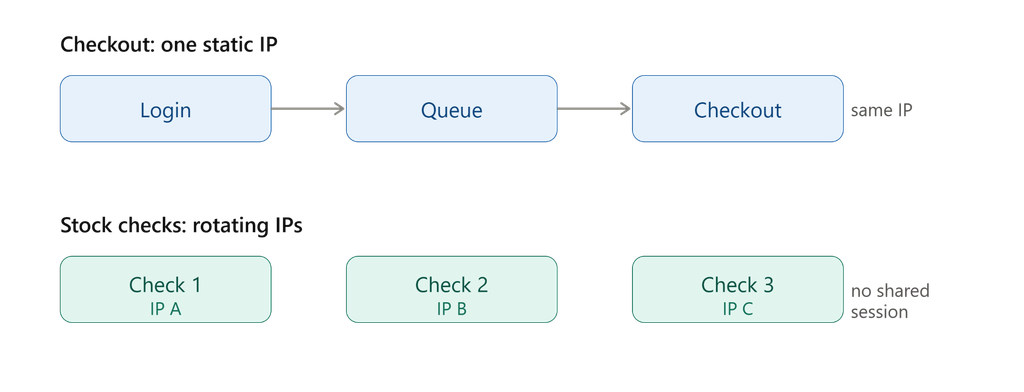
A sneaker proxy acts as a go-between for your bot or browser, forwarding requests to the store. What you need is going to depend on your workflow – a fixed IP address to keep the same identity through checkout, or rotating IPs to bounce around different locations while doing your own independent stock checks.
ProxyWing’s ISP proxies are straightforward – a static IPv4 address that stays the same for the duration of your subscription, perfect for sneaker bot proxies that need to keep the same identity throughout the checkout process. You get the same IP address for as long as you need, with all the traffic you can handle, and no IP rotation to disrupt your connected flow.
Keep in mind that ISP coverage isn’t as widespread as ProxyWing’s residential network, so make sure you buy from a location that’s covered in the region where your target store is.
If you’re doing sneaker drops and need to match the region of the store you’re hitting, then residential proxies are the way to go. ProxyWing’s residential network draws on real home ISP connections from over 190 countries, with options to target by country, city and ISP – all plans come with this level of targeting.
You can run a rotating session for doing independent stock and price checks, where getting a fresh IP for each request can work in your favour. But if you need to hold one identity from login through payment, then go for a static session and set your own TTL – up to 1000 minutes on the Standard plan, or up to 7 days on Premium.
Datacenter proxies are the way to go for sneaker restock, price and size monitoring, where the frequency of checks is more important than the volume of data. ProxyWing’s datacenter IPs are dedicated and static, so you can just pay per IP with unlimited traffic.
Just bear in mind that not all sneaker stores will accept datacenter-sourced connections the same as they would a residential or ISP connection. Make sure to test your target before scaling up.
Need mobile carrier IPs instead? Mobile proxies for sneakers are an option, but it’s not always the best choice – especially if your bot just happens to run on a phone.
Your sneaker proxy costs will depend on the IP type you use and how you’re planning on using it. Work out a static IP plan around the sort of sessions that need their own address, or try to estimate how much residential traffic you’ll use from your sneaker bot workload.
ISP and datacenter proxy prices are based on the number of IPs you have on a subscription – residential is usually billed by the amount of traffic you use in GB, and you don’t have to commit to a specific term. The minimum order price and advertised price can be different. ISP proxies start at $3.00 per IP if you’re just signing up for a one-month term, but if you go for 1,000 IPs on a 12-month term, they’ll actually come in at $1.71 per IP.
The number of proxies you need will depend on how many sneaker bot sessions you’re running at the same time, not on how many requests or pages you’re looking at.
| Product | Billing basis | Minimum order and price | Traffic and term |
|---|---|---|---|
| ISP | Per IP and term | $1.71 | Unlimited traffic |
| Residential Standard | Per GB | $1.00 | Static session TTL up to 1000 min |
| Residential Premium | Per GB | $1.80 | Static session TTL up to 7 days |
| Datacenter | Per IP and term | $0.87 | Unlimited traffic |
If you have a rough idea of how many IPs you’re going to need and for how long, the math is simple. 10 ISP IPs on a one month term will cost you 10 x $2.10/IP = $21.00, and that’s before any longer term discounts that might apply.
Choose a proxy location that makes sense for the store’s region and see how it holds up with your bot. The fact that a product has protocol support doesn’t make a store accept and checkout – there’s still a lot to figure out.
For store-specific setup, have a look at our guides for Nike SNKRS, Footsites and Shopify.
Obviously, there’s no one-size-fits-all solution that will work with every sneaker bot and every store – so if you’re not sure whether your product, location and tool will work together, test it out yourself or message our team for help choosing a product that will work for you.
During testing, make sure to check that the response time and stability are good under the load you expect – being connected to a city right next door to your target might not make the connection faster, so it’s worth testing out the actual route you’re gonna use, rather than just picking somewhere because it’s close by. Keep an eye out for any errors that come up during stock checks, and try not to have the proxy decide to switch IPs right in the middle of a queue or checkout.
Useful tools: Proxy Formatter will come in handy for getting your list into the right format, and Proxy Tester will let you check the speed, anonymity and overall reliability of the connection. Just remember, a quick connection test doesn’t actually guarantee that the checkout will go smoothly – all it does is tell you the proxy itself is working.
| Problem | What to check |
|---|---|
| No connection | Host, port, protocol, authentication, and whether the service is active |
| IP changes or session resets | Session mode, duration, and tool settings |
| Proxy works but store rejects an action | The store’s response, region, and workflow requirements – share a redacted error with support if needed |
Yes, sneaker proxies work with any compatible browser or app, not just a bot. Whether you need one at all depends on your IP and location requirements, not on how you’re buying. For an ordinary purchase with no specific location or IP need, a proxy isn’t necessary.
It depends on the sites, your tool, and your plan’s terms. A working connection doesn’t guarantee independent accounts or orders across different stores. Choose separate IPs when your workflow actually needs separate addresses, not for every site by default.
Start with the smallest package – 1 IP for ISP or datacenter, or 1 GB for residential – and test it against your actual target store before scaling up. ProxyWing doesn’t offer a free trial, but covers technical issues with free proxy replacement. That’s not the same as a refund for an unsuccessful drop, check the current terms on the purchase page for what’s covered.
No. A proxy provides a connection, the outcome also depends on stock availability, release mechanics, your account, your tool, and the store’s own checks. Changing your IP doesn’t change your account or device, solve a CAPTCHA, or guarantee you’ll avoid a block.