Best USA Proxy Providers in 2026
01.11.2026 12 min
It is not possible to watch all TikTok content from a single region. Many social media managers, TikTok influencers & creators, and affiliate marketers want to see global content but cannot access it globally. This is where the best proxy for TikTok works. Do you want to know more about the best proxy for TikTok? Let’s deep dive into this blog. Here you will learn everything about how TikTok proxies block traffic and how professionals use them to their advantage in 2026.
Let us compare the best proxy for TikTok. By seeing this comparison, you will know what recent market plans the proxy provider is offering to their users.
| Provider | Best For | Proxy Types | Starting Price | TikTok Performance |
| ProxyWing.com | Multi-account, automation, geo-targeting | Mobile, Residential, ISP, DC | $0.90/IP | ⭐⭐⭐⭐⭐ Excellent |
| Bright Data | Large-scale enterprise scraping | Residential, Mobile, ISP, DC | $1.8/IP | ⭐⭐⭐⭐⭐ Excellent |
| Oxylabs | Enterprise market research | Residential, Mobile, ISP, DC | $6/GB | ⭐⭐⭐⭐⭐ Excellent |
| Smartproxy (Decodo) | SMB multi-account management | Residential, ISP, DC | $2/GB | ⭐⭐⭐⭐ Very Good |
| NodeMaven | TikTok automations at scale | Residential, Mobile | $2.20/GB | ⭐⭐⭐⭐ Very Good |
| NetNut | US geo-targeted campaigns | Mobile, ISP, Residential | $0.7/GB | ⭐⭐⭐⭐ Very Good |
| SOAX | Social media management | Residential, ISP, Mobile, DC | $0.32/GB | ⭐⭐⭐⭐ Very Good |
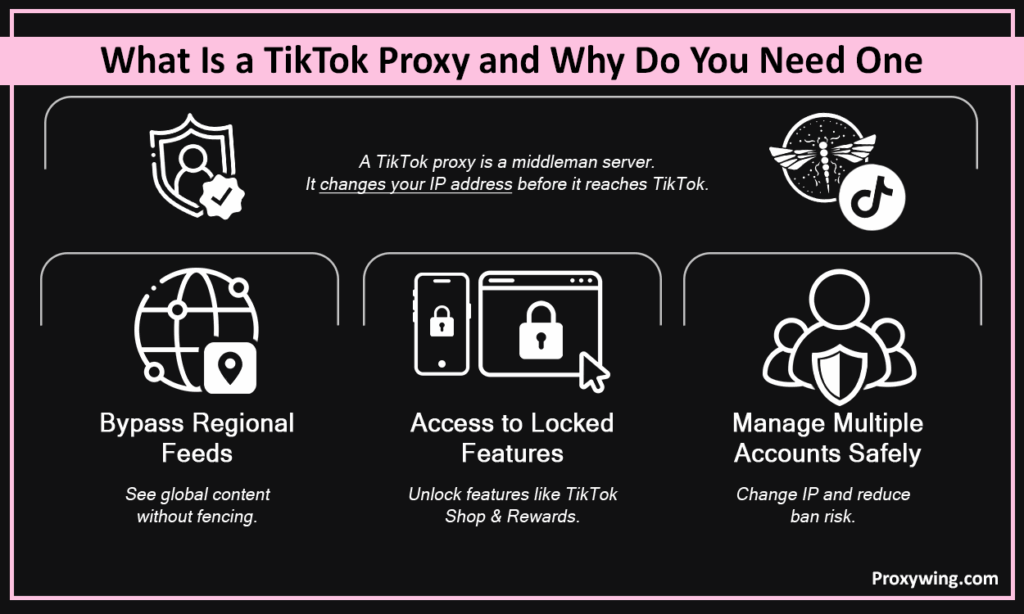
A TikTok proxy is a middleman server service. It changes your IP address before it reaches TikTok’s server. The user needs this TikTok proxy because TikTok uses strict geofencing to restrict content. Due to this, a USA TikTok creator could not see much content from Canada, Europe, or Asia, and vice versa.
In 2026, you specifically need the best TikTok proxy for these reasons:
TikTok primarily uses three detection methods to block proxies. These are:
When users use free TikTok proxies, the TikTok security system easily detects them. The result is that the user gets their account permanently banned on TikTok.
The TikTok server does not manage all proxies the same way. It treats some internet connections with high trust and others with immediate suspicion. ProxyWing is providing the exact high-grade proxy types that TikTok trusts the most. It is a perfect choice for professional marketers who want to avoid account bans.
Here is the table for TikTok’s detection systems. It shows how mobile and static ISP proxies offer high trust and low risk.
| Type | Trust Score | IP Source | Best TikTok Use Case | Cost |
| Mobile (4G/5G) Proxies | 5 | Carrier CGNAT | Automation, multi-account | $4/per day |
| Residential Proxies | 4 | Home ISPs | Account management, scraping | $1/per GB |
| ISP (Static Residential) Proxies | 4 | ISP-issued static | Long-lived sessions | $1.7/per month |
| Datacenter Proxies | 2 | Data centers | Low-rate scraping only | $0.90/per month |
Mobile proxies are used the most globally. And the best part is that they easily bypass the TikTok security system. These proxies make bots and automated accounts that act like real humans scrolling on a phone. The challenging part here is that there are billions of phones worldwide. The internet has reached the end of the supply of unique IP numbers to assign to every phone. To fix this, mobile carriers use a technology called CGNAT.
Usually, TikTok does not ban mobile IPS connections. However, when you use a mobile proxy, choose the right one. There are proxy platforms that are different when it comes to a single main business page and automated tools.
Residential proxies are also secure. These proxies show you on the TikTok server as you are using home Wi-Fi. When you use them, they change your IP address every time you load a new page or request the trending data.
Residential proxies are less expensive. But they are only the best when used for copying data. If you use them with your main account, TikTok could ban your account because the IP address changes every time.
ISP proxies give you both speed and elite safety. They are a combination of datacenter infrastructure and residential home networks. These proxies are used by social media managers and marketing agencies.
ISP proxies are ideal for handling official brand accounts or client profiles. The user’s digital location never changes when using them. They prevent TikTok from raising suspicions.
Not many users use the datacenter proxy. The reason for this they are easily detected by the TikTok server. Datacenter proxies are created by big corporate houses or cloud companies.
Only basic and low-volume web scraping is safe with datacenter proxies. The ban is controlled on these proxies because of low request volume. So it is advisable that you do not use datacenter proxies for a personal account.
Below is the list of the best proxy providers and offers. They are ranked by the quality of their proxy IP pools, the types of proxies they offer, and TikTok-specific performance.

ProxyWing is the leading TikTok proxy service premium provider in 2026. They make this platform for you to easily manage social media networks and secure your accounts. ProxyWing also offers mobile proxies, rotating residential proxies, and ISP proxy pools. It is especially designed for your TikTok multi-account management, automation workloads, and geo-targeted campaigns. Also, their charges are lower and vary by the type of proxy you buy.

The second in the list is Bright Data. It is one of the largest residential IP pools. Bright Data has more than 72 million IP addresses from over 195 countries. They offer you unbanned home Wi-Fi and mobile network connections. Furthermore, Bright data easily bypasses TikTok’s strict geofencing. By using this, user easily access features like TikTok Shop or the Creator Rewards Program safely.

Oxylabs is the top choice for big enterprises. It gives businesses access to over 100 million real home Wi-Fi locations. Oxylabs uses smart AI software to automatically outsmart TikTok’s security filters. They offer you residential proxies and mobile proxies.

Smartproxy was one of the most well-known proxy providers in the corporate world. Now they have officially changed their name and rebranded as Decodo to expand their platform. Decodo offers access to a global network of over 40 million residential IP addresses across the US, EU, and APAC regions.

NodeMaven is an excellent premium services option for marketers who need reliable automated tools across multiple TikTok accounts simultaneously. They are reliable because their system uses a built-in safety filter to scan and remove malicious or blacklisted internet addresses. Furthermore, before you ever use them, ensure a successful connection.

NetNut stands out because it owns a massive network of over one million mobile locations worldwide. Instead of borrowing internet connections from people’s homes, NetNut buys these private internet lines directly from official internet service providers. TikTok trusts them completely and does not block them. TikTok uses a screening system called ASN analysis to instantly block fake robot traffic. But in the NetNut case, the connections look exactly like a real person’s home internet.

SOAX positions itself explicitly as a social media proxy provider. They built this service specifically for people who manage social media accounts like TikTok, Instagram, and Facebook. Every feature they offer is designed to help you run these accounts without getting blocked. Inside the SOAX control panel, the user chooses how often they want their internet address to change, for example, every 5 minutes or every 60 minutes. When the timer hits the chosen limit, SOAX automatically swaps your old IP address for a brand-new one.

IPRoyal sells all four main types of internet connections in the proxy industry. They openly state that they use only home Wi-Fi (residential) or cell phone (mobile) addresses when they want to work on apps like TikTok. IPRoyal has fewer home Wi-Fi addresses available.
The fundamental steps to set up a TikTok proxy for every provider are the same. It does not matter if you buy your internet addresses from ProxyWing, NetNut, or IPRoyal. The basic steps to connect them to your computer or phone are almost identical.
When a TikTok account is operated independently, the most secure method for connecting to a proxy is via an anti-detect browser.
If you have only 1 or 2 accounts, then you don’t need special multi-account browsers. You can set up your proxy in two easy ways:
Here is what you have to do when you use your computer to run TikTok automation:
When you use a proxy, always use an anti-detect browser. Both the anti-detect browser and proxy work as a group.
This is the reason an anti-detect browser is necessary. Otherwise, TikTok recognizes your computer, and you will be banned.
TikTok proxies are used by marketing professionals for many reasons. Here is the list experts use them in 2026:
By using proxy settings, users handle many TikTok accounts. Every account can get unique IP addresses.
When accessing content, it depends on which proxy to choose. Here’s how to pick the right type of proxy:
A free proxy costs nothing. Millions of people use that exact same internet address at the same time. Many of those people use it for spam bots. TikTok notices this bad behavior and adds that internet address to its permanent block list.
Worse yet, free proxies are a huge security hazard. They can be easily spied upon by the individuals operating them, with your passwords, logon tokens, and personal information being taken.
Article written by:

Head of Partnerships
Leads partnerships at Proxywing with hands-on knowledge of residential, ISP, datacenter, and mobile proxies. Works with affiliates, bloggers, and tech communities, bridging tech and partner needs.
All articles by author (23)Overall, ProxyWing is the best proxy for TikTok users in 2026. They offer the perfect mix of mobile, residential, and ISP proxies.
Yes, you can use a free proxy for TikTok. But using a free proxy can ban your ID permanently. Many users misuse free proxies, so TikTok’s security wall easily detects them.
Yes, in most countries you can legally use proxy servers. Many people use these to secure their privacy and digital footprints. However, you must understand the difference between local laws and platform rules.
It is advisable to use one account per proxy. If you manage three accounts using a single proxy IP address, your chances of getting banned increase.
When using the TikTok platform, it’s best to use a proxy rather than a VPN. Using a VPN is good for personal privacy, but not the best option for a social media business.
There are safe hacks to avoid detection by TikTok’s security algorithms when using a proxy. Here is what you can do: