




Proxy Authentication Methods Explained: Username/Password vs IP Whitelisting
06.10.2026 10 min
Craigslist, just like most online platforms, has rules that are geared towards making the platform safer for its users. The platform can block your IP address if it detects user behavior that doesn’t abide by their rules. If you’re currently facing the “Craigslist IP blocked” issue, this guide is for you.
In this guide, we will discuss how to bypass IP blocks on Craigslist and what you should do to avoid the same thing from happening in the future. So, without wasting any more of your time, let’s get into everything you need to know about the Craigslist IP blocked errors.
You will encounter the Craigslist IP blocked issue if your traffic seems suspicious. Some of the common reasons that may lead to this suspicion include:
This can include posting too many ads in a short time, reposting the same ads often, or posting across multiple categories. Craigslist’s algorithms already know the posting behavior of the average user on the platform, so if your account significantly deviates from that, the IP can get blocked.
Posting too frequently will look like spam and is usually linked to automated tools, so the platform may block the connection to stop further abuse. New accounts also have higher chances of experiencing Craigslist IP bans if they are used for posting very frequently.
Using several Craigslist accounts from one IP address is a common red flag that often leads to IP restrictions. In some cases, your accounts may get banned too. Even though your accounts may be in different categories, the platform may assume they are controlled by one person trying to bypass their default limits, which can lead to IP blocks.
This platform’s algorithms expect every user’s posting location to match their IP location. If you post ads in cities or regions that do not align with your IP, Craigslist may flag this as malicious. Having different locations for your ads and connection address can often lead to Craigslist IP blocked errors.
Several platforms, including Craigslist tend to block scrapers and other automation tools mainly because they put a heavy load on their systems. Scraping data can easily be detected and is one of the common reasons for Craigslist IP blocked errors.
This website prohibits posting certain kinds of content on their platform. Such content includes posts related to illegal services or goods, scams, misleading ads, or prohibited items. Posting such content is against the platform’s terms and can quickly lead to account bans and IP blocks.
Craigslist IP blocks are categorized into four types that affect victims differently. Knowing the category your IP block falls under is important when trying to regain access. Let’s walk you through these four categories.
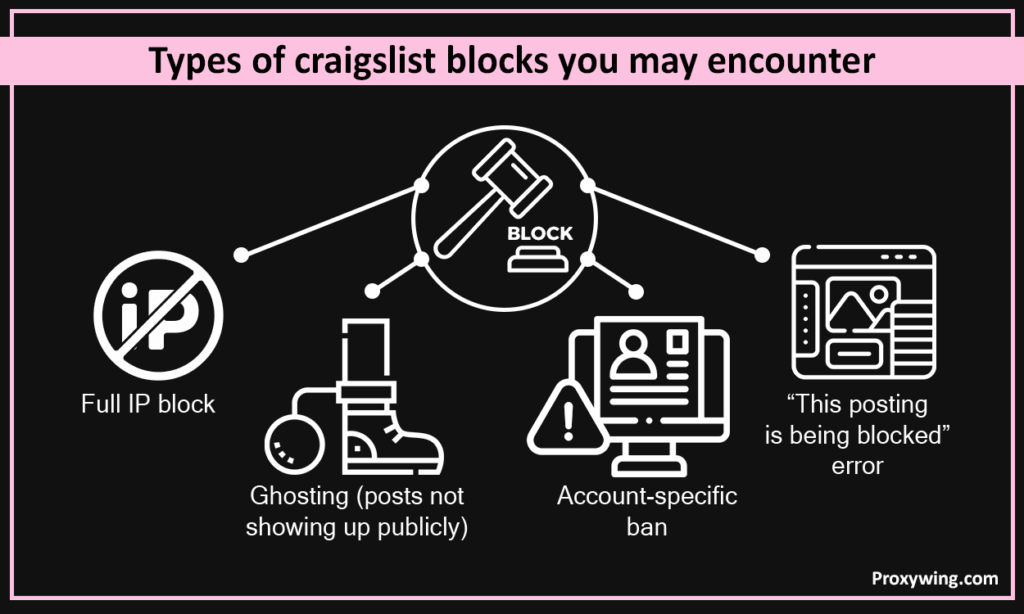
A full IP block means your entire internet network is restricted. Users experiencing full IP block may not be able to post, browse, or access Craigslist using that same network. This affects all accounts using the same network (such as home router).
With this type, only one Craigslist account is limited or banned. Other accounts may still access the platform on the same network without any limitation. Account-specific bans usually happen due to posting behavior, ad content issues, or repeated rule violations tied to that given account.
Like you may have guessed, ghosting happens when Craigslist lets you publish an ad, but it does not appear to any of their users on the platform. This might be the hardest to detect because users don’t get any warming message. The only way to detect ghosting is by checking your ad’s impressions and clicks. Craigslist uses ghosting to quietly limit spam or low-trust accounts.
This happens when trying to post an ad. Craigslist’s internal spam filters may block your post for reasons such as repeated postings, similar ad content, suspicious links, or behavior that looks automated.
If you happen to be in a situation where only one account is blocked, the issue is usually fixable with the right steps. Let’s explore some of the simple fixes you can use.
You should start by submitting a clear and polite request to Craigslist support. Your request should have all the crucial details, including the exact error you’re experiencing, what you were posting, confirmation that you follow the rules, and ask for a review. Always send one request at a time and avoid sending followups before receiving a response.
If you’re only banned from posting, but you can still access your account, consider reviewing all your ads. Ensure to remove banned words, excessive links, phone numbers written in unusual formats, and duplicate or very similar content. You can then monitor after a few hours to figure out if your account is still limited in any way.
If your account gets banned, it is totally fine to create a new one. However, creating a new account using the same network after a ban often makes things worse. If the new account’s traffic is coming from the same address, it is pretty easy for Craigslist to detect a connection between this new account and the old one.
This can often lead to faster and longer bans. Unless your account is permanently banned, it is usually better and safer to fix the original account instead of starting over.
Here is what you should do if you suspect any form of Craigslist IP bans:
Restarting your router can refresh the IP address if your internet provider uses the dynamic addressing system. This may not work in some cases, but it is the easiest first step to try. Some users have reported success using this fix.
If you’re currently using WiFi to access Craigslist, switching to mobile data will change the IP address you’re connecting with. This approach often bypasses IP blocks if Craigslist has automatically blocked the IP address of the WiFi network you were initially connecting with. If you switch to mobile data and Craigslist loads and posts work normally, the block is likely tied to your home or office network.
Tor Browser assigns you a new address through its network. Using this method is useful for testing if Craigslist is reachable. However, it is not reliable for posting since Tor traffic is heavily monitored by most platforms. But it is worth the try during the troubleshooting process.
Using the methods we have shared in the previous section can work sometimes. However, they may not be reliable for long-term access. In this section, we will cover the most reliable methods you can use to bypass IP blocks by Craigslist.
Residential proxies use real IPs sourced from home devices such as phones and personal computers. Traffic coming from such devices looks legitimate hence reducing the risk of future connection restrictions. This unblocks Craigslist bans put on your previous address.
ProxyWing offers reliable and affordable residential proxy services with plans starting from $2.5/GB. Our proxies give you access to millions of clean residential IPs that you can use to access Craigslist.
ISP proxies are proxy servers using IP addresses provided by internet service providers. ISP-assigned proxies are more trusted than standard datacenter IPs generated by cloud providers. Datacenter proxies may be faster and cheaper, but they are easier for Craigslist to detect and block. Overall, using ISP proxies gives you a balance of reliability and speed.
Using a good VPN can help you to temporarily regain access to Craigslist. However, it is important to remember that VPN IPs are often shared by thousands of users and Craigslist often flags these connections. Overall, VPNs are not as reliable as proxies since they don’t usually offer dedicated IPs.
Most platforms, including Craigslist, trust mobile traffic. That’s why mobile IPs have a very high trust level because they are shared by real users of mobile devices. So, using mobile IPs is just as effective as residential IPs since traffic from both is highly trusted by Craigslist.
In this section, we will cover some IP blocks bypassing tips that advanced Craigslist users may find useful.
Post less often, avoid repeating the same text, and use higher-quality IPs if you rely on proxies. Small changes in content and slower posting schedules can stop ghosting.
Always ensure to match your posting location to your proxy location. When the connection address of the city and ad details align, your ads look more natural and are less likely to be flagged by the platform.
If you intend to use several accounts on the same device, make sure that each account uses a different IP address, browser profile, and device fingerprint. Take advantage of residential proxies to get access to IPs of real home devices in different regions.
Craigslist blocks IPs if they detect automated activities like data scraping. You can avoid these IP blocks by using residential or mobile proxies, applying strict rate limits, rotating user agents, and avoiding aggressive scraping. Check out ourpost about using proxies for web scraping to learn more.
To minimize chances of connection restrictions in the long run always:
Your goal should be ensuring your post patterns appear to be human. Always post at a natural pace and avoid publishing many ads in a short time. This approach avoids IP bans since it allows you to stay below spam detection limits.
If you’re managing multiple accounts, ensure to use different IPs, browsers, and devices (if possible) for each one. This makes it harder for Craigslist to detect any familiar patterns between your accounts.
Like all websites, Craigslist has rules that you must follow to avoid bans. Avoid activities such as offering illegal services, posting misleading offers, and restricted items on the platform.
Article written by:

Full Stack AI Engineer
Full-stack engineer at Proxywing working across backend architecture, performance optimization, and AI-driven workflows. Node.js, React, cloud infrastructure, and RAG pipelines.
All articles by author (61)These are some of the quick fixes you can use:
Yes, many VPNs are easy to detect and Craigslist does block them very often. VPNs may work as a short-term solution, but they are not reliable for regular posting.
Follow these best practices:
There is no guaranteed approach that can unblock access forever. You just need to ensure to follow the platform’s rules. Also, fix any past issues that led to IP bans, use clean addresses when doing tasks like scraping, and always follow safe posting habits going forward.

