Best USA Proxy Providers in 2026
01.11.2026 12 min
You’re not alone if you have ever tried to access any website at school and found it restricted. A lot of students deal with this issue every day. GoGuardian and other tools are meant to limit what you can do online. But people still look for methods to unblock Goguardian with proxies.
This tutorial breaks everything down into simple language. It doesn’t encourage people to flout the rules or act in harmful ways. Instead, it helps you learn how the system works and make better decisions.
Keep reading if you want to know how GoGuardian works and why a proxy may not function.
Schools use GoGuardian to keep an eye on how students use the internet. It works on Chromebooks and other devices, as well as via networks. GoGuardian decides which online sites you may access. This tool also stops programs and add-ons from working. A lot of admins use it to make the internet safer.
GoGuardian also keeps track of what people do. That implies that the student online activity is visible to you. It helps tutors keep students learning and focused in class.
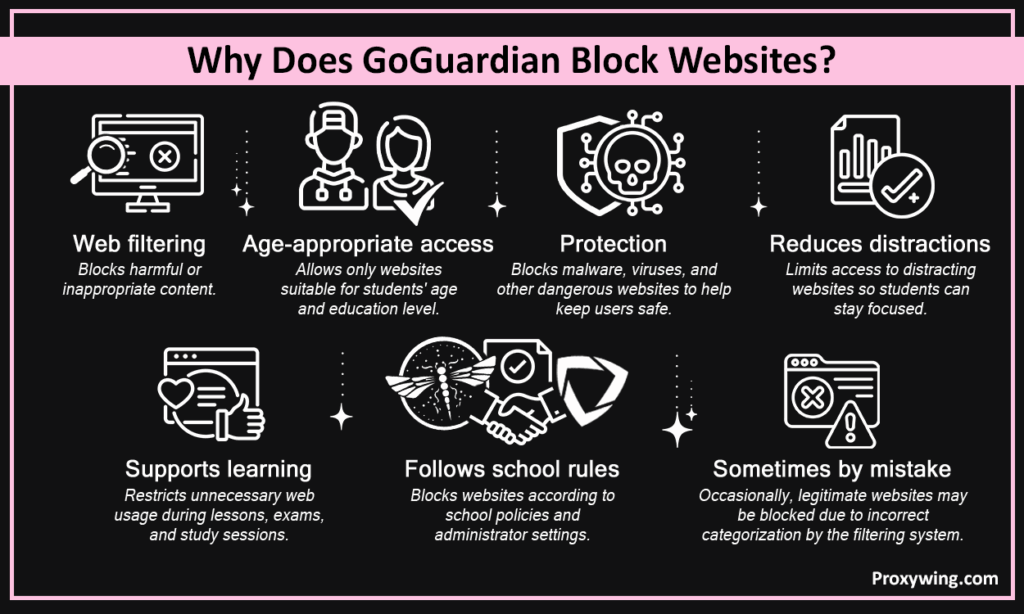
GoGuardian blocks several websites for a number of reasons.
These filters are primarily designed to keep students safe.
To filter is to stop users from going to particular sites. Monitoring is keeping an eye on what you do online. GoGuardian does both. Your behaviour may still be tracked, even if anyone attempts to bypass. So, a proxy may not conceal everything.
There are tight regulations for educational institution devices. These gadgets have settings that can’t be changed. Personal gadgets are not the same. They could provide you with greater freedom. But networks may still use filters.
That is why the results are different when you use a proxy.
If you try to bypass GoGuardian, you might breach school regulations. Remember, every school has its own rules and regulations. Most of the time, administrators don’t let people use tools that bypass the sites. This may include any VPN or proxy. In case you don’t follow these guidelines, you can face repercussions. These may be things like limited access or punishment.
Sometimes you may need to bypass a barrier of a banned site for homework. That’s normal. You may bypass it by asking the teachers or a GoGuardians admin.
Some examples are:
This is the best and most reliable way to do things.
A proxy sends your traffic via another server. Proxy solutions assist in concealing your true IP addresses. But GoGuardian is more sophisticated. It commonly finds and stops proxies. So, using a proxy to attempt to unblock GoGuardian may not always work.
GoGuardian already knows about many proxy sites, and it blocks them using lists. It also looks at how traffic moves. This helps find strange behaviour. Some systems also check SSL. This lets administrators see traffic that has been encrypted via proxy. So, in case a proxy loads, it might not function for long.
A lot of people assume that using a proxy renders them invisible. That isn’t accurate. Even if you are using a proxy, tracking activities may still be possible on controlled devices. Logs may still be there even if you change your IP address. So, employing a proxy doesn’t mean you’ll be safe.
There are big dangers with free proxies.
Some free proxy solutions even let other people see your personal and mobile contents.
Many individuals use proxy sites to get a hand on sites that are blocked. But GoGuardian usually blocks them. Using them can break the rules of your institution.
A few individuals try to update their DNS settings. This usually doesn’t work on devices that are managed. Policies are more essential than these settings.
A VPN is quite similar to a proxy. But most schools don’t allow VPN apps and add-on functions. These efforts are pretty easy to detect.
Using a mobile hotspot could seem like a smart idea. The device still has to obey GoGuardian rules, however. So, access can still be limited.
Some individuals try to get rid of GoGuardian add-ons. But this isn’t allowed on devices that are regulated. Don’t do anything like this.
This section is for general knowledge only. It does not apply to school devices.
Step 1: Create an account
Start by creating an account with a proxy and choosing a plan that works for you.
Step 2: Choose proxy type
Choose between residential and mobile proxies based on what you need to do.
Step 3: Get access credentials
You will get IP information or login credentials once you buy.
Step 4: Configure your tool or browser
Add the proxy information to the settings of your browser or program.
Step 5: Test the connection
Open a site on the web to be sure that your IP address has changed.
A proxy is useful in many legal ways.
Choose cautiously if you require a proxy for valid work.
A trustworthy vendor helps you get your task done quickly and securely.
It can seem straightforward to use a proxy to bypass GoGuardian. But it seldom works. GoGuardian is developed to regulate who can access what on networks and devices. It offers robust filtering as well as tracking.
Don’t take risks by trying to bypass; instead, look for safe choices. Speak with your teachers or administrators. This method helps you study better and keeps you safe online.
Article written by:

Full Stack AI Engineer
Full-stack engineer at Proxywing working across backend architecture, performance optimization, and AI-driven workflows. Node.js, React, cloud infrastructure, and RAG pipelines.
All articles by author (63)Yes, GoGuardian can find and block a lot of proxy connections.
Most Chromebooks in schools don’t let you use proxies. These gadgets are tightly controlled by admins.
No, free proxies are not secure or trustworthy. They often steal your data.
A VPN is like a proxy. GoGuardian can block both.
Talk to your teachers or administrators. This is the safest approach for accessing the websites you need.