




Proxy Authentication Methods Explained: Username/Password vs IP Whitelisting
06.10.2026 10 min
If you intend to use proxies, mobile proxies are among the most reliable options you can consider. These proxies rely on IP addresses from mobile cellular networks, which makes it hard to differentiate their traffic from real user traffic. You can use mobile proxy solutions for a wide range of real-world applications, including accessing content on mobile-first platforms, app testing, and more.
Like all the other proxy types, mobile proxies hide your real IP, enabling more private, anonymous, and reliable connections. That means users that need private web browsing can take advantage of mobile proxies. Please note that providers offering mobile proxies charge more for them compared to other types — their high trust scores makes them worth it though.
This guide will discuss mobile proxies in detail, including the setup process, rotation capabilities, best practices, and more. So, without wasting any more of your time, let’s dive into everything you know before getting started with mobile proxies.
Mobile proxies are IPs assigned by real mobile carriers (3G/4G/5G), shared across users via Carrier-Grade NAT. When using these proxies, your traffic is routed through IP addresses of real mobile devices connected to ISP mobile networks. This makes your traffic seem like it is coming from a real mobile user in the location you chose.
Try ProxyWing’s mobile proxies to get the fastest speeds, unlimited bandwidth and access to 4.5+ million real LTE mobile IP addresses. ProxyWing also offers better customer support than most of its competitors.
The table below shows how these major proxy types compare:
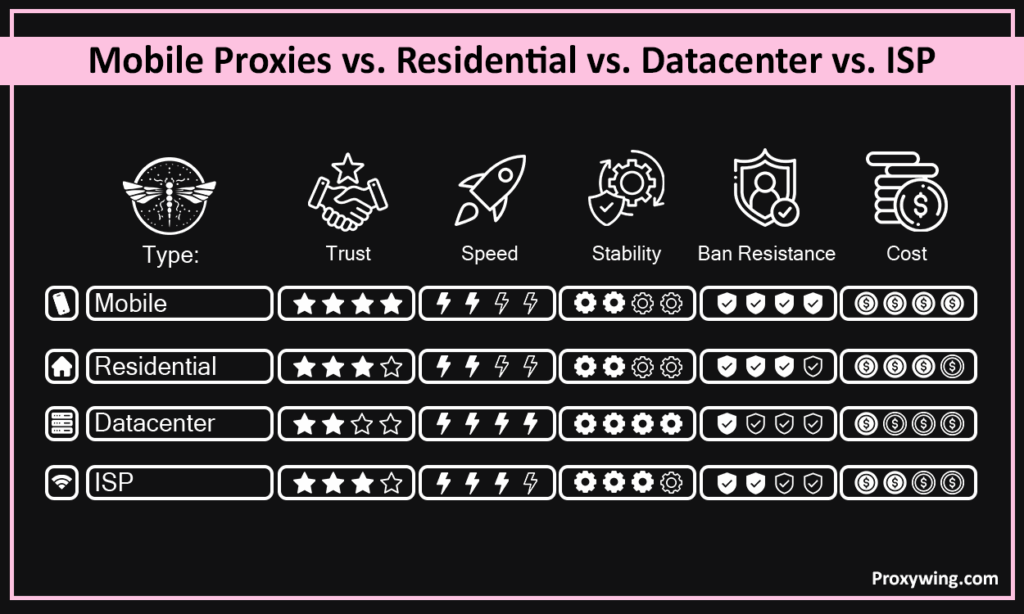
| Type | Trust | Speed | Stability | Ban Resistance | Cost |
| Mobile | Very High | Medium | Medium | Highest | Highest |
| Residential | High | Medium | Medium | High | High |
| Datacenter | Low | Fastest | Highest | Lowest | Lowest |
| ISP | High | Fast | High | Medium | Medium |
Key Takeaway: Mobile proxies are the best choice if you need the highest success rate and are willing to incur the premium to get that experience.
When you connect to the internet using a mobile proxy, your requests route through a gateway to a SIM-connected device, then exit via a carrier-assigned IP shared with others on the same network. The destination website or online service will only see this carrier-assigned IP, allowing you to bypass several restrictions. This makes it possible to access certain platforms as a mobile user even though you’re using a desktop machine.
This section will discuss some of the common use cases of these proxies to give you an idea of when it is best to use them:
Many platforms avoid blocking mobile IPs since doing so affects many real users. These proxies also frequently change network addresses, which reduces any single address from building a suspicious history that could lead to traffic bans.
As stated earlier, mobile proxies hide your real IP but don’t encrypt traffic. Full anonymity depends on browser fingerprint and cookies. To make your traffic fully anonymous, we recommend using mobile IPs together with an anti-detect browser.
Most platforms flag multiple accounts on the same network address. This is common for platforms like e-commerce that typically allow sellers to have one account. By using these proxies, you can use a different IP address for each account, minimizing the chances of account linking and potential bans.
Mobile IPs rotate through large carrier pools, lowering detection risk on tough targets, which are needed when web scraping and other tasks that require automation. Human-like request intervals improve results further.
Mobile proxy servers route your traffic through local carrier IPs to verify how ads appear to mobile users in specific regions. Traffic matches real mobile patterns, reducing platform flags and also gives you a clear picture of the experience of your potential audience.
Countries, Cities, Carriers City and carrier targeting matters more than country alone. Tier-1 carriers carry more platform trust than regional ones. Select a provider that offers a variety of options to choose from, especially if you need more granular control.
Look for on-demand rotation, timed intervals, and configurable sticky duration. Having rigid controls limit what tasks you can run.
Larger pools reduce the chance of reusing a flagged network address. Small pools increase detection risk over time since you may find yourself using the same network addresses for several requests. Rate limits are also common if you have fewer IPs to use in your proxy lists.
Before subscribing, remember to check the real latency and success-rate data, not advertised speeds. Latency matters more than bandwidth for automation tasks.
Username/password works from any location, suiting tasks that involve request movements or switching of networks. IP whitelisting enables more secure connections but requires a fixed outbound IP.
After making the purchase, your provider gives you a hostname (Server IP address), port, username, and password. A wrong port or stray space breaks the connection, so ensure to double check the details.
Once you have these details, follow these setup steps you get started using proxies:
Copy hostname, port, username, and password exactly from your provider’s dashboard. Small typos are the most common setup failure.
Configure at system level, app level, or inside your scraping tool of choice. Choose based on what traffic you need routed.
Open Settings > Long-press your Wi-Fi network > Open Advanced. You should then enter the proxy details. Verify if your network address changes by using lookup tools like Proxywing IP-checker.
Launch Settings > Tap your network in Wi-Fi settings > Tap “i” to view more network details. You should then select Manual under HTTP Proxy, and enter hostname and port. Confirm proxy connection using an IP-check site.
Go to your browser network settings to access their proxy settings. Enter credentials and select HTTP or SOCKS5 depending on provider support. Match session type and geo to your profile.
Check that your IP changed, location matches, and no DNS or WebRTC leaks are present. Tools like Proxywing IP-checker that we shared earlier can be used to make these checks. You should only connect to the target sites after confirming that your traffic is being properly routed correctly.
Most dashboards let you manage credentials, choose between different locations, and session settings in one place.
Create a user and choose IP whitelist or username/password authentication depending on your preference. Username/password is more flexible and IP whitelist is more secure, but requires sticking to the same outbound IP to work.
Pick country, city, and carrier from the dashboard, depending on the available option. More specific targeting improves success rate.
Set a sticky duration or rotation interval to match your task. Use manual rotation if a site starts blocking your current address.
Select country, carrier, and session type to generate a ready-to-paste proxy URL. No manual string building needed. This allows you to use the proxy within the browser without making any extra proxy configurations.
Here are some key considerations to get the best experience:
These three are among the common causes of blocks the proxy can’t prevent. They are usually common when handling tasks like web data extraction that involve sending too many requests.
Most failures come from configuration errors, not the proxy. The good news is that most tools provide error codes that you can use to diagnose the root cause of the issue.
| Code | Meaning | First Fix |
| 401 | Auth failed | Check username/password |
| 403 | Access forbidden | Check IP whitelist or target restrictions |
| 407 | Proxy auth required | Confirm proxy auth is configured in your tool |
| 429 | Rate limit hit | Slow down requests or increase rotation |
| 5xx | Upstream/server error | Retry or switch endpoint |
You can track bandwidth, success rate, and errors from your provider’s dashboard. Early anomalies catch wasted spend before it compounds. These dashboards also allow you to manage your proxy spend before it gets out of hand.
The table below shows the best proxy choice based on your intended use case:
| Situation | Best Type |
| Social media, ads verification, strict platforms/apps | Mobile IPs |
| General scraping, budget-conscious | Residential IPs |
| Speed-critical, low-risk targets | Datacenter IPs |
| Static IP, high trust needed | ISP IPs |
Article written by:

CEO
Founder of Proxywing. Drives growth across EU, US, and Asian markets, combining B2B strategy with a hands-on focus on product quality, 99% uptime, and responsive support.
All articles by author (64)Yes. Mobile IPs match what platforms expect from real users, making them reliable for account work and ad verification.
Yes. They work at system level on Android, iOS, Windows, and Mac, or inside desktop tools.
Rotate per request for scraping and use 10–30 minute sticky sessions for account management.

