




Proxy Authentication Methods Explained: Username/Password vs IP Whitelisting
06.10.2026 10 min
AliExpress is still the go-to platform for shoppers that need access to a variety of products on a budget. But like most e-commerce websites, this platform also has certain restrictions on the number of accounts you can run, how to run them, what features you have access to depending on your region, and many more. To bypass such restrictions, using a proxy server is one of the most effective solutions.
When you use AliExpress proxy, it routes your traffic through a remote server, allowing you to access the platform using an IP address in a region of your choice. This location switching flexibility comes in handy for a lot of real-world applications. In today’s guide, we will discuss how to set up an AliExpress proxy, why you need one, the types available, and more. Let’s jump right in!
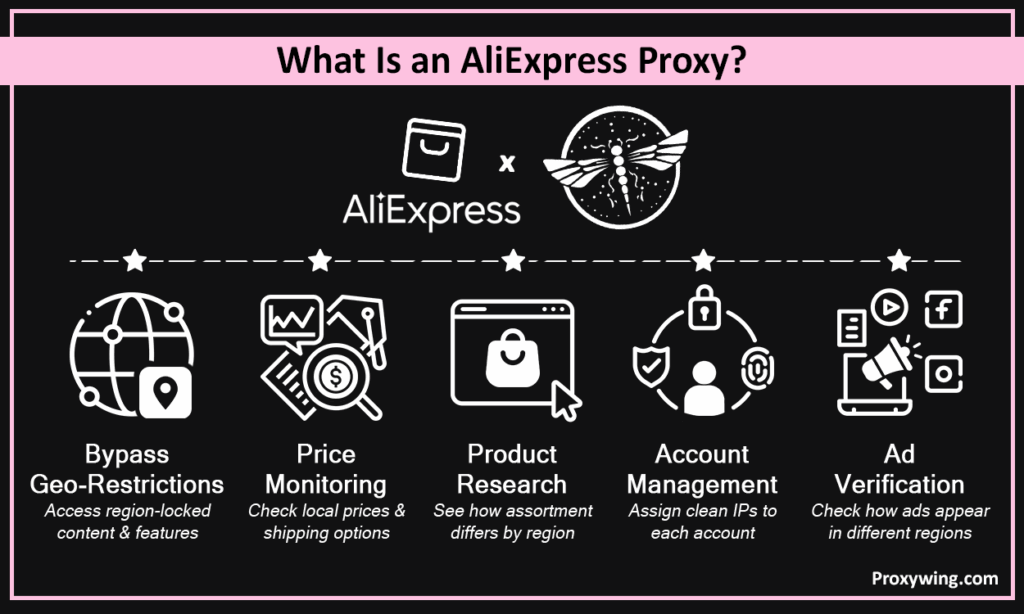
When you use AliExpress proxy, it routes your traffic through a different IP address before reaching the site’s servers. In the process, it masks your real location when browsing, automating, or managing accounts on the platform. With your real IP address and location hidden, your privacy and flexibility while using the platform is significantly improved.
After you connect and start to use AliExpress proxy, your traffic is first routed through a remote server before being forwarded to the destination server. By the time your traffic gets to this website’s servers, it will bear the proxy’s IP address and not your real one, making your connection more anonymous. As you use AliExpress proxy servers, they will route your traffic through home device devices, mobile devices, and datacenter IPs depending on the type you choose.
If your workplace, region, or ISP limits access to this platform, an AliExpress proxy reroutes your traffic through a clean, unrestricted IP. Network admins will only see your traffic heading to a random remote server IP, hence allowing it to proceed even if this website is restricted in the firewall rules.
This e-commerce site displays different prices, sellers, and shipping times depending on location. AliExpress proxies let you view the platform as a local user in any target region. This location flexibility allows you to get the best products and prices regardless of your current location.
It is common for sellers and buyers to have more than one account — each extra account is usually created for a different goal. If you decide to use AliExpress proxy, each account should be assigned a unique, stable IP to avoid linking. We recommend using this approach for legitimate workflows and avoid anything that violates this site’s terms of service.
AliExpress proxies allow distribution of requests across different IPs, which is crucial for preventing IP blocks when monitoring prices, tracking competitors, and bulk product research. For a seamless experience, keep requests responsible and avoid aggressive scraping that strains the platform. Even when using automatic tools, the goal is to make your traffic appear as natural as possible.
Check that ads on this site, affiliate campaigns, and mobile app experiences display correctly across different regions and devices. By using IPs from any region, it allows you to get the real experience your target audience in that region gets when viewing your ads.
The best option for accessing this e-commerce site. This type routes your traffic through IPs of real home devices, making them reliable for account access, browsing, and localized research. Residential IPs have a high trust score, which significantly reduces any chances of IP blocks.
Rotating IPs allow users to distribute their requests across multiple IPs to make each request seem like it is coming from a differ users. This approach is ideal for scraping product pages, monitoring prices, and bulk research without getting blocked.
These route traffic through servers running in ISP-managed datacenters. They are best when you need a consistent IP for the same account or session. ISP IPs combine residential-level trust with datacenter-level speed, making them a perfect option for a wide range of use cases.
Mobile proxies route your traffic through IPs of mobile devices, which makes your connection appear like it is coming from legitimate mobile users. Use mobile proxies to view ads on mobile devices and region-specific mobile experiences on carrier-assigned IPs. They are the most expensive type, but worth it for certain use cases.
With this type, your traffic is routed through IPs of servers running in traditional datacenters. They are faster and cheaper, but more likely to be flagged by most platforms. Datacenter IPs are only suitable for lightweight browsing and non-account workflows.
| Setting | Rotating Residential | Static Residential (ISP) |
| IP changes | Per request or interval | Fixed |
| Best for | Scraping, product research | Account management, logins |
| Detection risk | Lower for bulk tasks | Lower for persistent sessions |
| Session stability | Low | High |
You can always re-enable the proxy for AliExpress if you need to use it again since the settings are preserved as long as you don’t delete them.
| Problem | Likely Cause | Fix |
| Connection refused | Wrong IP address, port, or logging credentials | Double-check proxy credentials and confirm they are all correct |
| AliExpress still shows real location | Proxy not applied correctly | Verify settings and test IP |
| Account flagged or locked | IP switching too frequently | Switch to a static/sticky IP |
| Slow loading | Distant server or overloaded IP | Switch to a closer or faster proxy |
| CAPTCHA appearing | Bot-like behavior detected | Use residential IPs, slow requests |
These are some of the best practices you should follow for the best experience when using AliExpress proxy services:
Assign each account a dedicated IP and keep it consistent. Frequent IP changes on the same account raise flags. If you’re using chrome, you can create multiple profiles for the extension — each with its unique remote server details.
Free AliExpress proxies are often slow, shared, and already flagged by this website’s security systems. They also pose privacy risks since they can log your sensitive browsing information and sell it to data brokers.
Switching between countries on the same account can trigger security checks and deliver inconsistent results. Random IP changes are seen as a security incident by these platforms, triggering re-authentication and re-captchas.
Use AliExpress proxies for legitimate access, research, testing, and privacy. Avoid any activity that violates this site’s terms or local regulations to avoid any legal repercussions down the road.
ProxyWing offers residential, ISP, and datacenter proxies for AliExpress with 70M+ IPs across 190+ countries — reliable coverage for any use case. City-level targeting, sticky and rotating sessions, SOCKS5 and HTTP/S support, and 99.99% uptime make it a strong fit for workflows that involve account management and large-scale research. Plans start at $0.90/month — one of the most affordable choices in the industry today.
Even though you can access this e-commerce website without a proxy, advanced users that need more capabilities will significantly benefit from using one. Proxies make AliExpress more accessible and more useful for workflows that involve checking regional pricing, managing accounts, or running product research at scale.
For the best experience, match the type to your workflow, use a reliable provider, and stay within platform guidelines. The setup process is straightforward for most platforms — simply find the proxy settings and input the server details. Always confirm that these details are accurate to avoid connection issues after setup.
Article written by:

Product & Support Operations Lead
Built Proxywing's support department from scratch — documented workflows, clear escalations, consistent quality. Now bridges the CEO and engineering, keeping infrastructure projects on track.
All articles by author (68)Yes you can, but we don’t recommend them. Free proxies are unreliable, often flagged, and expose your data to risk since they log browsing data that can later be sold to data brokers. Use a paid provider for any serious workflow.
Check your server details such as the IP address, port, and credentials and confirm that they are accurate. Confirm the protocol matches your setup and verify the IP has actually changed before accessing AliExpress.
Yes, price monitoring is one of the common use cases for proxies. They route your connection through a local IP in the target country to see region-specific prices, shipping options, and product availability.
Yes, if each account uses a unique, stable IP. Avoid sharing IPs between accounts or switching locations frequently. You should also consider having a unique browser profile for each account.
Each has its best use case. Rotating IPs are best for product research and scraping. Static IPs are ideal for account management and any session requiring a consistent IP.

