




Proxy Authentication Methods Explained: Username/Password vs IP Whitelisting
06.10.2026 10 min
The HTTP Error 503 Service Unavailable is a server-side error that is reported whenever a website is not able to process requests at that time. The server is running, but it is not responsive at the moment. This is also known as code 503. This normally occurs when maintenance is being done, during traffic surges, or when the server resources are strained.
The experience of viewing the “the service is unavailable” notice can be annoying either when you are operating a site or when you are simply trying to open a site. The first step of resolving http error 503 is to know its causes. Knowing how to fix http error 503 service unavailable can help reduce downtime, protect user trust, and keep a site running smoothly.
This article will discuss the meaning of HTTP Error 503, its causes, and how to fix it and prevent it. Read on to learn practical steps and real examples that make handling service unavailable errors easier.
The HTTP Error 503 Service Unavailable is a signal that this server is online, but at the moment it is incapable of answering your request. It is just the server who is saying, “I am here, but now I am busy.” This can happen because of normal reasons, like the website owner updating the website or resuming the services. In that case, the http error 503 is expected and usually disappears once the work is done.
But sometimes a 503 http error is a bad sign. It may appear when the server is overloaded, has reached memory limits or connection limits, or has a failed setup. If it happens often or lasts too long, it is often an indication of something that has to be fixed.
An HTTP error 503 is a server-side status code. Your browser did not cause it. Your device did not cause it. A server is that which provides a response. Code 503 errors are also usually temporary and therefore removable after a few minutes.
A 503 error does not always imply that the whole site is not alive. You can even view it occasionally, as on refresh. You are likely to have a maintenance message. What you can do after a minute is to retry, and the site loads well. These are good signs that the 503 issue is temporary.
If the site starts working again after a short wait, it confirms the 503 issue was temporary and not a full outage that requires a deeper fix.
The HTTP 503 errors can be different depending on server software, hosting provider, CMS, or network configuration. The meaning is the same, and there can be signs of what is not working in the message. Even when the text looks different, it still points to 503 http error.
Many websites show simple messages such as:
Additional information can be displayed when the site uses CDNs, load balancers, or reverse proxies. The messages may include “origin server unhealthy,” “connection with upstream is not working,” “rate limit exceeded,” or “temporarily blocked.”
This information will help in identifying the problem on the origin server, traffic restrictions, or an intermediate node such as a CDN or a security service.
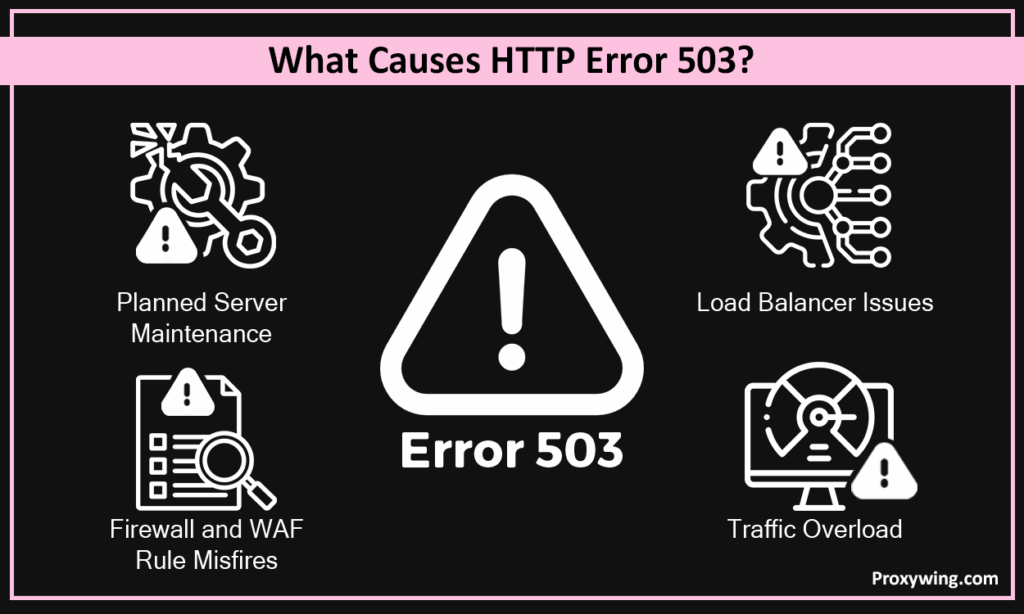
HTTP Error 503 occurs when a system is unable to receive requests at that time. Some causes are harmless and expected, and some signify stress or misconfiguration. Understanding these factors is essential if you want to fix http error 503 correctly instead of guessing.
Servers often return a http error 503 during scheduled maintenance. This involves deployments, updates, security patches, configuration updates, or restarts. The server during this period waits before it starts handling requests to avoid HTTP errors or corrupt data.
This is the normal type of 503 error that is usually temporary. When the maintenance is done, the site is put online again.
One of the most widespread reasons for 503 error is traffic overload. Marketing campaigns, sales events, viral content, or bot traffic may overload the server. When CPU, memory, or connection limits are reached, new requests start failing, and the server needs a quick fix.
Traffic patterns like rate limits, worker process limits, or traffic patterns that resemble attacks may also causes http error 503 responses even though the traffic is legitimate.
In some situations, the server itself is stable, but the application or database behind the server is sluggish. Requests can be blocked by long database queries, locked tables, or stuck background jobs.
Application responses can be blocked by queue backlogs, overwhelmed connection pools, or timeouts of upstream services. In case the server fails to receive a reply on the back-end, it responds with a http error 503.
Most of the current sites have CDNs or load balancers ahead of the origin server. If these layers are not able to reach the origin, they might respond with a 503 http error.
This may occur as a result of back-end failures, improper routing policy, or cache layers. The 503 fault in these situations lies in the network layer rather than in the application itself.
Http error 503 can also occur due to security tools. Overly strict firewall or WAF rules may block real users by mistake.
Requests can also be rejected before reaching the server by geo rules, IP reputation filters, bot protection, or provider-level limits. This will give a 503 error despite the availability of the server.
Real-world scenarios make HTTP error 503 easier to understand.
A team launches a new update of a webpage. Maintenance mode is enabled so that the users are not able to access the site when updating.
They receive an error 503 when it is in maintenance mode. Once the maintenance mode has been released and turned off, the site goes back to normal operation. This is an expected use of a 503 error.
Viral posting or a promotion will create a lot of visitors to a site. Resources on the server are unavailable, and requests start to fail.
The server replies with HTTP 503 until either the traffic is reduced, or the capacity is increased, or rate limits are hit. When the resources stabilize, the site is back in operation without any change of code.
CDN is positioned in front of the server. Failure of health checks or blocking of CDN IPs to access the origin server will result in the inability of the CDN to fetch content.
When the application is still active, it displays an error 503. Fixing origin access restores normal service.
This section explains how to fix http error 503 service unavailable by identifying the point of the failure and thereafter putting in the appropriate fix.
Response headers to verify the status code 503 error. Use browser developer tools or simple request checks.
Check logs to identify the reasons for the 503 http error server, CDN, load balancer, or firewall.
Check CPU, role, memory, disk space, and open connections. Resource exhaustion is a common cause of 503 errors.
Reboot stuck processes, get disk space, increase the limits, or temporarily size things to be running again.
Compare the time error in comparison with new deployments or changes of configurations. Crashes, timeouts, or broken connections are the common occurrences that can be seen in logs.
Use debug mode if needed and disable it after troubleshooting the problem.
Plugins tend to generate 503 errors in CMS-related websites. Excessively large or diseased plug-ins may load the server.
Turn off all the plugins and turn them on one by one to locate the issue.
Themes also pose performance problems. To test, switch to the default theme.
When the error 503 goes away, then the theme probably requires fixing or optimization.
The heartbeat tasks and background tasks make frequent requests. On small hosting, this may result in resource drainage.
Lower the heartbeat frequency or disable unnecessary tasks to reduce load.
Bypass the CDN to test the origin server directly.
If the site is operational without the CDN, fix the origin access, and then re-enable the CDN.
Make sure that health check paths are right and not too stringent.
Confirm backend servers are working correctly and scaling settings are functioning as expected.
Check for false positives from rate limits or bot rules.
Relax too-strict policies and check whether providers are not rejecting legitimate traffic.
A 503 http error cannot be fixed typically by the visitors, yet some basic tests can assist.
Sometimes a 503 error means your IP is being blocked or throttled.
Yes, sometimes. A 503 error can show up when a site’s security or rate limits block your traffic, even if the site works for others.
It functions in one network but fails on another, such as mobile data and home Wi-Fi. Automated requests fail again and again until you slow them down or wait until they start to work.
Send fewer requests. Add retries with longer waits instead of instant repeats. Keep headers and sessions consistent. Follow robots.txt and site terms. High anonymity proxies may help in approved cases, but only when allowed.
Most 503 errors occur due to overload of the server or too rapid changes. The only solution to prevent them is to plan and keep things simple. Complex systems are not necessary. You require systems that are able to take pressure.
Understand the average amount of traffic that your site receives and what occurs during high traffic days. Assess what initially breaks with the increase of traffic. Get simple alerts so that you are alerted in time. If possible, autoscaling is the ideal option, as additional resources are silently installed even before the server runs out of space to breathe.
Caching helps a lot. It prevents repetition of the same task by the server. Queues work when numerous events coincide by diverting the load. Rate limits prevent the overloading of a given site by a single user or bot.
Do not update everything at the same time. Gradually release changes to ensure that users are not disconnected. If there is a need to take the site down, consider displaying a plain maintenance page and restoring the site as quickly as possible.
Monitor the normal and busy times of your site. Monitor errors and page load time to identify issues early. When pages begin to slow or errors begin to rise, then it is normally an indication that something needs attention and a quick fix. These minor changes usually come before a 503 error is displayed.
Keep an eye on server resources, such as CPU, memory, disk space, and open connections. Watch the upstream services like databases, APIs, or CDNs. When one of these starts failing or slowing down, it can quickly lead to the service is unavailable error if not fixed in time.
Article written by:

Full Stack AI Engineer
Full-stack engineer at Proxywing working across backend architecture, performance optimization, and AI-driven workflows. Node.js, React, cloud infrastructure, and RAG pipelines.
All articles by author (61)A 503 error usually lasts a few seconds to a few minutes. If it lasts longer, the site owner needs to fix overload or backend issues.
A 500 error is a general server error. A 503 error means the server is temporarily unavailable, often due to maintenance or overload.
Disable plugins, switch to a default theme, clear the cache, and check server resources and logs related to the 503. Re-enable items one by one to find the cause and apply the correct fix.

