




Proxy Authentication Methods Explained: Username/Password vs IP Whitelisting
06.10.2026 10 min
Python is still widely considered the most popular language in 2026. One of the main reasons for its popularity is its simplified syntax, which makes it a lot easier to learn and use. Despite having simplified syntax, it is pretty common for programmers to make errors while using Python.
Parse errors are among the most common ones, and they happen when the Python interpreter fails to understand your code structure. In today’s guide, we will discuss how to fix parse error in Python. We discuss a lot more about parse errors, including the common causes and the best practices to follow to prevent code errors like these.
Before we dive into parse error troubleshooting, here is a brief summary of what we will cover in this guide.
It is a common error that occurs when the interpreter cannot understand the structure of your code. Unlike runtime errors, parse errors happen before the program runs. Before Python can run your program, it first reads and checks the code line by line. For all Python versions (Python 2 and 3), this process is what is referred to as parsing.
If the interpreter finds anything that breaks the rules of the language, it stops immediately, triggering error messages. So, this type of error typically happens before your program runs.
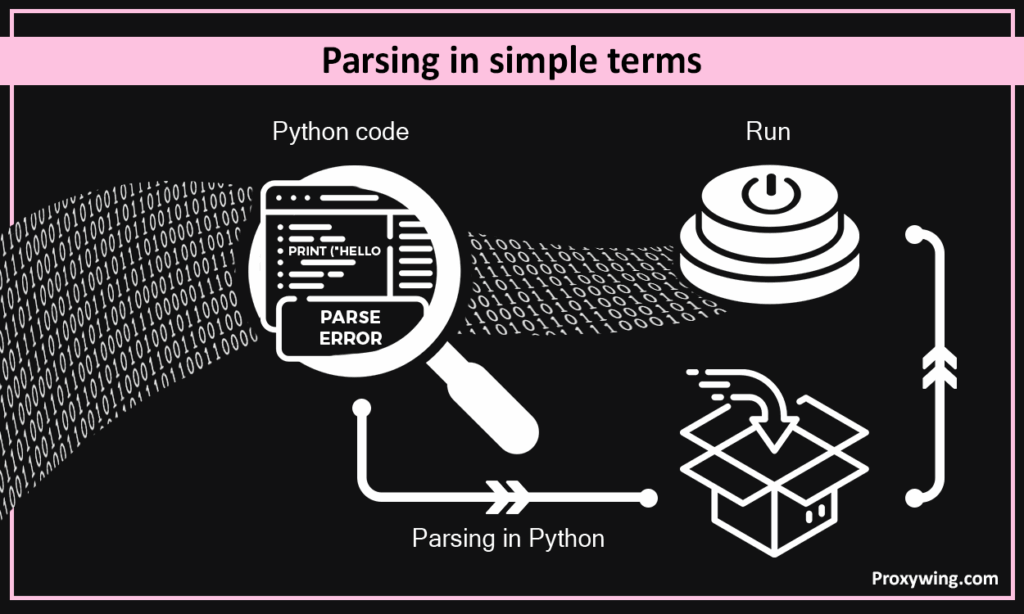
In simple terms, parsing in Python is the process of inspecting your code to ensure it doesn’t violate any rules of the language before running it. If we can compare this to school, parsing is like proofreading your essay and ensuring it is grammatically correct before submitting it. Python works the same way. If the code structure is wrong, Python can’t continue hence getting parsing errors. Json parsing and parsing in all other programming languages are the same.
Parse-related issues usually appear as SyntaxError or IndentationError messages. In your terminal, when inspecting these errors:
That spot (^) is usually near the real problem. You can always go back to your code and resolve the error. After resolving it, you should then compile and run the code again to confirm whether the error is handled.
We will discuss the common solutions to these errors in the next section.
These are some of the common issues that cause parsing errors in Python.
Python requires a colon (:) after these statements. Using any of the above statements without the colon will trigger syntax errors.
Incorrect:
ifx > 5
    print("Hi")
Correct:
ifx > 5:
print("Hi")It is common for programmers to unintentionally leave unclosed or mismatched symbols in their code. This confuses the Python interpreters hence triggering error messages.
Incorrect:
print("HelloCorrect:
print("Hello")The same applies to (), [], and {}.
Python uses indentation to define blocks of code. Proper indentation also makes code more readable, which is why it is embedded into the rules of this language. Problems occur when your indentation is wrong or inconsistent.
Some of the popular indentation issues include:
Any of these will lead to an IndentationError. It is recommended to always use spaces (most editors default to 4 spaces) instead of tabs. It is much easier to be consistent when using spaces over tabs. These defaults are often implemented by all the modern IDEs, providing a more seamless coding experience.
The assignment operator (=) usually confuses early developers. They often mix it up with the comparison (==) operator. Check out the examples below.
Incorrect:
if x = 5:
    print("Hi")
Correct:
if x == 5:
    print("Hi")
In the incorrect code, the assignment operator was used instead of the comparison operator, which automatically leads to errors. Assignment operators are used when assigning variables to a specific value, while comparison operators are used to compare two values and return a true or false result.
When writing lists, dictionaries or function arguments, it is important not to forget commas in-between the different items.
Incorrect:
numbers = [1, 2 3]Correct:
numbers = [1, 2, 3]When it comes to missing commas, the error message may point to the same line or the next one.
Python supports over 35 keywords and misspelling any of them will result in parsing errors.
Incorrect:
deff my_func():
    pass
Correct:
def my_func():
    pass
In the incorrect code, the interpreter doesn’t recognize the word “deff” since it is misspelled.
This error means the interpreter reached the end of the file but expected more code. This can happen due to several reasons. Some of the common reasons include:
When the interpreter encounters problems due to this issue, you should also check the code lines above, not just the last line.
This error usually happens when:
You can solve this error by retyping the affected line, removing and re-adding quotes or symbols, or using a plain-text editor if needed.
In Python, most parse errors show up as SyntaxError or IndentationError. In both cases, it simply means the interpreter could not understand your code structure, so it stopped before running anything else.
Here is the key difference between these two:
A SyntaxError happens when an interpreter sees code that does not follow Python’s syntax rules. Like any language, Python has many rules that must be keenly followed when writing your code.
Some of the common causes of syntax errors include:
Typical messages from syntax errors look like this:
The arrow (^) in the error message shows where the interpreter got confused.
An IndentationError happens when code blocks are not lined up correctly. In addition to the standard syntax (grammar) rules, Python also has rules that guide how your code should be structured. Violating any of these rules will result in an IndentationError.
Common causes include:
Python is strict about indentation because spacing defines code blocks, unlike many other languages that use {}.
When this error happens, the typical error messages you will see in the terminal look like this:
Broken code:
if x > 10
    print("High value")
As you might have noticed, the above code triggers a syntax error because the if statement is missing a colon.
Corrected code:
if x > 10:
    print("High value")
Once the colon is added, Python can parse the code correctly and it will run with no errors.
Broken code:
if x > 10:
print("High value")
In this code, the print line is not indented under the if block, causing an indentation error message.
Corrected code:
if x > 10:
    print("High value")
Adding proper indentation (four spaces) before the print statement solves the issue. As stated earlier, the best indentation practices include using spaces only (recommended: 4 spaces) and not mixing tabs and spaces in your code. Most modern IDEs add indentation automatically.
As you write code in Python or any other programming language, a significant amount of your time will be spent debugging errors. So, getting good and spotting these errors and handling them is a skill that you need to build.
When Python hits a parse error, it prints a traceback in the terminal. This message tells you where the interpreter got confused, not always where the mistake actually started. Learning how to read this output saves a lot of time. Here are some tips you need to follow to improve your debugging skills and save time.
A typical error message looks like this:
File "app.py", line 8
    if x > 5
^Here are the main elements in the above error:
Parse errors often start earlier than the line shown. Common cases include:
To solve the error, you should scan the line above, the line below, and the start of the current block.
If you’re dealing with large files, here is what we recommend:
This makes the real issue easier to spot and avoids distractions.
In this section, we will share a simplified checklist that you can use to handle most parse errors in Python.
Bad formatting causes many errors. So, before you even scan your code, ensure to:
Often, proper indenting alone solves several issues.
These three are among the common characters programmers often misuse or forget to use.
Make sure all symbols, including quotes, brackets, and parentheses are closed. A single missing symbol can break parsing many lines later.
Look for missing:
Misusing or not using any of these characters can often be big problems.
Modern IDEs like VS Code and PyCharm catch parse errors early. They usually highlight any syntax problems as you type your code in real time. So, always handle these errors before proceeding.
Linters warn you about mistakes before running code and formatters solve spacing and indentation automatically. Using these tools will save you a lot of time compared to looking for these common errors manually.
You might encounter parse errors, especially when you write code fast. The good news is that a few habits and following some best practices can greatly reduce how often they happen.
PEP 8 is Python’s official style guide that tells programmers how to write their code. This guide defines how several structures of python should be implemented, including indentation or spacing. Following this guide makes it easier to spot missing symbols.
Coding while following the PEP best 8 practices makes your code look cleaner, making it easier and faster to spot syntax mistakes.
Good editors like VS Code or Sublime Text catch parse errors before you run the code. IDEs highlight syntax mistakes, auto-indent code blocks, and warn you about missing colons or brackets.
It is best to avoid writing large blocks of code without testing. The best practice is writing a few lines of code, running it, and troubleshooting errors before moving ahead. It is much easier to handle errors in one function than the entire program.
Before committing code, always run a syntax check. You should run basic tests to ensure all the basics are implemented. Pre-commit hooks can block broken code from being saved, which saves time later.
Not all errors in Python are the same. Knowing the difference will help you debug faster. Let’s explore the differences between these popular errors.
Parse errors happen before the program runs and are caused by invalid code structure. The common parse errors are SyntaxError and IndentationError. If the program never starts, it’s likely a parse error.
Exception errors happen while the program is running even though your code structure is valid. The common ones include TypeError, ValueError, and IndexError. Handling exceptions can sometimes be more confusing, especially for beginners.
As covered throughout this guide, parse errors happen when Python cannot understand the code. They make your program stop immediately. These errors are easier to solve because Python tells you where to look.
On the other hand, with logic bugs code runs, but results are wrong. These trigger no error message, which makes them harder to detect.
Parse errors are caused by an invalid code structure and will stop your program before it runs if the interpreter detects any issues. They usually appear as SyntaxError or IndentationError. The error message usually shows the details of the error, including the error message, line number, and caret (^).
Displaying a detailed error message makes it much easier to handle these errors compared to logic bugs. Using modern IDEs that highlight these errors and handling syntax issues before the program gets more complex is the most effective way to deal with parse errors.
If you’re writing Python scripts for scraping, automation, or data work, using stable and reliable infrastructure matters too. Using these tools, especially scrapers, will often require proxies to access geo-restricted content and minimize chances of IP bans. ProxyWing offers reliable proxy services with plans starting at $1.05/month.
Article written by:

Full Stack AI Engineer
Full-stack engineer at Proxywing working across backend architecture, performance optimization, and AI-driven workflows. Node.js, React, cloud infrastructure, and RAG pipelines.
All articles by author (61)This error happens when the Python interpreter reaches the end of the file but expects more code. Some of the common causes include unclosed quotes, unclosed brackets or parentheses, and unfinished block.
To find the error, read the error type, check the line number, look at the caret (^), and inspect the lines above and below.
No. By default, Python cannot fix parse errors automatically. However, using modern IDEs like Sublime text or VS Code can help highlight these errors, making it easier to fix them.

