




Proxy Authentication Methods Explained: Username/Password vs IP Whitelisting
06.10.2026 10 min
Web scraping powers most modern data collection. Price monitoring, lead generation, market research – all of it depends on the ability to scrape data from websites that were never built to share it. The technique sounds simple: send a request, get HTML, parse what you need. But anyone who has tried to scrape more than a few hundred pages knows it breaks fast. Sites change layouts. JavaScript renders content after load. IPs get banned. This guide covers the web scraping techniques, web scraping methods, and tools that hold up at real scale.
Web scraping uses a computer program that extracts data from websites. Instead of a human manually copying and pasting data from aproduct page into a spreadsheet, you scrape the site with a script that sends HTTP requests, downloads HTML, and pulls out what you need. Output goes into CSV files, JSON, or a database.
Price comparison sites scrape competitor catalogs daily. Real estate platforms pull listing data from multiple pages. Recruiters scrape job boards to track hiring trends. Data science teams do data collection from social media for sentiment analysis. E-commerce sellers monitor competitor pricing to adjust their own.
This kind of data collection is impossible by hand. A single analyst copying from 500 product pages takes days. A Python script can scrape and process them in minutes. That’s the core value – it turns websites into a structured data source you can build a project around.
Data scraping of public content is generally legal. The 2022 hiQ Labs v. LinkedIn ruling confirmed that you can scrape publicly accessible data without violating the Computer Fraud and Abuse Act. But website terms of service matter. Some sites prohibit automated data scraping. If you scrape behind a login wall or collect personal data without consent, that creates legal risk.
Every web page is a document tree. `<head>` holds metadata, `<body>` holds visible content. Elements nest – a `<div>` contains a `<table>`, which contains `<tr>` rows and `<td>` cells. Web scraping works by navigating this tree to find nodes that hold your target data.
Tags define what an element is. Attributes define its properties. A product title sits inside `<h2 class=”product-name”>Widget Pro</h2>`. Classes and IDs are your primary selectors when importing scraping logic into a Python project – they let you target elements without parsing the full page.
title = soup.find(‘h2′, class_=’product-name’).text
Right-click any element in Chrome or Firefox and choose “Inspect.” DevTools opens with that element highlighted. Pay attention to `class`, `id`, and `data-*` attributes – these are the anchors your scraping logic targets. Check the Network tab too. Sometimes data loads via a separate API call, which is easier to extract than rendered HTML.
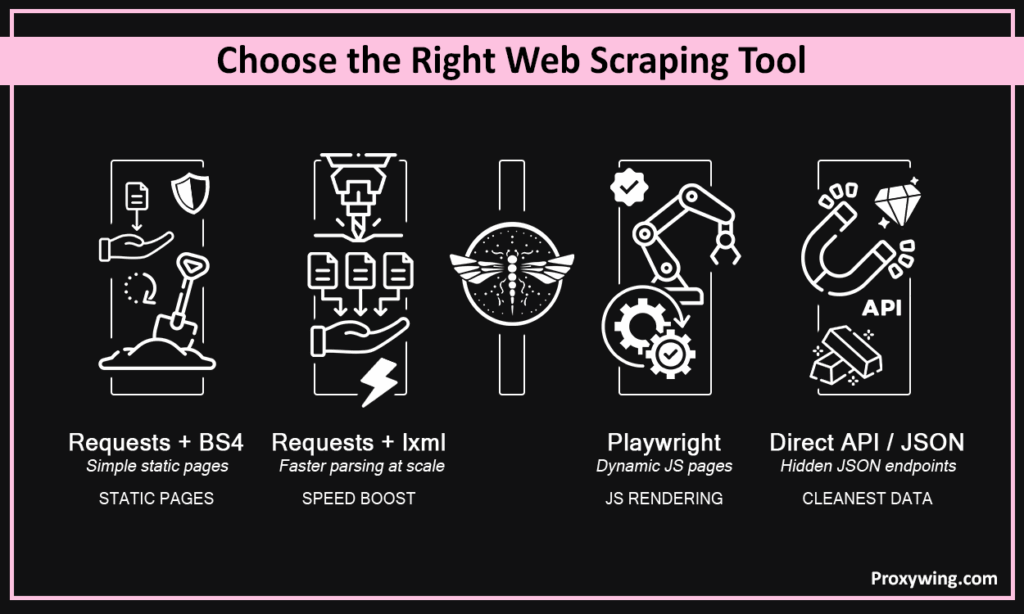
For pages that serve content in the initial HTML response, Python’s `requests` paired with BeautifulSoup is the standard starting point. Requests handles HTTP. BeautifulSoup handles parsing.
import requests

from bs4 import BeautifulSoup

response = requests.get('https://example.com/products')

soup = BeautifulSoup(response.text, 'html.parser')

prices = [tag.text for tag in soup.select('.price')]
This web scraping method is fast and works for many sites. It fails when content loads via JavaScript after page load.
BeautifulSoup is forgiving with broken HTML but slow on large documents. If you scrape thousands of pages and export to files or spreadsheets, switching to `lxml` cuts processing time by 60-70%.
soup = BeautifulSoup(response.text, 'lxml')When a page loads content through JavaScript – React apps, single-page applications – you need a real browser to scrape it. Selenium has been the default for years, but Playwright is faster and more reliable for scraping. It supports Chromium, Firefox, and WebKit, runs headless, and has better auto-wait logic.
from playwright.sync_api import sync_playwright

with sync_playwright() as p:

    browser = p.chromium.launch(headless=True)

    page = browser.new_page()

    page.goto('https://example.com/app')

    page.wait_for_selector('.data-loaded')

    content = page.content()

    browser.close()
Browser automation is resource-intensive. Use this technique only when you actually need it.
Some pages lack clean HTML structures – data scattered across elements, no reliable class names, inconsistent formatting. LLM-based tools like LangChain parse these by understanding context instead of relying on CSS selectors or regular expressions. The technique works but costs more per page. Reserve this web scraping method for cases where traditional parsing fails.
Running any serious web scraping project without proxies is a dead end. ProxyWing gives you the infrastructure to scrape at scale – over 70 million residential IPs across 190+ countries, $1.00/GB residential, $0.90/month datacenter. HTTP and SOCKS5, rotating and sticky sessions, 99% uptime.
For web scraping, ProxyWing’s rotating residential proxies distribute requests across thousands of IPs. Each request appears to come from a different household connection. Target sites see normal traffic instead of thousands of hits from one address.
Every scraping request goes from an IP address. Too many from the same IP and the target site blocks it. Proxies route requests through different addresses. Instead of 10,000 from one IP, you send 10 each from 1,000 IPs. Without rotation, you can’t scrape at any real volume.
Datacenter proxies are fast and cheap but come from hosting providers with well-known IP ranges. Sites with aggressive detection flag them. Good when you need to scrape targets with minimal protection.
ISP proxies sit between the two. Assigned by real internet providers but hosted in data centers. Faster than residential, more trusted than datacenter.
Residential proxies carry the most trust. They come from actual home connections and look like regular traffic. Essential when you need to scrape sites with strong anti-bot measures – Amazon, Google, social media.
View page source (Ctrl+U) and look for your target data in the raw HTML. If it’s there, the page is static. Blog posts, news articles, older e-commerce sites – typically static. The `requests` library handles them. Choose this web scraping technique first and scrape the website directly.
If “View Source” shows empty `<div>` tags and `<script>` references, the page is dynamic. Content gets injected by JavaScript after load. React, Angular, Vue.js apps work this way. `<div id=”root”></div>` with nothing else means a single-page application. Requests alone returns an empty shell.
Not always. Many dynamic sites fetch data from API endpoints that return JSON. Check the Network tab, filter by XHR/Fetch, reload. If a request returns the data you need as JSON, scrape that endpoint directly. This web scraping technique is faster and produces cleaner data.
Most JavaScript-heavy pages pull data from backend APIs. Open DevTools, watch XHR requests during page load. You’ll find endpoints returning JSON – product catalogs, search results. Copy the URL, replicate the headers, and hit it with requests.
headers = {'User-Agent': 'Mozilla/5.0'}

response = requests.get('https://api.example.com/products?page=1', headers=headers)

data = response.json()
No HTML parsing, no JavaScript waits. Structured data ready for your data collection pipeline.
When browser automation is your only option, control the environment. Disable images and CSS loading. Set explicit waits instead of `time.sleep()`. Block ad trackers, analytics, font files. These tips make your web scraping pipeline faster and more predictable.
Infinite scroll pages load data as you scroll. Simulate scrolling, wait for new elements, repeat until nothing new appears. For AJAX content triggered by clicks, find the underlying API calls in the Network tab. You can scrape those endpoints directly and avoid browser interaction entirely.
CSS selectors and XPath are the two methods for targeting elements in HTML. CSS selectors work like front-end code: `.class-name`, `#id`, `div > p`. XPath handles advanced cases – navigating up the DOM, matching text content. BeautifulSoup supports CSS selectors. The lxml library provides XPath. Most tasks work with CSS, but XPath is essential when you scrape complex structures.
When a website exposes a public or hidden API, scrape that instead of parsing HTML. API responses are structured, consistent, and less likely to break on a redesign. Many sites that seem to have no API actually do – the JavaScript front end pulls data from somewhere. Finding these endpoints is one of the most valuable web scraping techniques you can develop.
Playwright beats Selenium – faster, better auto-wait. But a single headless Chrome instance eats 200-500MB of RAM. At 50 concurrent sessions you need serious hardware. That’s why this web scraping method should be your last option.
Don’t re-scrape unchanged pages. Store ETags and Last-Modified headers. Send conditional requests on the next run – the server returns 304 if nothing changed. For sites without conditional support, hash the content and compare. This data collection technique cuts costs on recurring web scraping jobs.
Websites provide plenty of obstacles for scraping. Pagination means following “next page” links or incrementing parameters. Rate limiting means you scrape at 1-2 requests per second per IP. Login walls need session cookies. CAPTCHAs need solving services or enough proxy rotation to avoid triggering them.
Honeypot links catch bots – invisible anchors a human never clicks because CSS hides them. Review link visibility before following. Dynamic class names from React change on every build. Target data attributes or ARIA labels instead.
IP blocking is the most common anti-scraping technique. The fix: proxy rotation. Residential proxies work best because they look like real users. Rotate your User-Agent too – 50,000 requests with the same header is an obvious bot signal.
CAPTCHAs appear when a site suspects automated scraping. Slower request rates and residential IPs reduce triggers. Services like 2Captcha solve them at $2-3 per thousand, but prevention costs less.
Detection systems like Cloudflare, PerimeterX, and DataDome fingerprint your browser – JavaScript execution, canvas rendering, WebGL data. Passing these checks requires undetected-chromedriver or Playwright with stealth plugins. Randomize request timing and scroll patterns. Predictable behavior is detectable behavior.
Build retry logic into every scraping pipeline. Requests fail, connections time out, pages return updated content you didn’t expect. Use exponential backoff for retries.
Log everything. Every request, every response code, every parse failure. Store raw HTML alongside extracted data so you can re-parse without re-fetching if your logic had a bug.
Separate scraping logic from parsing logic. Different concerns, different failure modes. Swap components easily – scrape with Playwright instead of requests, parse with lxml instead of BeautifulSoup.
Monitor data quality. A scrape that returns empty results silently is worse than one that fails loudly. Schedule web scraping during off-peak hours – less load means fewer blocks.
Web scraping techniques compound with experience. The basics – sending requests, parsing HTML, crawling multiple pages – take a day to learn. Building scraping pipelines that run reliably for weeks takes practice. Start simple: requests and BeautifulSoup for static pages, Playwright for dynamic ones, direct API calls when possible. Add proxy rotation early. Scrape responsibly.
Web scraping methods keep evolving, but fundamentals don’t change. Understand page structure. Choose the right technique for the content type. Respect the target site. Build for reliability, not a one-time data grab.
Article written by:

Head of Partnerships
Leads partnerships at Proxywing with hands-on knowledge of residential, ISP, datacenter, and mobile proxies. Works with affiliates, bloggers, and tech communities, bridging tech and partner needs.
All articles by author (23)Start with Python’s requests library and BeautifulSoup. These essential tools handle most static websites and teach the fundamentals of parsing and data extraction. Learn CSS selectors for targeting elements on a website, then practice before attempting advanced web scraping techniques.
Playwright. It runs headless Chromium, Firefox, or WebKit, and handles dynamic content better than Selenium. Before committing to browser automation, check DevTools Network tab – the data might come from an API call you can hit directly with a simpler technique.
Identify the pagination method. Some sites use page numbers (`?page=2`), others use offsets (`?offset=50&limit=25`), some use cursor-based tokens. Build your scraper to follow these patterns. For API pagination, keep requesting until the response returns empty data.
Rotate IP addresses through a proxy service with residential IPs. Space requests at 1-2 per second per IP. Randomize User-Agent headers. Follow robots.txt. If a site returns 429 status codes, back off. Realistic traffic patterns prevent bans better than any workaround after you’ve been flagged.

