When managing more than one account on a given platform, using a proxy to assign each account a unique IP address is an effective way to create account isolation and minimize the chances of detection. However, using a proxy alone is not enough since these platforms use browser fingerprints as another detection signal.
Using an anti-detect browser like ClonBrowser is a necessary step if you need to create maximum isolation between the accounts. By using ClonBrowser, you create a different profile for each account and use a proxy to assign a unique IP to each, creating more isolation between the accounts.
The good news is that setting up ClonBrowser involves just a few steps if you know what to do. In this guide, we will discuss the steps for setting up this anti-detect browser with a proxy. But first, let's share a few facts about ClonBrowser.
What ClonBrowser is and where the proxy fits
ClonBrowser is an anti-detect browser built on two engines, Chromium and Firefox. Like most anti-detect browsers, it keeps each environment separate, so the fingerprint, cookies, storage, and extensions of one profile never leak into another. On top of that, it adds RPA automation, window sync, team permissions, and an OpenAPI.
ClonBrowser is supported on all the major platforms, including Windows, macOS, and Linux. It offers up to 10 environments on the Free plan, with the Pro plan starting at $6 a month for those that need more environments and other features.
However, this separation doesn’t change your IP address. Every environment still leaves through whatever connection your computer uses, which is why you add a proxy to each one.
Item | Value |
|---|---|
What it is | Anti-detect browser with isolated environments, plus RPA automation and team features |
Engines | Chromium and Firefox (Chrome 150, Firefox 150) |
Latest version | 6.4.0 (August 2026), 6.4.2 in beta |
Platforms | Windows 10+, macOS 14+, Linux (beta) |
Free plan | 10 environments, HTTP / HTTPS / SOCKS5 / SSH |
Paid plans | Pro from $6/mo, up to 300,000 environments, adds Trojan, VMess, RPA |
Where a proxy is set | New Browser wizard, or Proxy Management → Set Proxy |
Proxy checks | Check Network (single), PING (batch) |
Bulk features | Batch Add Proxy, batch binding, random assignment |
Verified on | ClonBrowser 6.4.0, September 2026 |
Two places to add a proxy: the New Browser wizard or Proxy Management
- Proxy Settings step: Here you can enter four values, run Check Network, and the proxy lives inside that environment.
- Proxy Management: a pool you fill with New or Batch Add Proxy and then bind to browsers through Set Proxy > Existing Proxy.
Use the wizard for a handful of environments and the pool for everything else. Regardless of the method you choose to use, always change the proxy while the browser is closed.
Which proxy protocols ClonBrowser supports, and what Pro adds
The free plan covers HTTP, HTTPS, SOCKS5, and SSH, which is essentially every proxy you can buy from a provider. The Pro plan adds Trojan, VMess, proxy forwarding, and VLESS with Xray-Reality since 6.1.6. The extra features in the Pro version may only matter if you route your own server or subscription.
Three proxy layers in one app: browser proxy, client proxy, and local proxy
- Browser proxy is what a website sees, set per environment.
- Client proxy is what the app uses to reach its own servers, set in Settings as Follow System, Custom Proxy, or Do not use any proxy, and it has followed the system proxy by default since 6.0.7.
- Local proxy runs the other way, sharing an environment's proxy with a device on your network.
Most "proxy not working" issues are caused by the first two layers colliding.
Which proxy type to use in ClonBrowser
The table below shows the various proxy types you can integrate into this browser and their capabilities.
Proxy type | Platform trust | IP stability | Best for | Watch out for |
|---|---|---|---|---|
Residential (sticky) | High | Held until the TTL expires | Most social and marketplace environments | Priced per GB, IP changes after the TTL |
ISP (static residential) | High | One fixed IP, no TTL | Amazon, eBay, PayPal, ad accounts | Priced per IP, fewer countries |
Mobile (4G/5G) | Highest | Rotates on demand, or held static | Instagram, TikTok, heavily scrutinized accounts | Priced per day or month, limited countries |
Datacenter | Low | Static or rotating | Layout checks, RPA on tolerant sites, scraping | Flagged fast on social and marketplace sites |
Residential proxies with sticky sessions
These will route traffic through a real home IP. A sticky session pins one to your environment for a set time. On ProxyWing, the session ID and TTL are parameters in the username, with up to 1,000 minutes on Standard and 7 days on Premium.
When the TTL ends you get a new address in the same city. In ClonBrowser, this is an ordinary HTTP or SOCKS5 entry, so two environments can share one gateway host without sharing an IP.
ISP proxies: one fixed IP per browser
An ISP proxy is a residential-registered address hosted in an ISP-managed datacenter and rented to one customer. Nothing expires and nothing is metered, so the environment keeps that IP for as long as you pay, which suits marketplace and payment accounts and long RPA schedules.
Mobile proxies: when they are worth it
These route your traffic through mobile IPs that belong to a carrier and are shared by thousands of real phones, so platforms cannot block it cheaply. This makes mobile proxies the ideal choice for Instagram, TikTok, and heavily scrutinized accounts.
Datacenter proxies: when they are enough
These are cheap and fast datacenter IPs that can easily be detected by any platform that cares. In ClonBrowser, they fit RPA against tolerant sites, layout and price checks, and throwaway test environments. On ProxyWing, they start from $0.87 per IP.
What you need before you start
- The ClonBrowser desktop app for Windows 10+, macOS 14+, or Linux plus an account. The Free plan's 10 environments are enough for this guide. The help center asks for a 4-core CPU, 8 GB of RAM, and 50 GB of disk.
- Your proxy host, port, username, and password from your provider.
- Turn off any VPN or system proxy first, or set the client proxy to Do not use any proxy.
Product | Host | Port | Username | Type in ClonBrowser |
|---|---|---|---|---|
Residential | quality.proxywing.com | 8888 | Generated in the dashboard, carries country, session and TTL | HTTP or SOCKS5 |
ISP | Dedicated IP from the dashboard | Per-proxy | Dashboard login, or IP whitelist instead | HTTP or SOCKS5 |
Mobile | Host from the dashboard | Per-proxy | Dashboard login, or IP whitelist | HTTPS or SOCKS5 |
How to add a proxy to one ClonBrowser environment: step by step
These are six simple steps and they do apply to other proxy providers as well.
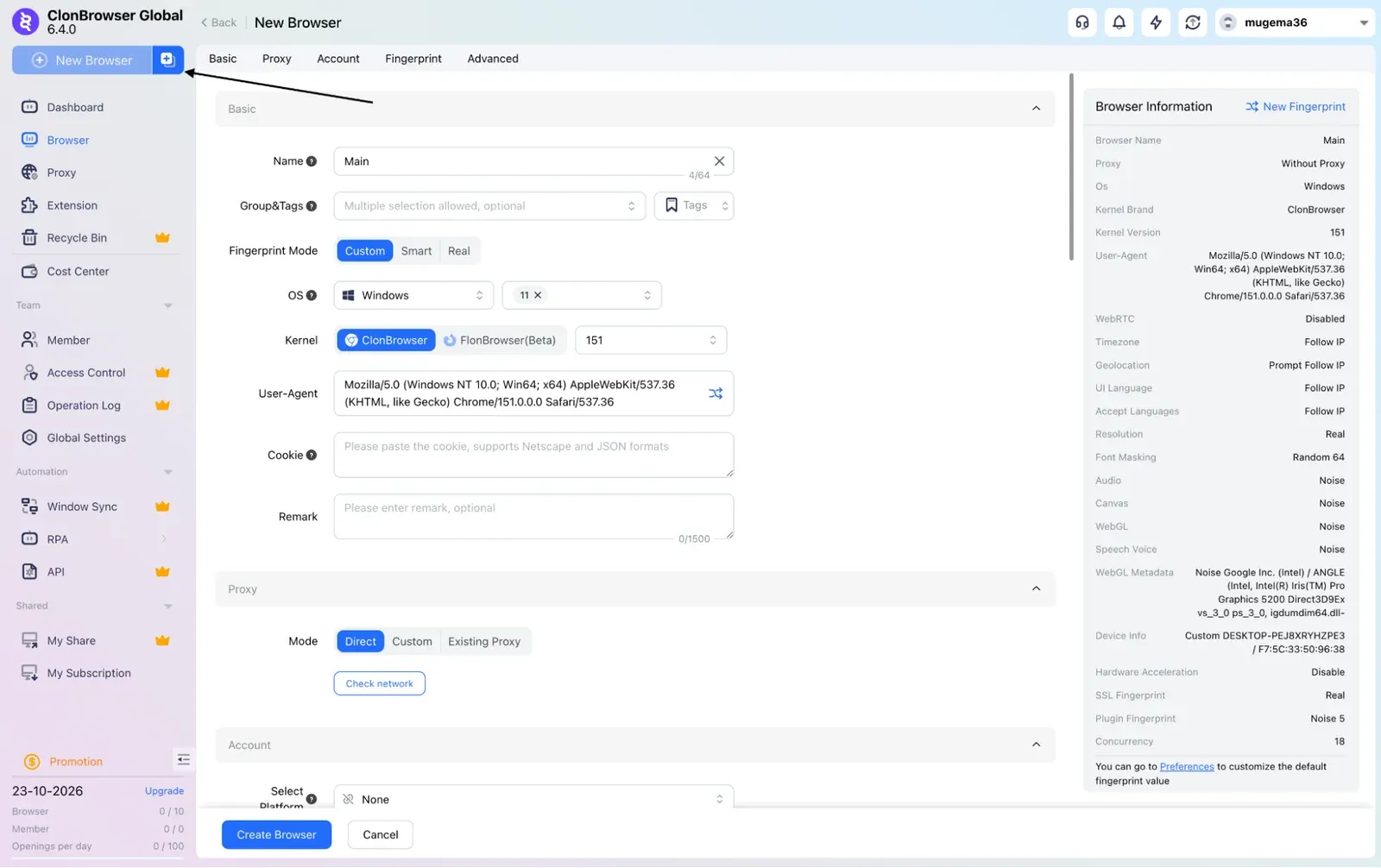
Step 1. Click New Browser and fill in Basic Settings
Click New Browser in the top-left corner to open the six-step wizard. In Basic Settings, name the environment after the platform, country, and number, such as FB-DE-04 or SHOP-CA-12, then choose a group, an operating system, and a kernel. If the environment already exists, skip the wizard: hover over its proxy column in the browser list and click Set Proxy.
The screenshot below shows the New Browser page, which opens when you click New Browser in the top-left corner.
Step 2. Proxy Settings: add a new proxy and choose the type
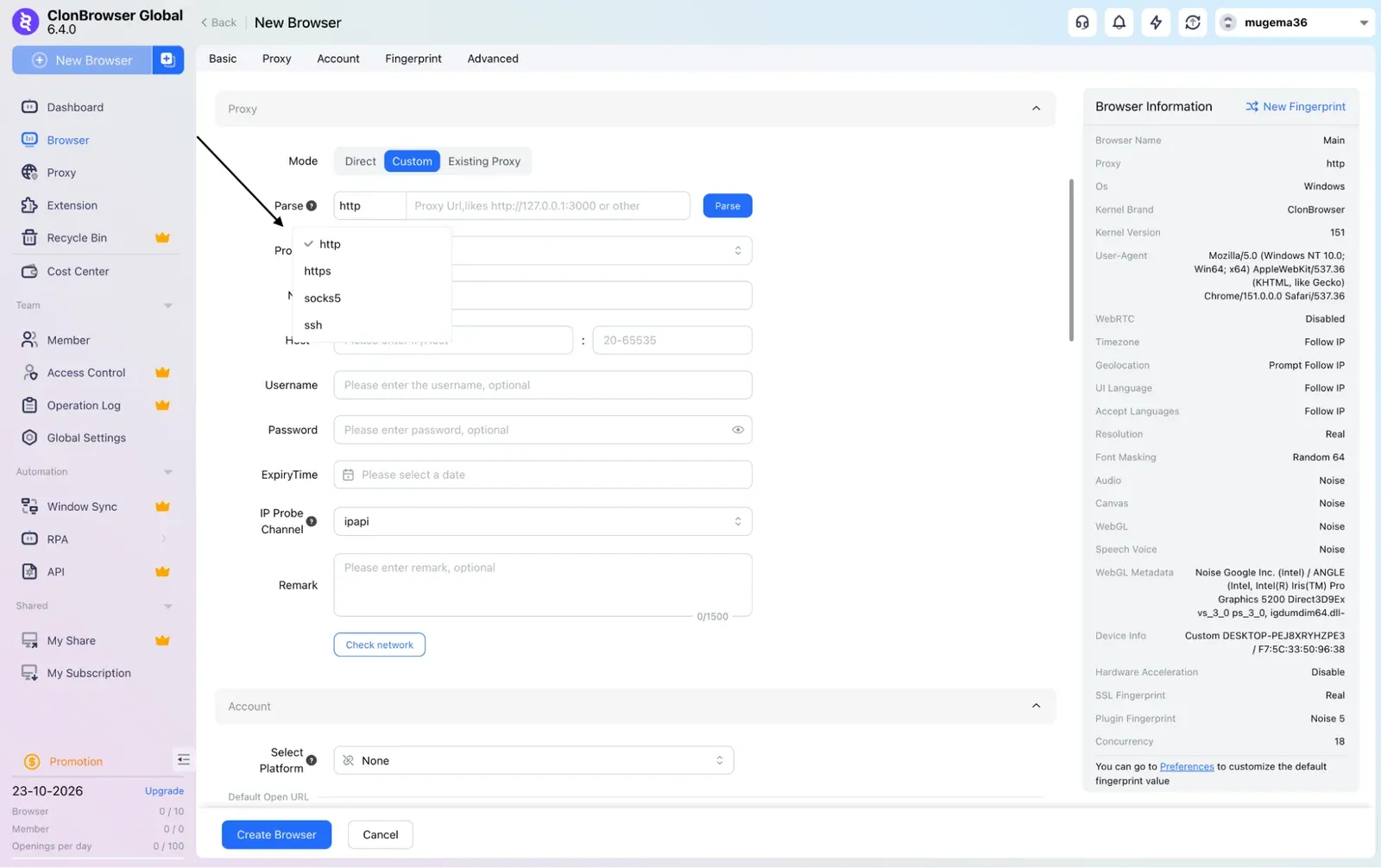
You get three options here: create a new proxy, pick an existing one from the pool, or select Direct Connection and add a proxy later. Choose the first, set the type to match what your provider gave you (usually HTTP), and name the entry after the environment, such as DE-resi-FB-04. That name also appears in Proxy Management, so keep it descriptive.
The screenshot below shows the Protocol dropdown in Custom mode, where you can choose HTTP, HTTPS, SOCKS5, or SSH.
Step 3. Paste the proxy line and click Parse, or fill the four fields
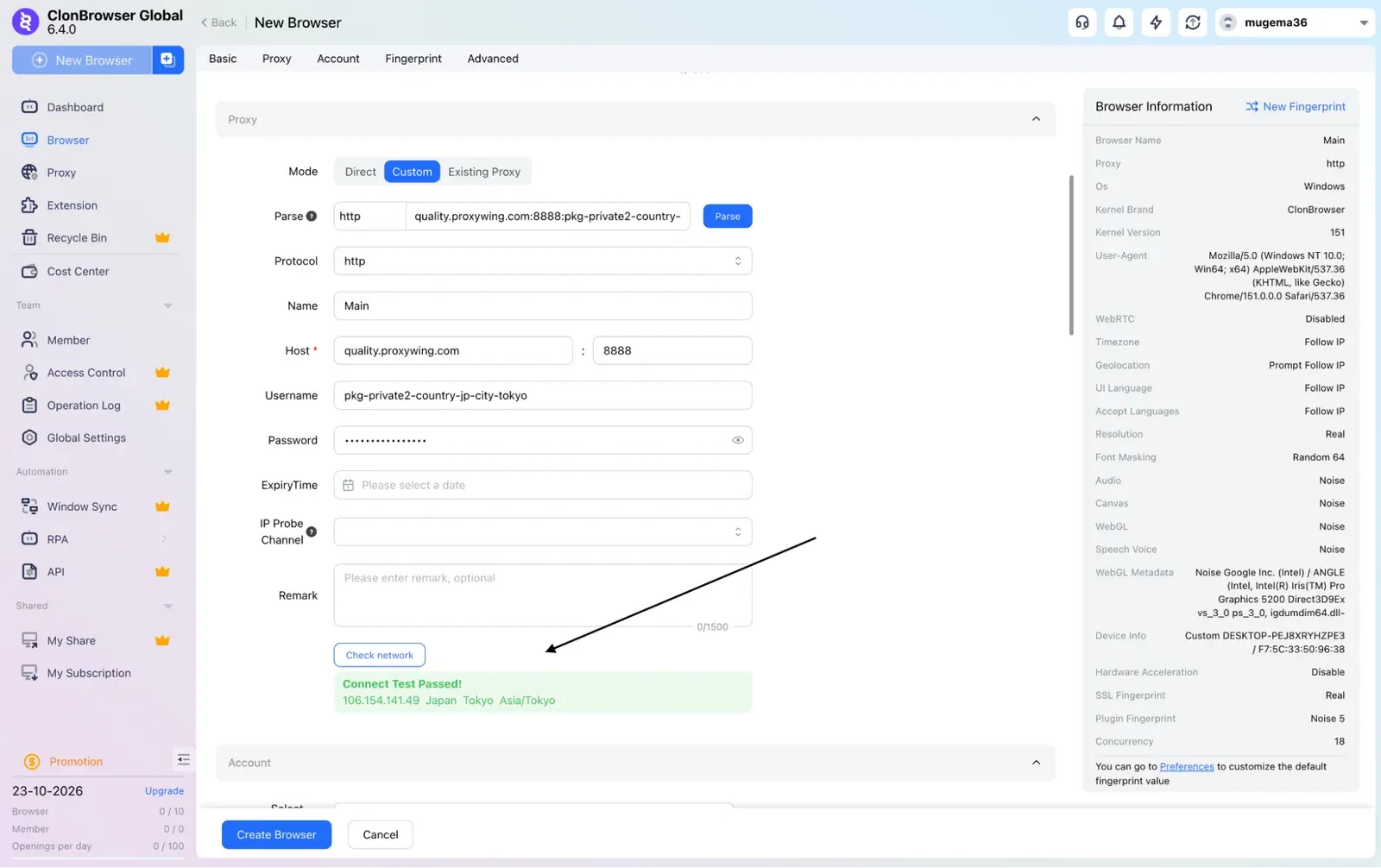
Copy the full host:port:username:password line from your provider's dashboard, paste it into the address field, and click Parse. ClonBrowser will split it into the four fields for you. For residential proxies, the host is a domain rather than an IP, which is normal. The format of the string will look as follows:
quality.proxywing.com:8888:pkg-private2-pool-onlyipv4-country-DE-session-fbde04-ttl-120:PASSWORD
Step 4. Run Check Network and read the result
A successful check shows the exit IP, its country, and the response time next to the button. The country should match the one in your username. If the result is red, nothing has been saved yet or proxy credentials are not correct.
Note that the check passes through the client's own proxy layer, so a VPN left running can fail it even when the proxy works, which is why turning any running VPNs off is necessary. The screenshot below shows a successful Check network result, confirming the proxy connects through a Tokyo, Japan IP address.
Step 5. Fingerprint Settings
The previous step, Account Management, attaches a platform login and can be skipped. In Fingerprint Settings, change four things only: set Timezone and Geolocation to Follow IP, match UI Language and Accept Language to the target market, and set WebRTC to Replace. Never use the Real option, as it exposes your actual IP. Leave every other value as generated.
Step 6. Create Configuration, open the browser, and confirm the IP
Advanced Settings covers Cookie Sync, LocalStorage, IndexDB, and Exclusive Access, and the defaults work fine. Click Create Configuration, then open the environment from the browser list. The first launch downloads the kernel, so give it a minute. Before logging into any account, use an IP checker to confirm the address, then check the profile on BrowserLeaks to make sure the timezone and WebRTC match the proxy.
Proxy Management: build a pool, import in bulk, and bind proxies to browsers
Once you run more than a handful of environments, entering proxies one by one becomes inefficient. The pool imports a whole list in a single paste, tests every entry with one PING, and since version 6.3.3, it also binds proxies in bulk or assigns a random unused one at creation.
Note: Bulk-added proxies only land in the pool, and binding them to browsers is a separate step.
Add proxies to the pool one at a time
Go to Proxy Management and click New. Enter the same four fields plus a name, run Check Network, and save. The list shows type, host, port, latency, and last use, which is what you check when something breaks, so name each entry after the environment it serves to make them easier to understand down the road.
Batch Add Proxy: paste the list, Parse, PING, Confirm
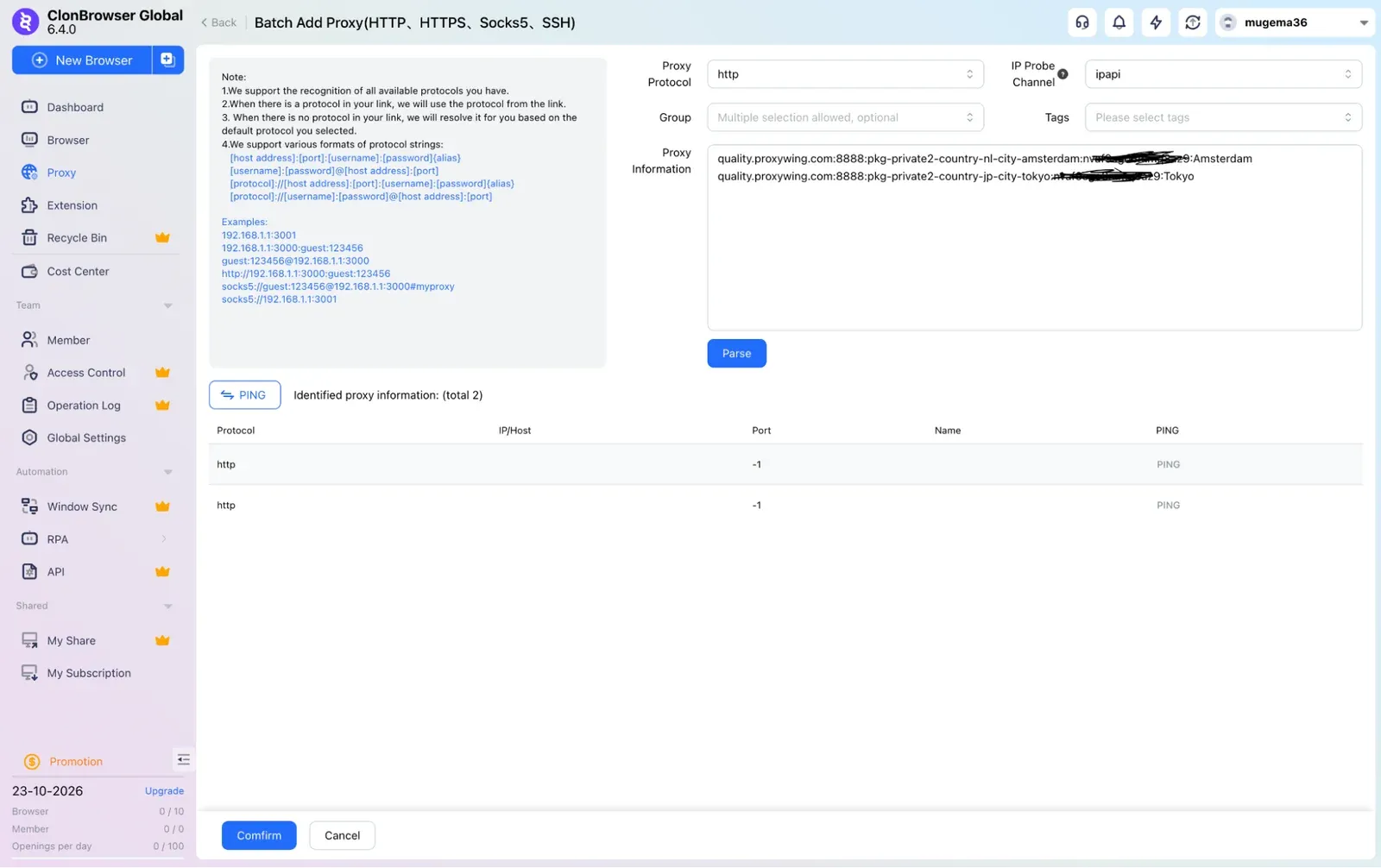
Click Batch Add Proxy, paste one proxy per line in the format shown in the dialog, then click Parse. Run PING before Confirm so dead entries get caught here rather than inside a login page. Give every line its own session string, and test one with curl first.
Sample shown below:
quality.proxywing.com:8888:pkg-private2-pool-onlyipv4-country-ES-session-igesa1-ttl-600:PASSWORD
quality.proxywing.com:8888:pkg-private2-pool-onlyipv4-country-IT-session-igitb2-ttl-600:PASSWORD
quality.proxywing.com:8888:pkg-private2-pool-onlyipv4-country-FR-session-igfrc3-ttl-600:PASSWORD
The screenshot below shows the Batch Add Proxy page, where you can paste several proxies at once and click Parse to import them.
Bind an Existing Proxy to a browser, in bulk and at random
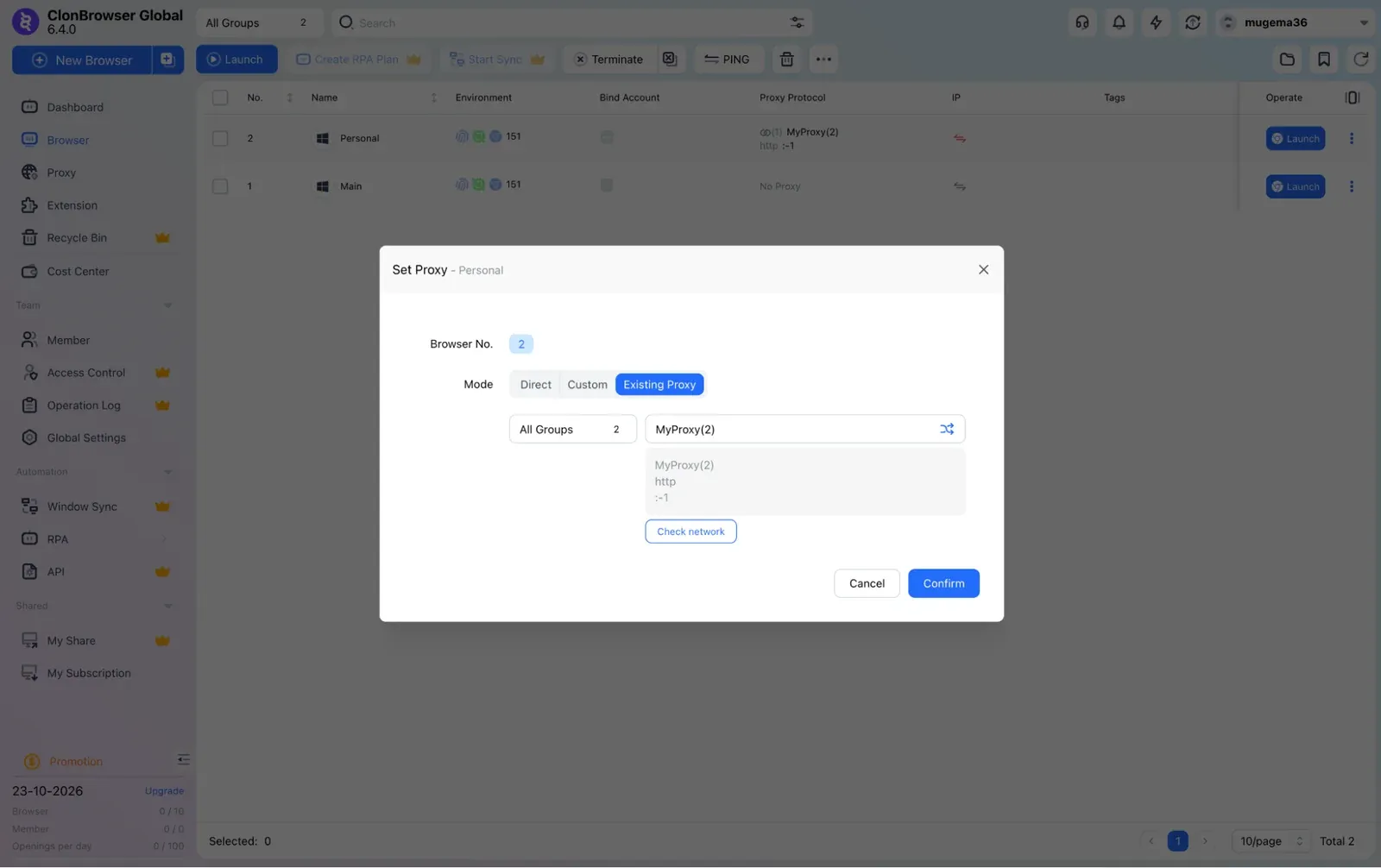
Hover over an environment's proxy column, click Set Proxy, choose Existing Proxy, and pick the entry. Since version 6.3.3, you can do the same across several selected environments, and the wizard can give each new browser a random unused proxy, which is only safe when every pool entry is sticky and the countries match.
Remember to use a unique proxy for each environment. If two environments show the same proxy name, two accounts are leaving through one address, which increases the risk of detection. The screenshot below shows the Set Proxy window, where you choose Existing Proxy mode and pick a saved proxy for the selected browser profile.
Batch Create: build many browsers from a template, each with its own proxy
Download the spreadsheet template, fill in one row per environment, and upload it, and ClonBrowser creates them all in a single run. Quick creation is the alternative, applying a shared group, fingerprint mode, OS, and kernel. The template includes a proxy column, so fifty Etsy environments become fifty pool lines and one upload. Leave that column empty and random assignment or a bulk bind fills it afterward.
Local proxy: share an environment's proxy with a phone on the same network
Open a pool entry, choose Set Local Proxy, select HTTP and a free port between 20 and 65535, click Start, then open View Configuration for the address. Enter that address in the Wi-Fi settings of a phone on the same network and it will exit through the same IP as the environment. This works only within one local network, and it is separate from the client proxy.
Sticky vs rotating: how to keep one IP per browser
- A rotating proxy gives the environment a new IP on every request, which makes it look like a hijacked session to a platform you are logged into.
- A sticky proxy holds one IP for as long as the session ID and TTL allow.
On ProxyWing residential proxies, this comes down to a few characters in the username: country-JP sets the country, session-mk7q2v names the session, and ttl-240 holds that IP for four hours (240 minutes).
Remove the session and the gateway rotates again. None of this affects ClonBrowser's performance, since rotation happens on the provider's side, and ClonBrowser has no rotation control or change-IP field of its own. Use sticky proxies for work inside an account and rotating ones for scraping public web pages.
Setting proxies through the ClonBrowser OpenAPI
ClonBrowser has had dedicated proxy and account endpoints in its OpenAPI since 6.1.7, plus a Scalar reference since 6.3.4. That means a script can add a proxy to the pool, create an environment bound to it, and return a debugging address for Puppeteer or Selenium, with no clicking involved.
The reference opens from inside the client, and the request order follows the manual flow exactly: create the proxy first, then the environment, then bind by proxy ID. Check which plan includes API access in your dashboard to get started.
Troubleshooting: ClonBrowser proxy not working
The four key failure categories we will cover include the proxy configuration, your local network, the proxy itself, and software running on your machine. The table below covers the common issues and their relevant fixes:
Symptom | Likely cause | Fix |
|---|---|---|
One proxy fails Check Network | Typo or stray space in the line, wrong type for the port, empty balance | Re-paste from the dashboard and click Parse, then test the line in curl |
Every proxy fails, including yesterday's | VPN or system proxy feeding the client layer, or a firewall | Turn the VPN off, set the client proxy to Do not use any proxy, whitelist ClonBrowser |
Check passes, wrong country returned | Country parameter missing from the username | Add the country tag, re-run the check |
A sticky IP keeps changing | No session string, a duplicated one, or an expired TTL | Give the environment its own session string and a longer TTL |
Parse returns fewer rows than you pasted | Wrong field order or blank lines in the list | Match the order shown in the dialog, strip empty lines |
PING says dead, curl says alive | Firewall or security software blocking the client, not the proxy | Whitelist ClonBrowser, check for port conflicts |
Right IP, wrong timezone or language | Fingerprint fields set to Custom, or the proxy was swapped later | Return Timezone and Geolocation to Follow IP, reopen the browser |
Everything green, account still flagged | Shared proxy, datacenter range, mismatched country history, or WebRTC on Real | Check the proxy column for duplicates, switch IP type, set WebRTC to Replace |
Check Network fails or PING shows the proxy dead
Test the credentials outside ClonBrowser first. You can do this by running them through curl (shown below) in your terminal, and if the correct country comes back, the proxy is fine and the fault is on your machine.
Check the proxy type, then any VPN, then the client proxy in Settings, then your firewall, in that order. If curl fails as well, the issue is your credentials or an empty traffic balance.
curl -x "http://USERNAME:PASSWORD@quality.proxywing.com:8888" http://ip-api.com/json
The proxy connects but the browser shows another country
These are two separate faults that look the same from a website's side. If an IP lookup returns the wrong country, your username is missing its country parameter or is reusing a session string from a different environment.
If the IP is correct but BrowserLeaks reports a mismatched timezone or language, Fingerprint Settings is stuck on Custom, or you changed the proxy after the environment was already built.
The proxy works but the account still gets flagged
A green Check Network confirms the connection works, not that the identity holds up. If it is getting flagged, scan the proxy column for two environments sharing one entry, then check whether the IP type suits the platform, then whether the proxy country matches where the account normally logs in, and finally confirm WebRTC is not set to Real. Rule out all four before you blame the provider.
How to use ProxyWing proxies with ClonBrowser
Choose the product based on what the account is worth, then paste the four proxy values from the dashboard into Proxy Settings or Batch Add Proxy. What you need to know:
- Residential starts at 1 GB with prices from $1.00 per GB, targets country, city, and ISP, holds a sticky session for up to 7 days on Premium, and the traffic never expires.
- ISP gives you a dedicated address with unlimited traffic across 11 countries from $1.71 per IP.
- IP whitelisting means the entry needs no password at all.
- Mobile proxies cover 15 countries from $4.00 per day, with rotation you can turn off. Each one arrives as a single line that Parse reads on its own.
Platform | Proxy type | Session | ProxyWing product |
|---|---|---|---|
Facebook, Meta Ads, LinkedIn | Residential or mobile | Sticky, long TTL | Residential Premium (7-day session) or Mobile |
Instagram, TikTok | Mobile | Sticky per task | Mobile |
Amazon, eBay, Etsy, Shopify | ISP | Static | ISP |
PayPal, Google Ads, crypto exchanges | ISP | Static | ISP |
Reddit, forums, dating apps | Residential | Sticky | Residential Standard with a session string |
RPA data collection, geo QA | Residential | Rotating | Residential without a session string |
Summary and next step
Keep these four rules in mind:
- Give each environment one sticky IP and leave it bound.
- Choose the proxy type by what the account is worth, not by price.
- PING the pool before you start work, not after you hit a login screen.
- Keep the three proxy layers apart, since the client proxy is what usually breaks Check Network.
Note: These same four proxies used with ClonBrowser work in ixBrowser, GoLogin, AdsPower, and any other anti-detect browser, so your pool is never tied to one browser.
FAQ
How do I add a proxy to an existing ClonBrowser environment?
Hover over the proxy column in the browser list, click Set Proxy, pick a new or existing proxy, run Check Network, and save. Close the browser before you make the change.
Does ClonBrowser support SOCKS5?
Yes. The Free plan covers HTTP, HTTPS, SOCKS5, and SSH. The Pro plan adds Trojan, VMess, VLESS, and proxy forwarding. Some providers issue a separate SOCKS5 port, so check your dashboard.
Can I use one proxy for several ClonBrowser environments?
You can, but we don’t recommend it. Two environments on one address are two accounts on one address, and platforms link them no matter how different the fingerprints look.
Can ClonBrowser import proxies in bulk?
Yes. Go to Proxy Management, click Batch Add Proxy, paste your list, then Parse, PING, and Confirm. The proxies sit in the pool until you bind them, either in bulk or by random assignment.
Is ClonBrowser free to use with my own proxies?
Yes, the Free plan gives you 10 environments and the standard protocols. You only need Pro (from $6/mo) for more environments, team members, RPA, and the advanced protocols.
Why does Check Network fail?
Usually a typo or trailing space, the wrong proxy type for the port, a VPN, an empty balance, or a firewall. Testing the same line in curl tells you whether the proxy is dead or your machine is blocking it.
Should I use rotating or sticky proxies in ClonBrowser?
It depends on the use case. Use sticky for anything you log into, rotating for data collection and geo tests.
Does ClonBrowser rotate proxies itself?
No. Residential rotation comes from your username parameters, and mobile rotation happens in the provider's dashboard.