
Anti-detect browsers hide your device fingerprint to keep accounts from being linked, and ixBrowser is one of the more popular options for running several profiles on one machine. ixBrowser gives every profile its own fingerprint, but a website checks your IP address before it reads a single fingerprint value, and that address comes from the proxy you assign.
A proxy can be set two ways: inside a single profile, or through a list in Proxy Resources that gets bound to profiles in bulk. Most account workflows need one stable IP per profile, while rotating IPs are ideal for data collection, not logins.
Batch import lets you load up to 200 proxy lines in one run. It's an import tool, not a way to switch between a pool of IPs during a session, as some guides describe it. Paired with ProxyWing residential, ISP, and mobile proxies, ixBrowser lets you run profiles in dozens of countries with one stable IP behind each account.
In this guide, we will cover both ways to add a proxy, which IP type fits which platform, how to keep one IP per profile, and what to do when Proxy Detection fails. Steps were verified in ixBrowser v2.9.26 in October 2026. Let’s get into this.
What ixBrowser is and where the proxy fits
ixBrowser is an anti-detect browser built on Chromium that is designed to run multiple user profiles with each having its own isolated fingerprint, cookies and local storage. When managing multiple accounts, using a browser like ixBrowser allows you to isolate them fully by allocating each account its own browsing footprint.
It ships as a desktop app (for Windows and macOS) with cloud sync, team seats and a Local API for scripting. Fingerprint isolation stops at the browser, though. The IP address is a separate layer, set per profile through a proxy. Combining the two is what allows effective multi-accounting without detection.
ixBrowser: key facts
Category | Detail |
|---|---|
Category | It is an anti-detect browser. It is Chromium-based, runs multiple isolated browser profiles from one dashboard |
Current build | v2.9.26 on kernel 148, as of October 2026 |
Free tier limits | Profiles: unlimited · Creations: 10/day · Opens: 100/day · Team seats: 2 |
Paid tiers | Professional $3.99/mo > Enterprise $19.99/mo, scaling seats and daily limits, plus Basic Developer $9.99/yr for light use |
Unlocked only on paid plans | Local API, Synchronizer, Batch Import, Advanced Fingerprint Control |
Supported proxy protocols | HTTP, HTTPS, SOCKS5, SSH, IPv6 |
Proxy entry points | Per-profile (Proxy Configuration → Custom) or centralized (Proxy Resources > Static Proxy, then linked to profiles) |
Proxies for sale inside the app | Purchased Proxy tab: Dynamic IP, Static IP, mobile 4G |
Connection testing | Proxy Detection (Global or Chinese line), plus a batch-check across the whole Static Proxy list |
Note: Regarding the free plan, the cap isn't on how many profiles you can hold ( that's unlimited), it’s rather on how many you can create and open per day.
Two places to add a proxy: inside a profile or in Proxy Resources
There are two ways to add a proxy:
- Inside a profile, under Proxy Configuration > Custom, which is good for just a few profiles.
- Saved entry in Proxy Resources > Static Proxy, which any profile can use. It works better once you have many, since it shows how many profiles share the same proxy. "Static Proxy" is just the section's name: all proxy types go there, including mobile, datacenter, and residential.
Which proxy protocols ixBrowser supports
ixBrowser supports all the major protocols, including HTTP/HTTPS, SOCKS5, SSH and IPv6. Use HTTP unless your provider tells you otherwise. Use SOCKS5 if you are given the SOCKS5 port. SSH is only for running your own proxy server. It is a more complex and costly option, even though it offers more control.
Which proxy type to use in ixBrowser
ixBrowser can be used with all the major proxy types. The table below shows a summary of the proxy types that can be used alongside this browser:
Proxy type | Trust level* | IP behavior | Best for | Session |
|---|---|---|---|---|
Residential (sticky) | High | Same IP held for a set time | Social and marketplace accounts, multi-country setups | Sticky |
ISP | High | One fixed IP, no expiry | Long-term accounts — marketplaces, ad platforms | Static |
Mobile (4G/5G) | Highest | Fixed or rotating, provider-controlled | High-risk platforms with strict checks | Sticky or rotating |
Datacenter | Low | Fixed or rotating | Scraping, non-sensitive tasks | Either |
Note: Trust level reflects how platforms typically treat each IP range and not a published score.
Residential proxies with sticky sessions
A residential proxy exits through a real home IP address, and a sticky session pins one of those IPs to a profile instead of handing out a new one per request. TTLs vary by provider: some cap a session at 30 minutes, others let it run for days. With ProxyWing Residential proxies, the country, session ID and TTL are all parameters set in the username.
ISP proxies: one fixed IP per profile
With an ISP proxy, your traffic is routed through a residential-registered IP address hosted in a datacenter and rented to one customer, so there's no session to expire. ISP Proxies fit accounts meant to keep the same IP for months. In the Static Proxy list, an ISP entry is the simplest kind: host, port and login, with nothing extra in the username.
Mobile proxies: when they are worth it
Mobile proxies route your traffic through mobile IPs that sit behind carrier-level CGNAT, shared by large numbers of real phones, which makes platforms reluctant to block traffic from these proxies. Using mobile IPs can be worth the extra cost for managing Instagram, TikTok and other platforms known for aggressive checks.
ixBrowser's built-in proxy store: what it sells and when to skip it
Next to Custom, Proxy Configuration also offers Purchased Proxy, which includes Dynamic IP, Static IP, and mobile 4G. This option is good for one or two profiles since it saves opening a second dashboard. However, skip it if you need:
- A specific city
- A sticky TTL you control
- Unmetered ISP traffic
- One invoice for a large batch of IPs
For those use cases, use a dedicated proxy provider. This guide assumes Custom with your own proxy from here on.
What you need before you start
- The ixBrowser desktop app and an account (the free plan is enough)
- Host, port, username and password for your proxy from the provider
- The country (and city, if it matters) the profile should represent
- Any VPN or system proxy switched off, otherwise Proxy Detection may report the wrong address
ProxyWing connection details for ixBrowser
ProxyWing connection details for ixBrowser
ProxyWing product | Proxy Type in ixBrowser | Session behavior | Notes |
|---|---|---|---|
Residential | HTTP or SOCKS5 | Rotates by default. Add a session parameter to make it sticky | From $1.00. Country and city targeting available |
ISP | HTTP or SOCKS5 | Static — one IP per purchase | From $1.71. Unmetered traffic |
Mobile | HTTPS or SOCKS5 | Sticky per task or rotating, controlled from the dashboard | From $4.00 |
HTTP or SOCKS5 | Static or rotating | From $0.87. Best for non-account, non-sensitive tasks |
How to add a proxy to an ixBrowser profile: step by step
These are the key setup steps that you can implement in about five minutes. The example uses a ProxyWing proxy. If you choose to use another provider, only the four connection values change.
Step 1. Create a profile and skip the "no proxy" warning
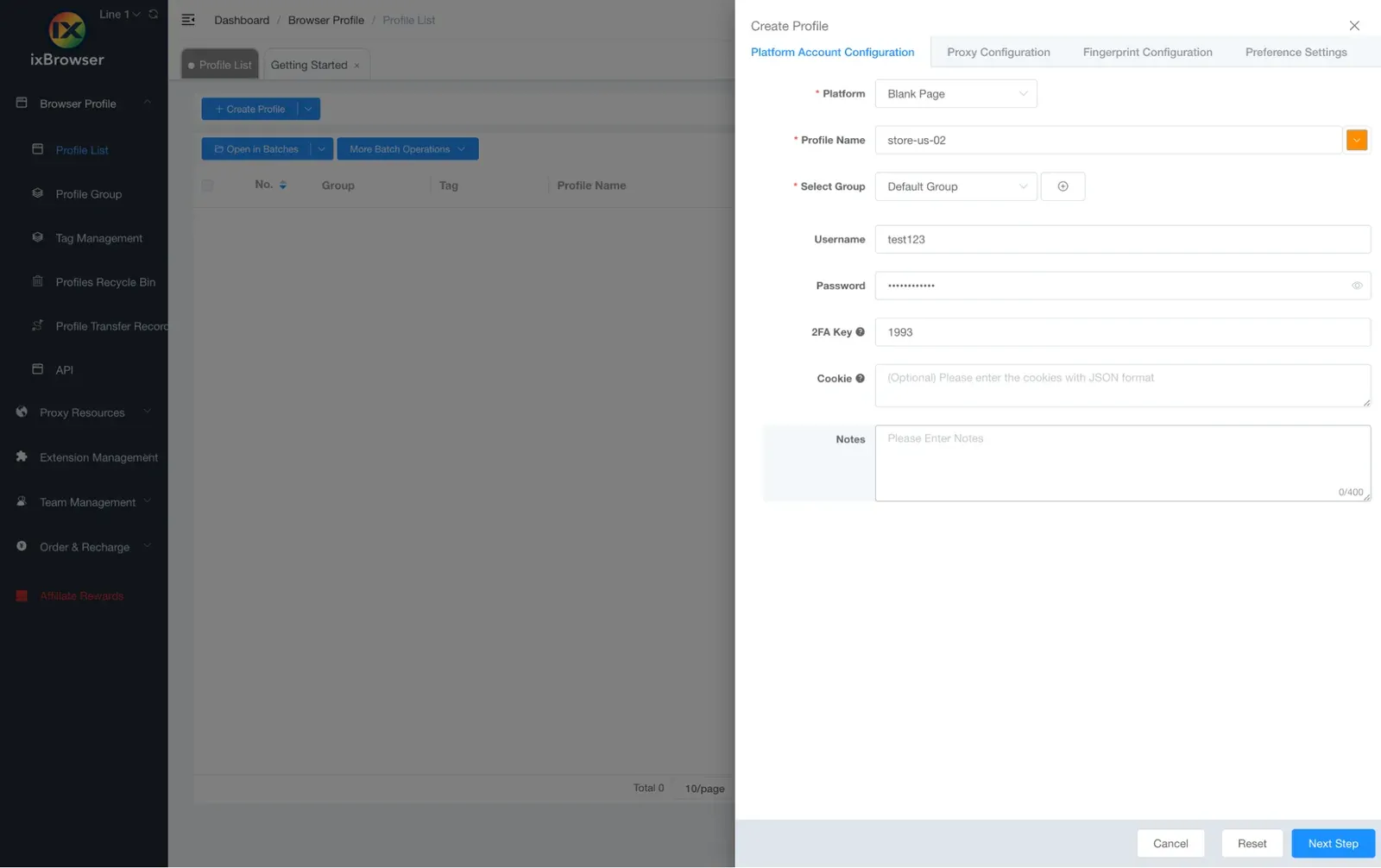
To get started, go to Browser Profile > Profile List > Create Profile. Choose a platform template or Blank Page, name the profile after the account and country (e.g., store-us-02), and pick a group. To edit an existing profile, click Edit on its row and make the necessary changes.
Step 2. Open Proxy Configuration and set the method to Custom
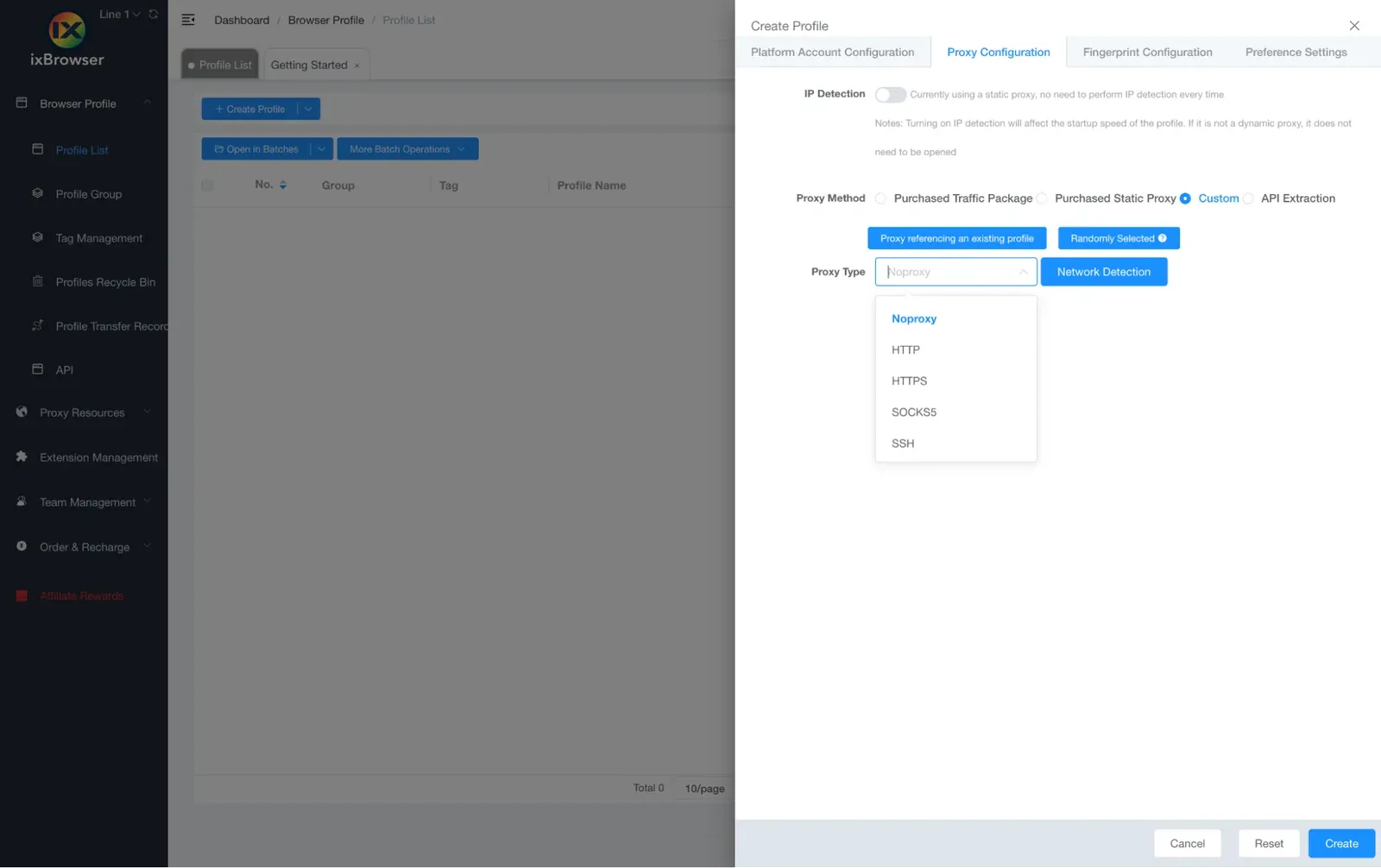
The Proxy Method dropdown has three options:
- Custom, for a proxy you enter yourself
- Purchased Proxy, ixBrowser's store
- Saved-list option pulling from Proxy Resources.
In this case, choose Custom, then set Proxy Type to match your provider. Use HTTP by default unless you were issued a SOCKS5 port.
Step 3. Enter host, port, username and password
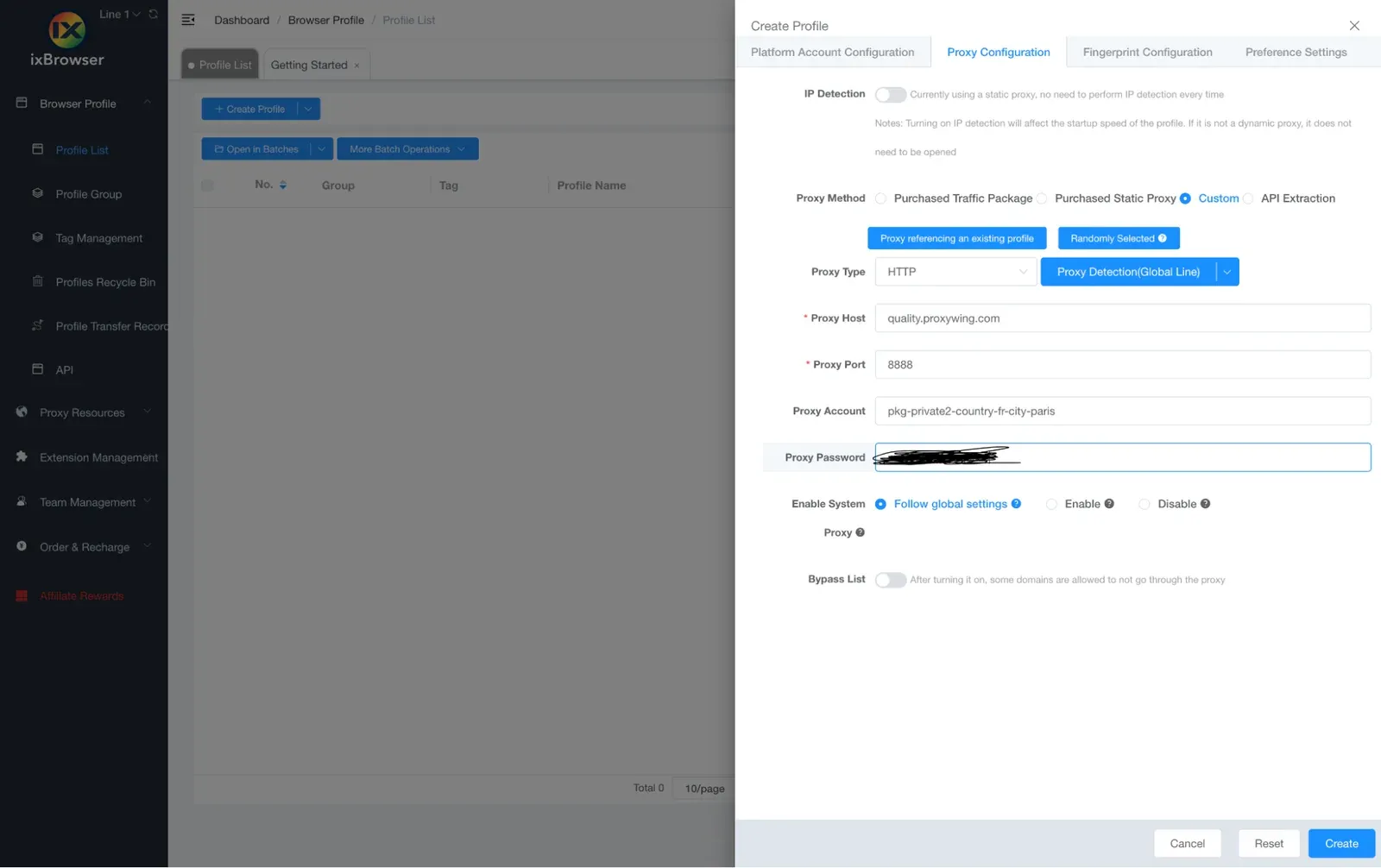
Fill the four fields with proxy credentials from your provider’s dashboard, or paste the whole connection string into Proxy Host. ixBrowser recognizes a host:port:username:password line and splits it automatically.
Step 4. Run Proxy Detection and read the result
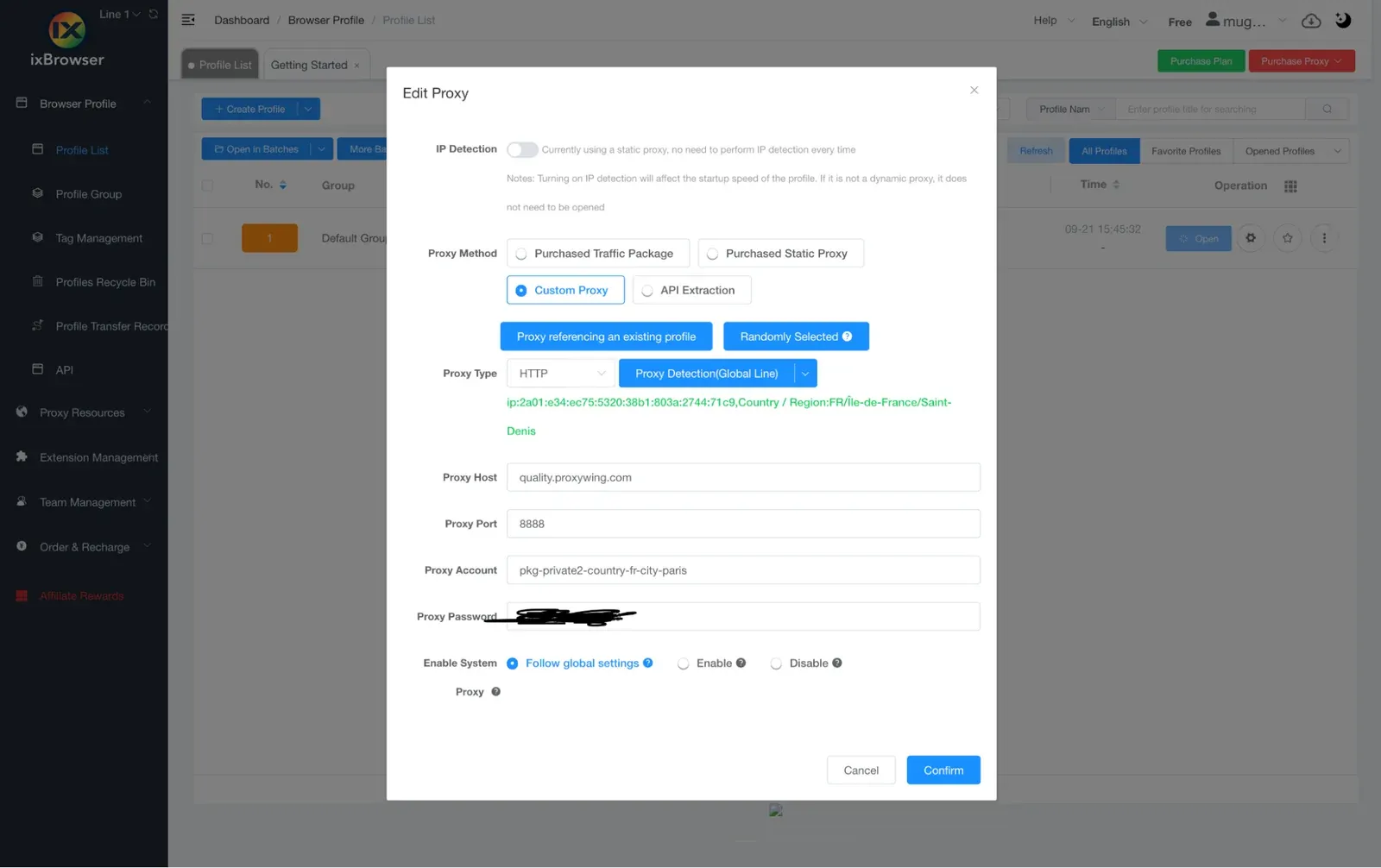
A pass shows the exit IP, country, city and response time. Leave the access line on Global unless you're physically in mainland China. The Chinese line checks through a different network path and can fail on a working connection. A red result means nothing is saved. We will cover the fixes in the troubleshooting section.
Step 5. Match timezone, language and WebRTC to the proxy
In Fingerprint Configuration, check the timezone, language and geolocation. These should follow the IP automatically, and WebRTC should be set to replace or disable, never real. Leave the rest on ixBrowser's generated defaults.
Step 6. Create, open and confirm the IP
Click Create, then Open. A Chromium window launches with a numbered taskbar icon. Its start page repeats the profile's exit IP and location. Confirm the new IP address with an independent IP checker before logging into anything, then run the profile through a fingerprint checker once.
How to manage many proxies: Proxy Resources, batch import and binding
Typing a proxy into every profile works fine for a handful, but not for dozens. That's what Proxy Resources is for: it stores all your proxies in one list, lets you import many at once, shows which profile is using which proxy, and checks the whole list in one click. Bulk import has been available since ixBrowser v2.1.11 (April 2024).
Add proxies one at a time
Go to Proxy Resources > Static Proxy > Add. You'll see the same fields as in a profile, plus a note field. Test the proxy with Proxy Detection before confirming. Use the note to record which account or platform the proxy is for. A list of bare hostnames becomes unreadable within a week.
Add proxies in batches
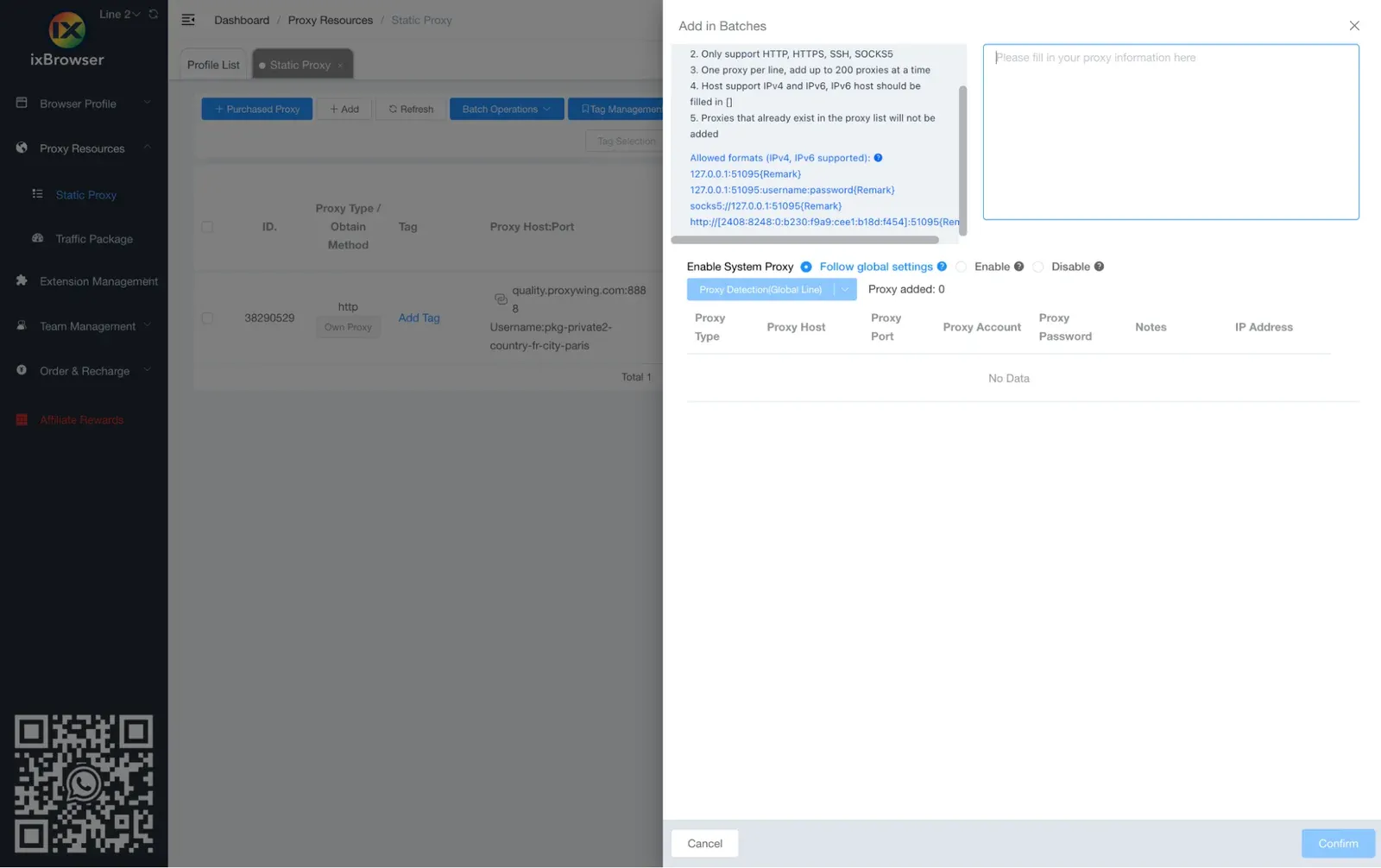
Batch Operations in Static Proxy gives you two ways to add many proxies at once:
- Text field: paste one proxy per line, in `host:port:username:password` format, up to 200 lines per run
- Spreadsheet import: upload a file using the downloadable template
If your provider needs a non-HTTP protocol, check the dialog itself for the exact syntax before relying on it.
Example:
quality.proxywing.com:8888:USERNAME-country-US-session-01:PASSWORD
quality.proxywing.com:8888:USERNAME-country-GB-session-02:PASSWORD
quality.proxywing.com:8888:USERNAME-country-DE-session-03:PASSWORD
Give each line its own session string. Before importing all of them, test one with curl (see the troubleshooting section below).
Bind a saved proxy to a profile and keep one IP per profile
In the profile editor, switch Proxy Method to the saved-list option and pick an entry. Then check Static Proxy: the usage count next to each proxy should read 1 for every live account. A count of 2 means two accounts share an IP, which is exactly what proxies are meant to prevent.
For dozens of profiles at once:
- Select them all, then use More Batch Operations > Edit Profiles to assign proxies in bulk
- Or let ixBrowser auto-assign a random unbound proxy at creation, which is only safe if every entry is sticky and its country matches the account
Rule of thumb: one profile, one proxy, one session string, set once.
Batch-check the list before you open anything
Static Proxy can be checked in a single pass instead of row by row. Always remember to run it before a working session, not after. A proxy that expired overnight shows up red here, not as a login failure inside a profile an hour later.
Sticky vs rotating: how to keep one IP per profile
A rotating proxy assigns a new IP on every request. This approach is fine for scraping, but it looks like a hijacked session on a logged-in account. A sticky session on the other hand holds one IP for as long as its session ID and TTL allow.
With ProxyWing Residential proxies, the switch is a few characters in the username: a session parameter turns rotation off, and a TTL parameter controls how long the IP holds. Leave the session out, and the same gateway rotates on its own.
Note: ixBrowser has no rotation control of its own. For mobile proxies, the timer or trigger lives entirely in the provider's dashboard.
Setting proxies through the ixBrowser Local API
On paid plans, ixBrowser exposes a Local API for scripting profile creation, reachable at 127.0.0.1:53200 by default (the port is configurable in Software Settings). A profile's proxy fields (proxy_type, proxy_ip, proxy_port, proxy_user and proxy_password for a custom proxy, or proxy_id to reference a saved Proxy Resources entry) are set like any other field, so a script can spin up many profiles with unique sessions without touching the UI.
Opening a profile through the API returns a debugging address that Puppeteer or Selenium can attach to directly.
Troubleshooting: ixBrowser proxy not working
Symptom, cause, fix
Symptom | Likely cause | What to do |
|---|---|---|
Proxy Detection is red | Typo or trailing space, wrong Proxy Type for the port, VPN/system proxy active, zero balance | Re-paste from the dashboard, match type to port, disable VPN, test with curl |
Detection passes but shows the wrong country | Missing country parameter, or a session string reused from another profile | Add the country parameter and give the profile its own session string |
Fails on Chinese line, passes on Global | Check routed through a network the proxy doesn't serve | Use Global unless physically located in mainland China |
IP changes on a profile that should be sticky | Missing session parameter, shared session string, or expired TTL | Add a unique session and TTL |
Some sites never load through the proxy | Provider block on that category of site, or a local firewall | Check the provider's restricted list, then test the site without the proxy |
Batch import added fewer entries than lines pasted | Wrong field order, line count over the limit, or unbracketed IPv6 | Reformat to host:port:user:pass, split the file, bracket IPv6 hosts |
Timezone is wrong despite a working proxy | Timezone set manually, or proxy changed after profile creation | Reset timezone to follow IP, rerun Proxy Detection |
Proxy works, account still gets flagged | Shared IP, datacenter range, country mismatch with account history, or WebRTC set to real | Check usage count in Static Proxy, switch IP type, fix WebRTC |
How to use ProxyWing proxies with ixBrowser
Pick the product based on your account management workflow, then copy the four proxy credential values from the ProxyWing dashboard into Custom for one profile, or Add in Batches for a list.
ProxyWing’s Residential proxies start at $1.00 with country and city targeting and sticky sessions, while ISP starts at $1.71 with unmetered traffic. Both types arrive as the same host:port:username:password line ixBrowser reads on its own.
Platform | Recommended type | Session | ProxyWing product |
|---|---|---|---|
Facebook, Meta Ads, LinkedIn | Residential or mobile | Sticky, long TTL | Residential (extended session) or Mobile |
Instagram, TikTok | Mobile | Sticky per task | Mobile |
Amazon, eBay, Etsy | ISP | Static | ISP |
PayPal, Google Ads, KYC platforms | ISP | Static | ISP |
Reddit, forums, dating | Residential | Sticky | Residential with session |
Scraping, geo QA | Residential (no session) or datacenter | Rotating | Residential or Datacenter |
Note: These are our recommendations, but they don’t guarantee against detection or bans.
Summary and next step
For a more seamless experience, make sure:
- One profile gets one sticky IP, and no IP is shared between accounts.
- Match proxy type to what the account is actually worth protecting.
- Batch-check the list before a session starts, not after a login form fails.
Your proxy credentials (hostname, port, username/password) can be used in other anti-detect browsers too if you ever need to. ProxyWing's residential, ISP and mobile proxies all ship as ready-to-paste lines, making it more seamless to add them to your browser setting.
FAQ
How do I add a proxy to an existing ixBrowser profile?
Edit on the profile row > Proxy Configuration > Custom > enter the four proxy values or paste the string > Proxy Detection > confirm.
Does ixBrowser support SOCKS5?
Yes, it does. ixBrowser supports HTTP, HTTPS, SOCKS5, SSH and IPv6. Some providers require session and country parameters in the username specifically for SOCKS5.
Can I use one proxy for several ixBrowser profiles?
Technically yes, and the usage count in Static Proxy will show it. For real accounts, we recommend one IP or one session string per profile.
Can ixBrowser import proxies in bulk?
Yes, since v2.1.11 (April 2024). You can use either a text-based batch add or a spreadsheet-based Batch Import.
Is ixBrowser free to use with my own proxies?
Yes, you can use the free plan. It has unlimited profiles, capped at 10 creations and 100 opens a day. However, the local API and Batch Import require a paid plan from $3.99/mo.
Why does Proxy Detection fail?
Some of the common reasons include a typo, a mismatched Proxy Type, an active VPN, a zero balance (depleted bandwidth), or a check on the Chinese line instead of Global. Testing with curl separates a proxy problem from an ixBrowser one.
Should I use rotating or sticky proxies in ixBrowser?
Go with sticky proxies for anything with a login. Choose rotating for scraping and geo checks. Please remember that the mode is set in the proxy's login parameters, not inside ixBrowser.