Best Proxies for OnlyFans in 2026
22.10.2026 12 min
Web scraping is one of those tasks that requires using specialized tools to avoid getting blocked, especially when collecting data from strict websites. An anti-detect browser is one of the tools you may need to use as it masks your identity fingerprint, making identity profiling and monitoring harder.
These browsers are commonly used for managing and creating multiple accounts. In addition to managing multiple accounts, they are also used for web scraping. If you’re searching for a good antidetect browser for data scraping, this article is for you. In this article, we will discuss the most reliable antidetect browsers that you can use for web scraping. Let’s kick things off with a brief overview of the top 8 anti-detect browsers.
If you do not want to read all ten reviews, here is the short version.
One thing worth saying up front: no antidetect browser makes you invisible. The browser handles the fingerprint. The proxy handles the IP. If either side is weak, the profile still gets flagged.
| Browser | Key Features | Why Stands Out | Limitation |
| GoLogin | Kernel-level fingerprint spoofingCloud profilesSelenium, Puppeteer, and Playwright supportStrong proxy handling | It is very reliable for login-based scraping and long sessions. | Higher starting price compared to the other alternatives |
| AdsPower | Dual engine (Chromium + Firefox)Support for RPA toolsBulk profile management | It is ideal for large-scale data scraping since it allows creating unique profiles and managing them | Its fingerprint depth slightly weaker than the other available alternatives |
| MoreLogin | ML-based realistic fingerprintsLightweight Chromium baseStrong automation tools support | It offers a great balance between fingerprint quality, performance, and cost | It is less advanced against very aggressive anti-bot systems |
| OctoBrowser | Fingerprints managed at browser-code levelOffers high uptimeIncludes CDP support | One of the best options for high-protection sites | High RAM usage and only has paid plans |
| BitBrowser | Simple fingerprint controlLarge RPA marketplaceChromium base | It is beginner-friendly and good for small data scraping projects | Not ideal for advanced or heavily protected sites |
| Dolphin Anty | Solid fingerprint maskingSupports Playwright and Selenium supportStrong proxy integration | It is an ideal option for affiliate and social data scraping workflows | Occasional sync or session issues reported by some users |
| Linken Sphere 2 | Hardware-consistent fingerprintsC++ optimizationIncludes built-in proxy analyzer | It is really good against the most advanced anti-bot systems | Expensive and not beginner-friendly |
| GeeLark | Cloud-based profilesMobile fingerprintsLow local footprint | It is the best choice for mobile and app-level data collection | Performance depends on network quality |
| Incogniton | Isolated browser profiles, strong fingerprint spoofing, Selenium Puppeteer Playwright support, proxy per profile, API automation | Good balance of automation, stability, and cost for multi-account workflows | Less advanced fingerprint depth compared to top-tier anti-detect browsers |
Every browser below was checked against the same set of criteria, in the same order of importance. If your priorities differ, the comparison table will still let you filter by what matters to you.
A note on testing tools. Passing Pixelscan or Iphey means the fingerprint is internally consistent. It does not mean the site will let you through. Modern anti-bot systems also look at the TLS handshake, at how the browser is being driven, and at how the session behaves over time. Treat a clean check as a starting point, not a guarantee.
Let’s discuss the key features of our top 8 anti-detect browsers for data scraping.
Free plans in this category range from genuinely useful to barely worth installing. They are fine for testing a target site before you commit budget, and they are almost never enough for production scraping.
| Browser | What the free plan gives | The catch |
|---|---|---|
| GoLogin | 3 profiles, no time limit | No API, so no automation |
| Incogniton | 10 profiles for the first 2 months, then 3 | Automation sits behind a paid tier |
| AdsPower | 2 profiles, no expiry | No cloud sync, no bulk operations, no API |
| Dolphin Anty | 5 profiles | Automation and bulk tools stripped out |
| BitBrowser | Limited free profiles | Weak against strict anti-bot systems |
| Kameleo | 2 concurrent browsers, capped monthly minutes | Minutes run out quickly on long jobs |
| MoreLogin | Free tier with a small profile count | Limited parallel sessions |
| GeeLark | 2 cloud phones, limited minutes per month | Pay-as-you-go once minutes are gone |
Which free plan to start with. If you only need to check whether a target site accepts an antidetect profile at all, GoLogin is the cleanest starting point because the three profiles are permanent. If you need more profiles for a short evaluation window, Incogniton gives ten for the first two months. If your target is a mobile app or a mobile-only site, GeeLark is the only way to test a real Android device identity for free.
What free plans never include. Automation and API access, team seats, bundled proxy traffic, and profile recovery after deletion. Those are exactly the features that matter once scraping moves from a test to a schedule.
About “free proxies” bundled with antidetect browsers. Some tools include a small free proxy allowance. It is useful for a first check, but shared free IPs are usually already flagged on the sites worth scraping. As soon as you scale, the proxy becomes the limiting factor, not the browser.
An antidetect browser is a browser that is specifically built to control and isolate your browser fingerprint, making it harder for websites to profile your identity. So, when web scraping, each of your sessions can look like a real, separate user instead of one machine making many requests.
All antidetects allow you to create hundreds or even thousands of profiles which allow users to send several requests to the target website using different identity details. These profiles make it seem like you’re using different devices since they create isolated browsing environments.
Anti-detect browsers help scrapers deal with IP-based, fingerprint-based blocks, “unusual traffic detected” warnings, and login checkpoints and verifications. They also make it easier to manage multiple logged-in sessions safely. Overall, antidetect browsers do not make web scraping invisible, but they significantly reduce detection when used correctly.
Fingerprint masking used to be most of the job. It is now the entry ticket. Four things changed, and all of them affect how you should set up a scraping profile.
The practical takeaway has not changed much: pair a consistent fingerprint with a clean IP, keep the session stable, and do not move faster than a person would. What has changed is that the browser alone can no longer carry the whole setup.
Using antidetect browsers may not be necessary if:
Most blocks are not caused by the browser. They are caused by setup mistakes that are easy to avoid.
For scraping, the automation layer matters as much as the fingerprint. A browser that masks perfectly but cannot be driven from your script is not useful at scale.
Almost every tool in this list works the same way. The browser exposes a local API, you ask it to launch a profile, and it returns a debugging port. Your automation framework then connects to that port over the Chrome DevTools Protocol instead of starting its own browser. Your scraping logic stays the same, only the connection changes.
| Browser | Selenium | Puppeteer | Playwright | Local API / SDK |
|---|---|---|---|---|
| Multilogin | Yes | Yes | Yes | Yes, with Python and CLI |
| GoLogin | Yes | Yes | Via CDP | Yes, REST |
| AdsPower | Yes | Yes | Community wrapper | Yes, local API |
| Kameleo | Yes | Yes | Yes | Yes, Python, JS, C# SDKs |
| Octo Browser | Yes | Yes | Yes | Yes, from mid tiers |
| MoreLogin | Yes | Yes | Via CDP | Yes, plus ADB |
| Dolphin Anty | Yes | Yes | Yes | Yes, local API |
| BitBrowser | Yes | Yes | Via CDP | Yes, plus RPA |
| Linken Sphere 2 | Yes | Yes | Yes | Yes, API workflows |
| GeeLark | Yes | Yes | Yes | Yes, plus ADB |
Patched Playwright or Selenium with a stealth plugin can work on light targets and costs nothing. The trade-off is maintenance. Each detection update breaks something, and you end up patching signals by hand instead of collecting data. An antidetect browser moves that work to the vendor. Which approach is right depends on how many targets you scrape and how often they change.
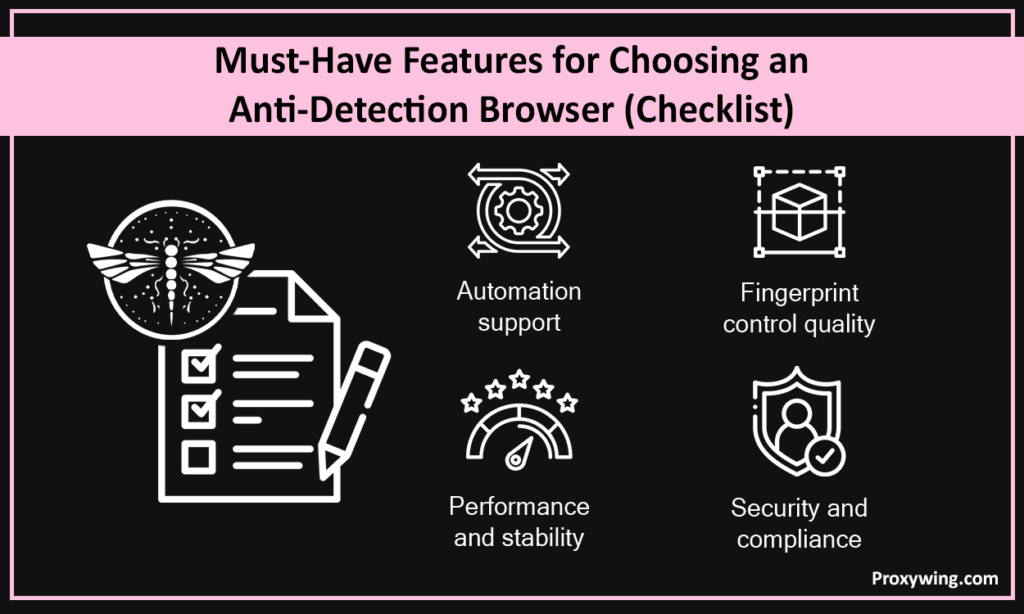
When choosing an antidetect browser for scraping, here are some of the key factors that you must consider:
Before you point a new profile at a real target, run it through a fingerprint checker. It takes two minutes and catches most misconfigurations.
What a clean result actually means: the profile is not giving itself away through its fingerprint. It does not mean the target site will let you through. TLS handshakes, request timing, and mouse or scroll behaviour are all outside what these tools can see.
The browser handles what your device looks like. The proxy handles where it appears to be. Getting one right and the other wrong is the most common reason a well-configured profile still gets blocked.
An antidetect browser is not the only way to scrape without getting blocked, and for some jobs it is more setup than the job deserves.
The rule of thumb: if you need to be a logged-in user, use an antidetect browser. If you only need the data on the page, one of the lighter options above will usually do the job for less.
Article written by:

Product & Support Operations Lead
Built Proxywing's support department from scratch — documented workflows, clear escalations, consistent quality. Now bridges the CEO and engineering, keeping infrastructure projects on track.
All articles by author (69)In most regions, using anti-detect browsers is legal. These browsers are simply tools designed to manage digital fingerprints and sessions. However, you need to use them for only ethical tasks.
The role of stealth plugins is primarily to modify a few browser signals to hide automation or headless mode. They do help, but their protection is limited. Antidetect browsers on the other go much further by offering full advanced fingerprinting control and strong profile isolation. Anti-detect browsers also ensure better consistency across long sessions
Not necessarily. Anti-detect browsers can be used without proxies. However, using them with proxy solutions, enables hiding both your identity fingerprint and IP/location. This makes detection even harder than using them without proxies.
There is no single “best” option. However, some of the common frameworks used with these anti-detect browsers include Playwright, Puppeteer, and Selenium.
Headless mode is usually riskier for protected sites as they are easier to detect. It is much safer to use anti-detect browsers than headless browsers. Many platforms actively detect headless signals, even when they are used with stealth plugins.
They are two names for the same category. “Fingerprint browser” describes what the tool changes, “antidetect browser” describes what it is for. You will also see “anti-fingerprint browser”, “stealth browser”, and “multi-accounting browser” used for the same thing.
Several tools keep a permanent free tier, usually two to five profiles. GoLogin and Incogniton are the most usable of them. Free plans almost always exclude API access, which means no automation, so they suit evaluation rather than production scraping.
Yes. Multilogin ships a Firefox engine alongside its Chromium one, AdsPower offers a Firefox-based profile type, and Camoufox is an open-source Firefox build. A Firefox fingerprint is less common in the wild, which can help on sites where Chromium traffic is scrutinised more closely.
Sometimes. Fingerprint checkers already identify a few tools by name, either from a signature in the browser environment or from a local API server left open on the machine. Detection systems also compare what different parts of the page report about the same device. A profile that is internally consistent and paired with a clean IP is much harder to flag than one that is merely spoofed.
They can, but it removes part of the advantage. These browsers are built to look like a person using a window. Running them headless can bring back the exact automation signals you were paying to avoid. If you need headless scraping at volume, a scraping API or a patched automation framework is usually the better fit.