




Proxy Authentication Methods Explained: Username/Password vs IP Whitelisting
06.10.2026 10 min
Claude AI stops loading, and the first instinct is to assume the service is down. Usually, it’s not. The problem sits between you and the server – a blocked IP, a filtered network, or a regional restriction you didn’t know existed. Thousands of users try to unblock Claude AI every week, and most fix it within minutes once they understand what’s actually happening. Below you’ll discover the real causes and every working method to unblock the service.
The service is not open to every user on the planet. The restrictions show up in different ways depending on where you are and how you connect.
Anthropic does not offer Claude AI in every country. Users in regions like Hong Kong, China, and parts of the Middle East cannot access the platform at all. The block happens at the account and IP level. If you travel to a restricted region, you lose access even if your account was created in a supported country. This is a geo-compliance decision, not a temporary bug. Users in unavailable countries need to unblock the service by changing their visible location.
Corporate firewalls and school networks commonly block chatbot services. IT administrators add the domain to their deny lists the same way they block social media or gaming sites. The block usually targets the domain itself, and sometimes the entire IP range. You won’t see an error from the provider – you’ll get a generic “connection refused” or a redirect to an internal policy page. To unblock the service, you either need to go around the firewall or switch to an unrestricted network.
Shared IP addresses cause problems. When dozens of users hit the platform from the same IP – common with VPNs and office NAT setups – the system can flag that address. The result looks like a block even though your account is fine. Datacenter IPs from popular VPN providers get flagged often because automated bots use those same ranges. You can unlock access by switching to a clean, dedicated IP.
Not every connection problem means you’ve been blocked. But certain patterns point directly to a block rather than a general outage.
You type claude.ai into Chrome and nothing loads. No login screen, no error page. Just a timeout or a blank screen. This usually means something between your device and the server is dropping the connection. If other sites work fine, the issue is specific to Claude AI on your network.
The page loads but you get errors during login. Messages like “service unavailable in your region” or generic 403 errors point to an IP or geo block. The error pages tend to be vague, which makes it hard to tell whether the issue is your account, your location, or your IP.
The page loads, but the chatbot responds with extreme delays or drops mid-conversation. This happens when your connection is being throttled rather than fully blocked. Some network filters slow down traffic to chatbot services instead of cutting it completely. The experience is bad enough that Claude becomes unusable even though it technically connects.
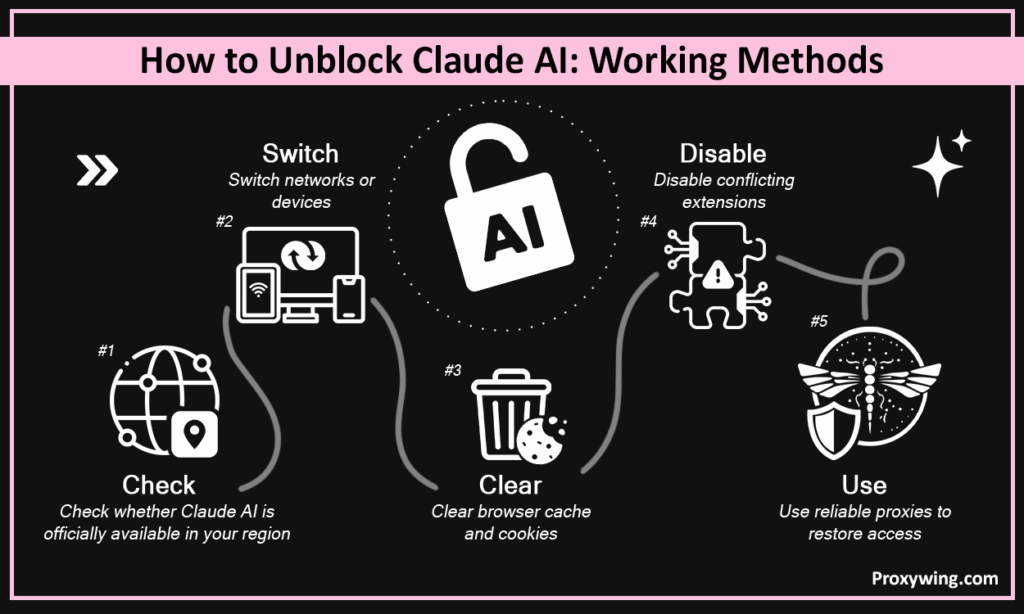
Start with the free options. Most users don’t need to change their entire setup – one of the first three methods usually does the job.
Go to the supported countries list on the Anthropic website first. If your country is not on it, no amount of cache clearing will help – you need to change your visible location to unblock the service, which means proxies or a VPN. If your country is supported, follow the steps below before spending money on tools.
The fastest diagnostic test. Connect your phone to mobile data and try loading Claude. If the service loads on mobile data but not on your home or office Wi-Fi, the problem is your network. This narrows things down immediately. Corporate and campus networks are the usual culprits here.
Open Chrome, go to Settings, then Privacy and Security, then Clear Browsing Data. Select cookies and cached files. This fixes problems where an old session token or a corrupted cookie blocks the login flow. Takes thirty seconds and resolves the issue more often than you’d expect.
Browser extensions that modify network requests can interfere with the site. Ad blockers, privacy tools like uBlock Origin, and some VPN extensions inject themselves into every connection. Temporarily disable all extensions, then try loading the page again. If it works, re-enable them one by one to find the conflict. Chrome DevTools (F12, Network tab) shows exactly which requests fail.
When the problem is your IP address or your geographic location, proxies are the direct fix. A proxy routes your traffic through a different IP in a different location, so the platform sees a clean address in a supported country. Services like ProxyWing.com provide residential and ISP proxies across 195+ countries, which means you can pick an IP in a proper region to unblock the service. This is the method that works to unlock Claude when nothing else does.
Proxies solve the specific technical problems that cause blocks on Claude AI. Not in a vague “improve your connection” way. In a concrete, measurable way that can unblock access within minutes.
Every request to the site carries your IP address. If that IP is flagged or located in a restricted country, the service won’t respond. A proxy replaces your IP with one from the proxy server. Pick a residential IP from the US or UK, and the platform sees a normal user from a supported region. That’s how proxies unlock access.
Office networks, university Wi-Fi, and public hotspots share a single external IP among hundreds of users. If anyone on that network triggered rate limits, the entire IP gets flagged. A proxy gives you a dedicated address that isn’t affected by other users’ behavior. That alone can unblock your Claude connection.
Sessions on Claude AI can drop when your IP changes mid-conversation. This happens with some VPNs that rotate IPs aggressively. Sticky proxy sessions hold the same IP for hours or even days, so your conversation stays connected without interruption. That stability helps unlock a smoother experience overall.
Three types work. They differ in speed, trust level, and price.
These IPs come from real internet service providers and are assigned to actual home connections. Claude AI treats them as regular users because that’s exactly what they look like. Residential proxies have the highest trust scores and the lowest block rates. The tradeoff is bandwidth cost – typically $1.00 to $3.00 per GB depending on the provider. Best choice when you need reliable, long-term access and want to unblock the chatbot for good.
ISP proxies sit on datacenter hardware but carry IP addresses registered to internet service providers. They combine the speed of datacenter connections with the trust score of residential IPs. Prices start around $1.80/month per IP. Good fit for users who run long Claude sessions and need fast, stable connections without burning through bandwidth-based billing.
Cheapest option. Datacenter IPs are fast and available in large quantities, often starting at $0.90/month. But Claude AI and similar services can identify datacenter IP ranges, so the block rate is higher. Useful for testing or short-term access, not ideal for daily use of the chatbot.
The setup takes about five minutes on any operating system.
Sign up with a proxy provider and pick a plan that fits your usage. You’ll get a proxy address (IP or hostname), a port number, and usually a username and password. For unlocking Claude AI access, choose a residential or ISP proxy with a location in the US, UK, or another country where Anthropic supports the service.
On Windows, go to Settings, then Network & Internet, then Proxy. Turn on manual proxy setup and enter the address and port. On macOS, open System Settings, then Network, select your connection, and click Proxies. In Chrome, you can use extensions like FoxyProxy to manage proxy profiles without changing system-wide settings. Enter hostname, port, username, and password. Save and connect.
Open a fresh browser tab and go to the Claude website. Log in with your account. If the page loads and the chatbot responds, the proxy is working. Run a quick test conversation to confirm responses arrive without delays. If something still fails, try a different proxy IP or switch to a different geographic location.
Some approaches look logical but make things worse.
Free proxy lists circulate on forums and get picked up by thousands of users at once. These IPs are overloaded, slow, and frequently flagged. Worse, free proxies can intercept your login credentials since your traffic passes through their servers. For chatbot accounts where you enter a password, the security risk alone rules out free options.
If you pick a proxy IP in a country where the service doesn’t operate, you’ve just moved from one blocked region to another. Always confirm that your proxy location is on the supported countries list before connecting. US-based IPs are the safest default because Claude AI has full availability there.
Not all proxy IPs are equal. A residential IP from a clean subnet with no abuse history works smoothly. A recycled datacenter IP used for scraping last week will get blocked within hours. Check whether your provider offers IP management tools or fresh IP rotation. This matters more for chatbot access than for most other proxy use cases.
ProxyWing covers the specific requirements for unlocking Claude AI without the typical complications. The pool includes over 70 million IPs across 195+ countries, so finding a clean residential IP in a supported region is straightforward. Residential plans start at $1.00/GB, ISP proxies at $1.70/month, datacenter IPs from $0.90/month. All plans support HTTP and SOCKS5.
Sticky sessions last up to 7 days, which matters because the chatbot benefits from a stable IP throughout a conversation. Uptime sits at 99%, and there’s 24/7 support if you run into configuration issues. The setup works with standard browser proxy settings – no special software required. For users who need to unblock Claude AI from restricted regions, ProxyWing handles the unlock process with proxy infrastructure that actually fits the job.
Most access problems with Claude AI come down to three things: your IP got flagged, your network blocks the traffic, or the service doesn’t cover your region. Start with the free fixes – clearing cache, switching networks, disabling extensions. If those don’t work, proxies are the practical next step to unblock the platform. Pick residential or ISP proxies with clean IPs in supported countries, configure your browser, and test. You can unlock Claude AI without complicated setup once you know what’s causing the block.
Article written by:

CEO
Founder of Proxywing. Drives growth across EU, US, and Asian markets, combining B2B strategy with a hands-on focus on product quality, 99% uptime, and responsive support.
All articles by author (64)
