Best USA Proxy Providers in 2026
01.11.2026 12 min
It is common for many schools to block access to YouTube and other social media sites. Blocking websites like YouTube and social media allows students to only access online services that will make them more productive with their studies. However, there are still ways to unblock these YouTube restrictions on your Chromebook or any other device if you need to.
If you’re a Chromebook user, VPNs and proxies are the two common tools you can use for bypassing restrictions at both network and device level. In today’s discussion, we will cover how to unblock YouTube on a school Chromebook to enable watching your favourite YouTube videos with no restrictions.
The methods we will cover will allow you to access YouTube and any other restricted sites on your Chromebook with minimal friction. By the end, you will have all the information you need to choose the appropriate method that suits your situation. So, without wasting any more of your time, let’s dive in!
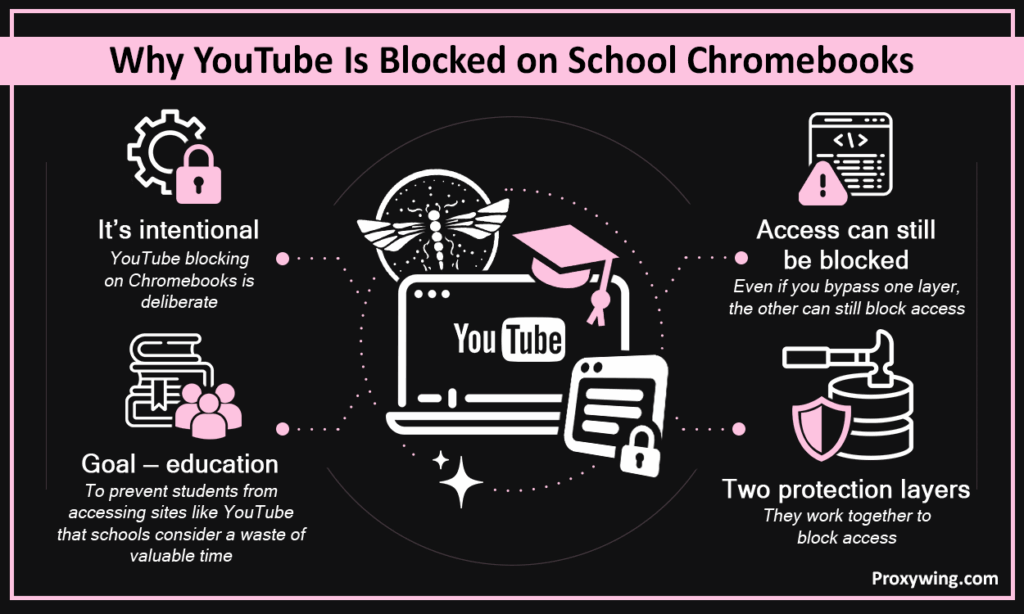
YouTube blocks on Chromebooks aren’t accidental, but intentional. They are deliberately enforced through two separate layers that work together to ensure students don’t access sites like YouTube that schools deem a waste of valuable education time. Since they use two protection layers, even when you bypass one, the other can still block access. Let’s explore these two layers in more detail.
Education institutions manage Chromebooks through Google Workspace for Education, which lets IT admins block specific URLs, force YouTube Restricted Mode, and prevent extension installs — all running silently in the background. These policies apply to the Chromebook regardless of which network it’s on. This layer is one of the hardest to bypass since it is on the device-level and it applies even when you connect using a mobile hotspot.
School networks use DNS filtering to block video and entertainment domains such as YouTube, throttle streaming bandwidth, and in many cases perform HTTPS inspection to catch traffic that slips past DNS blocks. Combined with device-level policies, both layers make YouTube effectively inaccessible on school-managed Chromebooks.
For those who may not know, YouTube mirror sites are unofficial copies or proxies of YouTube that replicate its interface and contents on a different domain to bypass blocks. These YouTube mirror sites do work sometimes, but rarely for long since admins can quickly detect and block them.
YouTube mirror sites get blacklisted within days as IT admins update their filter lists. So, they are good short term solutions, but you can’t trust them to work for weeks. They also tend to serve aggressive ads and occasionally host malicious scripts. YouTube mirror sites are worth trying as a quick fix but we would not recommend them as a reliable long-term solution.
The methods below are ordered from easiest to most reliable. Some work better depending on the strictness of your IT’s filters, and more than one can be combined for better results. You can use any of these YouTube unblocking methods depending on your circumstances:
This is one of the easiest and most direct methods. Follow these steps to use it:
Open your browser and paste a mirror URL such as youtubeunblocked.live. Search for your video directly on the mirror site and play it. The site will fetch the YouTube videos and play them.
Pros: No install required on your Chromebook, typically free, and instant access
Cons: Short shelf life, heavy ads, unreliable YouTube streaming speeds, and potential malware risk
These route your traffic through remote servers, making your traffic seem like it is heading to another IP address and not YouTube’s, bypassing network restrictions. To get started with this method, go to a web proxy like CroxyProxy, ProxFree, or ProxySite. Paste the YouTube URL into the input field and click Go.
Pros: Free and no install required on your Chromebook to unblock YouTube
Cons: Slow speeds, frequent buffering, loaded with ads, proxy IPs often blacklisted by education institution, and log user data (less private)
A browser proxy gives you a separate connection, so you don’t have to open YouTube through a mirror site. Your Chromebook still has to allow proxy settings, because a new exit IP does not remove administrator policies.
For video, check how much traffic a plan includes along with its price. If you go with a residential connection, pick a ProxyWing residential proxy plan and enter code for a lifetime discount. Check that your device supports the setup before you order, then test playback with the endpoint you get.
VPNs encrypt and route your traffic through a remote server, making it impossible for the admin to detect that you are accessing YouTube or any other site. To get started, search the Chrome Web Store for a VPN extension, install it, connect to a server, then open YouTube.
Pros: Easy setup and free sometimes
Cons: Most managed Chromebooks block the Chrome Web Store entirely, making this method unavailable to many students.
Paste the following into your address bar, replacing the YouTube URL with your target video:
translate.google.com/translate?hl=en&sl=pt&u=https://www.youtube.com. Google Translate is rarely blocked by school filters. However, this method is hit-or-miss depending on your school’s rules strictness. IT systems that do deep URL inspection will quickly detect this method.
Pros: Free and simple to use
Cons: Low success rate and can easily be detected with minimal admin effort
Two quick alternatives:
| Method | Reliability | Safety | Ease of Setup | Works on Managed Chromebooks |
| Mirror sites | Low | Low | Very easy | Sometimes |
| Free proxies | Low | Medium | Easy | Sometimes |
| Premium proxies | Very High | High | Easy | Yes |
| VPN extensions | Medium | Medium | Easy | Rarely |
| Google Translate | Medium | High | Very easy | Usually |
| Mobile hotspot | High | High | Easy | Yes |
Sketchy unblocking methods carry real risks. For example, mirror sites frequently serve malware-laced ads that could affect your Chromebook or steal your sensitive data. Free proxy websites log your traffic and sell browsing data as a way to generate income, which could put your sensitive information in unsafe hands.
Fake VPN extensions on unofficial sources have been used to steal credentials and other sensitive user data. If you need a reliable and safe method, premium proxies are the most ideal choice. ProxyWing offers reliable proxies with clean IPs, no traffic logging, consistent performance, over 99% uptime guaranteed, and reliable 24/7 support.
Yes, most schools have the tools to detect this. Schools running HTTPS inspection can see that you’re connecting to a proxy or VPN, even if they can’t see the specific content. DNS logs also flag unusual traffic patterns. However , quality residential proxies are harder to detect than free proxies or common VPN servers, but no method is completely invisible on a monitored network. For the most reliable experience we recommend using residential proxies.
School restrictions on sites like YouTube exist to minimize distractions during class time, which is a valid reason to have them. If you do access YouTube using any of the methods shared in this guide, use it for legitimate study purposes — YouTube tutorials, lecture recordings, exam prep content. We don’t recommend accessing YouTube during times when you are supposed to focus on your studies.
You should also remember that using these methods to stream YouTube and other similar sites during lessons puts you at greater risk of consequences and undermines the reason you’re there. Make sure you are aware of the consequences in case your school determines that they are bypassing YouTube access restrictions.
Article written by:

Head of Partnerships
Leads partnerships at Proxywing with hands-on knowledge of residential, ISP, datacenter, and mobile proxies. Works with affiliates, bloggers, and tech communities, bridging tech and partner needs.
All articles by author (23)It is not illegal in most cases, but it likely violates your school’s acceptable user policy. Consequences are disciplinary rather than legal — detention, device restrictions, or loss of school network access. Ensure you are aware of these penalties before using any of the methods we have shared to bypass blocks on YouTube and other domains.
You need a method that can bypass both device and network-layer restrictions. Mobile hotspot and premium proxies are the most consistent. Both bypass school network filters entirely rather than trying to slip through them. However, premium proxies are the most reliable since they can bypass restrictions on both layers.
They do work, but rarely. Most managed Chromebooks block the Chrome Web Store, preventing installation of any VPN extensions. Even where they can be installed, free VPN IPs are often already blacklisted by school filters, making them unreliable.
On the school network, yes. Most schools implement HTTPS inspections that can reveal traffic destinations. However, on a mobile hotspot, your school cannot see your activity, though your mobile carrier can.
Yes, you can, depending on the rules of your school. Bypassing school network filters typically violates acceptable use policies and can result in disciplinary action by the school administrators. The risk level depends on how actively your school monitors traffic. Some schools have more relaxed policies than others.
Yes, it is possible to use more than one method. Using a premium proxy over a mobile hotspot, for example, gives you both network-level bypass and IP-level anonymity. Combining methods generally improves reliability and reduces detection risk. So, if you need more reliability, consider using more than one of the methods we shared.