




Proxy Authentication Methods Explained: Username/Password vs IP Whitelisting
06.10.2026 10 min
If you run an online shop, you could need more control over how you access it. A proxy set up for Shopify lets you send traffic through several servers without letting people see your true IP address. A lot of users utilise this configuration for testing, privacy, as well as making their workflow pretty smooth.
Using a proxy with Shopify gives you more freedom to manage numerous online stores, review product pages, and keep your networks safe. This article will show you how to set up a proxy for this e-commerce store, what it is, and why it’s important. Read till the end to find out how to use Shopify with proxy in an effective way.
A proxy is a piece of software that connects your device to the internet. It processes requests as well as sends data back from websites without showing your true IP addresses. This is important for Shopify because business owners often need safe browsing and limited access.
You can manage your Shopify apps, test different areas, and make your store safer while you visit it with the help of a proxy. It also allows you to manage while working on several platforms or teams, providing access to restricted environments when needed.
A proxy server gets your requests and sends them to the target URL. It sends back the answer, which keeps your identity secret. This approach aids in storing direct connection information and makes privacy better.
A lot of pros are using a proxy for Shopify for numerous reasons. Store owners look at how Shopify sites look in other parts of the world. Developers check the app configuration and the API endpoints while coding or debugging. Agencies run a lot of stores across networks, and to avoid blocks, they use Shopify proxy.
When you turn on a proxy, your device sends all of its requests through its server in lieu of connecting directly. Then, the server transmits traffic to the Shopify platform, gets the data it needs, and sends the response back along the same path. This process takes place in the background silently and doesn’t create a problem with normal usage.
Websites will see the server in place of your actual connection, which changes how your IP looks to them. It also changes how data is handled because all communication goes through a regulated point. Using a proxy can assist you in controlling access better and keep things running more smoothly as you work on theme apps.
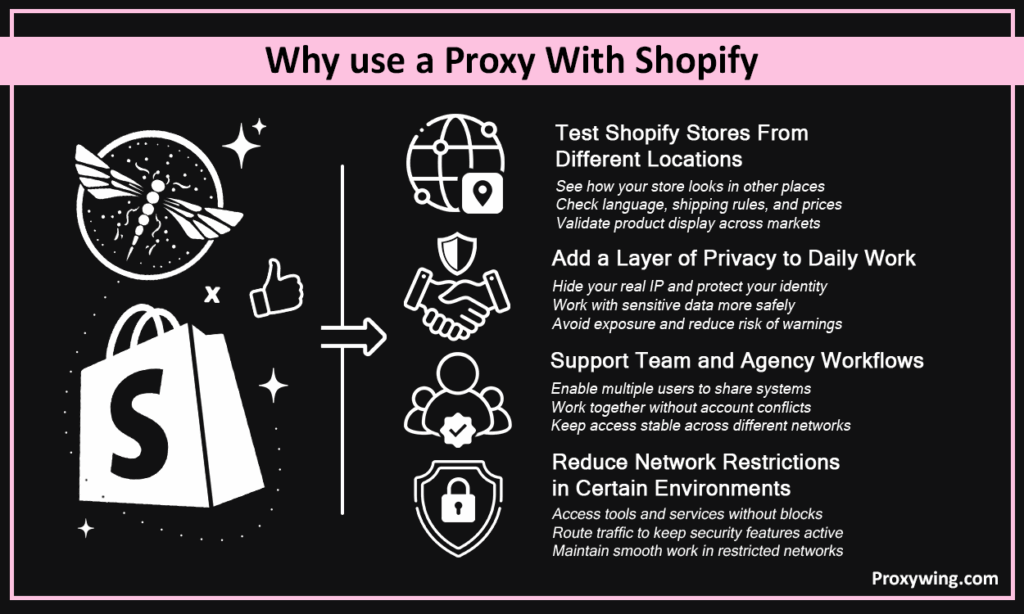
When you use Shopify proxy, it gives you more control over your workflow, more privacy, along with freedom. It contributes to keeping track of tasks that include many locations, users, as well as systems.
By modifying how your IP looks, a proxy allows you to see how your e-commerce stores act in different places. This lets you observe what people in others places go through without actually being there. You observe language, shipping rules, as well as cost more closely. It further supports the validation of the display of goods in multiple markets, something many developers have done to improve store performance.
Your real IP address is linked to your work on Shopify, which can show how you work. A proxy hides your identity by sending requests through another layer. This eventually adds privacy when working with sensitive data or switching between different multiple accounts. It also provides less direct exposure when accessing various parts of your operation, especially if you’ve previously gotten warnings for unusual activity.
Teams working across different locations generally rely on a proxy to ensure constant access. This allows multiple users to share systems without any conflict. If several people are involved in the same activities, this infrastructure allows for a more seamless collaboration. Multi-client agencies also gain from ordered access across diverse networks.
Some networks restrict access to some services or tools, which can disrupt day-to-day tasks. A proxy can let you get around these constraints by routing traffic differently but still keeping adequate security features in place. This allows for continued work in controlled situations without any interruption, though it might need proper setup depending on the network.
There are various types of proxy alternatives. Both meet various needs, such as speed, reliability, as well as usage. Also, the security level is different for each solution. You must pick the one that fulfils your unique needs.
Here are the key types of solutions:
A residential proxy employs real IP addresses from real homes to make it seem like a legitimate connection to websites. This is less likely to raise red flags because the traffic appears to come from normal people. That makes it ideal for situations where accuracy as well as natural behaviour are important, such as testing or maintaining Shopify bots.
ISP proxy alternatives are known for providing access to stable connections with the appearance of residential IP addresses. They provide steady performance as well as a continuous pace for ongoing tasks. A plethora of users have liked them as a compromise between trust and efficacy without having to deal with constant disturbances.
Datacenter solutions are created on dedicated servers; therefore, they have great speed and are cheaper. They are appropriate for high-throughput processing and high request volume. But they are not from real households, and certain websites may treat them differently.
Pick based on what you need for your assignment and how you work. If you need natural behaviour and more trust, use residential solutions. However, in case speed and volume are more your thing, then datacenter solutions are the way to go. ISP solutions strike a good Shopify balance for a mix of both and are suitable for most use cases.
You can use Shopify proxy with ease. You may need the right tools, the right settings, as well as accurate configuration details like IP, port, as well as credentials. Once you put everything precisely, your connection will route properly and work smoothly.
Moreover, it is crucial to check each step before implementing the modifications. Remember, minor setup errors can cause your connection to act differently. So, spending a few more minutes provides stable results. This will assist to avoid problems whether working on regular activities or when changing to a different environment.
Here is how to start:
You require access to a reputable service provider that delivers good stability. Moreover, you will also need the necessary login info, including IP, port, and credentials, to avoid setup problems. Make sure these details are correct before you start. Opt for ProxyWing for dependable Shopify proxy solutions that guarantee seamless and steady service. In some cases, setup could take longer in case multiple configurations are there.
Go to your system’s network settings and find the option to set up a manual network. Carefully provide your proxy server data (including the right port and passwords). Save the setup and test if your connection is working properly. This allows appropriate routing without breaking normal browsing.
For Mac, open System Preferences and go to the network options of your active connection. Enter all details correctly and add the needed proxy settings. Apply the adjustments, and your requests should start going through the proxy. This arrangement guarantees regulated access while working on daily tasks.
On mobile, go to Wi-Fi settings and pick your linked network. Then manually type in the proxy information, including the IP as well as port. Once saved, your device will send traffic to the proxy, eventually allowing you accessing Shopify admin or check product pages easily on the go.
There are extensions for web browsers to facilitate the setup. These utilities eventually enabling fast switching between different servers of a proxy without affecting system-level settings. It is a good way to easily manage connections, especially when you are working on multiple tasks/environments or creating test environments.
Set it up, then go to a site that provides your IP address. Thereafter, check that the IP shown is your proxy. This is to ensure that your connection is routed correctly. Browse e-commerce platform sites and see if the pages load correctly with no issues or delays.
You may also do short tests by accessing other websites or checking API answers to make sure everything is running smoothly. Monitoring loading speed as well as consistency is a good way to verify that your proxy setup is stable and, at the same time, functioning as planned.
Even when properly configured, problems can develop in everyday use. Such problems are generally related to connection quality, setup errors, or configuration mismatches. By learning about them, you will be able to swiftly identify the base cause and correct it without interrupting your workflow.
Slow speed. This may be due to the lengthy distance from the server or the bad quality of the solution. Delays and poor performance can also be caused by servers being busy. This can influence page loading times and the fluidity of completing tasks.
Incorrect IP, port, and login data can entirely lock you out. The connection may not work if there is a slight mistake in settings or configurations. Make sure your details are correct before you try again.
There are distinct settings and setup steps for each device. If it works on one system but not another, check the settings on that device. Just remember to fill out all the needed info correctly.
Some tasks require stable connections; some require normal IP behaviour. If you use the wrong sort of solution, you may get errors or restricted access. Pick the option that matches your distinct task requirements for better results.
Best practices help you to achieve seamless performance and fewer difficulties.
A good provider offers solid services, consistent speed, and strong security. It minimises the likelihood of connection failures or unexpected downtime. Don’t go for cheap vendors; they will often give you unstable performance and a plethora of problems.
Select the solution that fits the needs of your task. Some activities require stability; some require natural IP behaviour. The right choice is more efficient and saves avoidable errors in operation.
Document your settings, configurations, as well as login information clearly. This makes it easier to run numerous shops or users without misunderstanding. It also helps in case you are updating or debugging your setup.
Always test your setup before using it in your workflow. This helps to catch problems early and makes sure everything is working as it should. It also avoids interruptions when you are doing vital things. This step is not only pretty useful but also often requiring attention before scaling usage.
ProxyWing provides reliable proxy servers with robust connections as well as constant performance. It covers several use cases such as app development, testing, and protected access. The service is intended to work nicely with the Shopify platform, simplifying setup and everyday tasks. It also provides reliable connectivity between multiple networks, helping to ensure that workflows are not disrupted.
In addition, it is focused on maintaining steady performance even during extended use. This helps to avoid unforeseen interruptions and makes sure that processes operate smoothly. It’s easy to set up, so teams can adopt it without delay.
Article written by:

Full Stack AI Engineer
Full-stack engineer at Proxywing working across backend architecture, performance optimization, and AI-driven workflows. Node.js, React, cloud infrastructure, and RAG pipelines.
All articles by author (61)Yes, you can use proxy with Shopify when working as an admin. It is like regular browsing except it directs traffic differently. Provides privacy and control. Especially if you are doing so across several sessions, where the system will automatically adjust how it routes traffic.
The best proxy really relies on what your needs are and how you work. A residential proxy is good for natural access, and datacenter are faster. The appropriate solution allows you to balance your performance, dependability, and the way your connection appears when performing different tasks.
Yes, you can use this solution for day-to-day tasks. This is useful when you want to access your store or check updates on the go while having better control of how your connection behaves in different environments. Also, make sure your apps URL and proxy URL settings are correct.
It may fail due to faulty settings, wrong login data, or connection problems. Access might be blocked by a little setup mistake. Always check your configuration thoroughly and retest your connection to ensure everything is operating as it should have to.

