




Proxy Authentication Methods Explained: Username/Password vs IP Whitelisting
06.10.2026 10 min
Zalando is one of the leading e-commerce platforms in Europe with over 50 million active users. Like with most online stores, the experience users get on this platform may vary based on several factors, including location, age, and more. If you need to access this website without facing any geo-restrictions, using a Zalando proxy is the way to go.
Use a proxy with Zalando to hide your real IP address and make your connection more anonymous and private. For example, if you choose to use a German IP, this website will view your traffic as though it is coming from a user in Germany. This can be helpful, especially for shoppers and sellers that are outside of the supported markets.
In today’s guide, we will discuss how to use a proxy with Zalando on different kinds of devices, including Macs, Windows PCs, iPhones, and Android devices. Let’s dive in right away.
Using a Zalando proxy allows users to have access to this website without revealing their real IP address. A proxy replaces your visible IP with one from the proxy server, which makes your traffic seem like it is coming from a different location. Like most websites, this platform uses IP data to enforce regional availability, detect fraud, and flag unusual account behavior.
When you use proxy with Zalando, you’re able to tailor this experience based on what you intend to achieve. For instance, if you’re in a country where this website is banned or unavailable, using a proxy allows you to switch to an IP address of one of the supported countries.
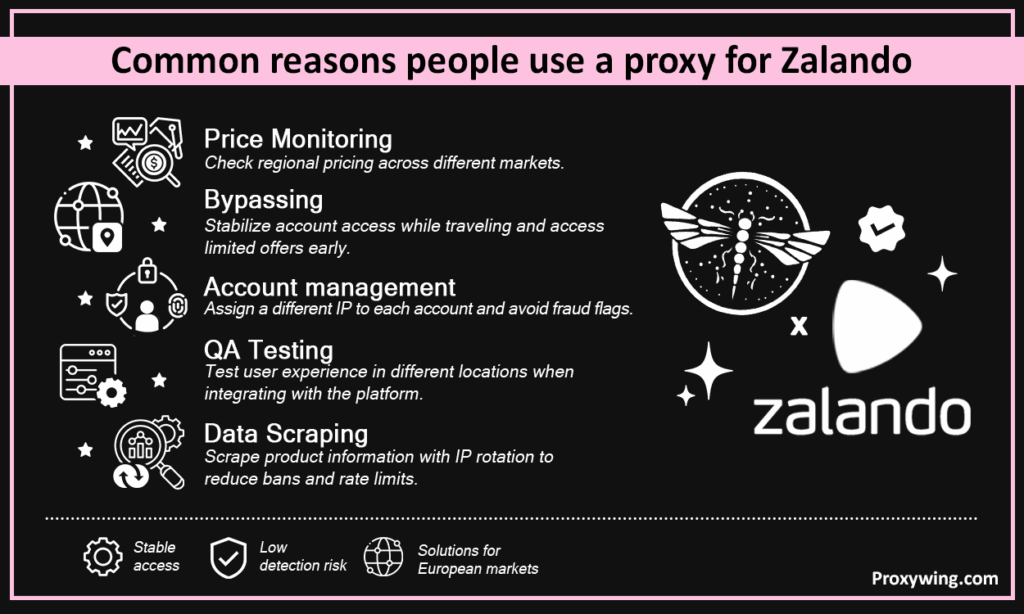
Some of the common use cases include:
ProxyWing offers residential and ISP IPs for Zalando across this site’s active European markets, enabling stable, low-detection access.
Proxies give more precise control, including targeting a specific city, assigning dedicated IPs per account, and configure at browser level. VPNs on the other hand are simpler but offer less IP control and are more likely to be flagged since they rely on well known datacenter IPs. Use Zalando proxies for tasks like account management or extracting data that require more IP control. VPNs are ideal for general privacy, especially when accessing the web via public networks.
ISP and residential proxy solutions carry the highest trust scores, which makes them ideal for the most sensitive tasks. Mobile proxies also offer the same high trust scores. Datacenter proxy servers, despite being faster and cheaper, are frequently challenged or blocked by fraud detection systems since they rely on well known IP addresses from datacenters.
After subscribing to a plan, your provider gives you access to server details, including server host, port, username, password, and protocol (HTTP, HTTPS, or SOCKS5). The username/password are required if your provider requires this kind of authentication before granting access. Most providers offer the option of IP whitelisting and in this case, you won’t need the username and password.
Avoid automating purchases aggressively, randomly switching IPs on a logged-in account frequently, or sending rapid page requests. These behaviors attract detection and could lead to IP bans, rate limits, and account restrictions (if you’re logged into any account).
In this section, we will cover the setup process on the different platforms.
Go to Settings > Network & Internet > Proxy. You should then toggle the “Use a proxy server” option to on and enter your server hostname and port, and click Save.
On your Mac, go to System Settings or System Preferences > Network and select an active connection. You should then click Details > Proxies, choose your protocol, enter the server details, and click Apply.
These settings apply to Wi-Fi only. For iPhone, open settings>WiFi and tap your Wi-Fi network. Tap on “i”> HTTP Proxy, select Manual, and enter your server details. On Android, long-press your network in network settings, tap Modify, expand Advanced options, set Proxy to Manual, and enter server details, including IP address and port.
If you’re using standard Chromium-based browsers like Chrome, Edge or Opera, installing this extension is the most straightforward method. Install ProxyWing Proxy Manager from the Chrome Web Store, create a profile with your credentials, enable it, and open this website in the same browser window. Your browser traffic is now routed through a remote IP address before being forwarded.
Firefox is one of the few browsers that supports setting up Zalando proxies within its built-in settings. To get started, go to Settings > General > Network Settings > Manual proxy configuration and enter your host and port. If you intend to switch between multiple server IPs, using an extension offers a more seamless experience.
Note: For all the above setups, if your provider needs authenticating with a username and password, ensure to enter them.
For account management, you must make sure each profile maintains its own cookies and session data. Pair each account with its own profile and dedicated Zalando proxy to prevent session bleed and login flags. Users can effectively do this using anti-detected browsers—these give you the option of creating different browser profiles, each with its own randomized identity fingerprints.
Always ensure to match your proxy country to the Zalando regional site and registered account address. Mismatches between proxy server location and billing details can easily be detected by fraud systems and traffic filters. Skipper will detect these abnormal behaviours and block them. For those that might not know, Skipper is an open-source HTTP router and reverse proxy used on this platform.
Maintain the same IP address for every session. Rotating IPs is only viable when accessing this platform without signing—common for tasks like data scraping.
Datacenter and residential IPs offered by free proxies are often slow, frequently blacklisted, and insecure. Using these IPs (shared by many others) will trigger frequent security action and potential IP blocks, affecting your overall experience when using this platform.
Zalando shows “Access denied” / endless captcha
This is often caused by IP blocks that are common with datacenter and free IPs. Switch to residential or ISP IPs, try an IP in a different city or ASN, reduce request frequency. Always remember to clear your cookies before retrying.
This can often be caused by random IP rotations. Assign one stable IP per account, use browser profile isolation (anti-detect browsers are recommended for multi-accounting), and avoid rapid login retries.
Always use a Zalando proxy that matches your billing country exactly to avoid payment system flags. Most providers offer IPs in over 180 countries—choose one that matches the billing address you intend to use.
This simply means your device is bypassing the proxy settings. Disable auto-detect settings, check the proxy bypass list for Zalando’s domain, and test in a separate browser to isolate the issue.
Article written by:

Full Stack AI Engineer
Full-stack engineer at Proxywing working across backend architecture, performance optimization, and AI-driven workflows. Node.js, React, cloud infrastructure, and RAG pipelines.
All articles by author (61)Yes, you can. Using one allows you to choose an IP in one of the supported countries, providing access regardless of your current location.
Residential IPs are most reliable since they are ISP-assigned. ISP IPs are a strong alternative when speed matters—these also rely on ISP assigned IP addresses.
Yes, proxy usage is legal in most countries. However, to avoid facing bans or rate limits, we recommend following Zalando’s terms of service.
This largely depends on the IP sources. Datacenter and free IPs are commonly blocked since they’re known. If a blacklisted IP is detected, it will be blocked immediately. Switching to a fresh residential or ISP IP usually resolves this issue. Remember to clear your browser cooking before reconnecting.
You can, but it is not recommended. When managing multiple accounts, it is best to assign a different IP address to each account to avoid cross-account linking and collective restrictions.

