




Proxy Authentication Methods Explained: Username/Password vs IP Whitelisting
06.10.2026 10 min
Data is the most important asset in this world. And Telegram is the most widely used platform for sharing large files, creating groups, and interacting with automated bots. With so many users flooding into the space, it becomes necessary to safeguard personal information. Here come two important data saviors: SOCKS5 & MTProto proxies. In this blog, you are going to learn about MTProto proxy vs. SOCKS5. What they are and what they allow users. What’s more, please have a quick read below:
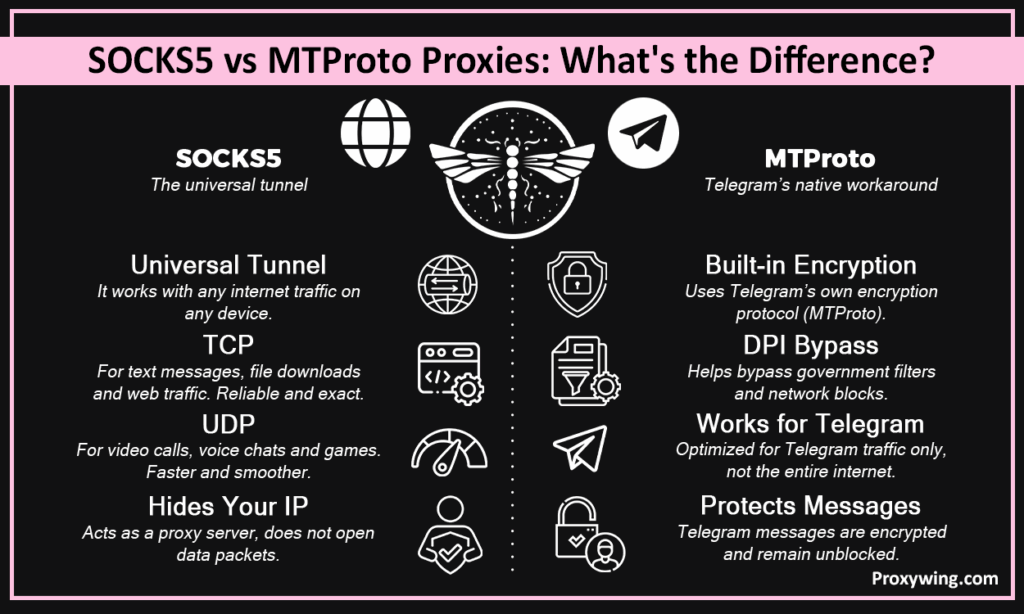
MTProto proxy vs. SOCKS5 proxy: both work differently, but the main job they do is to be a proxy. They are the servers that hide your real address from the destination. SOCKS5 and MTProto are the proxies Telegram users mostly use to secure their privacy.
As you read in the section above, the SOCKS5 proxy is a universal data delivery tunnel. It transfers data for online games, torrent tools, web scrapers, and automated marketing bots. It does this by supporting two different types of internet traffic:
The SOCKS5 proxy acts like a blind delivery driver. It does not open your data packages or care what is inside them. It is completely protocol-agnostic.
MTProto stands for Mobile Transport Protocol. Telegram built this system precisely to handle censorship issues. It works beautifully because of two main features:
If you turn on an MTProto proxy, your Telegram messages will be protected and unblocked. But if you open Google Chrome, YouTube, or an online game on the same phone, they will not use the proxy.
To understand how these two proxies protect your data, you have to look at how they interact with the internet. Every time your device connects to a proxy, they do a digital handshake. This is a coding interactivity where they finalize how to pass your data.
The SOCKS5 setup is very simple. Here is how it works:
At first, your device reaches the SOCKS5 server. The server sees your request and asks you for your username and password. This is to make sure you are a genuine user. After this process, you are free to use the SOCKS5 proxy pipeline.
The SOCKS5 proxy is highly flexible. It can read any type of internet address you want to use. It can work for IPs, such as an IPv4 address, a newer IPv6 address, or a regular website. It easily routes TCP traffic and UDP traffic straight to the final destination without altering a single file.
MTProto proxy does not require any usernames or passwords. It opens a digital handshake with your device. It means that when you connect your device to the MTProto server, it matches your Telegram account with a secret key. This is because both applications are designed by one company. The authentication is a secret key.
MTProto proxy recognizes the secret key in milliseconds. If a government censor uses Deep Packet Inspection to check your network, they are going to see absolutely nothing recognizable. The reason being it does not look like standard HTTPS web traffic, normal TLS security, or even a SOCKS proxy.
Let’s have a clear comparison between the MTProto proxy vs SOCKS5 proxy. You are going to see the core differences in features.
| Feature | SOCKS5 Proxy | MTProto Proxy |
| Supported Apps | All Apps & Browsers | Telegram Only |
| Encryption | None (Relies on individual apps) | Built-in Cryptographic Encryption |
| UDP Support | Full Native Support | Restricted / App Optimized |
| Censorship Resistance | Moderate (Easier to fingerprint) | High (Resists Deep Packet Inspection) |
| Speed & Latency | Extremely Fast (Minimal overhead) | Fast (Optimized for chatting) |
| Ease of Setup | Easy (Requires Username/Password) | Very Easy (One-click invite links) |
| IP Rotation | High (Supports Residential Pools) | Low (Uses static data center IPs) |
| Typical Use Case | Multi-accounting, Scraping, Gaming | Bypassing Country-Level App Blocks |
Some users also consider an HTTP proxy for Telegram. But they handle web traffic well. and reliable for HTTPS traffic. For Telegram, SOCKS5 or MTProto is a good option.
When it comes to comparing their performance on Telegram, they both handle their task well. The only thing that separates them is their working process:
Many people think proxies are 100% secure and encrypted. But this is a myth. Let’s clear up exactly what each tool hides and who it hides it from:
When governments want to block your apps, they set up big digital roadblocks. Let’s see how SOCKS5 and MTProto tackle this situation:
The biggest difference between SOCKS5 and MTProto is how they treat the other apps on your device. Here is how they handle software:
SOCKS5 can be yours when your online goals are just checking your Telegram chats. Also, you can choose SOCKS5 if you need to proxy other apps. It is a perfect option when you want to use premium residential IPs to keep your accounts completely safe from sudden bans. However, do not use it if your country actively blocks SOCKS5 traffic with advanced filters, as it will get stopped at the digital border.
If you want to experience the true power of a universal tunnel, you need a high-quality provider. ProxyWing offers premium SOCKS5 residential, ISP, and mobile proxies that work flawlessly with Telegram. Not only that, but it also provides smooth functionality on web browsers and advanced automation tools. Their elite IP pools ensure your accounts stay safe, fast, and completely unbanned.
MTProto is a specialized tool built for specific, tough situations. You should choose MTProto specifically when Telegram itself is completely blocked in your country. It is the best choice when Deep Packet Inspection (DPI) is the main threat to your digital freedom. If you only need to unblock Telegram and do not care about proxying your other apps, MTProto is the easiest and most effective tool for the job.
When standard connections fail, you need a specialized tool that refuses to be blocked. ProxyWing provides reliable, censorship-resistant MTProto proxies built specifically for unblocking Telegram in high-restriction zones. It ensures your messages, videos, and groups load instantly no matter where you are located.
Setting up these tools inside the official Telegram client is incredibly simple. The best part is that the steps are almost exactly the same whether you use Android, iOS, or a desktop computer.
To start, open your Telegram app and navigate to Settings. From there, tap on Data and Storage, scroll to the very bottom, and select Proxy Settings. Flip the switch to turn proxies on, and you are ready to enter your details from your provider, like ProxyWing.
To connect a SOCKS5 proxy manually, select the SOCKS5 option on the screen and fill in these exact fields:
The great thing is that these exact same SOCKS5 credentials can be copied and used inside your web browsers or scraping tools too!
To connect an MTProto proxy manually, select the MTProto option and type in these specific fields:
This secret is different from a normal password. It is a special cryptographic key that allows Telegram and the proxy to speak in their own secret language and scramble your data.
Both SOCKS5 and MTProto are built on different networking protocols. There is no need to sit on the fence here. The choice comes down to what you want to achieve:
If you want the absolute best of both worlds, you can actually run them in parallel! Keep your SOCKS5 proxy active for your heavy-duty scraping and browsing, and switch on MTProto inside Telegram to keep your chats lightning-fast and bulletproof.
Article written by:

Product & Support Operations Lead
Built Proxywing's support department from scratch — documented workflows, clear escalations, consistent quality. Now bridges the CEO and engineering, keeping infrastructure projects on track.
All articles by author (68)Yes, it is more secure against censorship and snooping. SOCKS5 only masks your IP address without adding extra encryption. MTProto adds a heavy layer of transport encryption and obfuscation, making your network traffic completely unreadable to your internet provider.
Yes, SOCKS5 has full native support for UDP traffic. This matters a lot for Telegram because UDP secure connections are the technology that powers live video calls and voice chats. It ensures your calls stay smooth without lagging or dropping.
Absolutely! That is its biggest strength. You can use a SOCKS5 proxy with web browsers, torrent apps, online games, and data scraping tools. MTProto, on the other hand, will only work inside Telegram.
Many MTProto proxies found online are free, but they come with a catch. Free proxies often show sponsored channels at the top of your Telegram chat list. While they cannot read your encrypted messages, free proxies can be slow, unreliable, and might track your connection times.
You cannot use them inside Telegram at the exact same millisecond. However, you can save both in your Telegram proxy list and toggle between them. You can also use SOCKS5 to protect your web browser while using MTProto to run your Telegram app.
SOCKS5 is the tool that also supports massive residential IP pools. Because residential IPs look like real home internet setups, they are perfect for managing multiple Telegram accounts without triggering security alerts or spam blocks.

