Best Proxies for OnlyFans in 2026
22.10.2026 12 min
XML is a text-based markup language that we can use to store and exchange structured data. If you’ve worked with XML, you know it can be easily read by humans. And it is also machine-readable. But a program needs structured data to understand and work with the XML. This is why we parse XML data. Many developers use the Python programming language to parse XML because it makes it quick and easy to work with XML data. We can also use it for reading configuration files and structuring data with ease.
This guide/tutorial will show you how to parse XML in Python. We’ll cover everything, from key tools and patterns to code examples.
Although JSON is now preferred for storing and sending structured data, many APIs, enterprise services, and config files still use XML. Here’s a quick overview of where XML is still used:
Python is great for reading, manipulating XML, saving XML documents programmatically, and extracting information.
Before looking at complex examples of Python XML parsing, let’s first understand how XML is structured and a simple example of parsing XML in Python.
An XML file contains hierarchical structures. It consists of:
Here is an example XML document:
<book>
    <title>Python Fundamentals</title>
    <author>Jane Doe</author>
    <year>2025</year>
</book><book> is the root element, <title>, <author>, and <year> are child elements, and Jane Doe is the text inside <author>.
The simplest way to parse XML using Python is the built-in xml.etree.ElementTree library. Here is how you can access a specific value inside the XML:
import xml.etree.ElementTree as ET

tree = ET.parse('book.xml')
root = tree.getroot()
print(root.find('title').text)  # Output: Python Fundamentals
In this code:
A proper Python setup includes everything (tools, packages, and libraries) you’ll need to parse XML
Python offers several XML parsing packages. In this tutorial, we’ll use the following libraries:
It’s a built-in library that many developers use when they want to parse simple XML. It is easy to learn and supports basic XPath-style searches.
lxml is a third-party Python library for XML parsing. It’s faster than ElementTree and is great for projects that use XPath or have large files.
Here’s how you can install it:
pip install lxmlWhen you’re parsing XML from user uploads, defusedxml is the best choice. It protects against XML attacks, such as entity expansion or Billion Laughs attacks, and provides drop-in replacement for libraries like ElementTree.
Here’s how to install it:
pip install defusedxmlIf you’re just getting started and working with small and simple XML files, ElementTree is the best option. For advanced searching or complex documents, lxml works best.
If you’re parsing user-provided documents, use defusedxml as it protects against XML attacks.
When we parse XML with Python, we need to load the XML from a file, a string, or a remote source before parsing it. It’s easy to do this with Python’s ElementTree modules. The library allows us to represent the XML as a tree of elements that we can easily inspect.
Many times, we need to work with XML stored on disk. Here’s how you can load XML from a file:
tree = ET.parse('data.xml')
root = tree.getroot()For very large files, it’s best to use ET.iterparse() instead of loading the whole tree to save memory.
Here’s how to load XML from a string:
xml_string = '<root><item>Example</item></root>'
root = ET.fromstring(xml_string)
In this code, ET.fromstring(xml_string) takes an XML document in the form of a text string and turns it into an object that is the root of the tree. It provides the same type of object you’d get from parsing a file, so you can still navigate the tree.
You can use this method when the XML is coming from other functions or an API response. However, always make sure the string has proper XML before parsing to avoid errors.
Many APIs and data feeds (such as RSS/Atom) provide XML over HTTP. Here’s an example for loading XML from a web API or feed:
import requests

response = requests.get('https://example.com/feed.xml', timeout=10)
if response.headers['Content-Type'] == 'application/xml':
    root = ET.fromstring(response.content)
In this code, requests.get(…) downloads the content at the URL. The Content-Type header check verifies that the server is returning XML. ET.fromstring(response.content) parses the downloaded XML into an Element that you can navigate.
Once you parse a document and have the root element, you get a hierarchical data tree of elements. Here’s how you can access them:
Accessing Child Elements
for child in root:
print(child.tag, child.text)
One important thing to know here is that iterating like this only gives you immediate children. It won’t automatically explore deeper nested elements. To search deeper, you can use .findall() (below) or a recursive iterator.
Accessing Nested Elements
Here is a simple way to find nested elements with XML Parsing in Python:
nested = root.find('parent/child')
if nested is not None:
    print(nested.text)
With this code, you can get nested elements. However, it only finds matching direct nested children in that element sequence.
If the element is deeper than you expect, the path won’t match. In such cases, you can use .findall() with .// for recursive searching.
Accessing Attributes
element = root.find('book')
print(element.get('id', 'default_id'))
If you want to access all attributes at once, you can use .attrib.
Finding Specific Elements
ElementTree provides many methods that let you search based on tag names or simple paths without manually looping:
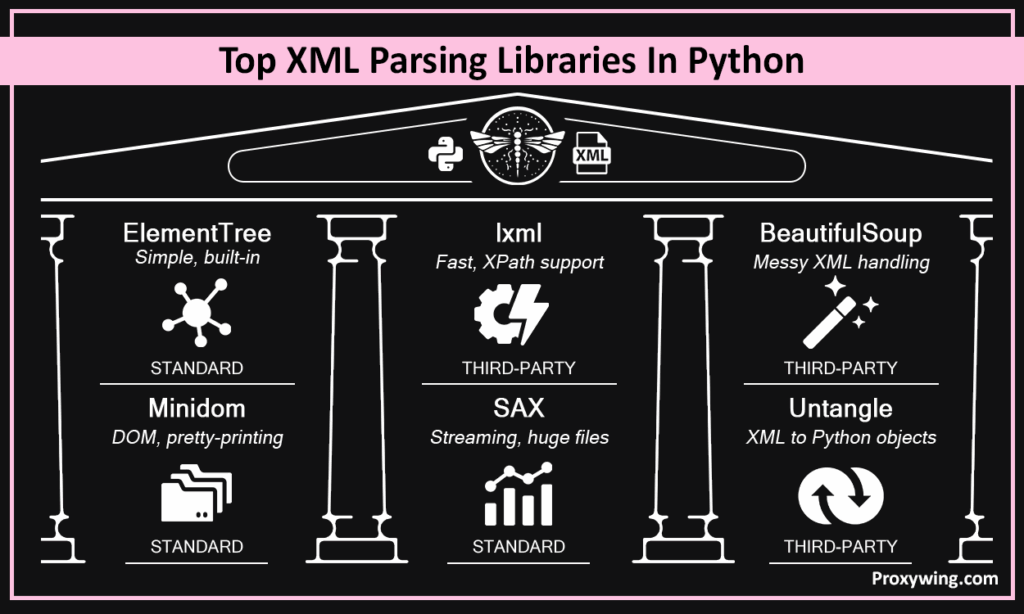
Most developers use this library for simple, well-formed XML. It’s lightweight, easy to use, and supports basic XPath.
It parses the whole document into memory. It’s useful for pretty-printing small XML files.
It processes XML as a stream of events. It’s the best choice for larger XML files where building a tree is too costly.
Many useful third-party XML parsing libraries are also available:
lxml is a fast library written in C. It can handle HTML documents and XML exceptionally well and parse documents quickly. lxml also supports full XPath queries and XSLT transformations for complex data.
BeautifulSoup is widely used for HTML web scraping. It can also parse XML efficiently. It can handle messy markup that doesn’t strictly follow XML rules. It builds a navigable tree that you can search using find() and find_all().
untangle doesn’t make you work with ElementTree or node trees at all. Instead, it takes an XML document and turns it into a normal Python object that you can work with. After parsing, each XML tag is a part of that object; you can access it using dot notation.
For high performance of XML parsing, you need to consider different things, such as how big your XML files are, what features you need, and how the parser handles building the in-memory tree of elements.
For small files, Python’s built-in library is a great choice because you don’t need any extra setup, and it gives you a simple tree that is easy to work with.
But if XML documents are large, they can take up lots of memory. For such documents, it’s best to use SAX parsers or iterparse(). Why? Because these tools don’t load everything into memory at once. So when you use these tools, you can read and handle the XML file in pieces.
So which library should you use for advanced searches and full XPath expressions? lxml is the right choice.
If your XML has deep nesting, writing so many manual loops can be difficult and time-consuming. XPath is a small query language for XML that lets you express exactly which nodes you want to find in a single string.
XPath uses path‑like expressions to move through the document tree. It doesn’t walk children and grandchildren step by step. With XPath, you need to write only one expression that the parser can use to return what you need. Using XPath makes complex navigation much simpler.
Here is an example of how to use XPath:
books = root.xpath('//book[author="Jane Doe"]/title')Here are the most common XPath patterns:
Namespaces in XML are a great way to avoid naming conflicts, but they can make searching and parsing a little tricky. A namespace appears in XML like xmlns:prefix=”URI” and tells the parser that any tag using that prefix belongs to a particular space.
Python’s XML libraries, such as xml.etree.ElementTree and the lxml library understand these default namespaces. But this means you usually need to include the namespace URI when you search for elements by name. Otherwise, your search won’t find the nodes you expect.
A simple way to detect what namespaces are present is to inspect the nsmap property if you are using lxml. Or you can check the xmlns attributes in the root element of your XML document.
If you’re using Python’s ElementTree, you can search namespaced elements. You need to provide a dictionary that links a prefix to its full namespace URI. You can then use that prefix in your search path when calling findall() or find()
Here’s one example for searching namespaced elements:
ns = {'ns': 'http://example.com/ns'}
root.find('ns:book', namespaces=ns)For huge files that don’t fit in RAM, iterparse is a good option. It lets you process piece by piece, so memory usage is low. Basically, you can work with each tag when it appears in the file, which means it doesn’t build a complete tree in memory.
SAX (Simple API for XML) is another great parser for big XML documents. It never stores the XML structure but only the element you’re processing, which means it doesn’t use much memory.
Here is how we can change element text:
book = root.find('book/title')     # Find the <title> element under the first <book> element
if book is not None: book.text = "Updated Python Fundamentals" # Change the text of the <title> elementHere’s how you can change attributes:
book = root.find("book")         # Find the first <book> element
if book is not None:
book.set("genre", "Python") # Modify the genre attributeHere’s how we can add a new element:
# Create a new <book> element with an attribute id="b3"

new_book = ET.Element('book', attrib={'id':'b3'})  # Create a <title> child element under the new_book elementtitle = ET.SubElement(new_book, 'title')

# Set the text inside the <title> element to "Python for Data Science"

title.text = 'Python for Data Science'
root.append(new_book)# Create a new element
new_book = ET.Element("book", attrib={
"id": "bk003", # Unique identifier for this book
"author": "Jane Doe", # Author attribute
"genre": "Programming" # Genre attribute
})
# Optionally, add a child <title> element under the new book
title = ET.SubElement(new_book, "title")
title.text = "Python Advanced Concepts" # Set the text for <title>
root.append(new_book) # Append the new book element to the rootSometimes you need to delete some elements instead of writing and modifying. However, most XML parsers don’t allow a node remove itself, so we use .remove() on the element’s parent. That’s because XML is a tree, and only a parent knows how to detach one of its child nodes.
When you know the parent element, you call parent.remove(child) and pass the child element you want to delete.
Here’s an example of basic removal:
for element in root.findall('item'):
    if element.get('type') == 'obsolete':
root.remove(element) # remove by calling .remove() on parent (root)Once you’ve parsed and modified an XML tree in memory, you need to write your changes back to disk. Without this, everything you did stays only in memory and won’t be visible the next time you load the file.
You can call tree.write(…) on an ElementTree. Python then writes the entire XML tree to a file. You should always specify encoding (use encoding=”utf-8“) when writing XML files. Also, add the xml_declaration=True, which tells parsers how to interpret the file’s encoding.
Here’s a simple example to write the file back to disk:
tree.write("updated.xml", encoding="utf-8", xml_declaration=True)Even though you can use Raw XML output, it’s usually not easy to read. You can pretty-print your XML, formatting it with indents and line breaks.
But it’s not recommended to pretty-print large files. Pretty-printing adds extra whitespace that further increases the file size.
Getting encoding right is important so that other systems and parsers can also understand and read your data.
Similarly, when you’re receiving XML from different sources, you need to detect and decode different encodings before parsing.
When you save or generate an XML file in Python, it’s recommended to explicitly set the encoding. UTF‑8 is the most widely supported and used encoding.
XML parsers usually detect encoding based on the XML declaration or a byte order mark (BOM) at the start of a file. If you read the XML using the wrong character encoding, the text can look mixed up or unreadable.
To avoid this, it’s better to open your file in ‘rb’binary mode so the XML parser can correctly detect the right encoding from the XML declaration or a byte order mark (BOM). Or you can convert the raw bytes yourself based on what the file says.
When you have an XML and you just want to use the data in your code, you can convert the XML into a dictionary-like structure. Python dictionaries use simple keys to access values. When you use this method, keys reflect XML tag names, and nested tags convert into lists.
Another option is Python dataclass, which is a built‑in standard feature. It lets you define simple classes with fields and type hints.
Here’s a simple coding example that parses XML with Python, extracts values, and constructs Python objects from it.
import xml.etree.ElementTree as ET
from dataclasses import dataclass

@dataclass
class Book:
    id: int
    title: str
    author: str
    year: int

# Parse the XML
tree = ET.parse("library.xml")
root = tree.getroot()

books = []
for book_elem in root.findall("book"):
    book = Book(
        id=int(book_elem.get("id")),                 # parse attribute
        title=book_elem.findtext("title") or "",      # extract text child
        author=book_elem.findtext("author") or "",
        year=int(book_elem.findtext("year") or "0")
    )
    books.append(book)

# Now `books` is a list of Book objects
for b in books:
print(b.title, b.author)When you call ET.parse() or ET.fromstring(), you will get an error from the parser if the XML isn’t well‑formed. There can be many reasons for this error:
Sometimes, syntax validity isn’t enough. Your XML should follow a specific structure. You can use schema validation for this purpose. XML documents can include or reference a DTD (Document Type Definition). Or you can use an external XML Schema (XSD).
When you’re processing XML files from external sources, there are security risks. Here’s how you can process such files securely:
If you’re parsing XML that comes from users, you should avoid using the standard parsers, such as xml.etree.ElementTree. In such cases, you should use defusedxml because it prevents common XML attacks.
When you’re parsing XML from the web, there are huge security risks. You should limit the download size and use connect and read timeouts for such files.
Article written by:

Full Stack AI Engineer
Full-stack engineer at Proxywing working across backend architecture, performance optimization, and AI-driven workflows. Node.js, React, cloud infrastructure, and RAG pipelines.
All articles by author (62)