




Proxy Authentication Methods Explained: Username/Password vs IP Whitelisting
06.10.2026 10 min
Artificial Intelligence is no longer the next big thing but the actual thing that is infusing almost every industry right now. Software development is one of the fields that has been disrupted by AI the most. Artificial Intelligence developers today can create software at several magnitudes faster than they did just three years ago. However, for a more effective workflow when creating and testing software, using tools like proxies may be necessary.
Proxies route traffic through a remote server, making your traffic seem like it is coming from a different IP address. Developers can use proxies for AI development to test how their apps perform in different regions, scraping data without being detected, and a lot more. In today’s guide, we will discuss the role of proxies in AI development, how they are used, and a lot more. Let’s dive in!
A proxy routes your requests through a different IP address, which makes your traffic appear like it is coming from the IP address of a remote server. This gives Artificial Intelligence developers location flexibility, enabling seamless data collection in more controlled testing environments. The type you choose affects the overall experience as it impacts the success rate, cost, and reliability.
| Setting | Proxy | VPN | Direct Connection |
|---|---|---|---|
| IP masking | Yes | Yes | No |
| Encryption | Optional | Yes | No |
| Per-request control | Yes | No | No |
| Speed | Fast | Slower | Fastest |
| Best for | Dev, scraping, automation | Privacy, browsing | Internal tools |
Proxies offer more granular control than VPNs, making them more practical for software development and automation. They also don’t compromise on speed as much, allowing software development professionals to maintain good speeds despite routing their traffic.
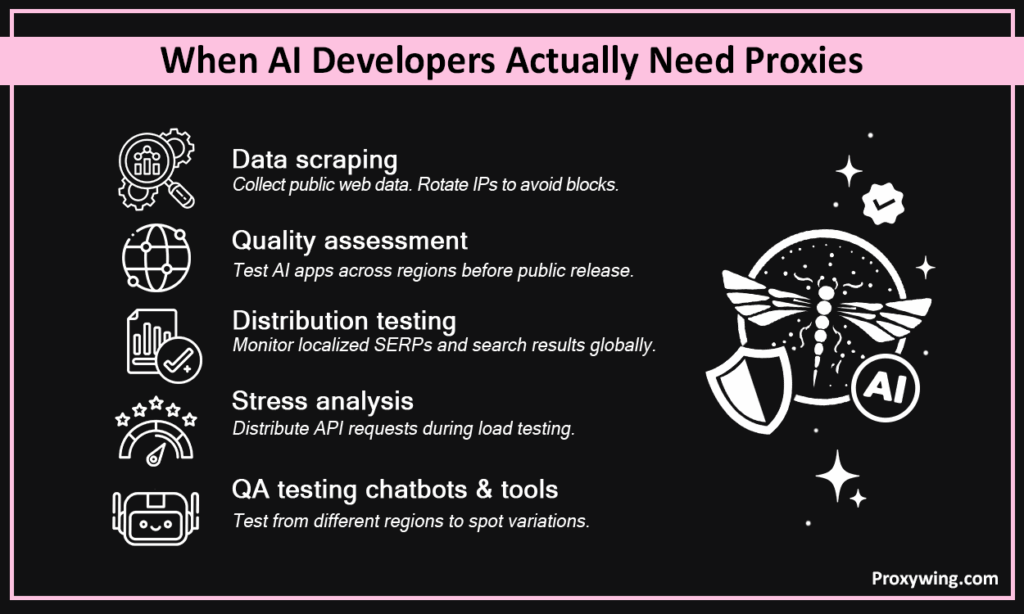
Some of the common use cases include:
Rotating proxies distribute requests across multiple IPs, reducing blocks when collecting large volumes of public web data. Requests coming from different IP addresses significantly lowers the chances of IP rates limits and blocks, which is crucial especially for large scale scraping projects.
Route traffic through IPs in different countries to verify how your Artificial Intelligence tool or chatbot responds to region-specific inputs or content restrictions. By using different proxy types, AI development experts can test their app’s performance for both desktop and mobile users.
Pull localized SERPs and track search engine overviews from different markets without search engines filtering results based on your origin IP. This allows developers to further optimize the marketing materials of their app in different regions.
AI proxies can distribute requests across IPs during testing. This allows developers to determine how their app behaves when API calls are made from different regions and if there are any variations in rate limits for each. It is always a good practice to verify this complies with the platform’s terms of service before proceeding.
Proxies support continuous access to diverse public datasets for fine-tuning and evaluation without triggering access blocks. With AI proxies, you can seamlessly collect data from public platforms while minimizing any possibilities of IP blocks or rate limits. Residential and mobile IPs are the most reliable since they have relatively higher trust scores than datacenter IPs.
Simulate real user sessions across regions, test login flows, and verify automation scripts before deployment. This approach allows software development professionals to know the performance of their app in different regions before fully rolling it out to the general public.
This type is best for trust-sensitive tasks. Since their IPs are assigned to real home devices, their traffic appears as genuine users, bypassing security restrictions even on the most strict platforms. However, they are generally more expensive than the other types.
These route traffic through servers in mainstream datacenters in different regions. They are faster and cheaper, but easier to detect and block. This makes them good for lightweight testing and high-speed requests where IP trust is less critical. They’re not the best choice if the task involves accessing strict platforms.
With this type, traffic is routed through IPs of servers running in ISP-managed datacenters. They combine speed with higher trust, making them a solid option for long-running Artificial Intelligence workflows needing both reliability, clean IPs, with the high costs of residential IPs.
These automatically cycle IPs per request. They are essential for large-scale scraping where a fixed IP would quickly get flagged and blocked. IPs can be configured to change per request or after a given period.
These maintain the same IP across requests. Better for API testing, account workflows, and sessions requiring IP consistency.
Some of the key metrics to consider when choosing a provider include high uptime, clean IP pools, broad location coverage, and HTTP/HTTPS and SOCKS5 support. ProxyWing offers proxies for AI development.
The three common ones include:
Most setups require server details such as the IP address, port number, username, and password (if IP whitelisting is not used). These details are entered directly into your tool’s proxy settings or passed as environment variables.
After inputting the server details, ensure to check the visible IP using a tool like whatismyip.com to confirm that the IP address of the connection is the proxy’s. You can also measure response time and watch for errors before running full workflows.
Track failed requests, latency, and error codes (403/429). Enable rotation if a single IP starts getting blocked. This requires you to have access to a larger IP pool.
Pass AI proxy settings as a dictionary to the proxies parameter.
import requests
proxies = {
    "http": "http://username:password@host:port",
    "https": "http://username:password@host:port"
}
response = requests.get("https://example.com", proxies=proxies)Add proxy settings via HttpProxyMiddleware in settings.py for automatic routing across large crawl jobs.
DOWNLOADER_MIDDLEWARES = {
    'scrapy.downloadermiddlewares.httpproxy.HttpProxyMiddleware': 110,
}
HTTP_PROXY = 'http://username:password@host:port'Pass AI proxy arguments at browser launch to route all traffic through the proxy.
from playwright.sync_api import sync_playwright
with sync_playwright() as p:
    browser = p.chromium.launch(proxy={
        "server": "http://host:port",
        "username": "user",
        "password": "pass"
})These are some of the best practices you must follow for the best experience:
This issue is often caused by using inaccurate or inactive remote server details. Check the server IP address, port, protocol, and credentials and confirm they are accurate and active. If using IP whitelisting, confirm your IP is on the allowlist.
Slow down request intervals or increase your IP pool to ensure each request uses a different IP address — expensive approach, but very effective. For APIs, check if an official rate-limited tier is available.
Reduce request frequency, switch to residential or ISP IPs, and rotate user agents. These fixes make your traffic more natural and less robotic.
Switch to datacenter or ISP IPs since they offer relatively faster speeds. Check whether the server is geographically distant from your target. Using dedicated IPs instead of shared ones can also significantly improve performance.
Switch to sticky or static proxies for any workflow involving logins or multi-step sessions. Random IP changes break sessions, resulting in security triggers like re-authentication and re-captchas.
ProxyWing is one of the best choices for AI developments. We offer a 70M+ IP pool across 190+ countries, covering all the major proxy types, including residential, ISP, and datacenter proxies. With city-level targeting, SOCKS5 and HTTP/S support, sticky and rotating sessions, and 99.99% uptime, we handle everything from large-scale scraping to regional QA testing. Plans start at $0.90/month.
Yes, using proxies makes your AI development workflow much more effective and seamless. This is more relevant for Artificial Intelligence projects involving data collection, localization testing, SERP monitoring, or automation. However, you need to use them responsibly, follow platform terms, and match the proxy type to the task for the best experience.
Article written by:

CEO
Founder of Proxywing. Drives growth across EU, US, and Asian markets, combining B2B strategy with a hands-on focus on product quality, 99% uptime, and responsive support.
All articles by author (64)Some key use cases include collecting training data, testing Artificial Intelligence apps across regions, monitoring localized search results, and running automation workflows without IP blocks.
Generally yes, for publicly available data. However, it is important to always check each platform’s terms of service to avoid any legal or ethical implications of using automation tools or proxies to access their services.
Residential proxies are the most reliable, especially for high-trust scraping — they offer residential IPs which generally have a high trust score. Datacenter proxies are fast and cheap, but easier to detect — this makes them only effective for accessing less sensitive platforms.
You can, but it is not recommended. Free proxies are unreliable and frequently blocked since they rely on known IPs that most platforms blacklist.
They can distribute requests during testing, but avoid using them to bypass official rate limits in production.
Yes, they can. Python Requests, Scrapy, Selenium, Playwright, and Puppeteer all support proxy configuration with minimal setup.

