




Proxy Authentication Methods Explained: Username/Password vs IP Whitelisting
06.10.2026 10 min
X (formerly Twitter) has over 560 million monthly active users, making it one of the leading social media platforms today. This massive user base is why many businesses (both online and physical) and individuals rely on it to grow their brands.
However, like many other social media sites, X has several limitations/usage restrictions and using proxies is one of the most effective ways to bypass them. In today’s guide, we will explore how to use Twitter proxy services, including configuring their settings to ensure a seamless and restriction-free experience.
Some of the common use cases of proxies for Twitter include:
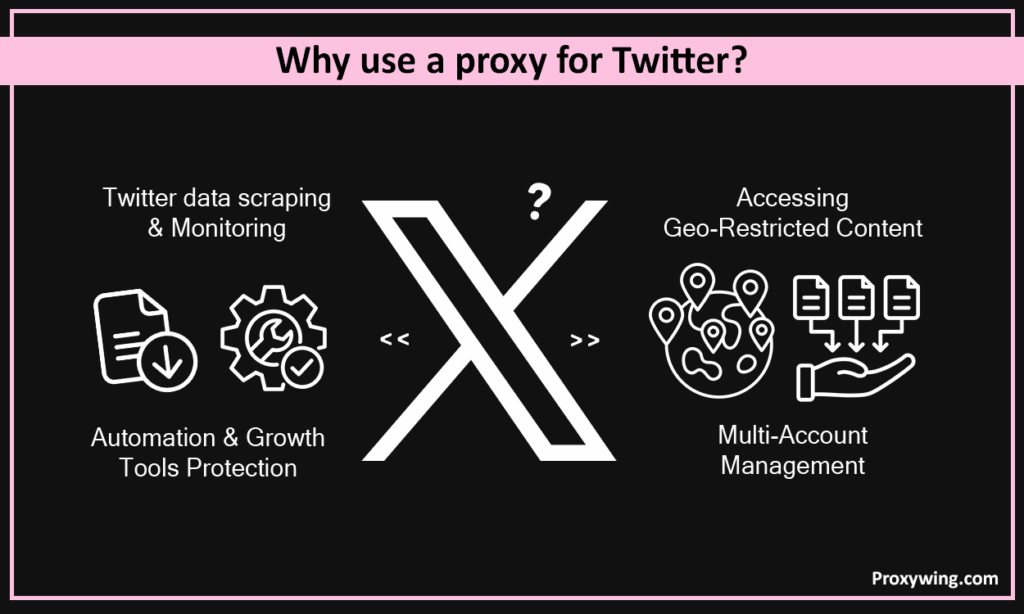
Managing multiple Twitter accounts is a pretty common trend among social media managers and agencies. To avoid account linking and potential bans, it is important to assign unique IPs to each account by using residential or mobile IPs. Overall, using Twitter proxy servers makes maintaining distinct digital identities for all your accounts more seamless.
Using proxies helps agencies and social media managers to bypass Twitter’s sign up limits that prevent creating multiple accounts from a single IP. Using a unique high quality residential IP for each account you create is the most effective way to prevent “instant flagging” by X security systems. They are also crucial for facilitating safe warm-up since they can mimic natural browsing behavior across different locations.
Automating actions on Twitter using the same IP can often lead to IP bans and potential account restrictions, especially when you send too many requests at any given moment. Proxies allow you to shield automation bots from detection by rotating IPs during high-frequency actions.
You can also distribute requests across multiple IPs to stay under Twitter’s anti-spam thresholds. X proxies also make it easier to lower the risk of shadow bans when using schedulers or auto-engagement tools.
Your experience on Twitter is hugely affected by your location. By using a proxy for Twitter, you can always switch your IP to another county, allowing you to unlock region-specific trends and hashtags to tailor content for global audiences.
The flexibility to switch IP addresses also allows you to manage localized accounts as if you were physically present in that specific country. Finally, proxies also allow you to seamlessly bypass local censorship or workplace/school networks that restrict X access.
In some regions, workplaces, and schools, access to X is blocked at the network level. A proxy routes your connection through an IP in a location where the platform is available, letting you reach X again without changing devices. This is one of the most common reasons everyday users, not just agencies, turn to a proxy for Twitter.
It’s tempting to reach for a free Twitter proxy here, but free servers are almost always blacklisted, painfully slow, and risky for your login data. For reliable, restriction-free access, a low-cost residential or ISP plan is a far safer way to unblock X than any free option.
They make it more seamless to collect public web data without hitting rate limits or being blocked by the platform. Scraping data requires dynamically switching IP addresses to prevent the X platform from seeing too many requests coming from the same IP, which often leads to IP bans.
By using proxies, you can seamlessly track brand mentions and competitor activity in real-time across different regions using data scraping tools. Businesses can also perform sentiment analysis at scale by distributing web requests through a proxy pool.
To set up your proxies for X, follow these five steps:
There are different types, enabling users to choose one based on their needs. Select residential IPs for the highest level of trust and lowest ban rates. Datacenter IPs are the easiest to detect but they offer the fastest speeds and are cheaper. ISP proxies give you the balance between speed and reliability, so they might be the ideal choice for some users.
Avoid free IPs as they often use blacklisted IPs and compromise your account security since they mainly sell user data to generate revenue. You must choose a reliable provider if you need a secure and seamless experience. Try ProxyWing’s Twitter proxies with affordable plans designed for speed, reliability, and well optimizing IP addressing systems.
Twitter proxy settings can be directly integrated into the browser. Firefox and a few other browsers have independent Twitter proxy settings. To configure them, open browser settings and navigate to the network or proxy configuration section.
There you should see an option to enter the proxy hostname (server IP address) and port provided by your vendor. You can also input login credentials (username and password) if your vendor requires authentication.
However, several browsers, including Google Chrome and Microsoft Edge don’t have independent Twitter proxy settings, so you will either rely on system network settings for proxies or use browser extensions. Using an extension like ProxyWing Proxy Manager allows you to set up different configurations (proxy hostname and port) that you can switch between seamlessly.
Many social media managers and agencies use automation tools for X account management. The good news is that most of these automation tools support proxy usage. To get started, locate the “Proxy” tab within your social media manager or bot software that is often found under the settings section.
Once you identify the proxy settings option, you can now import proxies in bulk using the standard format: IP:Port:User:Pass. This format allows you to use different proxy combinations for the different accounts you’re managing. You can sync specific accounts to specific proxies to ensure consistent login data.
We always recommend sticking to the 1:1 ratio to ensure X sees each account as a unique, legitimate user. Yes, you can use the same IP for more than one account, but this significantly puts your accounts at risk. X may ban your IP or restrict your account if they detect too many requests coming from the same IP.
To maintain IP consistency, use ”Sticky Sessions” so you don’t jump between locations frequently. ProxyWing offers static proxies that could help you maintain the same IP for every session.
Before you start using an IP address, you need to ensure it is clean. Check the IP’s “fraud score” using online tools to ensure it isn’t blacklisted. Use tools like IP Checker to verify the location. Finally, run a connection test to ensure the proxy speed is sufficient for media uploads.
You can choose from datacenter proxy, residential proxy, ISP proxy, and mobile proxy solutions depending on your needs. This section explores each in detail.
Here’s a quick side-by-side look at how the four proxy types stack up for Twitter. Use it to match a proxy to your specific task at a glance.
| Type | Trust Score | Speed | Cost | Best For |
| Datacenter | Medium | Very High | $ | Budget public-data scraping |
| ISP | High | High | $$ | Long-term management of established accounts |
| Residential | High | Medium | $$$ | Automation & bulk actions at scale |
| Mobile (4G/5G) | Very High | Medium | $$$$ | Maximum trust, account creation & recovery |
As a rule of thumb: the more sensitive the task (creating, warming up, or recovering accounts), the higher up this table you should go. For pure scraping where no login is involved, datacenter IPs keep your costs down.
Datacenter IPs offer the highest speeds and lowest costs, which makes them a viable option for high-volume data collection. However, they are easier to detect because their IPs originate from server farms rather than real homes. That’s why they offer the lowest success rate and are best suited for scraping public data where an account login is not required.
ISP proxies offer the perfect balance between residential and datacenter proxies. They combine datacenter speeds with the legitimacy of a residential IP address. They offer a static identity, ensuring the IP address of your login session never changes randomly, which can sometimes trigger X’s systems. This makes them ideal for the long-term management of established business or personal accounts.
These proxies assign a new IP for every request or set time interval to mimic different users. Residential proxies are the hardest to block because the IP addresses belong to genuine home internet connections. Rotating residential IPs are perfect for bulk actions like mass following, liking, or posting via bots that are assigned to different accounts.
Twitter Mobile proxies use real 4G/5G mobile tower IPs shared by thousands of actual phone users. They are virtually un-bannable because blocking one IP would affect thousands of legitimate users on the platform. Mobile IPs are also the most trusted, especially on mobile-first platforms like Twitter. While they carry the highest cost, they provide the highest success rate when implementing multiple actions on several accounts using the same device, making the cost worth it.
The right choice depends entirely on what you’re trying to do. Picking the wrong type is one of the most common reasons people overpay or get their accounts flagged.
Check the size and cleanliness of the IP pool, whether the provider offers the proxy types your task needs, the available locations, and whether sticky sessions are supported for account work. ProxyWing covers all four proxy types: datacenter, ISP, residential, and mobile, so you can match the IP to the use case without switching vendors.
X’s systems use different methods to detect anomalies on their platform. Some of these include:
Twitter flags known datacenter ranges (Autonomous System Numbers) often associated with spam and bot action. The platform also checks its blacklists to see if an IP has been previously reported for malicious activity. IPs from public proxies are often blacklisted, which is why they’re the least reliable for managing X.
Twitter’s systems can also detect impossible travel. For instance, security alerts are triggered if you log in from New York and then London minutes later. The platform also monitors time zones to ensure your system clock matches your proxy’s location. That’s why using static IPs is sometimes necessary, especially when handling actions in one account for an extended period.
X also tracks hardware data like screen resolution, OS, and fonts beyond just the IP. This data is mainly used for its ads algorithms and personalizing the users’ experience. For instance, if a desktop browser uses a mobile proxy signature, the system can detect such inconsistencies and flag the connection.
The system identifies “bot-like” speed, such as liking 50 tweets in exactly 50 seconds. It also monitors repetitive loops that differ from unpredictable human browsing habits. That’s why it is crucial to configure your automation tools to mimic human behavior when browsing this platform.
Avoid these actions if you need to preserve your Twitter accounts:
Twitter does allow using more than one account on the same device. However, there is an unknown limit to how many you can manage and bypassing that limit can often lead to bans. Using the same proxy for managing multiple accounts creates account linkage, meaning if one account is banned, all others follow. It also signals automation to Twitter’s security systems due to shared network footprints. To be on a safe side, always use a different proxy for each account.
X flags “impossible travel” patterns since they are linked to account hacking or proxy abuse. Random switching of IPs can trigger frequent sign-in requests or MFA actions to prove ownership of the account.
Free proxies expose your data since hackers often use them to steal user credentials. They have high failure rates as most of their IPs are blacklisted by platforms like X. For clean, high-reputation IPs, check out ProxyWing’s premium servers. ProxyWing offers a large pool of clean IPs, allowing you to handle your automation tasks without detection.
Aggressive posting on a new account immediately triggers spam filters. Try to increase account activity gradually with likes, scrolls, and follows to build trust over several days. This takes time, but you need to do it to avoid having your new accounts restricted.
Your experience managing Twitter accounts will be significantly better when you adopt proxies. Proxies allow you to allocate a different IP address to each account, making it harder for X to link your accounts or ban them. For even more privacy, you can use proxies with anti-detect browsers to prevent X from obtaining any of your real digital fingerprint data.
Apart from social media managers and agencies, everyday people can also use proxies to bypass restrictions put in place by their network admins and ISPs. With proxies, users can switch to an IP in a different country, allowing them to access the X platform without limitations.
Finally, choosing the right proxy type and a reliable provider is also crucial to your experience. For the highest success rate, residential and mobile proxies are the best choice. Even though these IPs are more expensive than datacenter IPs, their reliability makes them worth the cost.
Article written by:

Product & Support Operations Lead
Built Proxywing's support department from scratch — documented workflows, clear escalations, consistent quality. Now bridges the CEO and engineering, keeping infrastructure projects on track.
All articles by author (68)Yes, it is legal in most countries to use proxies for privacy and account management. However, you need to use proxies without violating the Terms of Service of the platform. Avoid prohibited spam or other platform manipulation tasks.
They are the hardest to detect since they use IPs for real home devices, making them appear like real traffic. Detection usually happens due to poor browser fingerprinting rather than the IP itself.
We recommend using one account per IP for maximum safety and longevity. While up to three is possible with high-trust mobile IPs, it carries significantly higher risk. So, always stick with one proxy for every account.
No, they are often slow, unreliable, and used by thousands of spammers simultaneously. They also rely on IPs that are often blacklisted by X and several other platforms. Furthermore, your login info can be intercepted by the person running the free server and some of these are managed by hackers.
Mobile proxies are the safest due to their high trust scores and shared IP nature. Residential proxies are the best runner-up for balancing cost and security. But if you need the highest success rate, mobile proxies are the best choice.
There’s no universal answer, it depends on your task. Static ISP proxies are best for managing established accounts, mobile proxies are best for creating and warming up new ones, and rotating residential proxies are best for scraping and automation at scale. For most account-management work, ISP or mobile proxies offer the best balance of trust and reliability.
Yes. When you’re pulling data through the X API at volume, routing requests through rotating residential proxies helps you stay under rate limits and avoids having a single IP flagged for too many calls. Assign clean IPs and rotate them to keep your API workflows running smoothly.

