




Proxy Authentication Methods Explained: Username/Password vs IP Whitelisting
06.10.2026 10 min
An HTTP reverse proxy is an important part of the web infrastructure we use today. It lies between your backend host and users, as well as controls how requests travel through your system. A lot of firms use this protocol-level technology to make things faster, safer, and easier to grow.
A reverse proxy gets traffic from users and transmits it to the right backend. It also takes care of responses before they get to the end user. This technique makes your endpoint host work better and keeps it safe.
Every developing web platform requires a powerful proxy layer these days. A well-configured proxy that works host-side makes a difference, whether you run small applications or large web servers.
Keep reading in case you want more speed, safety, as well as control. This article will shed light on how to set up and use a host-side proxy, providing clear steps and insights.
It is a protocol technology host that is present before backend systems. It gets clients requests from users and chooses where to send them. It then forwards those requests to the right backend.
The proxy acts as a layer in the centre. It prevents people from seeing the internal hosts. This arrangement gives you more control over incoming traffic.
This is how the flow goes:
Client → Reverse Proxy → Backend → Reverse Proxy → Client
A client sends incoming HTTP requests that come in. The proxy looks at the rules for routing. Then it forwards the request to one of the backend hosts.
The backend handles the request and sends back an HTTP response. The proxy gets it and transmits it back to the client.
The proxy may update HTTP headers, deal with SSL, or set caching rules throughout this operation. It also routes traffic across application hosts based on logic.
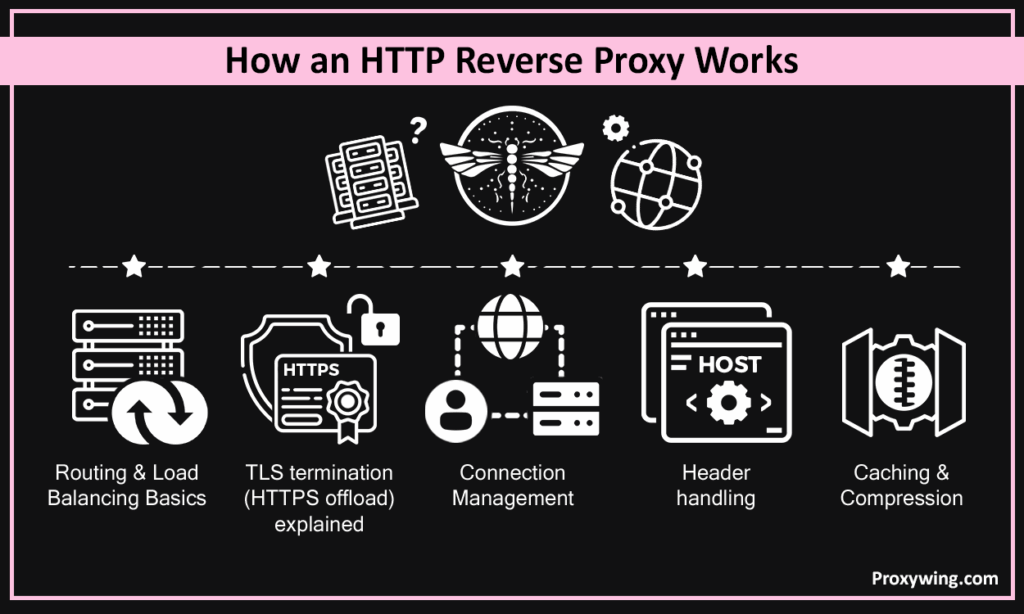
This solution sends incoming requests to distinct backends. It employs rules based on host names, paths as well as domains.
It may share loads in the following ways:
This makes sure that traffic is evenly spread out among multiple backend systems.
It happens at the proxy. The HTTP reverse proxy uses SSL certificates to decode traffic. It may send traffic to backend hosts like standard ones. Moreover, it may also encrypt it again. This approach makes it easy handling SSL and enabling SSL across platforms, while only allows controlled secure access.
It speeds things up by reusing connections. Also, this solution cuts down on the unnecessary labour that comes with making the same request again and again. It also works with newer protocols like HTTP/2. This speeds up users accessing your site. In some cases, it works similar to port forwarding or a forward port mechanism internally.
Headers include important information. A host-side proxy takes care of the following:
It also alters the response headers before delivering the response. This makes sure that backend applications receive the appropriate request information. It also creates better logging and tracking.
There are various ways that an HTTP reverse proxy speeds things up. It offers an advantage via caching, compression, and reusing connections. It also lets you use HTTP/2 multiplexing. This indicates that more than one request may go over the same connection. This makes things easier for backend hosts and better for users.
This network component keeps backend hosts safe. It keeps genuine IP addresses from being seen by users. This proxy also uses rules to regulate who can get in. Moreover, it may stop undesirable incoming traffic. This configuration lowers exposure and makes the system safer. This configuration lowers exposure and makes the system safer, especially when provided SSL is used.
It helps your system grow. Also, it sends traffic to multiple backend systems. This solution also examines the health of the backend. Furthermore, it transfers requests to another if one fails. This makes sure that everything is always available and runs well. Many systems have multiple backend nodes.
This solution makes deployments easier. You can direct traffic to updated versions of applications. This is helpful for testing as well as gradual updates. There is no need to update the core host configuration. It also supports modern release flows, where testing features are also included before full rollout.
This proxy can assist in balancing the load. It takes care of routing as well as spreading out traffic. On the other hand, a dedicated load balancer does a single job, i.e., to distribute loads. It may not be equipped with sophisticated features. This eventually implies the reverse proxy is pretty flexible.
An API gateway offers functionality like limiting the actual number of requests as well as verifying users. Conversely, a host-side proxy’s job is to take care of routing as well as requests. But it is not able to tackle complicated API logic. In case you need more control over your API, it is better to use a gateway.
A plethora of systems employ layered configurations. For instance:
This method results in better control as well as improved scalability. Moreover, it works great for a single web application or larger systems.
Nginx is the renowned HTTP reverse proxy. It offers robust performance along with simple configuration files.
It works well for web hosts as well as static content. Plethora of developers use it for VPS setups.
Pros:
Cons:
HAProxy primarily focuses on load balancing. It supports both Layer 4 as well as Layer 7 traffic. Moreover, it works effectively with multiple backend systems.
Pros:
Cons:
Apache supports host-side proxy by utilising mod_proxy.
It works really well if you already use Apache for your web applications.
Pros:
Cons:
Caddy simplifies the overall setting. This solution automatically manages SSL certificates.
Pros:
Cons:
Traefik works well with containers. It supports dynamic routing as well as service discovery across DNS names.
Pros:
Cons:
To begin, it is important configuring Nginx with a basic rule.
You need to use the server blocks setup:
server {

lisIP,ten 80;

server_name example.com;

location / {

proxy_pass http://localhost:3000;

}

}
This transmits incoming requests to the backend host.
To preserve protocol and IP put these headers:
proxy_set_header Host $host;

proxy_set_header X-Real-IP $remote_addr;

proxy_set_header X-Forwarded-Proto $scheme;
This makes sure that the backend application sees the right client IP.
Set timeouts to prevent problems:
proxy_read_timeout 60;

client_max_body_size 50M;
This prevents mistakes from happening when you upload a lot of files.
Add support for WebSockets:
proxy_set_header Upgrade $http_upgrade;

proxy_set_header Connection "upgrade";
This makes sure that connections are set correctly.
Turn on HTTPS using SSL certificates:
listen 443 ssl;

ssl_certificate /path/cert.pem;

ssl_certificate_key /path/key.pem;

Redirect HTTP to HTTPS:

return 301 https://$host$request_uri;Define upstream backends:
upstream backend {

   server 127.0.0.1:3000;

   server 127.0.0.1:3001;

}
Then route traffic:
proxy_pass http://backend;This helps you in running multiple backend services.
Enable modules:
a2enmod proxy

a2enmod proxy_http
Add config:
ProxyPass / http://localhost:3000/

ProxyPassReverse / http://localhost:3000/
This arrangement forwards incoming requests to applications on the backend.
Here is basic config:
frontend http_front

   bind *:80

   default_backend servers

backend servers

   server server1 127.0.0.1:3000 check

   server server2 127.0.0.1:3001 check
This sends traffic to different backend hosts.
A secure solution makes sure of handling data safely.
Check the logs and configuration options to fix problems.
Article written by:

Product & Support Operations Lead
Built Proxywing's support department from scratch — documented workflows, clear escalations, consistent quality. Now bridges the CEO and engineering, keeping infrastructure projects on track.
All articles by author (68)No, load balancing is part of a proxy. But it also takes care of headers as well as logic.
Yes. This solution prevents users from seeing the IP addresses of the backend.
Yes. It speeds things up by employing caching as well as compression. Sites that load faster do better in search results.
Use headers such as X-Forwarded-For. This communicates the genuine client IP address.
No, it’s not necessary. But it makes handling SSL and certificates pretty easy.
Absolutely. You may utilise routing rules as well as domain names with more than one backend system.
Yes. You can use domain names and routing rules for multiple backend systems.
An HTTP reverse proxy is useful for hosts, whereas a forward proxy is meant for clients.
A properly set up proxy that works in reverse direction makes things run faster, safer, and easier. It is the main part of contemporary web applications. Begin with basic configurations, test it, and then extend it as your needs change.

