




Proxy Authentication Methods Explained: Username/Password vs IP Whitelisting
06.10.2026 10 min
If you’ve ever set up a proxy, you’ve probably come across SOCKS4 and SOCKS5 as options. They are similar, and in many aspects they are, but the distinctions between them are important, depending on what you need a proxy for.
This guide provides a simple SOCKS4 vs SOCKS5 proxy comparison. You will understand what each protocol is, how they differ, and which one best suits your application.
Before we get into every detail, let’s take a look at the most important ways that SOCKS4 and SOCKS5 differ.
| Feature | SOCKS4 | SOCKS5 |
|---|---|---|
| Protocol support | TCP only | TCP and UDP |
| IP version | IPv4 only | IPv4 and IPv6 |
| Authentication | None | Username/password, GSS-API |
| DNS resolution | No (SOCKS4a adds it) | Yes |
| Security level | Basic | Enhanced |
| Performance | Good for simple TCP tasks | Better for high-bandwidth tasks |
| Best for | Legacy tools, simple TCP routing | Modern apps, UDP traffic, better security |
SOCKS proxy is a transport-level proxy, which is placed between your computer and the Internet. When you connect through one, it forwards your traffic to the destination server on your behalf, without caring what type of traffic it is.
That last part is what makes SOCKS different. It is compatible with nearly all applications that can connect to the network – torrent programs, email programs, game programs, browsers, and so on. It does not restrict itself to web traffic like in the case of HTTP proxies.
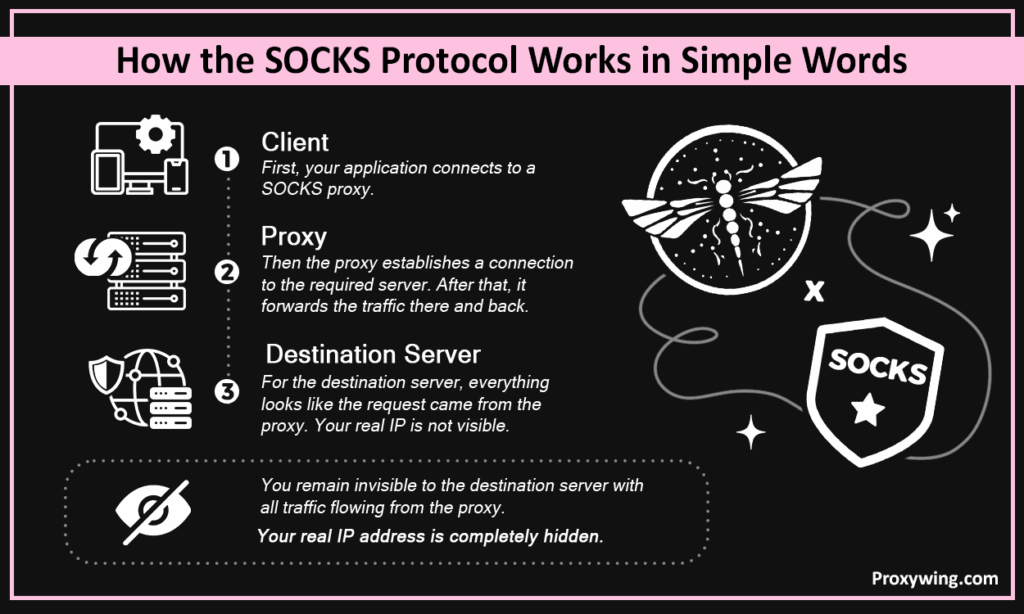
Client → Proxy → Destination
The SOCKS proxy server is connected to your device (the client). The proxy will then connect to the destination server you are attempting to connect to and forward traffic between the two. Only the IP address of the proxy is visible to the destination, not yours.
An HTTP proxy is created to support web traffic. It can read and understand HTTP headers, making it useful in such applications as content filtering or caching, but it can only process HTTP and HTTPS traffic.
A SOCKS proxy does not even look at your traffic. It is protocol-blind, meaning it works with all types of protocols and apps without having to know what is being transmitted. That makes it more flexible, but also means that it cannot filter and cache content like an HTTP proxy can.
SOCKS4 is the older version of the SOCKS protocol. It was made to do one thing: send TCP traffic from a client to a destination by going through a proxy server. It does that job reliably, but it doesn’t offer much beyond that. No authentication, no UDP support, no built-in DNS resolution, just a straightforward TCP relay.
SOCKS4 proxies support simple TCP connections. When an application requires connecting to a remote server, the proxy will create that connection and forward the traffic between the two.
What they don’t handle well is everything that’s become standard in modern networking. There’s no way to require a username or password before granting access. UDP traffic, as is relied upon by many modern apps, is not supported at all. DNS resolution occurs on the client side, that is, the destination domain name is resolved prior to reaching the proxy. This can expose information about where you’re connecting to.
This is what occurs when an app is connected via a SOCKS4 proxy:
| Pros | Cons |
|---|---|
| Simple and lightweight | TCP only – no UDP support |
| Wide compatibility with older tools | No authentication methods |
| Stable for basic TCP routing | No built-in DNS resolution |
| Low overhead, fast for simple tasks | IPv4 only – no IPv6 support |
SOCKS4 remains useful in some special cases:
The latest version of the SOCKS protocol is SOCKS5. It expands upon all that SOCKS4 has created and provides the features that are in fact needed by the modern networking – authentication support, UDP traffic support, IPv6 support and appropriate DNS resolution using the proxy itself.
ProxyWing provides SOCKS5 proxies that are reliable and ready to use in case you need a SOCKS5 proxy.
SOCKS5 proxies are capable of supporting more traffic compared to SOCKS4. They support TCP and UDP connections, making them available to those applications that SOCKS4 can not enable – voice calls, video streaming, or real-time data transfer.
They further facilitate authentication, i.e., a proxy can be secured using a username and a password, or more sophisticated authentication, such as GSS-API.
And to top all that, SOCKS5 is able to do domain name resolution on the proxy server side instead of the client side, which minimizes the chances of DNS leaks and provides you with increased privacy in general.
The SOCKS5 connection process has a few more steps than SOCKS4, but they happen quickly in the background:
| Pros | Cons |
|---|---|
| Supports both TCP and UDP | Slightly more setup complexity |
| Multiple authentication options | Not supported by some very old apps |
| DNS resolution handled by the proxy | Authentication depends on the provider |
| IPv4 and IPv6 compatible | More overhead than SOCKS4 for simple tasks |
| Better privacy and security overall |
SOCKS5 is the correct option in case your application requires more than simple TCP forwarding:
Since we have covered each protocol individually, we will now discuss the difference between SOCKS4 and SOCKS5 to get a clear idea of how they are different in real life situations.
Both SOCKS4 and SOCKS5 support TCP. This includes the majority of typical tasks – web surfing, scraping, automation, and typical HTTP requests. In case all you require is TCP, both protocols will be fine.
SOCKS4 doesn’t support UDP. SOCKS5 does, when the client and provider allow it. This is important in real-time applications such as VoIP, online games, and video streaming, which require UDP to perform effectively.
SOCKS4 has access controls by IP address only – no userid or password. SOCKS5 has the ability to be authenticated by username/ password and GSS- API. This leaves SOCKS5 as the only option when it comes to account-based proxy services or any environment where access control is an issue.
With SOCKS4, your app will look up the domain names locally and forward your request to the proxy. Those DNS calls will be made over your regular connection and not by the proxy and could reveal the information to where you are making the connections. SOCKS5 permits the proxy to perform DNS resolution and leaves queries in the proxy connection, reducing the possibility of leakage.
SOCKS4 supports IPv4 only. SOCKS5 is IPv4 and IPv6 compatible. SOCKS4 will not function if IPv6 exists in any way.
The things that matter most in speed are your provider, server location, and bandwidth, rather than the version of a protocol. SOCKS5 is good in reliability. Its broader base of features gives it the ability to not fail to connect, as SOCKS4 would do in more demanding configurations.
SOCKS5 is the default in most of the modern apps. SOCKS4 is primarily supported with older or minimal clients. In case you are on something constructed within the past few years, then SOCKS5 is what it anticipates.
SOCKS proxies are not encrypted, but they are relay-only. Although your connection is encrypted with TLS or HTTPS, the encryption is done on the application level. In order to encrypt the proxy layer itself, you need SSH tunneling or VPN. SOCKS5 can be tunneled using SSH, and is not a default option.
An HTTP proxy should be used when you are working with web traffic – browsing, scraping websites, or performing HTTP requests in a browser. The HTTP proxies are aware of web traffic, and as such, they can filter what is sent, cache responses, and manipulate headers in a manner that a SOCKS proxy can not.
Use a SOCKS proxy when using programs that generate more traffic than the typical web, such as games, VoIP software, torrent clients, or any other program that doesn’t use plain HTTP requests. Because SOCKS doesn’t examine your traffic, it can accommodate a wide range of protocols and application types.
SOCKS5 is usually the answer. It includes all of SOCKS4’s features and more. Only use SOCKS4 if it’s required for your configuration.
Your setup is simple: you have TCP-only routing, no authentication is needed, and you are either working in a monitored environment where access control was previously handled at the network level or you have legacy software that does not use SOCKS5.
You require something more than simple TCP forwarding. That includes authentication, UDP traffic, DNS resolution through the proxy, or compatibility with any modern application or proxy service. When in doubt, go with SOCKS5.
Using a SOCKS proxy safely comes down to a few straightforward habits that most people skip.
SOCKS4 vs SOCKS5 proxy difference is only a matter of how much you actually require. SOCKS4 does simple TCP routing and is still usable in simple or legacy environments. SOCKS5 has all the features of SOCKS4, and can also authenticate, support UDP, and more safely handle DNS, so it is the correct choice in most modern applications.
In case you are not sure about which one to use, use SOCKS5. It is more adaptable, well-supported, and will lead to fewer issues in the long run
Article written by:

Head of Partnerships
Leads partnerships at Proxywing with hands-on knowledge of residential, ISP, datacenter, and mobile proxies. Works with affiliates, bloggers, and tech communities, bridging tech and partner needs.
All articles by author (23)In nearly all instances, SOCKS5. It helps in authentication, UDP, and correct DNS processing. SOCKS4 can be useful for legacy software that cannot support SOCKS5.
Although it lacks authentication and does not guard against DNS leakage, it provides basic anonymity by concealing your IP. Anything that is sensitive to security is better than SOCKS5.
When performing web-only tasks like website browsing or scraping, use HTTP proxies. When you need to use protocols other than HTTP or want to route traffic from non-browser applications, you use SOCKS proxies.
Yes, the IP address of the proxy is visible on the websites, not yours. SOCKS5 is not a full privacy solution, though, as it does not encrypt your traffic.
Yes, SOCKS5 does accept UDP. Its functionality is determined by how well your client application and your proxy provider are on their part.

