




Proxy Authentication Methods Explained: Username/Password vs IP Whitelisting
06.10.2026 10 min
Geoblocking is quite common. It imposes location-based restrictions, which make certain content unavailable in some countries. So, when someone from outside the allowed region tries to access the content, they see a message like content unavailable in your country. But there are ways to bypass geoblocks and access restricted content even if it’s unavailable in your region.
In this article, we’ll discuss what geoblocking is and how it works. We’ll also show you the most reliable methods to bypass geo-blocking safely.
Geoblocking is basically a technique that websites use to restrict access to content based on the geographic location (country or city) of the user. Basically, websites use the IP address to determine where a user is coming from and then allow or block access accordingly.
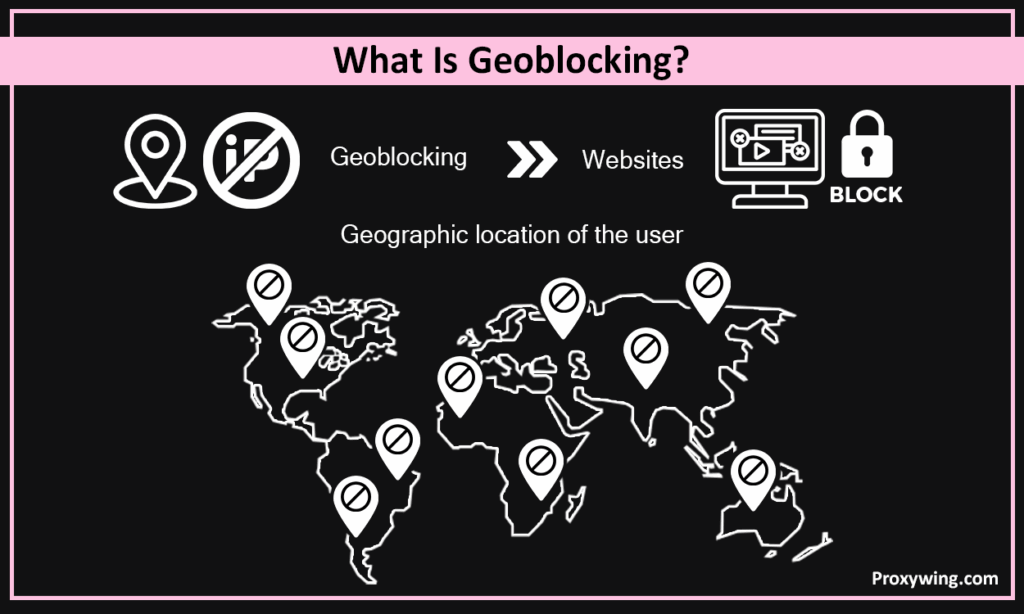
Streaming services, news websites, and online marketplaces usually have geoblocking in place. For example, platforms often have certain TV shows or movies only for a specific country. So, users outside of that country cannot access these movies or TV shows.
Some websites apply geo-restriction for legal compliance or security reasons, while others use it to comply with licensing agreements or show different pricing to users in different regions. However, geo-blocking can affect millions of internet users, especially those trying to access services while traveling or living abroad.
Geoblocking called geo-restriction, geo-fencing, or geo-location blocking. These terms all describe the same thing: limiting access to online content based on where you are.
Geoblocking works by detecting the location of a user and then allowing or restricting access. Websites use different techniques to detect users’ locations and implement geo-blocking. These include:
This is one of the most common ways to implement geoblocking. Any device that is connected to the internet has an IP address. Websites analyze IP addresses to determine a user’s country and region. If the IP falls outside the allowed regions, access is restricted.
For instance, many streaming services apply IP filtering for geo-blocking. This helps them ensure movies or shows comply with licensing restrictions in different countries. Many people don’t know that even mobile hotspots and public Wi-Fi networks also reveal their IP addresses, which means they still face geo-restrictions.
Some apps also use GPS data from mobile devices to confirm the physical location of the user for geo-restrictions. So, even if you change your IP using a VPN or proxy, GPS data can show your real location. That’s why some websites and services detect VPNs and block access, even when users are bypassing geo-restrictions.
For example, some travel apps and location-based services implement geo-restrictions through GPS. This helps them provide content relevant to a specific country or region. Users trying to access content from a different location won’t be able to access it.
DNS requests can also tell where users are located. Some websites analyze DNS traffic to detect attempts at bypassing geo-restrictions.
DNS queries basically help translate domain names into IP addresses. Websites analyze these queries to detect where a user is connecting from. If the DNS request comes from an unapproved region, access is blocked.
Cookies, browser fingerprints, and account history can also show user location, which websites use to implement geoblocking.
Basically, websites track your activity using cookies, local storage, and browser fingerprints. This way, they can detect repeated attempts to access restricted content from different locations. Even if you’re using a VPN or proxy, your browsing history can show your real region.
Many websites impose geo-restrictions using all these methods combined, which is why some users are unable to access content even while using VPNs or proxies.
Websites and platforms implement geoblocking for various purposes:
Licensing restrictions are one of the most common reasons for geoblocking. Content owners usually sell the rights to movies, sports events and TV shows separately for each country or region. Because of these agreements, platforms are legally required to limit access to users in approved locations. If a service shows content outside the allowed region, it could face legal penalties.
Many companies have different pricing for different countries. Basically, businesses adjust pricing based on local income levels, demand, or competition. For example, a subscription might be cheaper in a certain country but more expensive in another country. Geo-blocking helps companies ensure users see the specific pricing for their location.
Some online content is created for certain regions and may not be suitable or interesting to users outside that region. This could be due to language differences, cultural context, or local interests. So, websites might implement geoblock to restrict content and provide a better user experience.
Governments in some countries require websites and platforms to block access to certain contents. These rules can be related to political policies, national security, or local laws. In such cases, platforms must apply geo-blocking.
Geoblock also helps protect intellectual property. When platforms limit access to the content, they reduce the risk of piracy and unauthorized sharing.
Geoblocking itself is legal in most countries. Companies are generally allowed to decide where they offer their content, and licensing deals often require them to. There are limits, though. In the European Union, the Geo-blocking Regulation stops online sellers from blocking or redirecting shoppers, or charging them different prices, just because of where they are within the EU. Streaming rights are treated separately and are still region-based.
Bypassing geoblocking for personal use, such as watching content you already pay for while travelling, is usually not illegal. What can get you in trouble is breaking a service’s terms of use, which may lead to a suspended account rather than a legal penalty. The rules differ from country to country, so it’s worth checking the terms of the service you use and the laws where you live.
If you’re travelling abroad and still want access to local content, there are ways to bypass geo-blocking. Sometimes individuals and businesses also need access to restricted content for certain projects or market research.
Here are reliable methods to bypass geoblock:
A VPN is one of the most commonly used ways to bypass geo-restriction and access restricted content. Basically, a VPN hides your real IP and replaces it with a new one from a different country. This way, websites see you as someone from the allowed location and provide access to restricted content.
Many users worldwide use VPNs to bypass geoblocking on streaming platforms, websites, and online services. VPNs also encrypt traffic and improve privacy.
However, some platforms use advanced mechanisms to detect and block VPN IPs, so not all VPNs work equally well. That’s why it’s important to choose a reliable VPN provider.
Using a proxy server is another reliable method to bypass geoblocking. Proxy servers basically route your internet traffic through remotes server in different regions. This way, a proxy server replaces your real IP address with one from an allowed region.
While proxies work in a similar way to VPNs, there’s a difference between these two. VPNs encrypt all internet traffic from your device, while proxies generally do not encrypt traffic. While encryption improves security, making VPNs slower than proxies.
But this doesn’t mean that using a proxy always compromises security. If you use proxy servers from reliable proxy providers like ProxyWing, you get the fastest speed and secure connections. ProxyWing has servers all around the world. Our server locations include countries like the USA, UK, Netherlands, France, Germany, Spain, Poland, Romania, and many more.
With ProxyWing, you can pick from different types of proxies, such as residential proxies, ISP proxies, datacenter proxies, and enterprise proxies, depending on your needs.
Proxies are great for accessing online services and bypassing geo-restrictions on certain websites. They are also useful for users managing multiple accounts.
SmartDNS services reroute DNS traffic in a way that the users appear as though they are residing in an allowed region. These services don’t change the IP address of the user to change their location. Rather, they reroute only the parts of an internet connection that check a user’s location. SmartDNS basically modifies DNS requests so websites believe the user is accessing the service from an allowed country.
SmartDNS helps users avoid slowdowns caused by VPN encryption while bypassing geo-restrictions. However, SmartDNS does not encrypt traffic, so it is less secure than VPNs.
This method is quite effective in bypassing georestrictions implemented by streaming platforms, as it improves speed and reduces buffering. However, SmartDNS only works with certain online services.
The Tor Browser makes your traffic anonymous by routing it through various nodes around the world. This helps users bypass geo-blocking and access websites without revealing their real location.
Tor is useful for browsing and accessing online platforms with strict geo-restrictions. However, it has its limitations. Tor isn’t usually recommended for streaming platforms that require high speeds. Choosing a specific country is also difficult when using Tor.
Despite these limitations, Tor is still a good option.
Some users prefer browser extensions because they are quick to install and don’t need a separate app. Geolocation spoofing extensions change the location your browser reports to a website, so a page that checks your browser’s location sees the region you picked instead of your real one.
The catch is that most extensions only change the location signal from the browser. They don’t change your IP address, so a website that checks your IP can still see where you really are. For this reason, browser extensions work best for sites that rely on browser geolocation, and they are weaker against streaming platforms and services that use IP filtering.
For better results, many users combine a browser extension with a proxy. The proxy replaces the IP address with one from an allowed region, while the extension keeps the browser’s location signal consistent. Used together, they cover both checks a website might run.
A VPN is the most talked-about option, but it isn’t the only one. If you don’t want to use a VPN, you still have a few reliable ways to bypass geoblocking.
A proxy server is the closest alternative. It replaces your real IP address with one from an allowed region, just like a VPN does, but without encrypting all of your traffic. This makes proxies faster than VPNs, which helps with browsing and accessing region-locked websites. Providers like ProxyWing offer residential and ISP proxies in the USA, the UK, Germany, France, and many other countries, so you can pick the exact region you need.
SmartDNS is another no-VPN option. It reroutes only the part of your connection that checks your location, so it keeps speeds high and works well for streaming. The Tor Browser also bypasses geoblocking without a VPN, though it is slower and doesn’t let you choose a specific country. Browser extensions can help too, but they work best alongside a proxy.
For most people who want a no-VPN method, a proxy gives the best balance of speed, control over location, and reliability.
Each method has a job it does best. This quick comparison shows how proxies, VPNs, SmartDNS, the Tor Browser, and browser extensions stack up, so you can pick the right one for your situation.
| Method | Speed | Hides IP | Encrypts traffic | Choose a country | Best for |
|---|---|---|---|---|---|
| Proxy server | Fast | Yes | No | Yes | Browsing, multiple accounts, market research |
| VPN | Medium | Yes | Yes | Yes | Privacy and general streaming |
| SmartDNS | Fast | No | No | Limited | Streaming on smart TVs and consoles |
| Tor Browser | Slow | Yes | Yes | No | Anonymous browsing |
| Browser extension | Fast | No | No | Yes | Sites that only check browser location |
For most people in 2026, a proxy or a VPN is the best starting point. Pick a proxy when you want speed and control over your location, for example for browsing, shopping research, or running several accounts. Pick a VPN when encryption and privacy matter more than raw speed. SmartDNS is the better choice for streaming on devices where you can’t install an app, and Tor is there when anonymity is the priority.
Geoblocking isn’t only about streaming. Many online stores, airlines, and software companies show different prices depending on your country, and some redirect you to a local version of their site before you can see the original page. This is called geo-pricing, and the same tools that bypass geoblocking can help you compare prices across regions.
To check prices in another country, connect through a proxy or VPN located in that region and clear your cookies first. Cookies and saved location data often tell a website where you are even after you change your IP, so clearing them helps the site treat you as a new visitor from the new location.
Keep in mind that prices can also depend on the currency, the payment method, and the billing address you use at checkout. Changing your IP shows you the regional price, but you may still need a matching payment option to finish the purchase. Checking different regions is useful for spotting better deals and for market research.
Even with VPNs, proxies, SmartDNS, or Tor, some users face issues. Many websites also implement tools to detect and block known IP addresses, DNS reroutes, and other bypassing techniques.
Common reasons for geo-restriction tools not working include:
To solve these issues of geoblocking, you should clear cookies, switch servers, and use reliable bypassing tools. For some websites with stricter geoblocking, you may need multiple tools for uninterrupted access.
For example, a streaming platform with geoblocking might block certain VPN servers repeatedly, requiring users to try multiple server locations. Similarly, proxies for bypassing geoblocking may only work for specific websites. SmartDNS can also fail if the platform detects unusual DNS queries. Knowing this is important for bypassing geo-blocking.
Websites have a few common ways to spot when someone is bypassing geoblocking:
Residential and ISP proxies are harder to detect than free VPNs and datacenter IPs because the IP addresses look like those of ordinary home users. Pairing a clean IP with cleared cookies and matching browser settings gives the most consistent results.
Article written by:

CEO
Founder of Proxywing. Drives growth across EU, US, and Asian markets, combining B2B strategy with a hands-on focus on product quality, 99% uptime, and responsive support.
All articles by author (64)Various free VPN and proxy tools are available in the market, but not all of them are reliable for bypassing geoblocking. Many of these tools have limited IP addresses, slower speeds, and are more easily blocked by streaming platforms or websites. To bypass geoblocking effectively, it’s important to use reliable proxy tools with vast IP pools.
For example, ProxyWing is a trusted proxy provider with a global network of proxy servers. ProxyWing’s proxy server locations include the USA, the Netherlands, France, the UK, Poland, Germany, Romania, Spain, and many other countries.
At ProxyWing, you can choose between various proxy types, including residential proxies, ISP proxies, datacenter proxies, and enterprise proxies, to avoid geoblocking.
Bypassing strict geoblocking and censorship is challenging. Using advanced VPNs, specialized proxies, and Tor can help, but success varies based on the tool’s reliability. Moreover, users in certain countries only have limited access to restricted content.
With the right tools, you can avoid geoblock and access streaming platforms, online services, social media, news websites, and other restricted contents. VPNs and proxies are helpful in bypassing geoblocking and accessing content.
Some websites with geoblocking use techniques to detect known IP ranges and block traffic from VPNs or proxies. Switching servers or using different services can help solve this issue. You can also try clearing browser cookies.
Tor randomly routes traffic through multiple nodes. This means you cannot select a specific country when bypassing geoblocking. This limits control over location-based access but allows for better privacy.
Yes. A proxy server is the most reliable no-VPN option, since it replaces your IP address with one from another region without slowing you down as much as a VPN. SmartDNS, the Tor Browser, and browser extensions are other ways to bypass geoblocking without a VPN. For speed and control over your location, a proxy from a provider like ProxyWing is usually the best choice.
Connect through a proxy or VPN in the country you want to check, then clear your cookies so the website treats you as a new visitor. Keep in mind that the currency, payment method, and billing address can also affect the final price at checkout.
Browser extensions can change the location your browser reports, but most of them don’t change your IP address. They work for websites that only check browser geolocation, but not for services that filter by IP. For stronger results, use a browser extension together with a proxy.
In most countries, bypassing geoblocking for personal use is not illegal, but it can break a service’s terms of use. The rules vary by country, so check the terms of the service and the laws where you live.
Websites check IP reputation databases, look for DNS or WebRTC leaks, read cookies and browser fingerprints, and watch for mismatches between your IP and your browser settings. Residential and ISP proxies are harder to detect because their IP addresses look like those of regular home users.

