How to Unblock GoGuardian with Proxies
13.08.2026 8 min
If you’re reading this, Telegram has probably stopped working for you. Chats won’t load, files fail to send, the app hangs on “Connecting”, and you don’t know whether it’s your phone, your Wi-Fi, or your government.
2026 has been a rough year for Telegram access. India restricted the app nationwide in June. Russia’s regulator has been throttling it since February. China and Iran have blocked it for years. And in the US, UK and across Europe, a large share of the problem isn’t political at all, it’s school firewalls, corporate networks and hotel Wi-Fi that filter messaging apps by default.
The good news: almost every one of these blocks can be undone, usually in a few minutes. The catch is that a fix for a school firewall does nothing against a country-level block, and vice versa. That’s why this guide starts with diagnosis instead of a list of tools.
Before you buy anything or install anything, spend thirty seconds working out what’s wrong. There are four different problems here, and they need four different fixes.
Test 1 — Turn off Wi-Fi and switch to mobile data.
If Telegram works on cellular but not on Wi-Fi, the block belongs to that network: your school, your office, your hotel, your café. This is the easiest case to solve.
Test 2 — Try a second device on the same Wi-Fi.
If Telegram works on your friend’s phone but not yours, the problem is local to your device: a stale cache, a broken update, a firewall rule, a leftover proxy setting.
Test 3 — Check whether Telegram itself is down.
Outages hit everyone at once, across different networks and countries. Restrictions are consistent for you specifically and don’t care what time it is. If half of Twitter is complaining at the same moment, wait it out.
Test 4 — If it fails everywhere, including mobile data.
That’s a country-level or ISP-level restriction. Your provider is filtering Telegram traffic, and only a proxy or VPN will get you through.
| What you’re seeing | What it usually is | What fixes it |
|---|---|---|
| Works on cellular, dead on Wi-Fi | Network filter (school, office, hotel) | SOCKS5 proxy inside Telegram, or mobile hotspot |
| Dead on every network you try | Country or ISP block | SOCKS5 or MTProto proxy, VPN as backup |
| Loads, but media and calls fail | Throttling / partial block | MTProto proxy |
| Stuck on “Connecting” everywhere, all devices | Possible outage | Wait, then check status reports |
| App opens but you can’t message one person | You’ve been blocked by that user | Nothing technical will help — see the section below |
| “This account has been banned” | Account-level ban | Contact Telegram support, not a proxy |
Once you know which row you’re in, skip to the matching section. If you’re in rows one through three, keep reading — proxies solve all of them.
Russian authorities have taken an increasingly hard-line stance toward foreign digital platforms, citing new rules on information control and national cybersecurity. Roskomnadzor is systematically slowing access to popular services as part of a broader push toward a state-controlled “sovereign internet,” rather than dealing with temporary technical issues.
The regulator has learned how to effectively slow down traffic to popular platforms, making their use unbearable. Experts agree: expecting everything to be “fixed” overnight and rolled back is pointless. The trend toward blocking foreign services continues, and access restrictions will only intensify. For users in 2026, uninterrupted access to global online tools is becoming vital, as restrictions on foreign services are expected to keep tightening.
Telegram is legal and freely available across most of the world — all of the Americas except Cuba, most of Europe, most of Africa. But roughly a dozen countries block or throttle it, and the list has grown this year rather than shrunk.
| Country | Status in 2026 | Since |
|---|---|---|
| China | Full block behind the Great Firewall | 2015 |
| Iran | Full block | 2018 |
| Russia | Throttling and re-blocking by the regulator | 2026 |
| India | Temporary nationwide restriction | June 2026 |
| Vietnam | Providers ordered to block | 2025 |
| Nepal | Ban over fraud concerns | 2025 |
| Somalia | Block | 2023 |
| Cuba | Restricted since the 2021 protests | 2021 |
| Pakistan | Periodic restrictions | recurring |
| UAE | Voice and video calls blocked | long-running |
Two things worth knowing. First, several of these are intermittent — a country can restrict Telegram for a week around an election or an exam leak and then quietly restore it, as India did in June. Second, “blocked” rarely means the app vanishes. More often it means throttling: the app opens, text eventually arrives, but photos never load and calls drop after four seconds. That’s still a block, and it’s fixed the same way.
If you’re travelling to any country on this list, set up your proxy before you land. Once you’re on a restricted network, downloading proxy software or reaching a provider’s site becomes much harder.
Not long ago, a free VPN was enough to get around restrictions with a few taps. That’s no longer the case. Deep Packet Inspection (DPI) systems have become far more sophisticated, allowing Russian ISPs to quickly identify and block the standard protocols used by most public VPN services.
This is why many users are turning to proxies. Unlike a VPN, which routes all traffic from a device, a proxy can be set up for a specific app, such as Telegram messenger. That targeted approach makes proxies more stable, more efficient, and far more practical for staying connected under modern network restrictions.
If Telegram is essential for you, forget outdated HTTP proxies. The modern standard is SOCKS5.
SOCKS5 works at a lower network level, transmitting data without inspecting it. This results in:
Telegram natively supports SOCKS5, meaning it works seamlessly within the app.
When you use a SOCKS5 proxy, your traffic is routed through an intermediate server. To filtering systems, this looks like normal traffic – which is why access is restored almost instantly.
Regardless of the device you’re using — an old mobile phone, a modern smartphone, a desktop PC, or a work laptop — the setup script is the same. With the current Telegram client, the configuration is done within a few minutes, even for users who are not technofreaks.
How to set up a proxy in Telegram (universal guide):
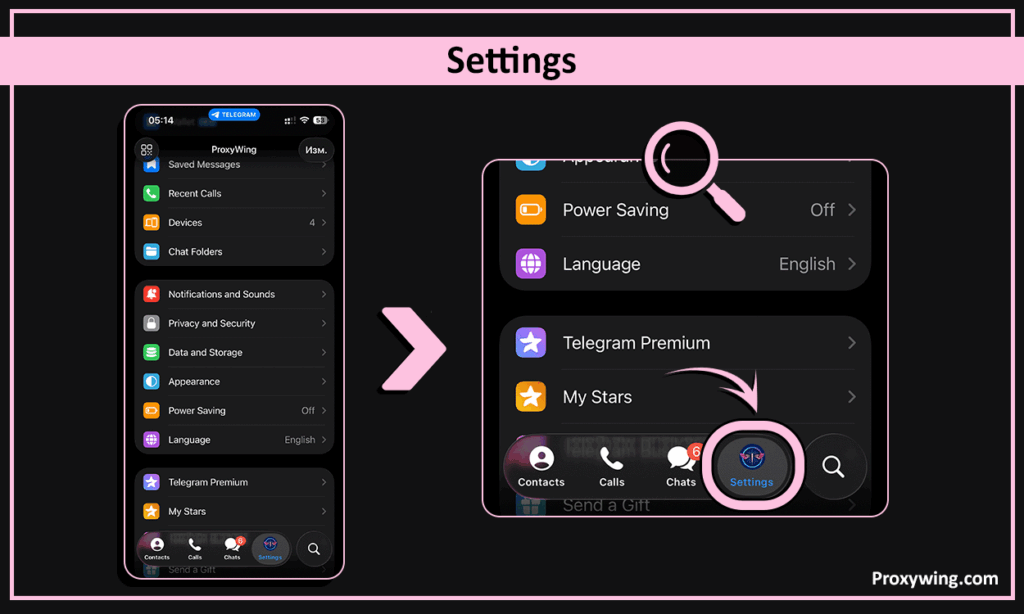
2. Go to Data and Storage.
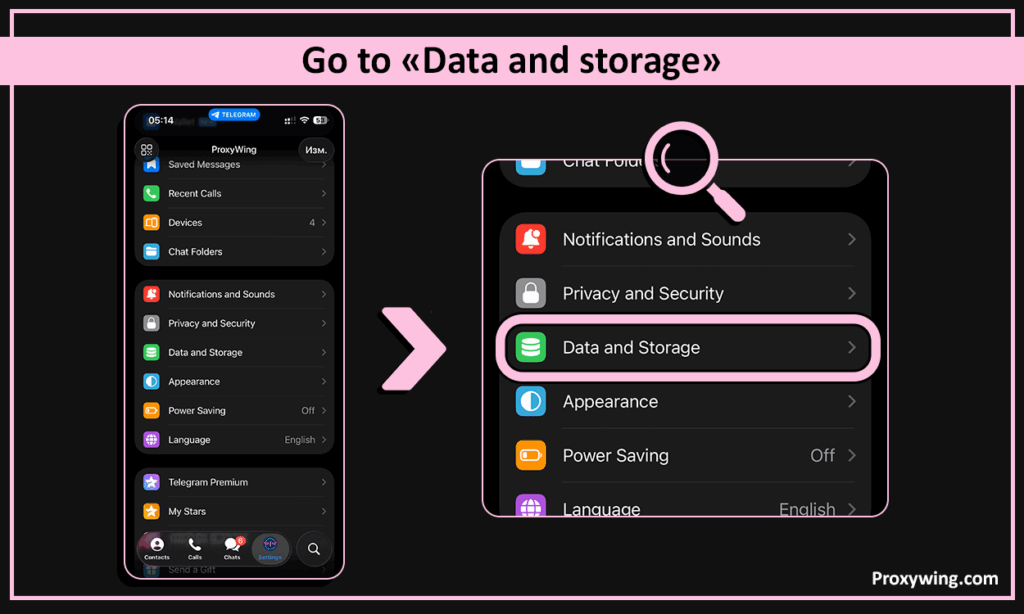
3. Scroll down to Proxy Settings.
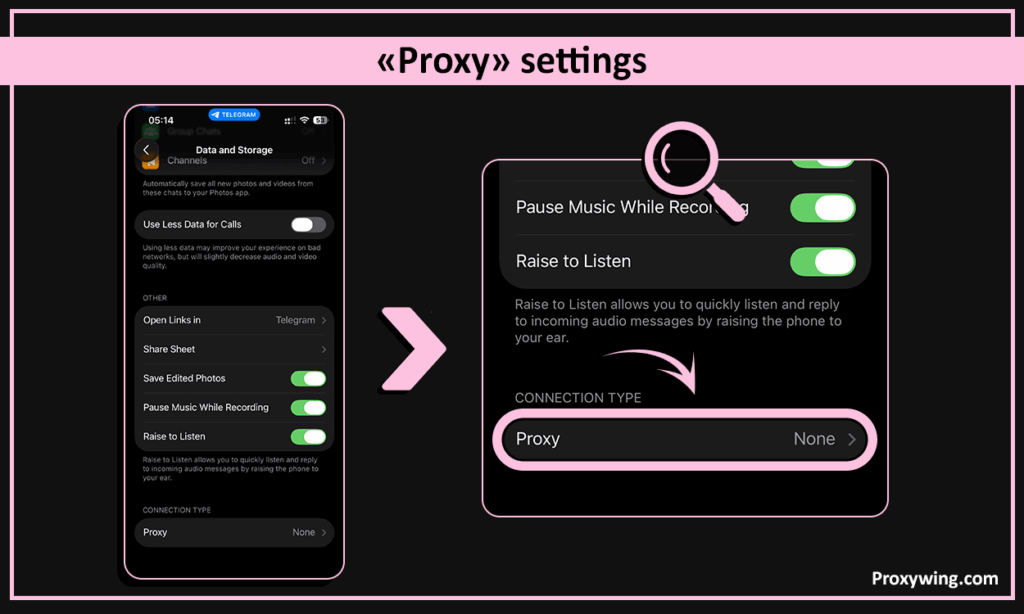
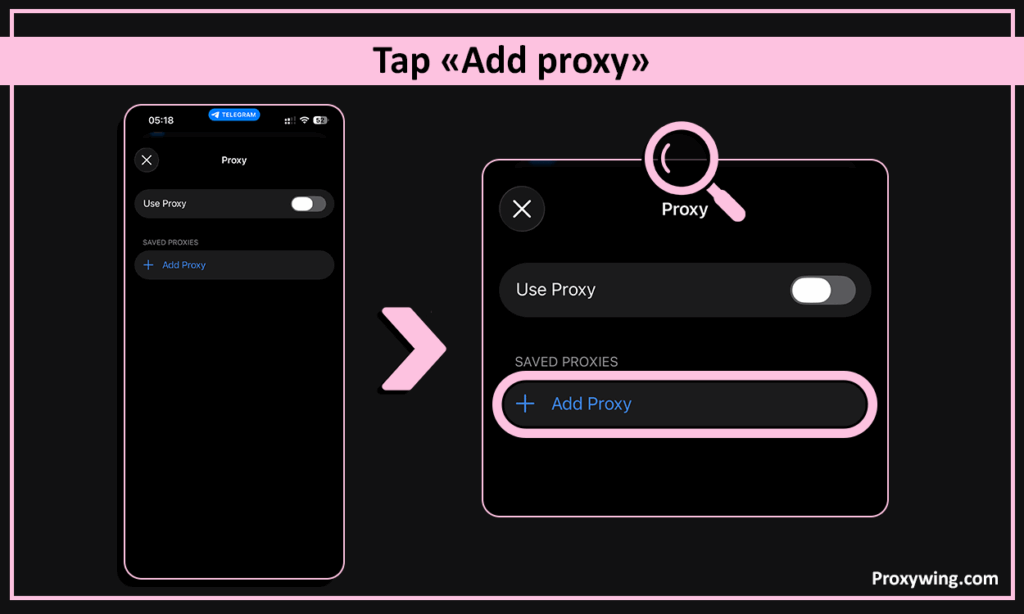
4. Tap Add Proxy.
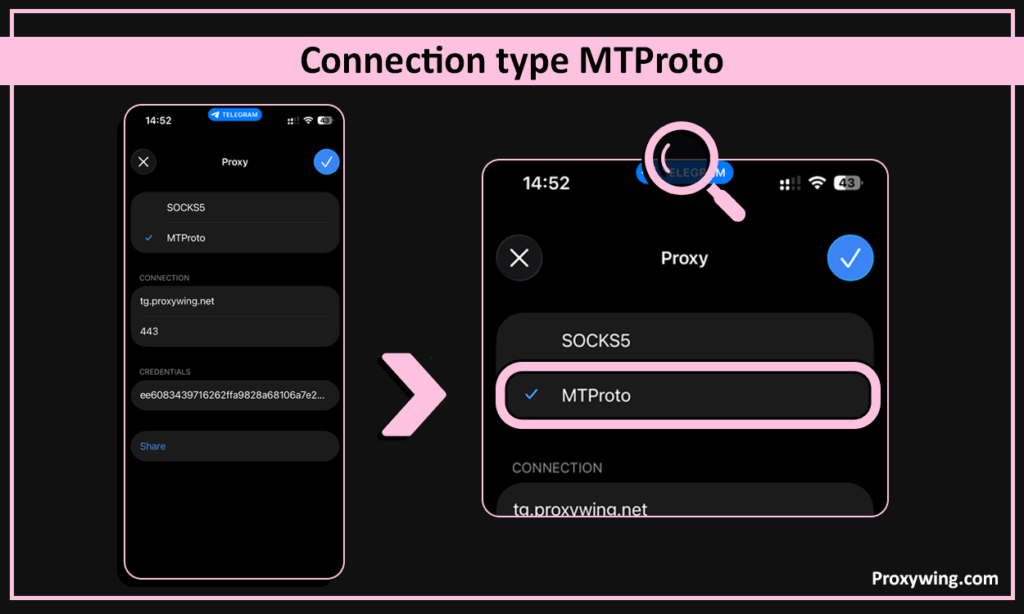
5. Important: select SOCKS5 as the connection type (this is critical for bypassing blocks in Russia).
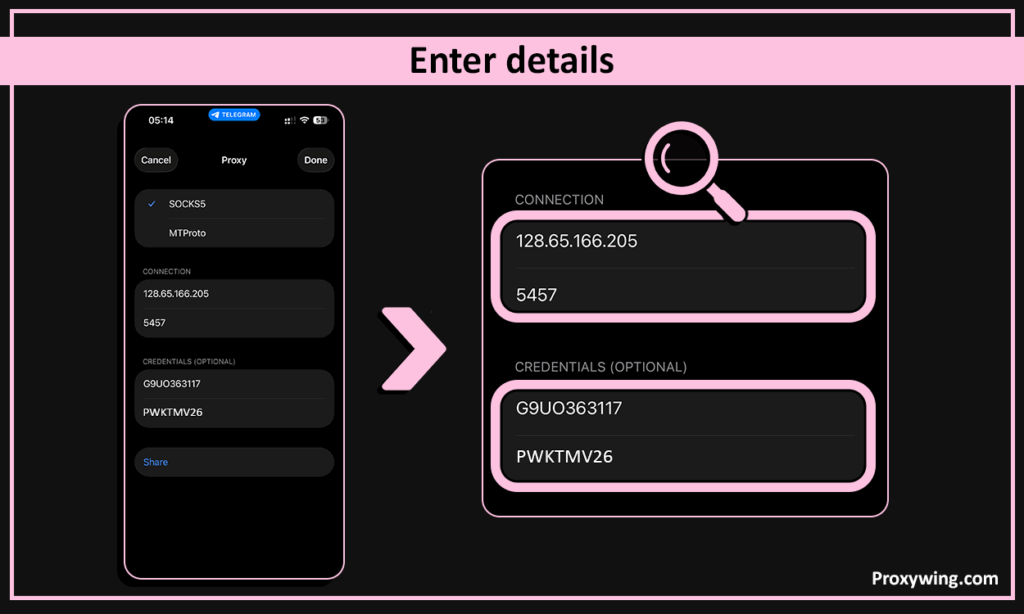
6. Enter the following details:
7. Tap Done or the checkmark icon.
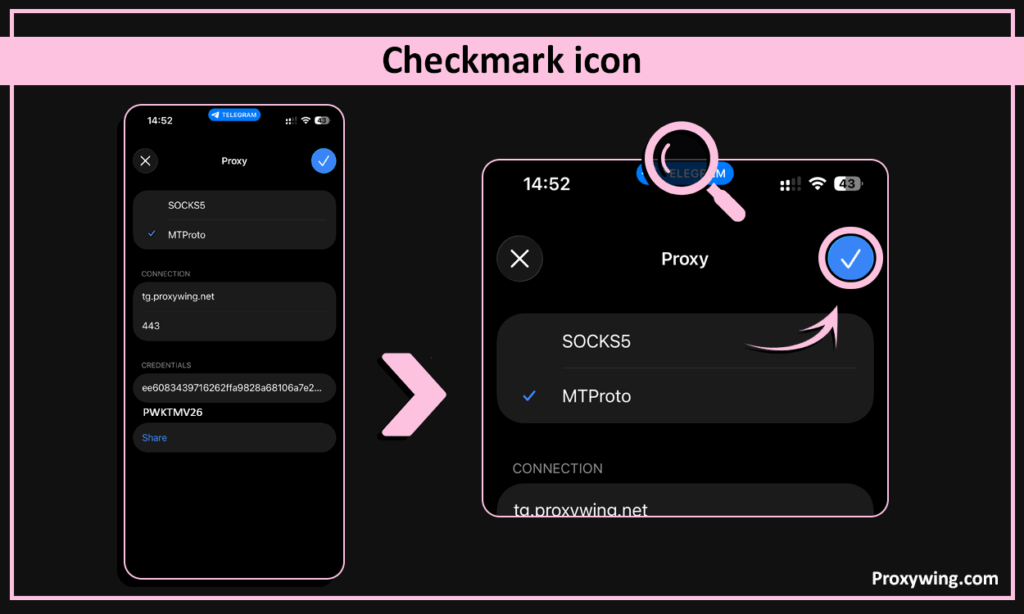
Afterwards, toggle Use Proxy to the active position. If everything is set correctly, the shield icon at the top of the screen will stop spinning and show the ping (response time). Telegram is now accessible!.
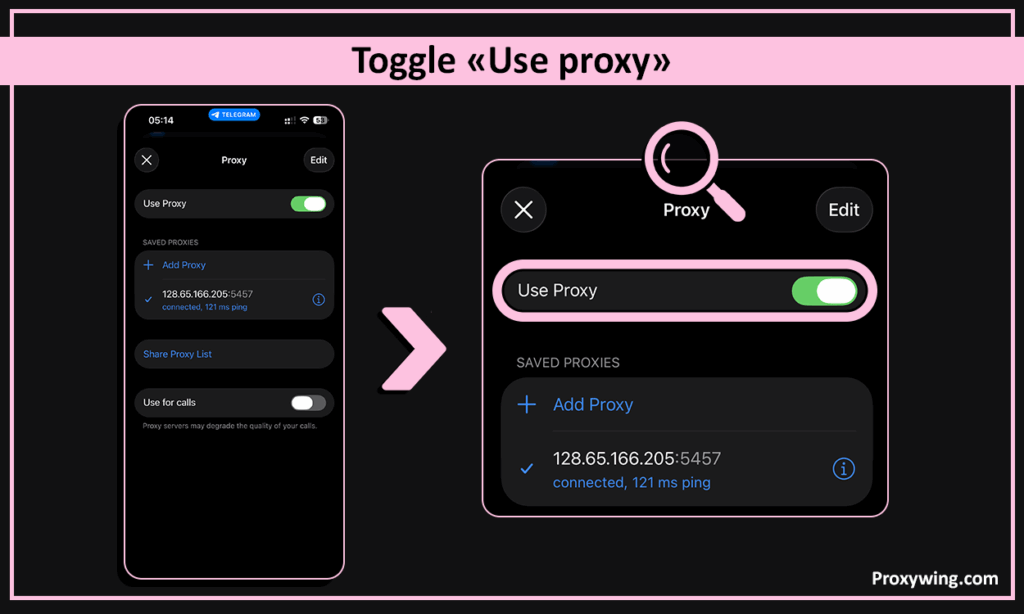
The steps above work everywhere, but the menus sit in slightly different places depending on what you’re using.
iPhone and iPad. Settings → Data and Storage → Proxy → Add Proxy. iOS keeps the proxy toggle inside Telegram only, so your Safari and other apps stay on the normal connection.
Android. Settings → Data and Storage → Proxy Settings → Add Proxy. On some Android builds you’ll also see a system-wide proxy option in Wi-Fi settings — ignore it, the in-app one is what you want.
Windows and macOS desktop. Hamburger menu → Settings → Advanced → Connection Type → Use custom proxy. Desktop lets you save several proxies and switch between them with two clicks, which is useful if one endpoint gets blocked.
Telegram Web. The browser version has no built-in proxy field. If you need Telegram in a browser on a filtered network, either use a browser extension that routes only that tab, or fall back to the desktop app.
Linux. Same path as Windows. If you’re running the Snap or Flatpak build, make sure the sandbox is allowed network access, or the proxy will silently fail.
Most Telegram blocks in the US, UK and EU have nothing to do with governments. Schools filter messaging apps to cut distractions, employers filter them to protect internal data, and hotels and airports filter them simply because their default firewall package does.
These blocks are shallow. They usually work by blacklisting Telegram’s domains or IP ranges at the router, which means anything that changes what your traffic looks like will get through.
In order of how quickly they work:
web.telegram.org. Worth thirty seconds of testing before you do anything else.One honest note: if your school or employer has a written policy against circumvention tools, that policy still applies whether or not the technical fix works. Check before you rely on it every day.
MTProto is Telegram’s official protocol designed specifically to bypass restrictions.
Key advantages:
Once enabled, Telegram automatically routes traffic through the proxy.
Important: Free/public MTProto proxies are often overloaded and quickly blocked. Private proxies are strongly recommended.
To help users restore access quickly, you can use the promo code:
SPRING2026 – 15% OFF your first order
Here’s how you can get your first proxy servers:
A VPN (Virtual Private Network) creates an encrypted tunnel between your device and a remote server.
This allows you to:
However, not all VPNs are effective anymore.
Many public VPN services:
Wing VPN offers:
Promo code: WingVPN10 (10% discount)
You can then use this link to activate your VPN connection..
Routes traffic through multiple nodes to provide anonymity.
Pros:
Cons:
Free VPNs may seem convenient, but in practice they come with major limitations. They are often slow, run on overloaded servers, may log or sell user data, and usually struggle against modern blocking methods. For Telegram access in 2026, they are generally not a reliable option.
| Method | Reliability | Speed | Security | Block Resistance | Ease of Use | Notes |
| SOCKS5 (Proxywing) | ★★★★★ | ★★★★★ | ★★★★★ | ★★★★★ | ★★★★★ | Best overall solution |
| MTProto (Proxywing) | ★★★★★ | ★★★★★ | ★★★★★ | ★★★★★ | ★★★★★ | Native Telegram protocol |
| Public proxies | ★★★☆☆ | ★★★☆☆ | ★★★☆☆ | ★★☆☆☆ | ★★★☆☆ | Often unstable |
| Free proxies | ★☆☆☆☆ | ★☆☆☆☆ | ★☆☆☆☆ | ★☆☆☆☆ | ★★☆☆☆ | High risk |
| Premium VPN | ★★★★★ | ★★★★☆ | ★★★★★ | ★★★★★ | ★★★★☆ | Strong alternative |
| Regular VPN | ★★★☆☆ | ★★★☆☆ | ★★★★☆ | ★★★☆☆ | ★★★★☆ | Partially blocked |
| Free VPN | ★☆☆☆☆ | ★☆☆☆☆ | ★☆☆☆☆ | ★☆☆☆☆ | ★★★☆☆ | Not recommended |
| Tor | ★★☆☆☆ | ★☆☆☆☆ | ★★★★☆ | ★★☆☆☆ | ★☆☆☆☆ | Too slow |
If Telegram is critically important for you, don’t rely on unstable tools. A reliable connection saves time, protects your data, and ensures uninterrupted access.
The provider’s website is user-friendly, and customer support works 24/7. ProxyWing with its massive pool of residential and datacenter IPs, will back you up.
Don’t let external restrictions dictate the rules for you. Set up a reliable connection today by implementing ProxyWing’s services and let Telegram blocks remain a problem for those who haven’t discovered ProxyWing yet. Stay connected with us!
Article written by:

CEO
Founder of Proxywing. Drives growth across EU, US, and Asian markets, combining B2B strategy with a hands-on focus on product quality, 99% uptime, and responsive support.
All articles by author (64)In restricted regions, it’s often unstable or completely inaccessible.
Their IPs are:
Yes – if they are private and from a trusted provider.
Free proxies can be dangerous.
Both are effective.
Possible reasons:
Yes, depending on your plan. For best performance, use separate proxies.
Yes, if Telegram is restricted in your network.
These technologies are widely used worldwide for privacy and secure access. Regulations vary by region, so always follow local laws.