Proxy Authentication Methods Explained: Username/Password vs IP Whitelisting
06.10.2026 10 min
According to the app itself, WhatsApp is used worldwide by billions of people for messaging. Businesses implement WhatsApp to automate conversations with customers, while regular users may create groups and exchange text and voice messages. This guide provides a detailed overview of WhatsApp proxy, including how to set up and enable it, which will help you with accessing the app if it is restricted in your region.
A proxy is a technology that allows a user to route their data through an intermediate server. Any text messaging or action you take within WhatsApp is a set of information that is sent directly to the messenger’s servers. When using a proxy, this information is initially sent to the proxy server and then forwarded to WhatsApp’s datacenters. With a proper Whatsapp proxy settings, you can hide your location or IP address to avoid geo-blocks.
Using reliable and secure proxies allows you to access any applications blocked in your region, including Whatsapp. If you are in a region where WhatsApp messenger is restricted, you will need to enable a proxy server to use it well-functioning.
Here are several reasons to use a proxy server for WhatsApp:
Yes, WhatsApp has a native proxy feature available directly in the app. You can find it under Settings -> Storage and data → Proxy. However, this built-in option has clear limitations and only works under specific conditions.
The proxy host is the address of the intermediate server that WhatsApp will route your traffic through. It is usually written in the format domain:port, for example, proxy.example.com:443. When you enter a proxy host in WhatsApp’s native settings, the app sends your messages and calls through that server instead of going directly to WhatsApp’s datacenters.
The built-in WhatsApp proxy setting supports only HTTP proxies on a limited set of ports: 80, 443, and 5222. It does not support SOCKS5, authenticated proxies (with login and password), or per-app traffic routing. This means:
For these reasons, the native WhatsApp proxy is best treated as an emergency fallback. If you want stable connection speed, SOCKS5 support, and authenticated private proxies, you should configure the proxy at the device level, which is exactly what the next section explains.
No, WhatsApp does not support SOCKS5 directly in its native in-app proxy settings, only HTTP proxies on ports 80, 443, and 5222 are accepted. However, you can still use SOCKS5 with WhatsApp by configuring the proxy at the device level through a traffic-management app such as V2Box. This is the recommended setup, because SOCKS5 works at a lower network level, supports TCP and UDP (needed for WhatsApp voice and video calls), and provides better performance than HTTP.
You can configure a proxy directly in WhatsApp, but in that scenario the proxy’s usage will be detected by the app. The optimal solution would be applying the proxy to the entire device by installing an app that manages traffic.
The simplest method is to use WhatsApp’s own proxy feature. This works only if your proxy supports HTTP and runs on port 80, 443, or 5222 — and it does not support SOCKS5 or authentication.
If your proxy requires a username and password, or if you want to use SOCKS5, skip this method and use the device-level setup below.
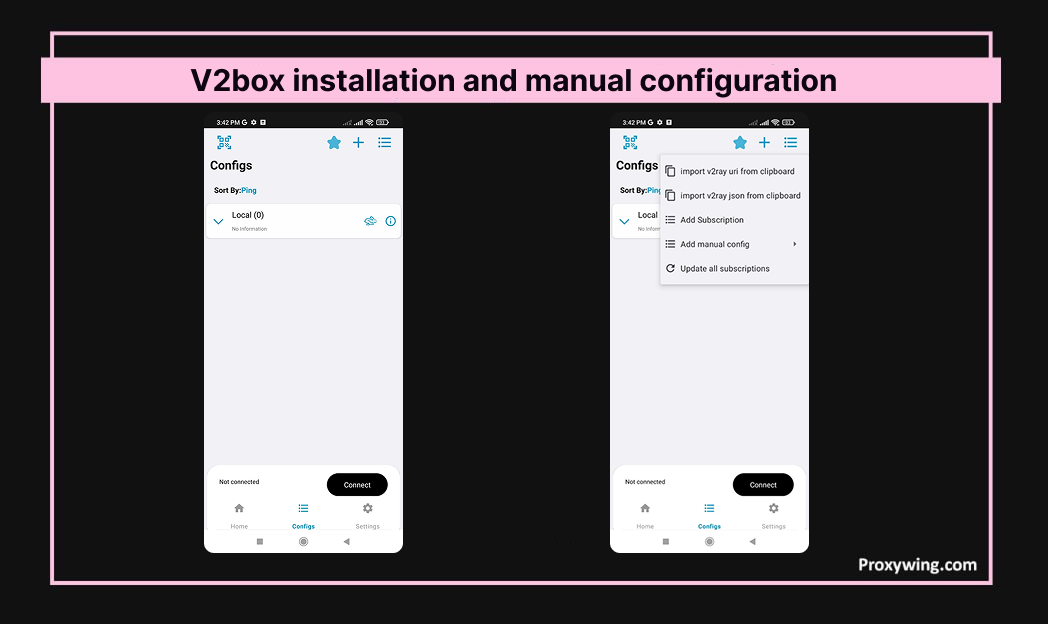
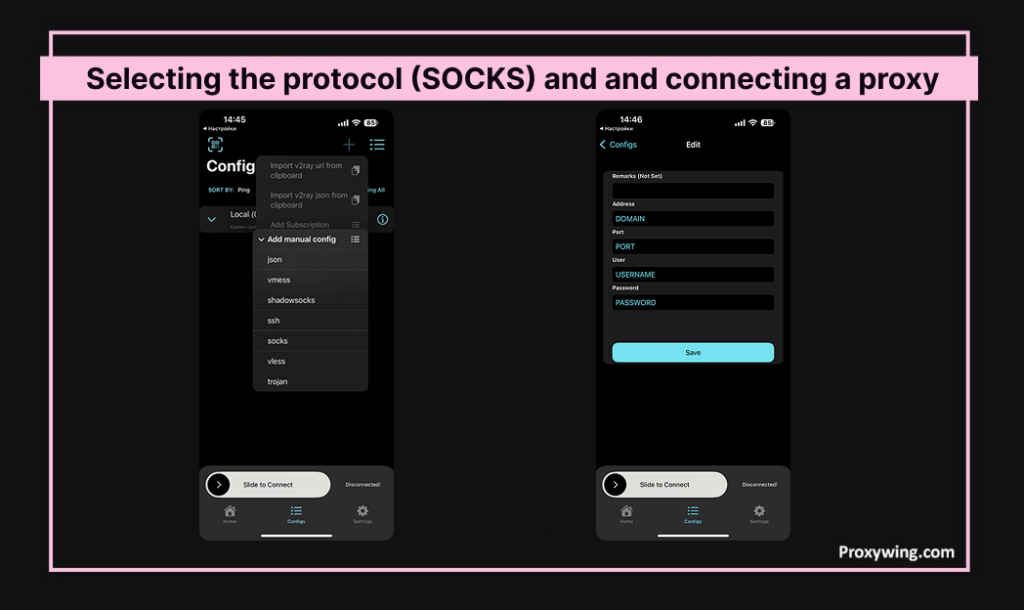
1. Go to the Play Market and install the V2Box app. At the bottom, open the “Configs” section. Tap “+” in the top right corner and select “Add manual config.” As explained earlier, the best protocol for WhatsApp is SOCKS — select it.
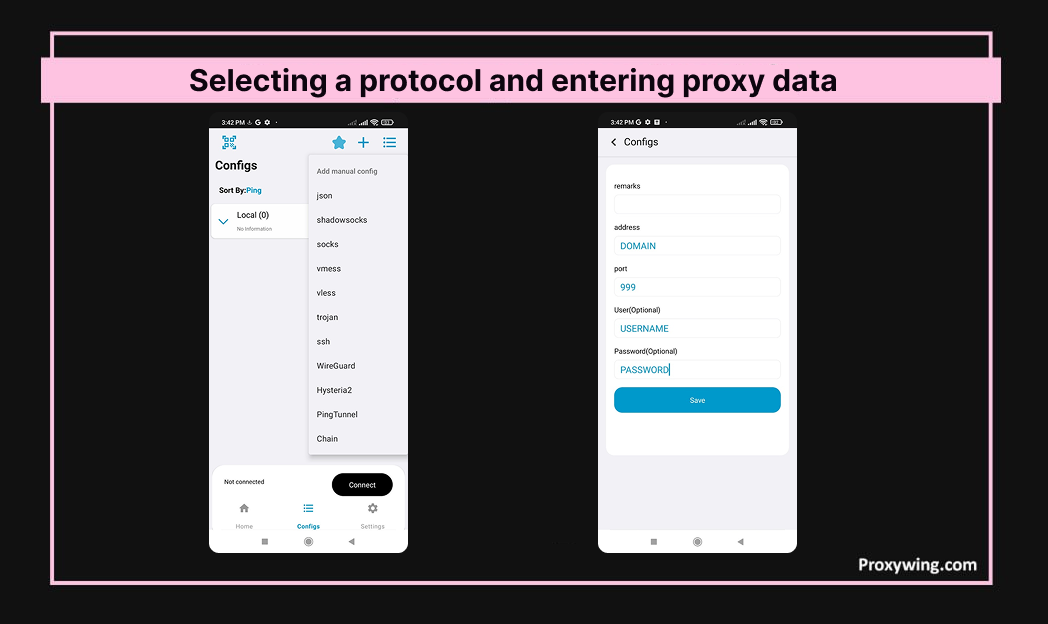
2. High-quality proxy servers use authorization, usually login and password. When purchasing a Whatsapp proxy from ProxyWing, you receive data in the format:
DOMAIN:PORT:USERNAME:PASSWORD. Enter the proxy details in the corresponding fields and tap “Save.”
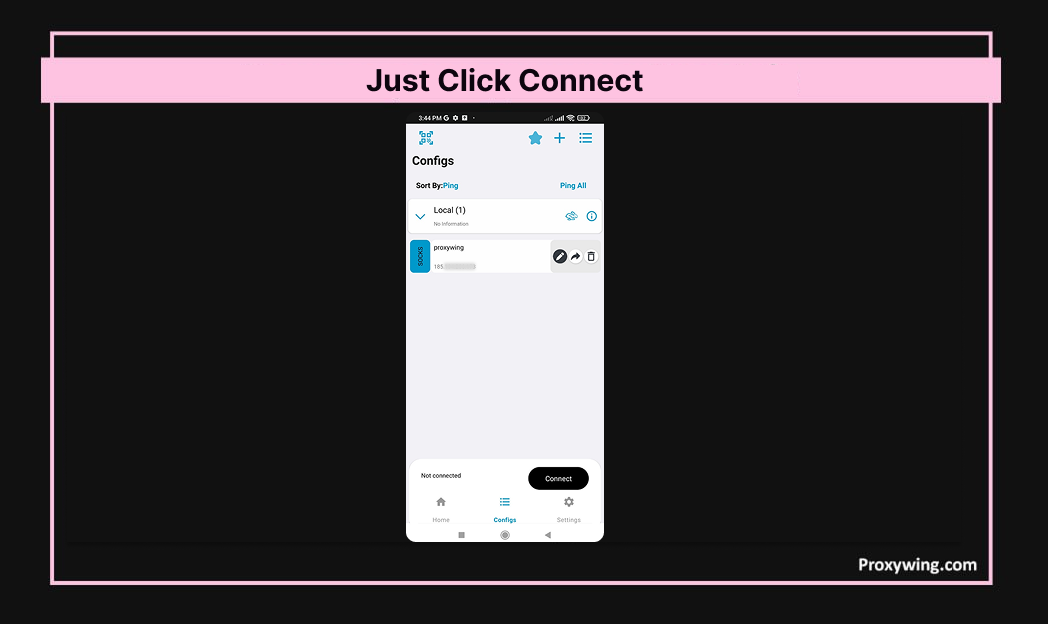
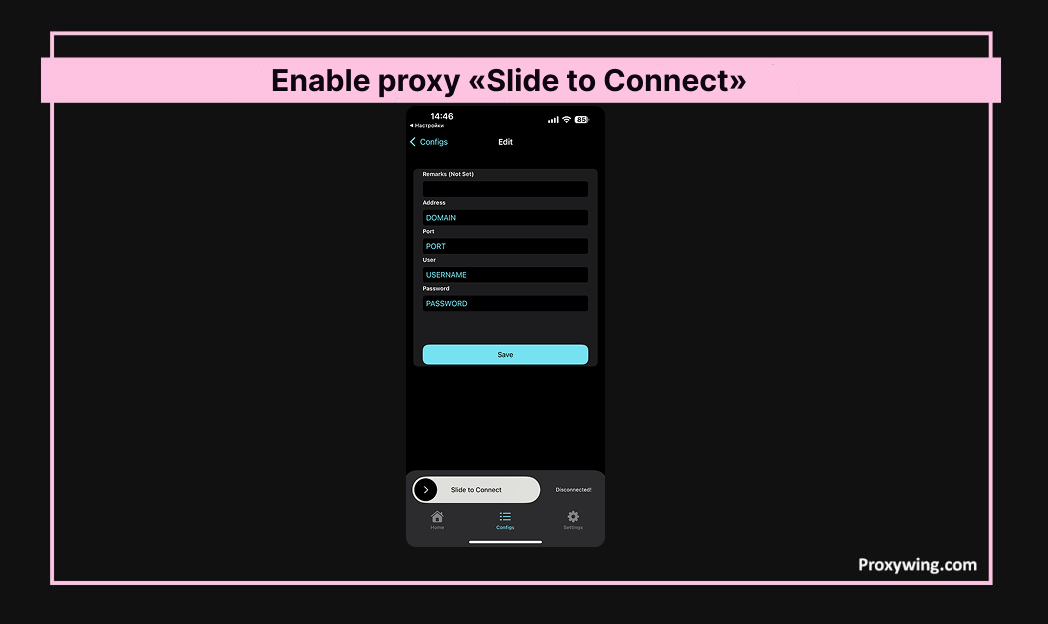
3. To enable the proxy, tap “Connect” whenever you want to change your IP address.
The iOS version of WhatsApp also has a native proxy feature. It accepts HTTP proxies on ports 80, 443, and 5222 only — no SOCKS5 and no authentication.
This option is useful as a fallback in heavily restricted networks, but for SOCKS5 and private authenticated proxies you’ll need a device-level setup.
For iOS users, setting up a WhatsApp proxy is nearly identical:1. Install V2Box from the App Store. Open the “Configs” section. Tap “+” and select “Add manual config.”
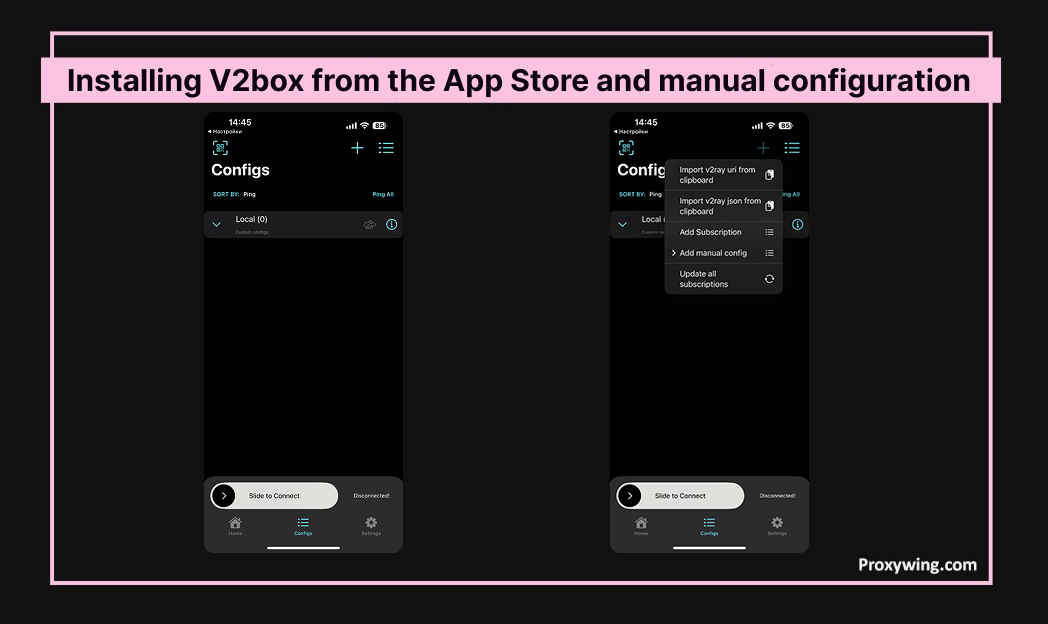
2. Choose the SOCKS protocol. Enter the provider’s data: DOMAIN:PORT:USERNAME:PASSWORD.
3. You can now enable the proxy using “Slide to Connect” when you want to change your IP.
Since WhatsApp Web runs in a browser, you can route its traffic through a proxy in three different ways:
For most casual users, the browser extension is the fastest setup. For users who need a stable connection in restricted regions or who run multiple WhatsApp Web accounts, Proxifier is the better choice.
Be careful with free proxy servers (public IPs), they can harm your device and/or compromise your privacy. It’s always better to choose dedicated IPv4 proxies with private IPs.
If you need a proxy for WhatsApp in specific, the best choice is individual datacenter proxies. There is no need to pay extra fees for more expensive and premium options. But if you only occasionally need to bypass blocked resources, take into consideration ProxyWing’s residential proxies. This option allows you to access proxies from over 190 regions, paying only for the traffic usage.
After configuring the proxy, you should verify that traffic actually goes through it. There are two quick checks:
If the test fails, the most common reasons are: the proxy host or port was entered incorrectly, the proxy doesn’t support the protocol WhatsApp is using (HTTP vs SOCKS5), or the proxy server is offline. Re-check the credentials your provider gave you, and if everything looks right, try a different IP from the same provider.
When you no longer need the proxy, for example, when you return to a region where WhatsApp is not restricted, you can disable it in a few seconds.
In all cases, no traces of the proxy remain on your device, and your traffic returns to its direct route immediately.
Article written by:

CEO
Founder of Proxywing. Drives growth across EU, US, and Asian markets, combining B2B strategy with a hands-on focus on product quality, 99% uptime, and responsive support.
All articles by author (64)Yes, a proxy allows you to change your IP address and location, letting you bypass restrictions.
If there is no need for further usage, you may simply disable V2box and restore all device settings to their default configurations.
WhatsApp’s built-in proxy setting only supports HTTP proxies on ports 80, 443, and 5222. SOCKS5 is not available through the in-app interface. However, you can use SOCKS5 with WhatsApp by configuring the proxy at the device level, through V2Box on Android and iOS, or Proxifier on Windows. This is the recommended setup for stable voice and video calls.
The proxy host is the address of the intermediate server that routes your WhatsApp traffic. It usually looks like domain:port, for example, proxy.example.com:443. You enter this value in WhatsApp’s native proxy settings or in a traffic-management app like V2Box.
WhatsApp’s native proxy feature accepts only HTTP proxies on ports 80, 443, and 5222. Other ports will not connect through the in-app setting. If your proxy uses a different port, configure it at the device level with V2Box or Proxifier.
Free public proxies are not recommended. They are often slow, unstable, and can intercept your traffic. Even though WhatsApp uses end-to-end encryption for message content, metadata (who you’re talking to, when, and how long) can still be exposed. For real privacy, use a private dedicated proxy from a trusted provider.
Yes. WhatsApp Business uses the same proxy infrastructure as the regular WhatsApp app, the native in-app setting, V2Box on mobile, and Proxifier or browser extensions on desktop all work identically. If you manage multiple WhatsApp Business accounts, use a dedicated proxy for each account to reduce the risk of blocks.