Proxy Authentication Methods Explained: Username/Password vs IP Whitelisting
06.10.2026 10 min
If you need to route your browser traffic without changing your system settings, using a proxy website is one of the most effective ways to achieve that. Nebula Proxy is one of the most popular options for getting Nebula unblocked access to restricted sites, and it works with all the mainstream browsers without any configuration or app installs.
In this guide, we will explore how you can use Nebula Proxy to get the best experience. We will also discuss how it works, its limitations, how it compares with VPNs, other proxy alternatives and a lot more. By the end, you will have all the information you need to get started using Nebula Proxy and when to choose alternatives. So, without wasting any more of your time, let’s jump right in!
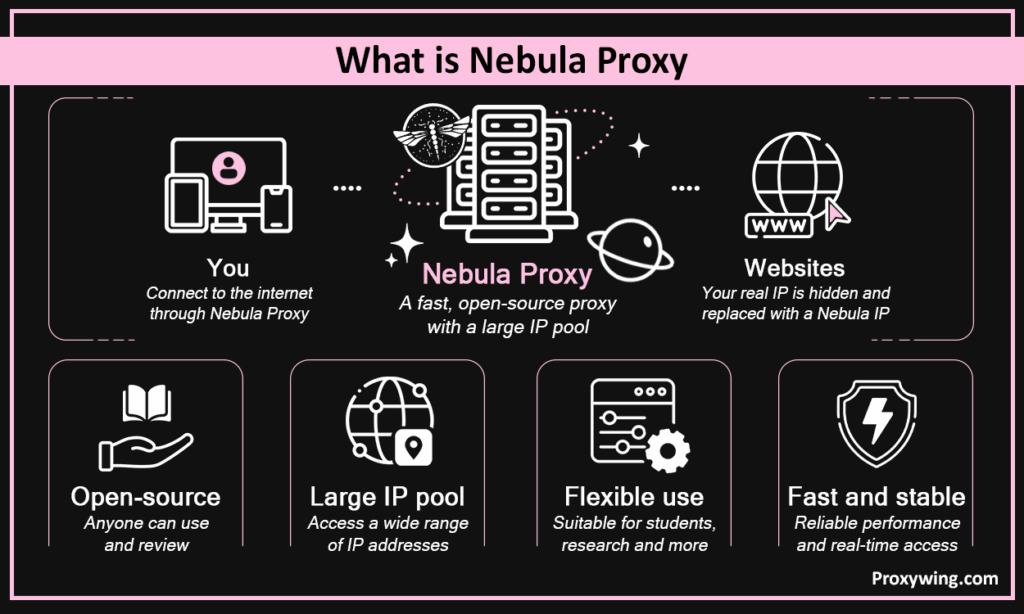
Nebula Proxy is a free, open-source proxy endpoint that anyone can use to route their traffic and access restricted websites. It is a web interface with a search bar, not a pool of purchasable IPs that you can configure on your device system settings. Nebula Proxy is maintained by Nebula Services and is especially popular with students and first-time proxy users, thanks to its simple no-install interface.
When you visit the Nebula, your browser only talks to its web page. Nebula then fetches the target site and hands it back through its front end, so a filter or your ISP sees only the proxy’s domain; it is essentially like a courier carrying your request in a sealed envelope.
That means users can quickly get started routing their browser traffic without making any configurations or installing apps. To ensure the most privacy, Nebula proxy uses the Ultraviolet and Scramjet backends for encoding/obfuscation, keeps HTTPS encrypted end-to-end, and defaults search to DuckDuckGo as the search engine instead of Google or Bing.
The above schematic shows the intermediary principle at the heart of Nebula Proxy. The network filter only ever sees a single encrypted connection to the proxy domain, while the target website only ever sees the request arriving from the proxy’s IP.
When you search for “Nebula”, your search engine may show you two unrelated projects: the Nebula browser unblocker by Nebula Services (this article) and Slack’s Nebula, which is an open-source mesh VPN for linking company servers. You need to choose the former to access the Nebula proxy front end.
Please note that there is no real “server-side Nebula Proxy” product; that’s an SEO invention blending the two. So, choose the proxy website if you need to route your traffic and access restricted sites.
Nebula has several entry points users can rely on to access the proxy. These include the GitHub repository (github.com/NebulaServices/Nebula), its Discord community (discord.gg/unblocker), and the live demo instance linked from the repo’s README.
There are also several “free Nebula mirror” lists, including school-themed domains, pages hosted on free platforms like Glitch and Cyclic, and “nebula proxy links” roundups recycled from past years.
However, most of these domains become unusable within weeks, since administrators blocklist known proxy domains almost as fast as new ones appear. Beyond the short lifespan, entering anything on an unverified mirror means trusting a server run by someone you can’t identify.
Some of these operators have no relationship to the original project at all, and a few can redirect to pages designed to harvest whatever you type in. We recommend sticking to the official demo or a self-hosted instance rather than working through a mirror list.
Nebula has been through a real technical overhaul rather than a cosmetic refresh. It has now moved to a modern Astro/Svelte/Fastify stack, added Scramjet as a second backend alongside Ultraviolet, introduced a Marketplace for themes and plugins, and added PostgreSQL support.
The latest tagged release is v9.1.4, though commits since suggest active ongoing development. That means more new features will be added even in the coming weeks.
In this section, we will cover some of the key features of Nebula:
Slack’s Nebula is an overlay network, not a browser tool. It encrypts traffic between nodes, authenticates devices with certificates, and scales to thousands of hosts, letting a company securely link servers and offices across different locations.
Slack’s Nebula solves “how do we connect our infrastructure,” not “how do I open a blocked site,” which is what the Nebula proxy tool is designed to do. Open source is the only similarity between the two projects.
Nebula proxy works on a number of devices since it’s a website, not a program. However, it does not offer sync between them. If you find guides that describe a “Nebula account” or client download, they’re simply describing something that doesn’t exist.
Since Nebula is open source, you can choose to self-host it and run it on your infrastructure of your choice. Running your own instance takes a few steps:
Some of the benefits of self hosting include keeping your own logs private, no strangers sharing your IP, and full control over speed and updates. It is the best way to reduce the risks covered later in this guide.
If you ever get stuck at any point when configuring a self-hosted instance, troubleshooting a backend, or just confirming a link is legitimate, the official README and documentation cover most common questions, and the Discord community can fill in the rest. Remember, this is help from enthusiasts and not paid support. There’s no SLA and no guaranteed response time, so plan accordingly if you’re relying on Nebula for anything time-sensitive.
Despite the ease of use and other benefits Nebula offers, it is not the ideal tool for everyone. In this section, we will cover ideal use cases of this tool.
Most admin filters will only see the proxy domain and not that of the site you intend to access. However, admins blocklist those domains (the proxy domains) fast, and bypassing one breaks institutional rules.
Using this proxy is fine for reading and searching, but not for valuable accounts or making transactions. Privacy from your network isn’t privacy from the proxy owner since they can see all the sites you access.
With this proxy solution, you can get Nebula games unblocked past school restrictions on gaming and chess sites. However, its unstable ping can ruin anything fast-paced, these need static ISP proxies for the best experience.
Nebula proxy is a good specimen for learning how web proxies work, and fine for light scripts. That’s where the open-source label earns its keep.
If what you actually need is secure remote access to internal resources, protected data exchange between cloud services, or encrypted communication between microservices, you’re solving a different problem than this article covers. That’s the territory of overlay networks and enterprise VPNs, including Slack’s Nebula, the project this one gets confused with.
| Job | Why it fails | Use instead |
|---|---|---|
| Large-scale scraping | No rotation or stability at volume | Rotating residential proxy |
| Price monitoring | IPs lack trust and diversity | Rotating residential proxy |
| SEO and SERP analysis | No geo-targeting or rotation | Rotating residential proxy |
| Multiple accounts | No isolation or fingerprint control | Antidetect browser + ISP proxy |
| Banking | Unacceptable risk | A trusted VPN |
| Ad verification | Needs carrier IPs | Mobile proxies |
As earlier stated, it is a legitimate open source project with auditable code and encrypted HTTPS. But public IPs are widely blocked, and safety depends on whoever runs your instance. Self-hosting is the only reliable way to ensure maximum safety and privacy; but it can be expensive and complex.
It is legal in most countries. However, bypassing blocks may be unlawful under strict regulation, geo-restricted access breaches terms, and beating a school and work filter breaks its rules. Please note that this is not legal advice.
When using a Nebula proxy, admins see the proxy domain. Also the operators of the Nebula instance can see the traffic and may log it. That’s why you should never enter logins or payment details on a public instance.
Swapping your IP doesn’t mean you’re fully hidden since your browser can still leak your real address through WebRTC, or expose signs of automation through your TLS fingerprint. Testing with the free WebRTC Leak Test, WebRTC/UDP Checker, and TLS Fingerprint tools shows whether you’re actually protected or only appear to be.
In the above screenshot, the IP Checker was run through Nebula Proxy: it flags a datacenter IP with VPN/proxy detection, an OS mismatch, and a WebRTC leak — a 37% anonymity score.
| Pros | Cons |
|---|---|
| Free, no license fees | No dedicated IPs, rotation, or geo-targeting |
| Open code you can modify | Deployment needs technical knowledge |
| Customizable via themes and plugins | Performance depends on the hosting |
| Works on desktop, server, mobile | Community support only |
| Gets past regional and network blocks | Security depends on configuration |
| Hides the real IP, nothing to install | Not ready-to-run for non-technical users |
When using a public Nebula proxy instance, thousands of users share the same datacenter IPs, so platforms blocklist them quickly, suspended accounts, 403 errors, and data with silent gaps. Check first with ProxyWing’s Proxy Tester and IP Tracing to determine how trustworthy that IP address is before using it.
In the above screenshot, Instagram returns “Page isn’t available” through Nebula Proxy, which is the platform’s generic block response when a request comes from a flagged datacenter IP, rather than serving the actual profile.
Public instances run on free hosting, so latency offered is usually the bare minimum. Add the endless mirror hunt and the conclusion is obvious: you need infrastructure, not a better link. If you need the best performance, you will have to incur the cost of self-hosting.
Yes the Nebula proxy interface is customizable, but the operational controls aren’t there. No country selection, rotation rules, sticky sessions, or dedicated IPs; can be deal breakers when handling use cases that rely on those capabilities.
Changing your IP doesn’t change your fingerprint, so platforms still link accounts and can block access or restrict your account. Multi-accounting needs using an antidetect browser alongside a dedicated proxy solution.
Since you’re relying on public instances, there is no SLA, no escalation path, no encrypted channel or private IPs, and no legal documents, which is a standalone risk for any business. Only viable for casual browsing and hobbyist projects.
Nebula Proxy versus Tor, VPNs and other browser proxies
| Nebula Proxy | Tor | VPN | Commercial proxy | Antidetect browser | |
|---|---|---|---|---|---|
| Speed | Variable | Slow | Fast | Gigabit backbones | Fast |
| Privacy | IP masking only | Strong anonymity | Full-system encryption | Encrypted tunnels | Fingerprint + IP isolation |
| Filter bypass | Good, short-lived | Good, often blocked | Often blocked | Good, stable | Good, stable |
| Account work | No | No | No | Yes, with ISP IPs | Purpose-built for it |
| Price | Free | Free | Subscription | Per-GB or per-IP | Subscription + proxies |
Nebula is a front end, not a managed network.
| Type | Job it fits | Key trait | From |
|---|---|---|---|
| Rotating residential | Collection, SEO, SERP | Fresh real-home IP per request | $1.00/GB |
| Static ISP | Accounts, storefronts | Datacenter speed, fixed residential IP | $1.71/IP/mo |
| Rotating mobile | Strict platforms, ad verification | Real carrier 4G/5G, rarely banned | $4.00/day |
| Rotating datacenter | Load testing, low-defense sites | Fastest and cheapest, easiest to detect | $0.87/mo |
| Unlimited bandwidth | Sustained volume | No per-GB metering | $0.90/IP |
If Nebula Proxy doesn’t fit your use case, there are several trusted Nebula Proxy alternatives worth considering instead. In this section, we’ll cover the most reliable options across both proxy providers and VPNs.
ProxyWing is one of the most reliable services, thanks to its focus on the core capabilities that most proxy users actually care about. It runs 70M+ IPs across 200+ countries, with residential coverage in 190+ locations and its largest pools concentrated in the US, India, Germany, the UK, and the Netherlands.
Rotation per request, or sticky sessions up to 1,000 minutes on standard plans and up to 7 days on premium — exactly the control Nebula Proxy fundamentally lacks.
Country, city, and ISP, at no extra charge.
NiuProxy is a Hong Kong-based budget provider offering rotating and static residential, ISP, mobile, and datacenter proxies. It has a pool of 50M+ residential IP pool and coverage across 195+ countries. Offers all types of proxies with datacenter proxies starting from $0.5/GB. It also promises 99.9% uptime and 24/7 support.
IPRoyal covers residential, ISP, datacenter, and mobile proxies in one account, with a 32M+ residential pool across 195+ countries. Residential IPs start around $1.75/GB, ISP from $2.40/proxy/month, and datacenter from $1.39/proxy. With IPRoyal, your purchased bandwidth doesn’t expire. Supports SOCKS5, rotation, sticky sessions up to 7 days, browser extensions, and in-house testing tools.
GloryCloud offers a 90M+ IP pool across 195–200+ countries. It covers residential, ISP, mobile, and datacenter proxies. Residential pricing starts around $7/GB pay-as-you-go, with a free trial available. Promised uptime is 99.96%, with automatic rotation, sticky sessions, and HTTP(S)/SOCKS5 support.
Multilogin offers a free plan, with paid tiers starting around $7.08/month billed annually. These scale up with profile count, proxy bandwidth, and automation features. Each profile gets a unique fingerprint with isolated storage, and proxy traffic is bundled in rather than sold separately.
OkeyProxy runs a 150M+ residential IP pool across 200+ countries. It also comes with SOCKS5 and HTTP(S) support, city and ISP-level targeting, and 99.9% promised uptime. Pricing starts around $0.35/GB, and new users get a small free trial that offers 1GB of rotating residential traffic (or a few static IPs).
RapidSeedbox is a seedbox-and-proxy combination for private storage and file distribution. As of mid-2026, plans start around €18/month (roughly $19) for the entry Fast tier. There’s a 14-day money-back guarantee on seedbox plans, plus separate IPv4/IPv6 proxy add-ons starting around $1/server.
Bright Data runs one of the largest proxy networks on the market with reported residential pool sizes of up to 400M+ IPs across 195+ countries, with city, ASN, and mobile carrier-level targeting. It also promises up to 99.9% uptime. It mainly targets the premium market with its pricing for residential proxies starting around $8/GB pay-as-you-go.
Another enterprise-focus provider that runs one of the largest residential proxy pools on the market with 175M+ IPs across 195+ countries. Oxylabs is backed by independent benchmarks showing strong success rates and low fraud scores. Their prices for datacenter proxies start at $6.75/month for 3 IPs.
Surfshark is one of the most popular VPN providers and offers 4,500+ servers across 100 countries, a no-logs policy, unlimited simultaneous devices on a single subscription. It also includes features like rotating IP, MultiHop double-encryption, and a kill switch. Pricing runs from roughly $2.49/month on the 2-year plan up to $16.45/month billed monthly, with a 30-day money-back guarantee on every tier.
NordVPN is another popular VPN provider and it runs roughly 9,300+ servers across 137 countries. It guarantees a strict no-logs policy independently audited by PwC, AES-256 encryption, an automatic kill switch. Pricing ranges from around $2.99–$3.49/month on 2-year plans up to about $13–$15/month billed monthly.
| Provider | Core function | Pool & geography | Proxy types | Price from | Support | Best-fit tasks |
|---|---|---|---|---|---|---|
| ProxyWing | All-in-one proxy network | 70M+ IPs, 200+ countries, residential in 190+ locations | Residential, ISP, datacenter, mobile | $0.87 | 24/7 | Scraping, SEO, ad verification, multi-accounting |
| NiuProxy | Budget residential proxies | 50M+ IPs, 195+ countries | Residential, ISP, mobile, datacenter | $0.5/GB (datacenter) | 24/7 | SEO monitoring, multi-accounting |
| IPRoyal | All-round proxy provider | 32M+ IPs, 195+ countries | Residential, ISP, datacenter, mobile | $1.39/proxy (datacenter) | Standard | Scraping, price aggregation, SERP parsing |
| GloryCloud | Residential proxies + data collection | 90M+ IPs, 195–200+ countries | Residential, ISP, mobile, datacenter | $7/GB (residential) | Standard | Done-for-you data collection |
| Multilogin | Antidetect browser | Bundled proxy traffic, plan-dependent | Residential (bundled) | Free plan available; paid from ~$7.08/mo | Standard | Multi-accounting, social marketing |
| OkeyProxy | Budget residential proxies | 150M+ IPs, 200+ countries | Residential, datacenter | $0.35/GB (residential) | Standard | Light SOCKS5 use cases |
| RapidSeedbox | Seedbox + proxy | N/A (storage-focused) | IPv4/IPv6 proxy add-ons | From $1/IP | Live chat | Torrents, media storage/streaming |
| Bright Data | Enterprise proxy network | [verify pool size], 195+ countries | Residential, mobile, datacenter | $8/GB (residential) | Standard/Enterprise | Large corporate data collection |
| Oxylabs | Enterprise proxy network | 175M+ IPs, 195+ countries | Residential, datacenter | From $6.5/month (for 3DC IPs) | Account managers | Web scraping, market research |
| Surfshark | VPN | 4,500+ servers, 100 countries | N/A | $2.49/mo (2-yr plan) | 24/7 | Household privacy |
| NordVPN | VPN | 9,300+ servers, 137 countries | N/A | $2.99–3.49/mo (2-yr plan) | 24/7 | Personal privacy |
In this section we will cover a few more options for users that need a free Nebula proxy alternative.
Some of the popular options you can consider include:
Premium proxy providers often offer their own free trials, which are a safer and more reliable way to test things than a random free proxy. These are worth considering if you’re handling a smaller project.
Separately, ProxyWing offers free tools like the IP checker, speed test, and leak-testing tool with no purchase required, and its cheap 1GB plan is a low-commitment way to test a paid proxy without significant spend.
Remember, a free solution has a price, it just isn’t paid in money.
| Task | Proxy type |
|---|---|
| 50+ social accounts | Static ISP |
| SEO and SERP parsing | Rotating residential |
| Mobile ads and apps | Mobile |
| Load testing, bulk requests | Rotating datacenter |
| Sustained volume | Unlimited plans |
| One-off filter bypass | Browser web proxy |
| Internal infrastructure | Overlay network or VPN |
Beyond price per gigabyte, some of the other key factors you must consider include:
A company hit repeated 403s scraping prices through a browser proxy because the anti-bot system of the target website rejected the cloud-host IP. Switching to rotating residential proxies with per-request rotation and country targeting lifted the success rate substantially.
Yes, the residential IPs can be more expensive, but with a significantly higher success rate, the price per successful request is lower than datacenter IPs. Stability is about the IP staying clean, not the server staying up.
Stay on Nebula if:
Switch if you need:
If you’re switching, here’s the recommended plan:
Start with 1GB of residential proxies to test the proxies against your real targets before going all in.
Nebula Proxy is one of the best free open-source web proxies of 2026 with a strong entry point for school network bypass, learning, and self-hosting, and no substitute for a managed network. Still not sure if Nebula proxy is right for you, here is a brief summary to guide you:
Before choosing a Nebula proxy alternative, pick the proxy type your task calls for, then test on minimal volume.
Article written by:

CEO
Founder of Proxywing. Drives growth across EU, US, and Asian markets, combining B2B strategy with a hands-on focus on product quality, 99% uptime, and responsive support.
All articles by author (64)Yes, it is open source with free public instances, and self-hosting options. Self-hosting is the most secure option, but it is expensive to run your own infrastructure.
Yes, you can access it using any mobile browser. No app to install is required.
Not necessarily. Many school networks blocklist proxy domains at the filter level.
Depends on the task. Nebula proxy is free and often faster. On the other hand a VPN is more private but blocked more often.
The current version offers a faster framework, marketplace, second backend, better mobile stability.
No, it is not. It gives an IP but no fingerprint control or session isolation. You need a dedicated proxy service to manage multiple accounts.
Not advisable. It offers no rotation or geo-targeting, which means quick bans on defended sites. Handling volume work needs residential proxies with proper rotation instead.
Providers own backbone infrastructure while public instances run on free hosting that is shared among thousands of users.
Yes, they can. Static ISP proxies deliver the low latency that most gamers need for a stable and reliable connection.
Residential proxies start from $1.00 with a 1GB minimum, ISP from $1.71. No subscription required to get started.