



To connect to ISP proxies, use:
- proxy IP address;
- port;
- username;
- password.
Two authentication methods are available:
- username and password;
- IP whitelist.
Both methods can be used at the same time. For more information about connecting with an IP whitelist, see IP whitelist
Basic format
ISP proxies are displayed as a string containing the address, port, username, and password.
By default, the CREDENTIAL FORMAT field uses:domain:port:username:password
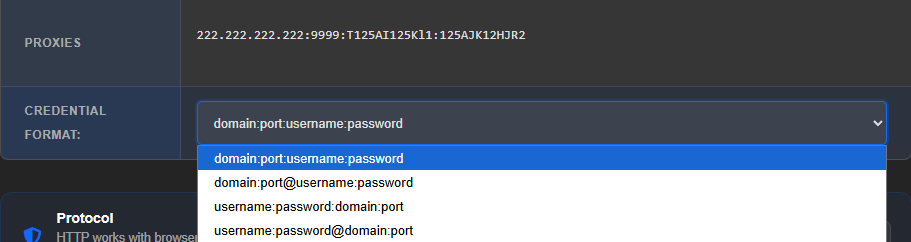
The connection details format can be changed through the CREDENTIAL FORMAT list.
Commonly used options are available:domain:port:username:passworddomain:port@username:passwordusername:password:domain:portusername:password@domain:port
The format names use domain, but for ISP proxies an IP address is displayed in its place. For connection purposes, this is the same part of the string: the proxy server address can be specified as a domain name or an IP address.
If you need a different format, you can use the free Proxy Formatter.