



ISP NEW supports the OS Signature (p0f) feature.
OS Signature (p0f) allows you to select the operating system network signature for connections through ISP proxies.
The feature changes TCP/IP connection characteristics that passive analysis systems may use to identify the presumed operating system. p0f does not change the User-Agent, TLS fingerprint, Canvas, WebGL, or other browser parameters.
How to change the signature
- Open the product card.
- Find the
OS Signature (p0f)field.
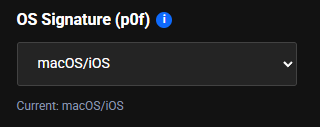
- In the
OS Signature (p0f)field, you can select: - Linux.
- Windows.
- macOS/iOS.
- Android.
- After changing the value, check the current signature displayed below the list.